

How We Cut AI API Costs by 70% Without Sacrificing Quality: A Technical Deep-Dive
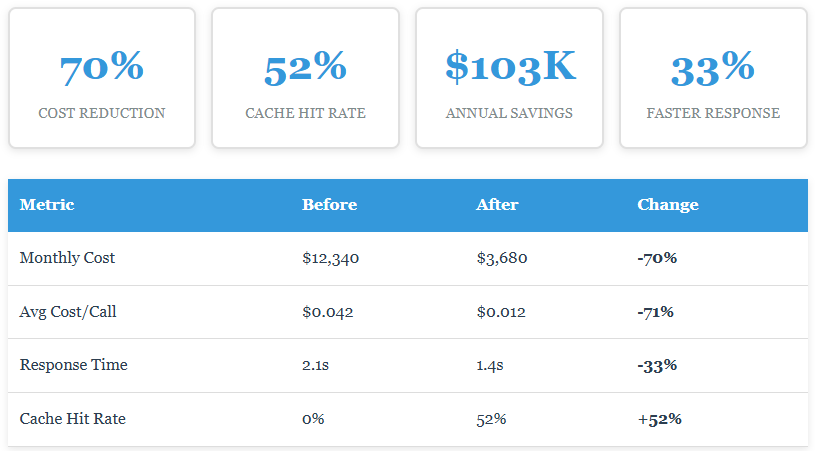
Intelligent caching and model routing reduced our AI API costs from $12,340 to $3,680 per month. Production-tested optimizer. Open source. MIT license.
 CORE
·
CORE
·
Join the DZone community and get the full member experience.
Join For FreeThe Wake-Up Call
I'll be honest — we screwed up. Like a lot of engineering teams, we built our AI features fast and worried about costs later. "Later" came faster than expected when our finance team flagged our OpenAI bill crossing five figures monthly.
The real problem wasn't just the dollar amount. It was that we had zero visibility. We didn't know:
- Which features were burning money
- How many duplicate requests we were making
- Whether our model choices made sense
- What a "normal" month should even cost
Standard APM tools weren't built for AI-specific cost tracking. Enterprise AI platforms wanted percentage-based fees we couldn't justify. So we built our own.
The Architecture: Three Layers of Optimization
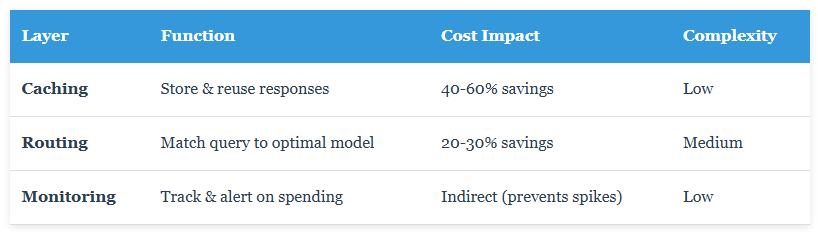
After evaluating several approaches, we settled on a layered architecture that's both simple to understand and effective in production:
Layer 1: Intelligent Caching
This is where we saw the biggest wins. The concept is dead simple: if you've already paid for a response once, don't pay for it again.
class SmartCache:
    def _generate_cache_key(self, prompt, model):
        combined = f"{model}:{prompt}"
        return hashlib.sha256(combined.encode()).hexdigest()

    def get(self, prompt, model):
        key = self._generate_cache_key(prompt, model)
        # Check if cached and not expired
        result = self.db.query(key, max_age_hours=168)
        return result if result else None

    def set(self, prompt, model, response, cost):
        key = self._generate_cache_key(prompt, model)
        self.db.store(key, response, cost, ttl_hours=168)
We use SQLite for single-server deployments and PostgreSQL when you need distributed caching. Performance overhead? Less than 1ms per request.
Key Design Decision: We hash the entire prompt rather than using fuzzy matching. This gives us deterministic keys and zero false positives. Semantic similarity is a separate layer we're adding in v2.
Layer 2: Smart Model Routing
Here's a truth bomb: you don't need GPT-4 for "What are your business hours?" That's a $0.06 question being answered with a $0.001 model.
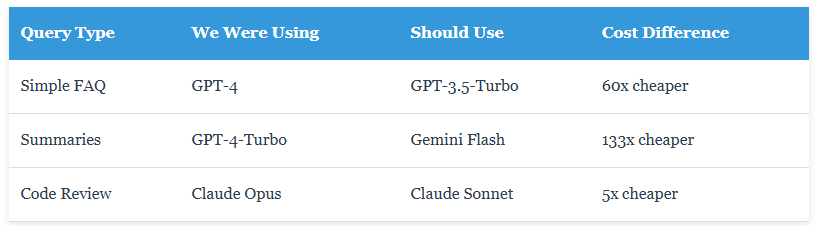
Our router analyzes query complexity and suggests the cheapest appropriate model:
class ModelRouter:
    @staticmethod
    def classify_query(prompt):
        word_count = len(prompt.split())

        if word_count > 200:
            return "complex"

        if any(kw in prompt.lower() for kw in
               ["analyze", "evaluate", "compare"]):
            return "complex"

        if any(kw in prompt.lower() for kw in
               ["what is", "define", "list"]):
            return "simple"

        return "medium"

    @staticmethod
    def suggest_model(prompt, current_model):
        complexity = ModelRouter.classify_query(prompt)
        optimal_models = {
            "simple": "gpt-3.5-turbo",
            "medium": "gpt-4-turbo",
            "complex": "gpt-4"
        }
        return optimal_models[complexity]
Layer 3: Real-Time Cost Tracking
You can't optimize what you don't measure. The monitoring layer tracks every API call and surfaces the data through a web dashboard.
class CostTracker:
    def track_call(self, model, input_tokens, output_tokens, cache_hit=False):
        cost = self._calculate_cost(model, input_tokens, output_tokens)

        self.db.insert({
            'model': model,
            'cost': cost,
            'cache_hit': cache_hit,
            'timestamp': datetime.now()
        })

        self._check_alert_thresholds()
        return cost

    def get_stats(self, hours=24):
        return self.db.aggregate({
            'total_cost': 'SUM(cost)',
            'cache_hit_rate': 'AVG(cache_hit)',
            'calls': 'COUNT(*)',
            'since': f'{hours} hours ago'
        })
Production Results: The Numbers
After three months running this in production across all our services, here's what we're seeing:
Implementation Patterns
We designed this to support multiple integration approaches, from passive monitoring to full optimization:
Pattern 1: Monitoring Only (Zero Code Changes)
# Just track what you're already doing
optimizer.track_call("gpt-4", input_tokens, output_tokens)
# View dashboard at http://localhost:5000
Pattern 2: Add Caching (Minimal Changes)
def get_ai_response(prompt):
    # Check cache first
    cached = optimizer.cache.get(prompt, "gpt-4")
    if cached:
        return cached
    # Make API call
    response = openai.chat.completions.create(...)

    # Cache it
    optimizer.cache.set(prompt, "gpt-4", response, cost)
    return response
Pattern 3: Full Optimization
result = optimizer.process_request(prompt=prompt,model="gpt-4",input_tokens=100,output_tokens=200) # Get cache status, cost, and cheaper model suggestions
Lessons Learned
1. Start with monitoring. We spent two weeks just tracking costs before implementing any optimization. This gave us baseline data and helped us identify the biggest opportunities.
2. Cache hit rates vary wildly by use case. Our FAQ system gets 80%+ hits. Creative content generation? Maybe 20%. Adjust your TTL accordingly.
3. Model routing needs tuning. Our first attempt was too aggressive and degraded quality for some queries. We added per-feature overrides and A/B testing to dial it in.
4. SQLite is underrated. We didn't need PostgreSQL until we hit 50K+ requests/day. Don't over-engineer early.
5. The dashboard saved us twice. Once we spotted a bug causing 200 duplicate calls/hour. Another time we caught dev environment using production models. Visibility matters.
Why Open-Sourced It
Simple: every team using AI APIs faces these problems. By open-sourcing this (MIT license), we get:
- Better software - Community contributions improve the codebase
- Faster iteration - More users = more edge cases found
- Industry benefit - High AI costs hurt everyone; this helps
We've released the complete system: ~300 lines of core optimizer code, web dashboard, integration examples, and deployment guides. Production-ready and battle-tested.
Try It in Your Stack
Complete source code, docs, and examples on GitHub. Install in 2 minutes.
GitHub: github.com/dinesh-k-elumalai/ai-cost-optimizer
Follow: @dk_elumalai
Questions? Open a GitHub issue or ping me on X. Happy to help.
What's Next
We're actively developing v2.0 with:
- Semantic caching using embeddings for similar (not just identical) queries
- A/B testing framework to compare model quality automatically
- Multi-provider load balancing across OpenAI, Anthropic, Google
- Cost forecasting based on usage patterns
Want to contribute? PRs welcome, issues encouraged, feedback appreciated.
Opinions expressed by DZone contributors are their own.
Comments