

Why 200 OK Is the Most Dangerous Lie in Enterprise Integration
A 200 OK can hide failed CRM or ERP updates. Learn how to build MuleSoft APIs that truthfully report completed, pending, and failed business outcomes.
 ·
·
Join the DZone community and get the full member experience.
Join For FreeA customer changes her email address in a mobile app on Friday afternoon.
The app displays a green confirmation message:
Your profile has been updated.
The API response was 200 OK. The mobile team sees no error. The API dashboard counts the request as successful.
On Monday, the customer receives an account statement at her old email address.
The update never reached Salesforce.
This is the kind of failure that frustrates everyone because nobody is obviously wrong. The mobile app did what the API told it to do. The API gateway recorded a successful response. The Mule application may even have logged the Salesforce timeout.
But the business action did not happen.
The customer did not care that the JSON payload was valid or that MuleSoft accepted the request. She cared that her email address changed.
That is the gap many integration APIs miss: technical success is not the same as business completion.
A 200 OK response can be completely valid at the HTTP level while being dangerously misleading at the business level.
This article is about fixing that gap.
The Real Problem: Green Dashboards, Failed Business Operations
Here is the common sequence.
The mobile app calls a customer-profile API. MuleSoft validates the request and invokes Salesforce. Salesforce is slow or temporarily unavailable. The Mule flow catches the error, logs it, and continues so that the client does not receive an ugly error message.
The caller gets 200 OK.
The update never happens.
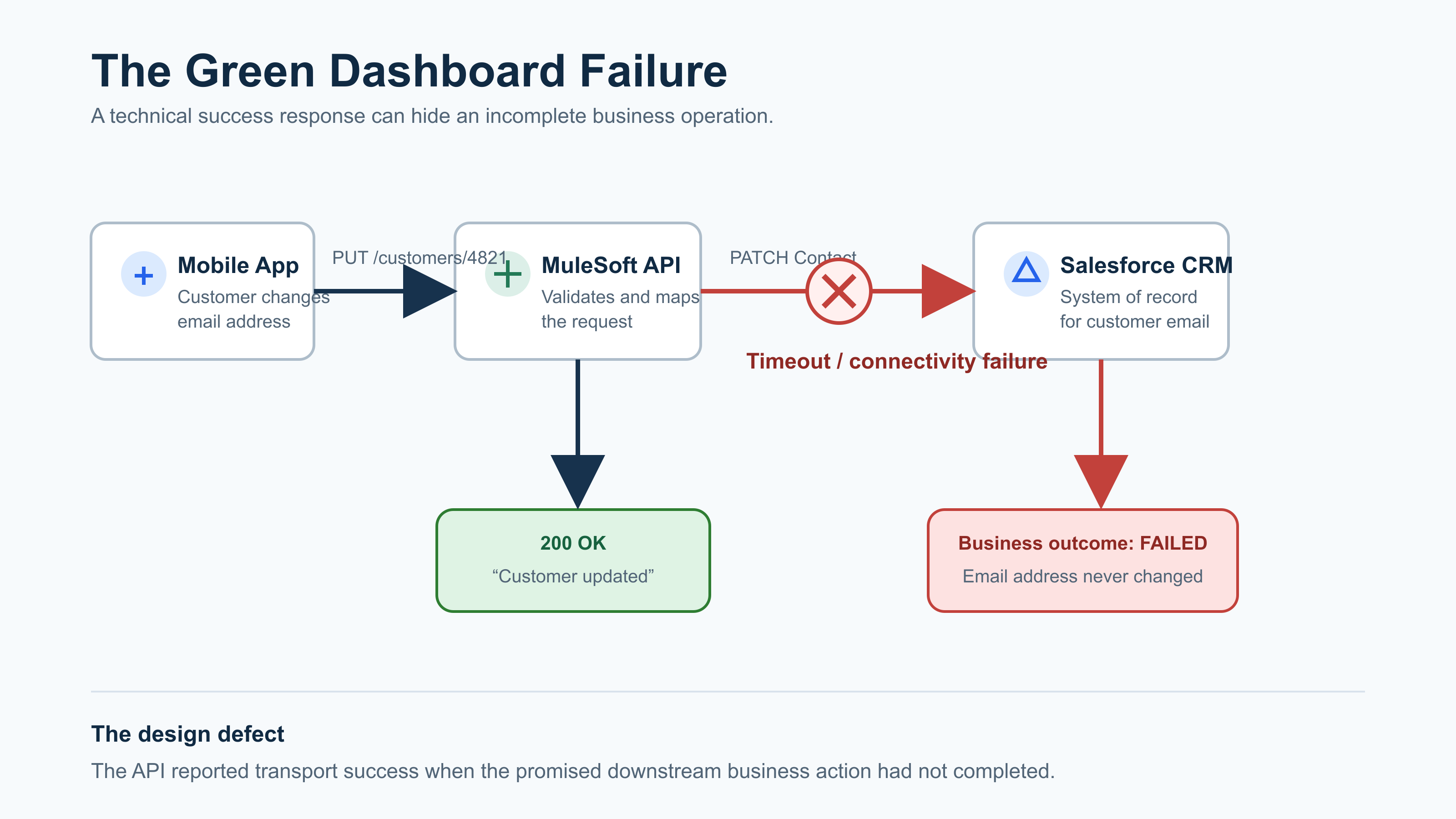
Figure 1 — The Green Dashboard Failure
A support ticket usually appears much later:
“The customer says she updated her email, but Salesforce still has the old one. Can someone check?”
At that point, the support engineer has to search logs, identify the correlation ID, discover a suppressed connector error, and explain why the API told the customer the opposite of what happened.
That is not a monitoring problem. It is an API-contract problem.
How MuleSoft Can Accidentally Turn Failure into Success
The risky part is often a well-intentioned error handler.
A developer does not want to expose Salesforce exceptions, stack traces, or internal system names to a mobile application. That is the right instinct.
But hiding technical details is different from hiding the fact that the operation failed.
Consider this Mule error handler:
<error-handler>
    <on-error-continue type="HTTP:CONNECTIVITY">
        <logger level="ERROR"
            message="#['Salesforce update failed: ' ++ error.description]" />

        <set-payload value='#[{
            status: "SUCCESS",
            message: "Customer updated successfully"
        }]' />
    </on-error-continue>
</error-handler>
The log captures the failure. The client receives success.
The word that changes everything is continue.
In Mule 4, on-error-continue treats the error as handled and allows the owning flow to complete. If the flow owns an HTTP request, that can result in a successful response even though a downstream call failed. MuleSoft’s own error-handling documentation shows this behavior.
on-error-continue is not wrong. It is useful when the failed step is optional.
For example:
- A customer order is created, but a noncritical analytics event fails.
- A product API succeeds, but an optional cache refresh fails.
- A notification preference update succeeds, but a marketing enrichment call fails.
In those cases, continuing can be reasonable.
It is not reasonable when the failed call is the business action the API promised to perform.
If the API says “update customer email,” and Salesforce is the system of record for customer email, then a Salesforce failure means the update is not complete.
The response must say so.
Stop Asking “Did the API Work?”
Ask a better question:
“When this API returns success, what business fact can the caller rely on?”
For a customer-email update, the answer should be specific:
“The customer’s email address has been updated in the system of record.”
If that cannot be guaranteed before the response is sent, the API has two honest choices:
- Return a failure because the requested action did not complete.
- Return
202 Acceptedbecause the action was safely accepted for later processing.
What it should not do is return 200 OK because the request reached MuleSoft.
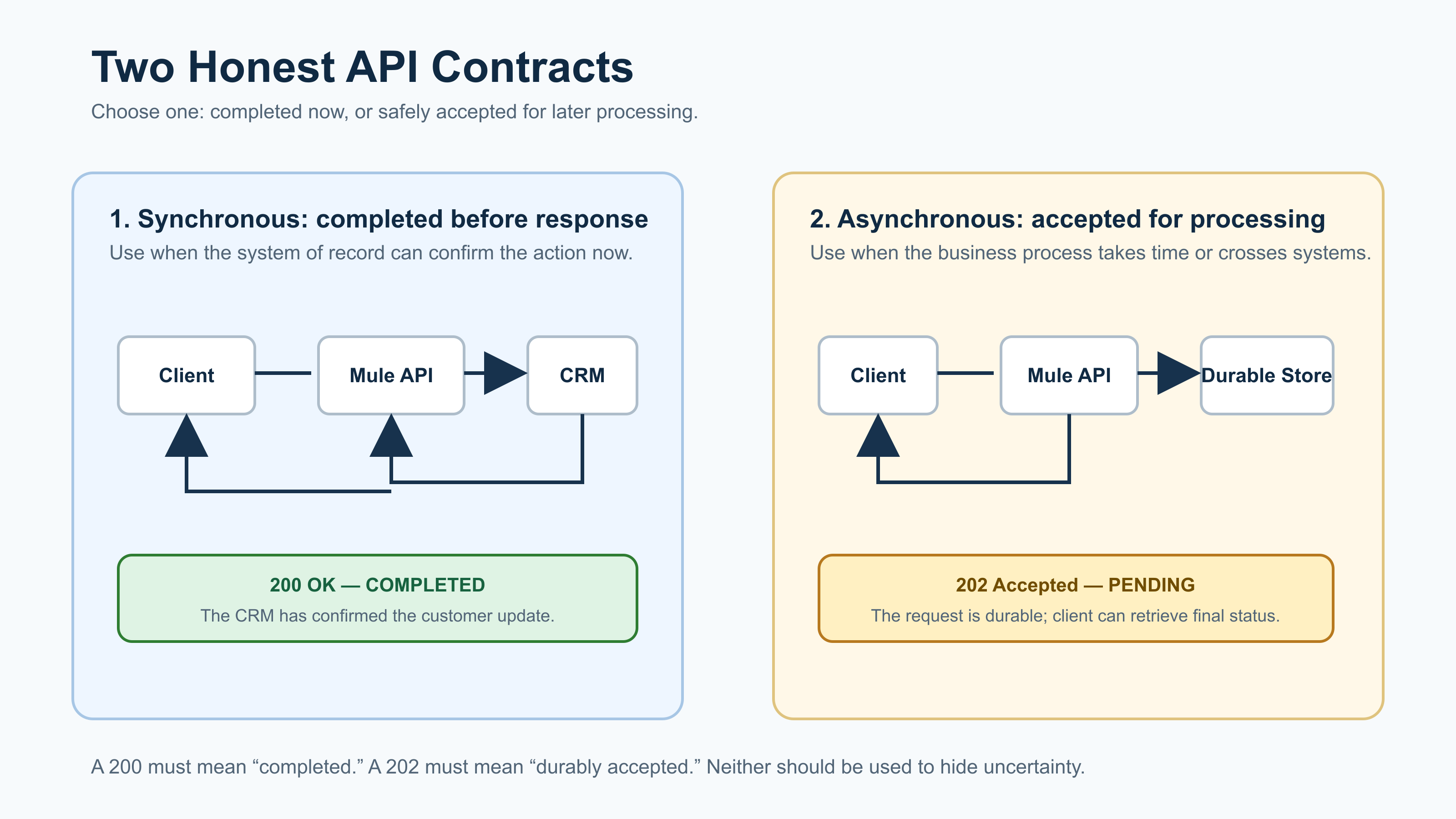
Figure 2 — Three Very Different Meanings of “Success”
This is the key design decision for command APIs:
| API response | What it should mean | Example |
|---|---|---|
200 OK or 201 Created |
The requested business action completed | Salesforce confirmed the email update |
202 Accepted |
The request was durably saved and will be processed later | The update command was written to a queue or database |
400 Bad Request |
The caller must fix the request | Invalid email format or required field missing |
409 Conflict |
The request conflicts with known state | Same idempotency key used with different payload |
503 Service Unavailable |
A required dependency prevented completion | Salesforce is unavailable and no durable request was created |
A successful HTTP response should not be a polite way of saying, “We will hope for the best.”
The Synchronous Contract: Return 200 Only After the System of Record Confirms
For a small, immediate update such as a customer email change, a synchronous API can be appropriate.
The call waits for Salesforce. If Salesforce confirms the update, return 200 OK. If Salesforce is unavailable, return a truthful temporary failure.
sequenceDiagram
    participant App as Mobile App
    participant Mule as MuleSoft API
    participant CRM as Salesforce

    App->>Mule: PUT /customers/4821/email
    Mule->>CRM: Update email address

    alt Salesforce confirms update
        CRM-->>Mule: 204 No Content
        Mule-->>App: 200 OK<br/>{status: COMPLETED}
    else Salesforce unavailable
        CRM--xMule: Timeout
        Mule-->>App: 503 Service Unavailable<br/>{status: NOT_COMPLETED}
    end
Here is the Mule flow shape:
<flow name="update-customer-email">

    <http:listener config-ref="HTTP_Listener"
                   path="/customers/{customerId}/email"
                   allowedMethods="PUT">
        <http:response statusCode="#[vars.httpStatus default 200]" />
    </http:listener>

    <try>
        <http:request config-ref="Salesforce_Request"
                      method="PATCH"
                      path="/services/data/v61.0/sobjects/Contact/#{attributes.uriParams.customerId}">
            <error-mapping sourceType="HTTP:CONNECTIVITY"
                           targetType="CUSTOMER:CRM_UNAVAILABLE" />
            <error-mapping sourceType="HTTP:TIMEOUT"
                           targetType="CUSTOMER:CRM_UNAVAILABLE" />
        </http:request>

        <set-variable variableName="httpStatus" value="200" />

        <set-payload value='#[{
            status: "COMPLETED",
            customerId: attributes.uriParams.customerId,
            correlationId: correlationId
        }]' />

        <error-handler>
            <on-error-propagate type="CUSTOMER:CRM_UNAVAILABLE">
                <set-variable variableName="httpStatus" value="503" />

                <set-payload value='#[{
                    status: "NOT_COMPLETED",
                    code: "CRM_UNAVAILABLE",
                    message: "The customer update could not be completed. Retry later using the same idempotency key.",
                    correlationId: correlationId
                }]' />
            </on-error-propagate>
        </error-handler>
    </try>
</flow>
The exact XML varies by project, but the design should not:
- Translate connector errors into meaningful application errors.
- Do not expose raw Salesforce or Mule exceptions.
- Do not convert a required downstream failure into success.
- Include a correlation ID in every outcome.
- Tell callers whether retrying is appropriate.
MuleSoft supports custom error mappings precisely so a connectivity failure from one dependency can be handled differently from a failure in another. See the Mule error model.
A 503 Can Be a Better Customer Experience Than a Fake 200
At first, returning 503 Service Unavailable sounds harsh.
But compare the two customer experiences.
Fake success
Friday: “Your email was updated.”
Monday: Sensitive statement sent to old email.
Tuesday: Customer contacts support.
Truthful temporary failure
Friday: “We could not update your email right now. Please try again.”
Friday, 30 seconds later: Customer retries.
Friday: Update succeeds and is confirmed.
A truthful failure is inconvenient.
A false success is expensive.
For retryable failures, return a clear response:
HTTP/1.1 503 Service Unavailable
Retry-After: 30
Idempotency-Key: 7a88e9dc-e1bd-4f38-a47b-0fc009392c78
X-Correlation-ID: 49d7d0a2-e771-43b7-ae4d-a9055ab21f3d

{
  "status": "NOT_COMPLETED",
  "code": "CRM_UNAVAILABLE",
  "message": "The customer update could not be completed. Retry after 30 seconds using the same idempotency key.",
  "correlationId": "49d7d0a2-e771-43b7-ae4d-a9055ab21f3d"
}
This response gives the client application something useful:
- A reason category, without leaking internal implementation details
- A retry interval
- A stable idempotency key for safe retry
- A correlation ID for support investigation
That is far more useful than a green checkmark built on a hidden error.
When 202 Accepted Is the Better Design
Not every operation should wait for the downstream system before responding.
Imagine a new employee onboarding request:
HR system → MuleSoft → Identity provider → Active Directory → Laptop workflow → Payroll
This is not a two-second API call. It is a business process.
Returning 200 OK after the HR request reaches MuleSoft would be misleading. But returning 503 because Active Directory takes time would also be wrong.
The honest model is asynchronous.
The API stores the request durably, assigns a tracking ID, and returns 202 Accepted.
HTTP/1.1 202 Accepted
Location: /employee-provisioning-requests/a0b6ef54-91d6-4a3c-ae76-e2d326f73ad5

{
  "requestId": "a0b6ef54-91d6-4a3c-ae76-e2d326f73ad5",
  "status": "PENDING",
  "correlationId": "49d7d0a2-e771-43b7-ae4d-a9055ab21f3d"
}
The client can then retrieve the real outcome:
GET /employee-provisioning-requests/a0b6ef54-91d6-4a3c-ae76-e2d326f73ad5{
"requestId": "a0b6ef54-91d6-4a3c-ae76-e2d326f73ad5",
"status": "COMPLETED",
"completedAt": "2026-08-29T16:45:12Z"
}Or, if something fails:
{
  "requestId": "a0b6ef54-91d6-4a3c-ae76-e2d326f73ad5",
  "status": "FAILED",
  "code": "IDENTITY_VALIDATION_ERROR",
  "message": "The employee username conflicts with an existing account."
}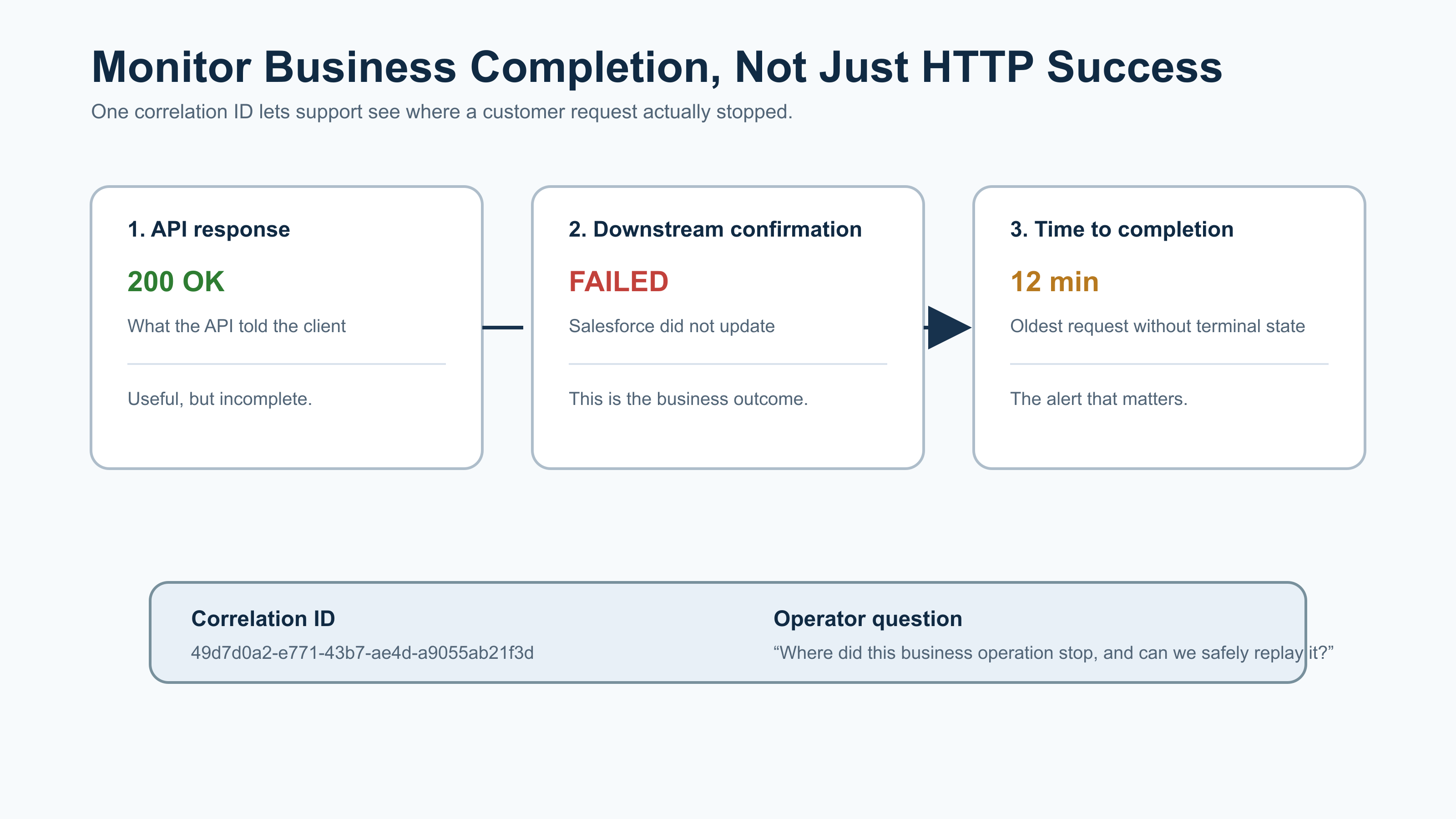
Figure 3 — The Honest Asynchronous Contract
The critical rule is simple:
Return
202 Acceptedonly when the request has been safely stored somewhere durable.
A request held only in memory is not accepted. A message that has not been committed to a queue is not accepted. A flow that merely intends to run later is not accepted.
The API must be able to prove that it owns the request before it tells the caller to stop waiting.
Measure Completion, Not Just API Availability
A dashboard showing “99.99% of requests returned 2xx” can be dangerously comforting.
For command APIs, measure three separate things:
| metric | what it tells you |
|---|---|
| HTTP response-code rate | What the API told clients |
| Downstream completion rate | Whether the target business system completed the action |
| Time to completion | How long customers wait for the real outcome |
For asynchronous work, also monitor:
- Pending requests by business operation
- Age of the oldest pending request
- Failures by downstream system
- Retry attempts and retry exhaustion
- Requests requiring manual intervention
- Duplicate requests prevented through idempotency
A useful alert is not:
“The API has 500 errors.”
A useful alert is:
“Customer updates accepted more than 10 minutes ago have not reached
COMPLETEDorFAILED.”
That alert tells the operations team what is actually at risk.
The Question to Ask in Every API Design Review
Before approving an integration API, ask one question:
“If this endpoint returns
200 OK, which system has definitely completed which business action?”
If the answer is “MuleSoft received the request,” the contract is not finished.
If the answer is “Salesforce confirmed the customer update,” then 200 OK is meaningful.
If the answer is “the request was safely stored for later processing,” return 202 Accepted.
If the answer is “we do not know because the dependency timed out,” return a truthful retryable failure—not success.
That one question catches a surprising number of production defects before they become support tickets.
Final Takeaway
The goal is not to return more errors.
The goal is to stop lying with success.
A 200 OK should mean the business operation completed. A 202 Accepted should mean the operation was safely accepted for later completion. A 503 should mean the operation did not complete and can be retried safely.
Anything else creates the worst kind of integration failure: one that is technically green, operationally invisible, and painfully real for the customer.
Opinions expressed by DZone contributors are their own.
Comments