

Data Science Project Folder Structure
One of the more annoying parts of any coding project can be setting up your environment. In this post, we look at some ways to organize your data science project.
Join the DZone community and get the full member experience.
Join For FreeIn computing, a folder structure is a way an operating system arranges files that are accessible to the user. Files are typically displayed in a hierarchical tree structure.
Have you been looking out for project folder structure or template for storing artifacts of your data science or machine learning project? Once there are teams working on a particular data science project, there arises a need for governance and automation of different aspects of the project using a build automation tool such as Jenkins. Thus, you need to store the artifacts in well-structured project folders. In this post, you will learn about the folder structure of data science project with which you can store the files/artifacts of your data science projects.
Folder Structure of Data Science Project
The following represents the folder structure for your data science project.
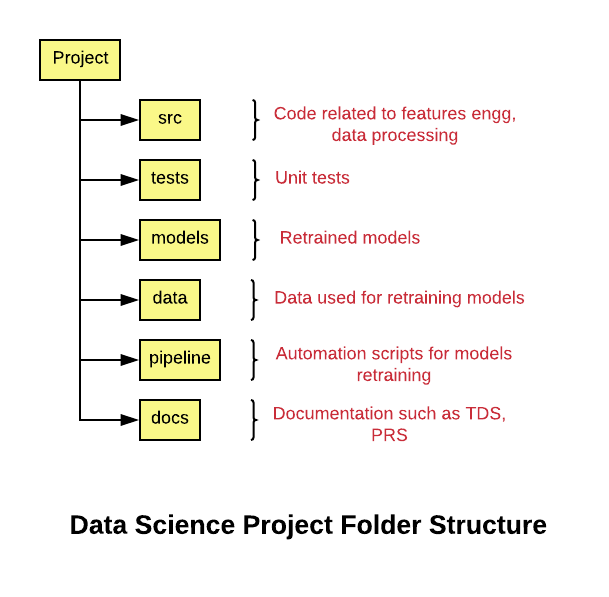
Note that the project structure is created keeping in mind potential integrations with build and automation jobs.
project_name/
- src/
- tests/
- models/
- data/
- pipeline/
- docs/
- Readme.md
- …
If you are building machine learning models across different product lines, here's a great folder structure to use:
- product_name_1
- project_name_1
- src/
- tests/
- models
- data/
- pipeline/
- docs/
- Readme.md
- …
- project_name_2
- …
- project_name_1
- product_name_2
- …
The following are the details of the above-mentioned folder structure:
- project_name: Name of the project.
- src: The folder that consists of the source code related to data gathering, data preparation, feature extraction, etc.
- tests: The folder that consists of the code representing unit tests for code maintained with the src folder.
- models: The folder that consists of files representing trained/retrained models as part of build jobs, etc. The model names can be appropriately set as projectname_date_time or project_build_id (in case the model is created as part of build jobs). Another approach is to store the model files in a separate storage such as AWS S3, Google Cloud Storage, or any other form of storage.
- data: The folder consists of data used for model training/retraining. The data could also be stored in a separate storage system.
- pipeline: The folder consists of code that's used for retraining and testing the model in an automated manner. These could be docker containers related code, scripts, workflow related code, etc.
- docs: The folder that consists of code related to the product requirement specifications (PRS), technical design specifications (TDS), etc.
Summary
In this post, you learned about the folder structure of a data science/machine learning project. Primarily, you will need to have folders for storing code for data/feature processing, tests, models, pipelines, and documents.
Published at DZone with permission of Ajitesh Kumar. See the original article here.
Opinions expressed by DZone contributors are their own.
Comments