

Implementing Governance on Databricks Using Unity Catalog
We learn how to treat data as a product through governance in Unity Catalog, ensuring the right people, metadata about the datasets.
Data governance has historically been the least glamorous part of data engineering. Engineers thrive on building things, designing scalable pipelines, curating high-quality datasets, and enabling machine learning models that deliver real business impact due to business demands. Governance, on the other hand, is often seen as red tape, including permissions, audit logs, compliance checks, and documentation. It doesn’t feel exciting, and it rarely gets prioritized until it’s too late.
That’s why, in many organizations, governance becomes an afterthought. Teams launch pipelines into production, datasets grow, and dashboards multiply. Business users rely on the insights daily, and ML models start to influence critical decisions. But then comes the compliance request, “Who accessed customer emails last quarter?”, “Can we guarantee PII is masked in this dashboard?”, “Where did this KPI originate?” Suddenly, the lack of a centralized governance framework is exposed. Access controls are fragmented across Hive Metastore, cloud IAM, and ML registries. Lineage is incomplete, forcing engineers into manual log-diving. Masking rules are inconsistent, often implemented with brittle regex that only works for part of the data. The governance story is fragile and reactive, not proactive.
This is exactly the gap Unity Catalog (UC) fills. UC is Databricks’ unified governance layer, a single control plane that governs not only data but also metadata (lineage, policies, tags) across SQL, machine learning, and even AI workloads. Instead of governance being bolted on after the fact, UC makes it part of the platform itself.
In this article, we’ll walk step by step through how UC can be rolled out on the familiar bakehouse dataset, mapping access and policies to different user groups within an organization. By the end, you’ll see how Bakehouse data can be:
- Securely accessed by the right people
- Masked to protect PII while preserving analytical value
- Shared across teams and regions with confidence
- Traced end-to-end through complete lineage
With Unity Catalog, governance transforms from a burden that slows projects down into a foundation that accelerates innovation safely.
Step 1: Create the Catalog and Schemas
At the heart of Unity Catalog is a simple but powerful idea: organize data the way businesses think about it, not just the way databases store it.
Unity Catalog introduces a 3-level namespace that standardizes how data assets are referenced:
<catalog>.<schema>.<table>
- Catalog – The highest-level container, typically representing a business domain or data product boundary.
- Schema – A logical grouping within a catalog, often aligned to functional areas (e.g., reviews, sales, supplier).
- Table – The governed dataset itself, stored in Delta format but managed through Unity Catalog policies.
CREATE CATALOG bakehouse;

CREATE SCHEMA bakehouse.reviews;

CREATE SCHEMA bakehouse.sales;

CREATE SCHEMA bakehouse.supplier;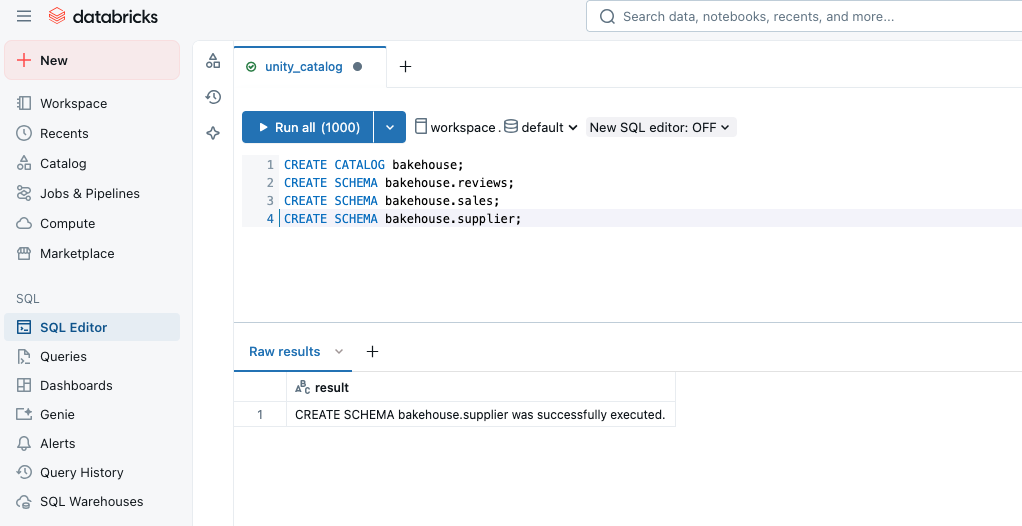
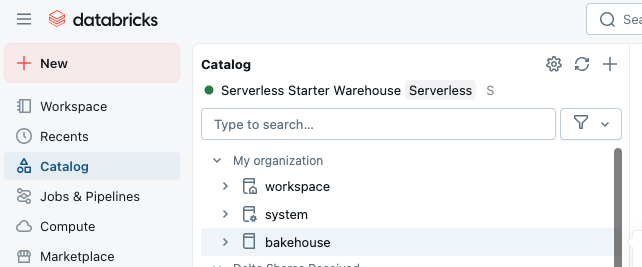
Step 2: Register Data Tables
Once the catalog and schemas are ready, the next step is to bring existing datasets under Unity Catalog governance. You do this by registering tables in the catalog. For Bakehouse, this includes customer feedback, sales transactions, and supplier invoices.
CREATE TABLE bakehouse.reviews.customer_feedback

USING DELTA

AS SELECT * FROM samples.bakehouse.media_customer_reviews;

CREATE TABLE bakehouse.sales.transactions

USING DELTA

AS SELECT * FROM samples.bakehouse.sales_transactions;

CREATE TABLE bakehouse.supplier.vendors

USING DELTA

AS SELECT * FROM samples.bakehouse.sales_franchises;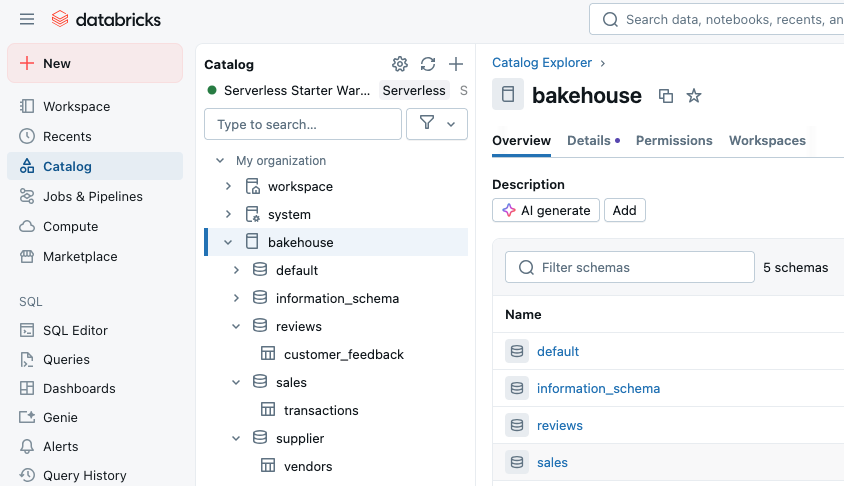
Here:
- The catalog (
bakehouse) represents the entire domain of Bakehouse data. - The schemas (
reviews,sales,supplier) reflect functional divisions of that data. - The tables store the actual governed assets.
Step 3: Define User Groups
Instead of micromanaging permissions for individual users, you define groups that reflect real job families or functions. These groups map directly to principals in Unity Catalog and can then be used in SQL statements. The benefit is huge: new team members are automatically governed as soon as they join a group, while offboarding is as simple as removing them from that group in your IdP. Governance is about people as much as data. Unity Catalog integrates with your identity provider (Azure AD, Okta, IAM) to enforce role-based access control, and we can create groups to manage access based on job family.
For Bakehouse, we define four key groups:
- Analysts – Query data, but PII masked.
- Data scientists – Build models, need full review text.
- Finance – Access to raw sales + supplier data.
- Compliance – Audit visibility across all domains.
Go to Settings → Identity and Access → Create the above groups.
Once the groups are created, enable the workspaces in the entitlements of each group.
Once the groups are linked to workspaces, we can grant access to groups based on the schema and tables.
GRANT SELECT ON TABLE bakehouse.reviews.customer_feedback TO `analyst_group`;

GRANT SELECT ON SCHEMA bakehouse.reviews TO `ds_group`;

GRANT SELECT ON TABLE bakehouse.sales.transactions TO `ds_group`;

GRANT SELECT ON SCHEMA bakehouse.sales TO `finance_group`;

GRANT SELECT ON SCHEMA bakehouse.supplier TO `finance_group`;

GRANT SELECT ON CATALOG bakehouse TO `compliance_group`;
Step 4: Apply Fine-Grained Security
Unity Catalog supports column masking and row filters, enabling access per role groups.
Mask customer emails for analysts:
CREATE OR REPLACE VIEW bakehouse.reviews.customer_feedback_masked AS

SELECT

 *,

 CASE

   WHEN is_account_group_member('analyst_group') THEN '[MASKED]'

   ELSE review

 END AS customer_email_masked

FROM bakehouse.reviews.customer_feedback;
Step 5: Lineage and Metadata
Now that we’ve created the Bakehouse catalog and registered our schemas and tables, the next step is to explore them in the Catalog Explorer. This is where Unity Catalog starts to show its real power; it’s not just about storing tables, it’s about making data + metadata easily discoverable and governed in one place.
When you navigate through the Catalog Explorer in the Databricks UI, you’ll notice that each table comes with a rich set of metadata. This includes technical details like column names, data types, owners, and creation history, as well as descriptions that help teams understand what the dataset is for. What’s new with Unity Catalog is that these descriptions can also be AI-driven — automatically generating human-readable explanations of what a table contains.
Another key feature you’ll find is the Lineage tab. This gives you a visual map of how data flows across the platform, from ingestion pipelines into Delta tables, through transformations and joins, and all the way downstream into dashboards or machine learning models.
Conclusion
Unity Catalog treats data as product by unifying data (tables, models, files) with metadata (permissions, lineage, classifications, and policies), UC ensures that every dataset is discoverable, trustworthy, and consumable across the organization.
In the Bakehouse example, we saw how reviews, sales, and supplier data could be packaged as governed products, each with clear ownership, access rules, and built-in safeguards like masking and row filters. Analysts consume curated reviews, Finance audits raw transactions, and Compliance monitors lineage, all from the same governed layer.
Opinions expressed by DZone contributors are their own.