

DataFlow — An Open-Source Data Preparation System Accelerating LLM Training
As data preparation becomes critical to LLM training, DataFlow emerges as an open-source system designed to automatically and systematically produce AI-ready data.
Join the DZone community and get the full member experience.
Join For FreeCompetition among large language models (LLMs) has intensified significantly over the past two years, with many believing that their core competitiveness lies in algorithms. However, this is not the case. The current open-source ecosystem has made mainstream architectures increasingly transparent — model structures such as Llama, GPT, and Gemma can all be publicly reproduced, and the competitive edge at the algorithmic level is rapidly eroding. The real competitive barrier actually exists at a more fundamental level — data.
Data is the sole source of knowledge for LLMs, and data quality determines a model's "emotional intelligence" and "intelligence quotient." This means the development of LLMs has largely relied on large-scale, high-quality training data. However, most mainstream training datasets and their processing workflows remain undisclosed, and the scale and quality of publicly available data resources are still limited. This poses significant challenges for the community in building and optimizing training data for LLMs.
Additionally, although there are already a large number of open-source datasets, making them AI-ready remains an obstacle for both the community and industry due to a lack of systematic and efficient tool support. Existing data processing tools, such as Hadoop and Spark, mostly support operators oriented toward traditional methods rather than effectively integrating intelligent operators based on the latest LLMs. Moreover, they provide limited support for constructing training data for advanced large models. How can we address this dilemma?
DataFlow: A Data Preparation Engine for LLMs
As data preparation becomes the main battlefield of competition, the open-source technology ecosystem is becoming the key to breaking the deadlock. That’s why we created DataFlow, a data-centric AI system that transforms “black-boxed” data preparation engineering capabilities into reusable and scalable open-source AI infrastructure.
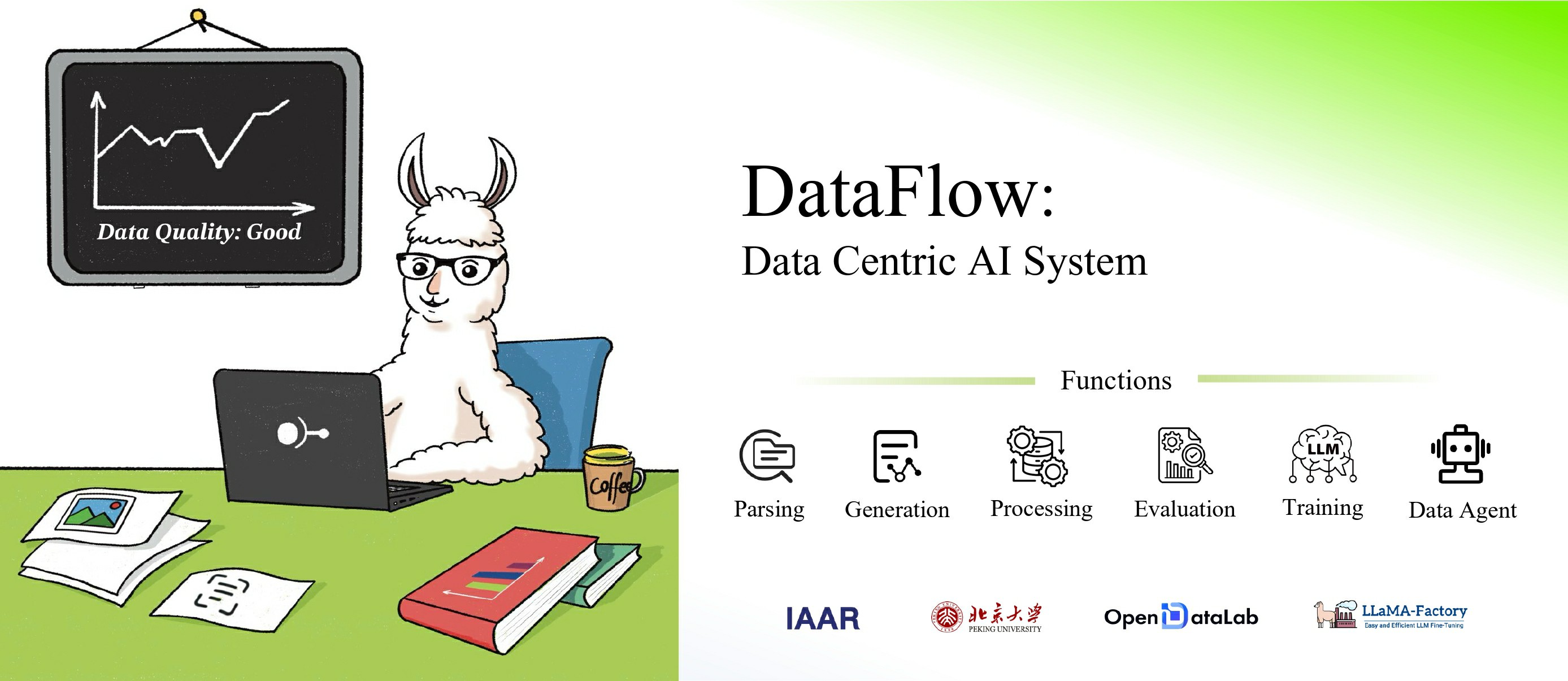
DataFlow fully supports text-modality data governance and also supports extracting and translating text content from PDFs, web pages, and audio. The processed data can be used for pre-training, supervised fine-tuning (SFT), and reinforcement fine-tuning of LLMs. It can effectively improve the inference and retrieval capabilities of LLMs in both general domains and specific domains such as healthcare, finance, and law.
DataFlow Technical Framework
When the complexity of LLM data preparation becomes the biggest bottleneck for model evolution, the traditional pattern of “isolated tools + manual orchestration” is clearly not the optimal solution. The technical framework of DataFlow follows a streaming architecture of “input → processing → output,” covering the entire journey from raw data processing to application implementation. Its core is divided into three major layers:
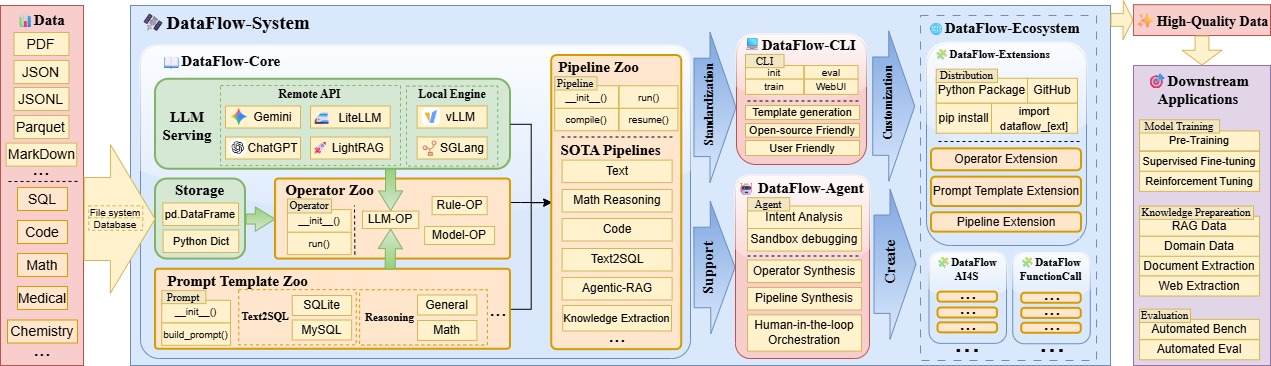
Data Input Layer
DataFlow supports multimodal machine learning data, such as JSON, PDFs, images, and videos.
Key Design:
- Unified Data Carrier: A
pandas DataFramecarries multimodal machine learning data in a structured format. - Scalability: A reserved multimodal processing interface (the current version focuses on text; image and video support are under development).
Core Processing Layer
The core functionality of DataFlow lies in the processing layer, which comprises three modules: Operator, Pipeline, and Agent.
DataFlow Operator System
An operator is a basic data processing unit that typically executes logic based on rules, deep learning models, or LLMs.
| Operator Type | Use Cases |
|---|---|
| MultiModal Operators | PNG → OCR MP4 → automatic speech recognition image → text description |
| General-purpose operators | Data filter/deduplicate/diversity control |
| Domain-specific operators | Medical entity identification, financial compliance testing |
| Evaluation operators | Give a score on Security/Complexity/Inference Difficulty |
DataFlow Pipeline
A pipeline is the logical orchestration of multiple DataFlow operators, designed to complete a full data processing task. DataFlow currently provides eight pipelines as references, and they can also be customized or modified.
Preinstalled Pipelines (Out of the Box):
- Strong Reasoning Synthesis: Generate mathematical or code reasoning chain data
- Agentic RAG Optimization: Build a high-quality knowledge base for Retrieval-Augmented Generation
- Text2SQL: Precise mapping from natural language to SQL
- Knowledge Base Cleaning: Extract information from PDFs, web pages, and audio, and construct RAG knowledge fragments or question–answer pairs
- ……
Customized Pipelines:
- Graphical Drag-and-Drop: Connect operators to build a DAG (no code required)
- YAML Configuration: Supports versioned management and reuse
DataFlow Agent
The DataFlow Agent is an automated task-processing system based on multi-agent collaboration. It covers the entire workflow of “task decomposition → tool registration → scheduling and execution → result verification → report generation,” and is designed for the intelligent management and execution of complex tasks.
Some agent capabilities include:
- Automatically arranging operators according to user queries to form new pipelines
- Automatically writing new operators based on user queries
- Automatically resolving data analysis tasks
Output Layer
The generated high-quality data can meet the requirements of LLM training and industry scenarios. Examples include:
- Multi-dimensional Assessment Reports: Visual displays of quality improvements in cleaned or synthesized data
- Downstream Scenario Support, including:
- Model Training: High-quality data for all stages of pre-training, SFT, and RLHF
- Vector Databases: Output of <Question, Evidence Fragment, Answer> triples adapted for RAG
- Domain-specific Knowledge Bases: Knowledge Q&A and decision support for the medical and financial industries
- ……
DataFlow Quick Start Guide
Next, let’s review best practices for installing and deploying DataFlow.
Environment Preparation
System Requirements:
- Operating System: Linux / macOS / Windows (Linux recommended)
- Python: Version 3.10 or higher
- Conda: For environment isolation and dependency management
- IDE: VSCode or PyCharm
Recommended Directory Structure:
workspace/
 ├── dataflow_env/
 ├── pipelines/
 ├── data/
 ├── cache_local/
 └── logs/
(Note: Simply prepare an empty folder named workspace. The subdirectories, such as pipelines, can be automatically generated by subsequent commands.)
Environment Configuration
Create a Conda Environment
conda create -n dataflow python=3.10 -y
conda activate dataflow
Tip: The -y parameter automatically confirms installation. Without it, you will be prompted to enter y manually.
Install DataFlow
pip install open-dataflow
# or
pip install "open-dataflow[vllm]"
We recommend using pip install open-dataflow initially. If you have a GPU, you can later install the version with vllm.
Verify Installation
dataflow -vIf the following message appears, the installation was successful:
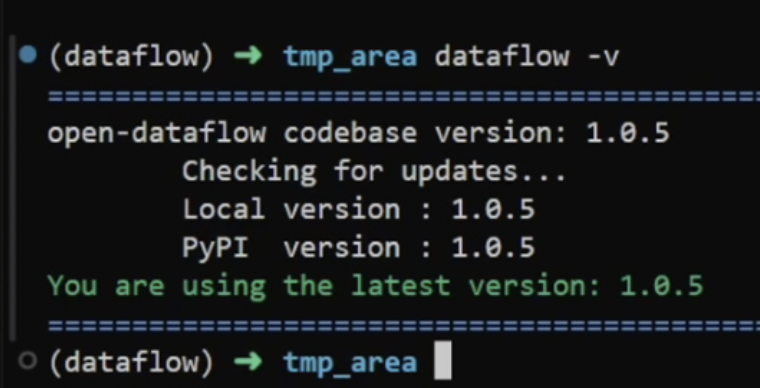
You are using the latest version: x.x.x
Note: The message indicating the successful installation is the same for all versions.
Project Initialization and Operation Verification
Initialize the Project Directory
dataflow initAfter execution, a default pipeline example and configuration file will be generated in the current directory (as shown in the figure below).
Run the Example Pipeline
- Locate the target pipeline file in the working directory.
- Configure the data source (sample data can be found in the example data directory).
- Input command: python + target pipeline file path
python example_data/example_pipeline.pyThe result file will be generated in the cache_local/ directory.
Advanced Deployment Practice
Build from Source
Suitable for developers who need to modify underlying logic or debug the framework.
git clone https://github.com/OpenDCAI/DataFlow.git
conda create -n dataflow_diy python=3.10
conda activate dataflow_diy
cd DataFlow
pip install -e .
Verify installation:
dataflow -vDownload a Dataset from Hugging Face
Install the package:
pip install huggingface_hubCreate hf_download.sh:
export HF_ENDPOINT=https://hf-mirror.com
rep="<huggingface dataset name>"
local_dir="./data"
huggingface-cli download $rep \
  --repo-type dataset \
  --local-dir $local_dir \
  --force
Run the script, and the style of the downloaded dataset is shown in the figure below:
bash hf_download.sh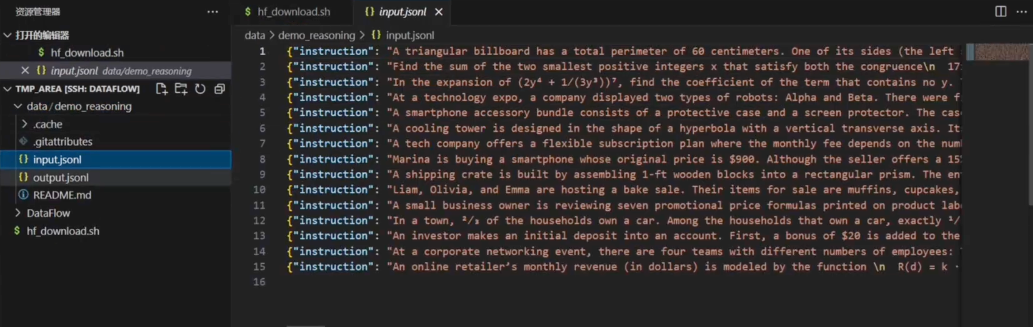
Run a Custom Pipeline
The steps are similar to those above:
python pipelines/custom_pipeline.py --config config/custom.jsonThe input source, operator order, and output path can be flexibly controlled through the configuration file.
That concludes the quick start guide for DataFlow. Technical documentation is also available, and the community is welcome to share insights and contribute.
Conclusion: A New Paradigm for Data Engineering
As the open-source LLM ecosystem continues to grow, one pattern is becoming clear: models evolve quickly, but data challenges remain difficult. DataFlow reframes data as a first-class, evolving system. It introduces operators for each stage of data processing — parsing, generation, filtering, evaluation, and feedback — that can be versioned, debugged, and improved independently, just like model code.
For developers building, training, and maintaining open-source LLM systems, this shared structure transforms isolated efforts into collective progress.
Opinions expressed by DZone contributors are their own.
Comments