

Decoupling Azure Releases With GitHub Actions
Decouple build artifacts from deployment using GitHub Actions and JSON config maps to prevent drift and enable safe, automated Azure deployments.
Join the DZone community and get the full member experience.
Join For FreeCloud deployments often fail because environment configurations are hardcoded into the build process. Here is a pattern to decouple your Build Artifacts from your Deployment Logic using GitHub Actions and a flexible JSON Configuration map.
In the world of Kubernetes, we are used to the separation of concerns: Docker builds the image, and Helm/Kustomize handles the environment configuration. However, when working with serverless (Azure Functions) or PaaS (App Service), developers often fall into the trap of monolithic pipelines. They build a package that only works in DEV, and then rebuild it for PROD.
This leads to "Artifact Drift," where the binary running in Production is not arguably the same binary that passed testing in Staging.
A recent implementation by Fujitsu’s Global Gateway Division tackles this problem head-on. By moving away from manual Azure CLI deployments to a strict GitHub Actions workflow, they reduced release time by 75% (from 2 hours to 30 minutes) and eliminated manual configuration errors.
Here is how to implement their "Environment Configuration Map" pattern to achieve safe, automated deployments across Azure environments.
The Problem: The "Config Matrix" Hell
In an Agile environment, especially during Proof-of-Concept (PoC) phases, assets are replaced frequently. You might have:
- Azure Functions (API logic)
- Cosmos DB (Data persistence)
- Virtual machines (Legacy processing)
The challenge is that DEV, STAGING, and PROD have completely different Resource Group names, Subscription IDs, and tier settings (e.g., Use a cheaper SKU for Dev).
If you hardcode these into your pipeline YAML, your pipeline becomes brittle. If you try to manage them manually, you risk human error.
The Solution: The "Build-Once, Deploy-Many" Architecture
The core philosophy of this pattern is simple: Build the binary once, version it, and then inject configuration only at the moment of deployment.
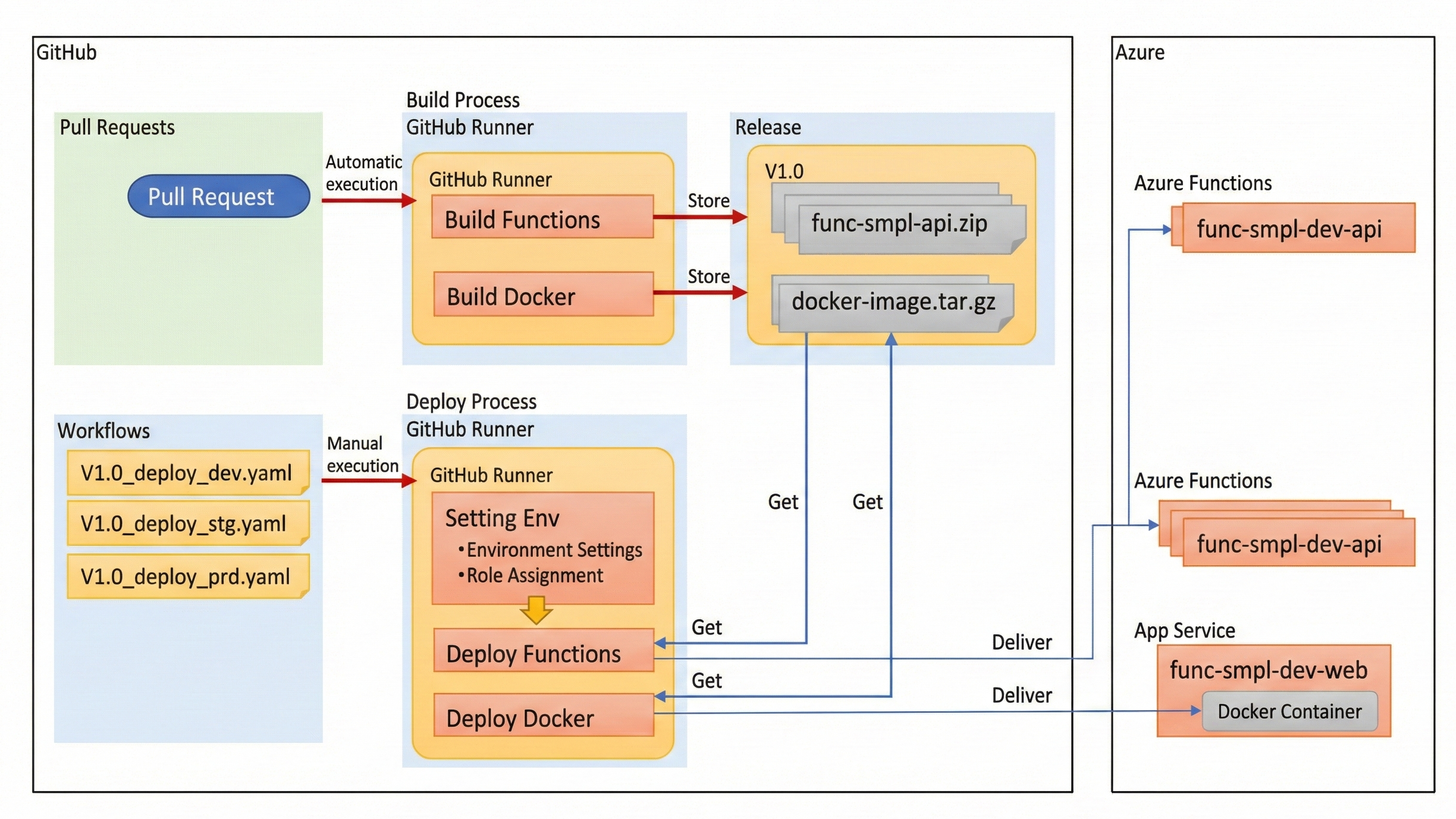
The workflow consists of three distinct phases:
- Build phase: Compile code and generate a .zip artifact.
- Release phase: Store the artifact in GitHub Releases (immutable versioning).
- Deploy phase: A workflow reads a Config JSON, pulls the artifact, and pushes it to Azure.
A sample workflow to understand release flow using GitHub Actions (manual versus automatic execution):
1. The Environment Configuration Map (config.json)
Instead of scattering variables across GitHub Secrets or Azure App Settings, we centralize the environment definition in a JSON file committed to the repository. This acts as our "Source of Truth."
File: .github/config/config.json
{
  "dev": {
    "subscriptionId": "sub-id-dev-001",
    "resourceGroup": "rg-app-dev",
    "resources": [
      {
        "type": "function",
        "name": "func-api-dev",
        "slot": "staging"
      }
    ]
  },
  "prod": {
    "subscriptionId": "sub-id-prod-999",
    "resourceGroup": "rg-app-prod",
    "resources": [
      {
        "type": "function",
        "name": "func-api-prod",
        "slot": "production"
      },
      {
        "type": "cosmosdb",
        "name": "cosmos-core-prod",
        "partitionKey": "/userId"
      }
    ]
  }
}
Key insight: Notice that dev might deploy to a staging slot, while prod deploys to production. This logic is abstracted away from the build script.
2. The Deployment "Operator" (Shell + Azure CLI)
Instead of relying solely on rigid GitHub Actions plugins, this pattern uses a Shell script to parse the JSON and execute the logic. This makes the deployment portable — you can run it locally or in CI.
File: scripts/deploy.sh
#!/bin/bash
ENV_FLAVOR=$1  # e.g., "prod"
TAG_VERSION=$2 # e.g., "v1.0.2"

# 1. Read Config using jq
CONFIG=$(cat .github/config/config.json | jq -r --arg env "$ENV_FLAVOR" '.[$env]')
RG_NAME=$(echo $CONFIG | jq -r '.resourceGroup')
SUB_ID=$(echo $CONFIG | jq -r '.subscriptionId')

# 2. Login to Azure
az account set --subscription $SUB_ID

# 3. Download the Immutable Artifact from GitHub Releases
wget https://github.com/my-org/my-repo/releases/download/$TAG_VERSION/build-artifact.zip

# 4. Iterate through defined resources and deploy
echo $CONFIG | jq -c '.resources[]' | while read resource; do
    TYPE=$(echo $resource | jq -r '.type')
    NAME=$(echo $resource | jq -r '.name')

    if [ "$TYPE" == "function" ]; then
        echo "Deploying $TAG_VERSION to Azure Function: $NAME..."
        az functionapp deployment source config-zip \
            --resource-group $RG_NAME \
            --name $NAME \
            --src build-artifact.zip
    fi
done
3. The GitHub Actions Workflow
Finally, we tie it together with a Workflow that requires manual approval for Production environments.
File: .github/workflows/deploy.yaml
name: Deploy to Azure

on:
  release:
    types: [published]
  workflow_dispatch:
    inputs:
      environment:
        description: 'Target Environment'
        required: true
        default: 'dev'
        type: choice
        options:
        - dev
        - prod

jobs:
  deploy:
    runs-on: ubuntu-latest
    environment: ${{ github.event.inputs.environment }} # Uses GitHub Environments for approvals
    steps:
      - name: Checkout Code
        uses: actions/checkout@v3

      - name: Azure Login
        uses: azure/login@v1
        with:
          creds: ${{ secrets.AZURE_CREDENTIALS }}

      - name: Run Deployment Operator
        run: |
          chmod +x scripts/deploy.sh
          ./scripts/deploy.sh ${{ github.event.inputs.environment }} ${{ github.event.release.tag_name }}
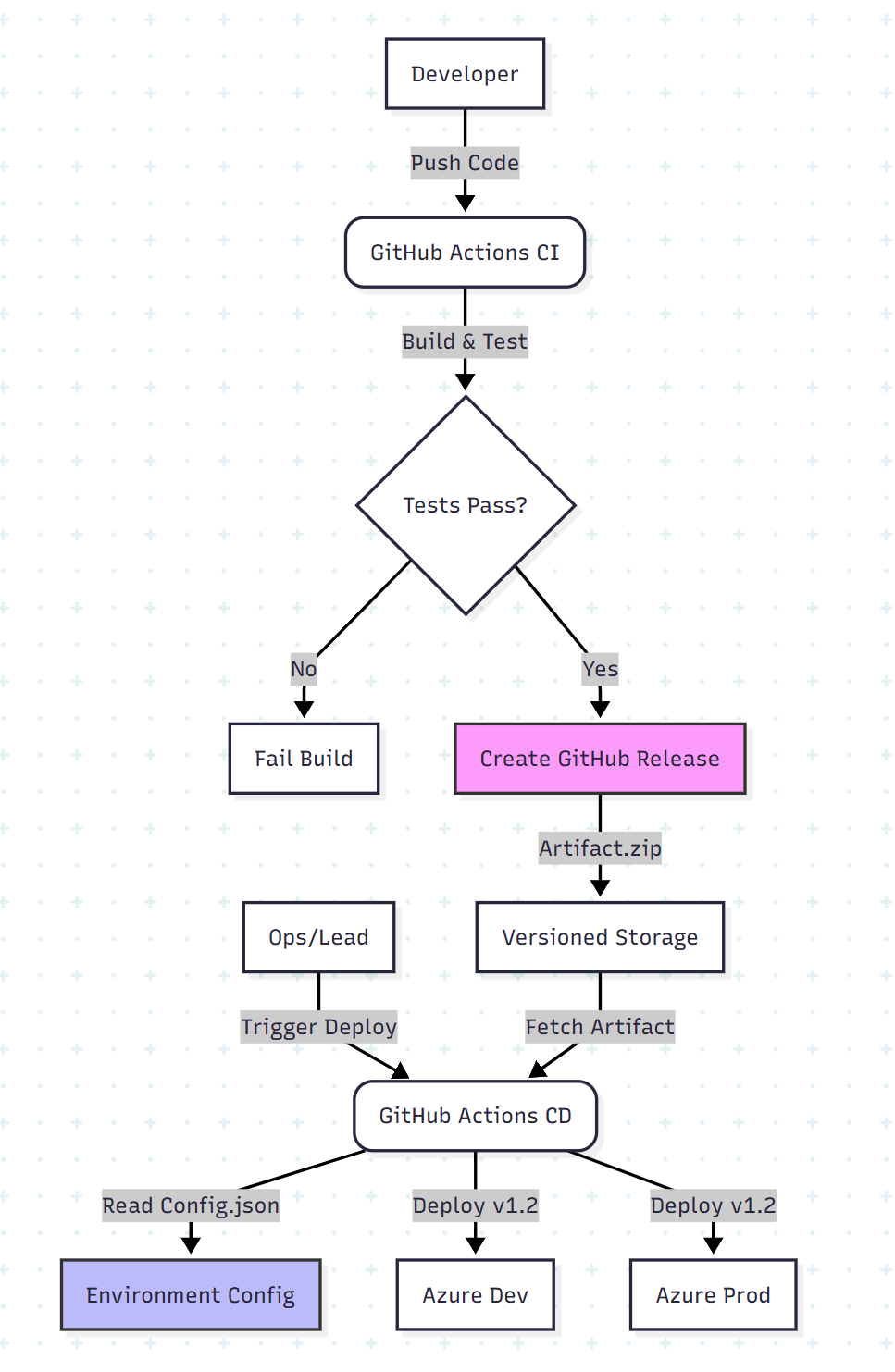
The Architecture Visualized
This approach separates the lifecycle of the code from the lifecycle of the environment.
Why This Pattern Works (The Results)
In the Fujitsu case study, adopting this pattern solved three critical issues:
- Instant rollbacks: Because artifacts are stored in GitHub Releases, "rolling back" is just re-running the deployment job with the previous Version Tag (e.g., v1.0.1 instead of v1.0.2). No rebuilding necessary.
- Resource isolation: The config.json allows granular control. You can define specific permissions or exclusion rules (e.g., ignore: ["iam"]) for Dev environments to prevent accidental permission overwrites.
- Eliminating "VM Lock": Previously, deployments required exclusive access to VMs, blocking other developers. By moving to Azure Functions and asynchronous Actions, the pipeline became non-blocking.
Conclusion
Tools like Terraform and Bicep are excellent for Infrastructure as Code (creating the resources). However, for Deployment as Code (moving the bits to the resources), a lightweight, configuration-driven approach using GitHub Actions and JSON maps provides the flexibility needed for high-velocity teams.
By decoupling the "What" (the build artifact) from the "Where" (the environment config), you turn a fragile manual release process into a robust, repeatable engine.
Opinions expressed by DZone contributors are their own.
Comments