

Building Scalable, Resilient Workflows With State Machines on GCP
Learn how to build scalable, resilient backend workflows on Google Cloud using state machines, Workflows, Eventarc, and more with real-world use cases.
 CORE
·
CORE
·
Join the DZone community and get the full member experience.
Join For FreeModern backend architectures often consist of many microservices and serverless functions working together. In such distributed systems, orchestrating complex processes reliably can be challenging. This is where state machines come into play. A state machine models a process as a series of defined states and transitions, enabling predictable sequences, loops, branching, and error handling in workflows. In practice, state machines let us implement robust workflows – essentially the flowcharts of business logic – with clear steps and outcomes. They are crucial for backend systems that require scalable, resilient coordination of tasks across services.
On Google Cloud Platform (GCP), developers have managed services to build these workflows without managing servers. GCP’s Workflows service is a fully managed orchestration engine that executes steps (states) in order, calling various services and APIs. This is analogous to AWS Step Functions – Workflows follows a similar state machine model to connect services in a durable, stateful execution. Combined with event-driven services like Eventarc, messaging like Pub/Sub, and compute platforms like Cloud Functions and Cloud Run, GCP provides powerful tools to implement state machine patterns. The result is scalable and fault-tolerant workflows for tasks such as order processing, data pipelines, and long-running processes with human or external triggers.
In this article, we’ll explore how to build such workflows on GCP using state machines. We’ll cover what state machines are and why they matter, how GCP Workflows and related services support them, common use cases (like e-commerce orders and retries with compensation), and best practices (dos and don’ts) for design. We’ll also look at a real-world case study of a Fortune 500 company leveraging GCP’s workflow tools in production. By the end, you should have a clear understanding of building scalable, resilient workflows on GCP using state machine principles.
State Machines and Why They Matter
A state machine is an abstract model of computation where an entity can be in one of a set of states, and transitions between states are triggered by events or conditions. In backend architecture, state machines provide a structured way to manage complex logic flows. Instead of ad-hoc scripts or tightly coupled service calls, a state machine defines explicit steps (states) and paths for success, failure, timeouts, etc. This yields several benefits:
- Clarity and Maintenance: Complex processes (e.g. multi-step transactions) are easier to reason about when modeled as states with clear transitions, rather than tangled asynchronous code. The workflow diagram (or definition) becomes a living documentation of the process.
- Resilience: State machines naturally handle error states. For example, GCP Workflows support explicit error handlers and retries in the workflow definition. If a step fails, the state machine can catch it and transition to a compensating action or a retry loop instead of crashing the whole process.
- Concurrency and Ordering: You can define which steps can run in parallel and which must run sequentially, ensuring correct ordering of operations. This is important in scenarios like processing payments (charge then ship, not vice versa) or coordinating distributed tasks.
- Long-Running Durability: A stateful workflow can persist progress. GCP Workflows, for instance, can run for up to one year and resume even if individual components or network calls are transiently unavailable. This durability is hard to achieve with naive scripting or manually stitching together services.
- Decoupling and Agility: The orchestration (state machine) is separated from the implementation of each task. You can modify the high-level workflow (add steps, change order, adjust branching logic) without rewriting the services performing the tasks, as long as their APIs remain consistent. This decoupling is key in microservices architectures for agility.
In summary, state machines bring predictability and robustness to backend workflows. They let you codify the “happy path” and all the alternate paths (errors, retries, timeouts) in one place. This is why they matter: they are the backbone of reliable orchestration, from financial transactions to IoT processing to user signup flows.
GCP Managed Workflow Solutions (State Machines on GCP)
GCP offers several managed services that together enable building state machine-based workflows without managing infrastructure:
- Google Cloud Workflows: This is GCP’s serverless orchestration service – essentially a workflow engine in the cloud. You define workflows in a YAML or JSON syntax, listing a sequence of steps (each step is like a state). Workflows supports conditional branches, loops, parallel execution, and integrates with many GCP services via connectors. It is analogous to a state machine coordinator that can call any HTTP API (internal or external) and native GCP APIs. Workflows is truly serverless and pay-per-use, so it scales automatically and even scales to zero when idle. You don’t worry about servers or workers; GCP handles execution, retries, and state persistence behind the scenes. This makes it ideal for orchestrating microservices and cloud functions.
- Cloud Functions: GCP’s Functions (especially 2nd Gen) are a natural complement to Workflows. Functions are small units of compute triggered by events or HTTP calls. In a workflow context, a Cloud Function might perform a task (e.g. charge a credit card, resize an image) when invoked by the workflow. Workflows can call Cloud Functions directly via HTTP triggers – effectively, each function becomes a step in the state machine. Cloud Functions are also serverless and can scale concurrently. An advantage of Cloud Functions is built-in auto-retries on certain event triggers and the ability to set a timeout per function invocation (now up to 60 minutes in Gen2). Best practice is to set appropriate timeouts on workflow steps when calling functions or HTTP services, to avoid hangs. In Workflows YAML, you can specify a timeout for an HTTP step (as shown later) to enforce this.
- Cloud Run: Cloud Run is GCP’s managed container service for running any container image as a serverless service. Like Cloud Functions, Cloud Run services can be part of a workflow – either invoked via HTTP from a workflow step or triggered via events. You might use Cloud Run for tasks that need a custom runtime, longer processing, or higher memory/CPU than Functions allow. For example, an image processing step in a workflow could call a Cloud Run service that runs heavy computation. Cloud Run instances scale out as needed and scale to zero on idle. Cloud Run can also run Jobs (one-off containers for batch processing) which Workflows can start and monitor. A common pattern is to have Workflows orchestrate Cloud Run jobs in parallel for data processing, then collect results.
- Pub/Sub (Publish/Subscribe): Pub/Sub is GCP’s messaging backbone for decoupling services. While Pub/Sub itself isn’t a state machine, it is often used within workflow architectures for event-driven steps. For instance, a workflow might publish messages to a Pub/Sub topic to fan-out work to multiple subscribers (e.g. multiple microservices processing a request in parallel). Inversely, Workflows can wait for a Pub/Sub message as a signal to continue (using Eventarc or polling callbacks, discussed below). Pub/Sub ensures reliable delivery and can buffer bursts of events, which adds resiliency to workflows. In GCP’s loan processing sample, a workflow published messages to a topic and multiple Cloud Functions subscribed to perform work concurrently.
- Eventarc: Eventarc is GCP’s event routing service. It captures events from various sources (Cloud Storage, Firebase, custom events, etc.) and can trigger targets like Cloud Run services or Workflows. This allows event-driven workflows: you can configure an Eventarc trigger so that, say, an upload to a storage bucket or a new message in a topic automatically starts a Workflow execution. Combined with Workflows’ ability to wait for external callbacks, this enables long-running state machines that pause until an external event happens. For example, a workflow could start when a Dataflow job state changes, or when an IoT sensor event arrives, kicking off a series of orchestrated steps. Eventarc essentially ties the state machine to real-world events in a loosely coupled way.
These services can be composed to implement sophisticated workflows. For instance, you might design an order processing workflow that is triggered by a Pub/Sub event (via Eventarc), then calls Cloud Functions/Run services to validate inventory, charge payment, and update databases, using Workflows for orchestration and Pub/Sub for notifying downstream services. GCP Workflows provides the central state machine logic, ensuring each step executes in order (or in parallel where specified) and handling errors.
- Workflows vs. Cloud Composer: It’s worth noting GCP also has Cloud Composer (managed Apache Airflow) for data workflows. Composer is great for ETL and data engineering tasks, but for microservice orchestration and API calls, Workflows is often simpler and more cost-effective. Workflows uses YAML/JSON and doesn’t require running an Airflow cluster. Many developers choose Workflows for lightweight service orchestration especially when integrating with Cloud Functions and Cloud Run, whereas Composer might be chosen for complex data pipeline scheduling. GCP’s guidance suggests evaluating the nature of your workflow: for event-driven, serverless app workflows, Workflows is usually ideal.
Next, let’s dive into common use cases where these GCP state machine capabilities shine.
Common Use Cases for State Machine Workflows
1. Order Processing and Transaction Orchestration: A classic example is an e-commerce order workflow. When a customer places an order, multiple services must work in sequence: create an order record, reserve payment, adjust inventory, arrange shipping, etc. A state machine can orchestrate this end-to-end process, ensuring each step succeeds before moving on and handling failures gracefully. GCP Workflows makes it easy to chain HTTP calls to different microservices for each stage. Crucially, it can implement the saga pattern for distributed transactions. In a saga, if any step fails permanently, the workflow triggers compensating actions to undo prior steps. For example, if payment fails, the workflow can automatically cancel the pending order in a previous step.
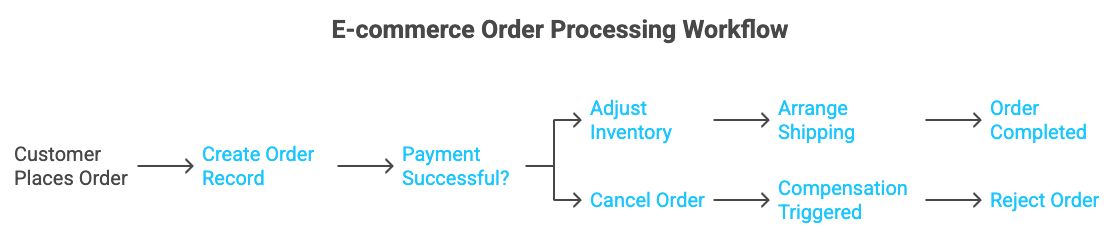
Figure 1: Saga pattern in an order processing workflow on GCP – if the credit reservation fails, a compensation step triggers to reject the order. Workflows’ try/retry and try/except steps enable robust error handling for such multi-step transactions.
In the figure above, the workflow (state machine) coordinates an Order Service and a Customer Service. It creates a pending order, then reserves credit by calling a payment service. If the payment step succeeds, the workflow approves the order; if it returns an unrecoverable error (e.g. insufficient funds), the workflow enters an error state and invokes a compensation step to reject the order. This approach prevents inconsistent outcomes (like an order stuck as "pending" after payment failure). Workflows natively supports retries for transient errors as well – for instance, wrapping a payment call with retry to handle a temporary network glitch. By orchestrating the whole saga in a single workflow, you ensure data consistency across microservices without manual intervention. Many large retailers and financial services adopt this pattern; for example, a global payment platform could use Workflows to coordinate checks across fraud, credit, and order systems, so that each transaction either completes all steps or properly rolls back.
2. Long-Running Processes and Human-in-the-Loop: Not all workflows finish in seconds; some involve waiting for external events or approvals. Traditionally, implementing a wait or manual step could require polling or building custom logic. With GCP Workflows, you can use callbacks and Eventarc to handle this elegantly. Instead of polling a database or queue, a workflow can pause at a certain state and wait for an event or HTTP callback to resume. A real use case is document processing or approvals: e.g., a workflow that processes a loan application may need a human manager’s approval at one step. Using Workflows callbacks, the workflow can call an external system (or send a Pub/Sub message) to notify a reviewer, then wait until the reviewer’s decision comes back (perhaps via an HTTP callback or a Pub/Sub event). This drastically simplifies long-running orchestration involving people or external systems. Another example is waiting for a long batch job to finish: instead of polling the job status, the workflow can register for a completion event. GCP’s Eventarc can emit events for Cloud Run jobs or Dataflow job status changes, which the workflow can listen for. The general pattern is event-driven orchestration: the state machine remains dormant until a relevant event triggers the next transition, avoiding wasteful loops and reducing latency.
3. Batch Jobs and Data Pipelines: Workflows are also useful for coordinating data processing tasks. Suppose you have a pipeline to process large datasets or generate reports nightly. You might need to run multiple jobs in sequence or parallel, handle failures, and gather results. GCP Workflows can orchestrate Cloud Run jobs or even Hadoop/Beam jobs on Dataflow. For instance, a workflow could kick off multiple Cloud Run jobs in parallel to process different chunks of data, wait for all to complete, then aggregate the outcomes. If any job fails, the workflow can capture that and decide to retry or fail the whole pipeline. The benefit of using Workflows here is that you get a single control plane for the pipeline logic, with visibility into each step’s success/failure. This is much simpler than writing a bunch of glue code or cron scripts. GCP Workflows supports a parallel step construct to run branches concurrently and then join, which is perfect for speeding up batch workflows by parallelizing independent tasks. (We’ll see an example of parallel steps in the next section.)
4. Microservice Choreography and Integration: Often, building a new feature means integrating several APIs or microservices. You might call a maps API, then a database, then an analytics service, etc. Workflows can serve as the integration glue, especially when the sequence matters or conditional logic is needed. Because Workflows can call any HTTP-based API (including SaaS or private APIs), you can use it to orchestrate across cloud boundaries as well. For example, an IoT workflow might call a device API, then a third-party weather service, then a Cloud Function to store results. The state machine approach here ensures each call’s result is handled properly before moving on. And since Workflows can pass data between steps (the output of one step becomes input to the next), it’s convenient for transforming and aggregating data from multiple sources. This use case is about reducing errors and improving reliability in multi-service interactions. Instead of having each microservice call the next (which can lead to brittle chains and hard-to-track failures), Workflows acts as a central conductor. This also makes testing easier – you can simulate different step outcomes in a controlled way.
In all these scenarios, the combination of managed services means you get scalability by default. Workflows, Cloud Functions, Cloud Run, Pub/Sub – all scale out without you managing servers. And they are resilient by design: for example, Pub/Sub will durably buffer messages, Workflows will retry failed steps or trigger compensation as configured, and Cloud Run can be deployed across multiple regions for high availability.
Next, we’ll discuss best practices and potential pitfalls when designing these workflows on GCP.
Best Practices for GCP Workflows (Dos and Don’ts)
Designing a state machine workflow requires careful thought to ensure it remains reliable and maintainable. Here are some key best practices and common pitfalls to avoid:
- Plan for Failures (Use Retries and Saga Compensations): Always assume that services will fail at some point in a distributed system. Use Workflows’ built-in retry policies for transient errors and customize them if needed. For example, wrap external API calls in a try/retry with an exponential backoff for network issues. GCP Workflows provides a default HTTP retry for 5 attempts on 4xx/5xx errors. For non-transient failures (e.g. business rule violations), implement the saga pattern: in a try/except block, define an except path that calls compensating steps to undo any partial work. This ensures your workflow can gracefully roll back if a critical step fails and won’t leave downstream systems in an inconsistent state. Don’t ignore error handling – a workflow without it will fail entirely on the first error, which is far from resilient.
- Avoid Deeply Nested Logic – Keep Workflows Readable: It can be tempting to cram complex logic with many nested conditional branches or loops into a single workflow definition. However, deeply nested steps become hard to read and maintain. Do strive for a clear, linear structure of steps. Use the switch (conditional) construct for branching rather than nested if-like chains where possible. If you find yourself with too many levels of indentation, consider refactoring. One approach is to use subworkflows (Workflows supports calling child workflows or defined subflows) to encapsulate complex portions. For example, if your process has several phases, each phase could be a subworkflow. This modular approach improves readability and lets you reuse subworkflow definitions in multiple places (especially for common compensation steps or repeated sequences). In general, each workflow should have a single clear responsibility or outcome. Chaining multiple workflows via events or calls is often preferable to one monolithic workflow that does everything.
- Use Modular, Stateless Steps: Each step in a workflow ideally calls an idempotent service function – meaning if it’s retried or called twice, it won’t wreak havoc. Designing your Cloud Functions/Cloud Run handlers to be idempotent (or at least side-effect aware) is a best practice, so that retries don’t duplicate work (e.g., ensure a “charge credit card” step checks if already charged to avoid double charge). Also, keep the business logic within the service implementations, not in the workflow definition. The workflow should orchestrate at a high level, not perform complex data transformations itself. As one Google Cloud expert noted, workflow tools focus on control flow over data handling. If you need to do heavy data processing, do it inside a Cloud Run job or Dataflow, and let the workflow just kick off that job and wait for result. Don’t try to write huge inline code within Workflows – use small functions or APIs for the heavy lifting. This separation makes workflows simpler and services more reusable.
- Leverage Parallelism for Speed: A powerful feature of state machine orchestration is the ability to execute independent steps in parallel. GCP Workflows supports parallel steps natively. Identify parts of your workflow that don’t depend on each other and run them concurrently to reduce overall latency. For example, if fulfilling an order requires contacting three external suppliers, you can invoke all three in parallel and wait for all to finish, rather than sequentially taking three times as long. Below is a snippet illustrating the use of a parallel for-each loop in Workflows:
main:

    steps:

      - init:

          assign:

            - modules: ['accounts', 'items']

            - function_url: ${sys.get_env("FUNCTION_ENDPOINT")}

      - retrieve_modules:

          parallel:

            for:

              value: module

              in: ${modules}

              steps:

                - get_module:

                    call: http.post

                    args:

                      url: ${function_url}

                      body:

                        module_name: ${module}

                      timeout: 1500

                    result: module_result

                - log_result:

                    call: sys.log

                    args:

                      data: ${module_result}
In this example, the workflow iterates over a list of modules and calls a Cloud Function for each, in parallel, rather than one after the other. Each call also has a timeout: 1500 (milliseconds) set – a good practice to cap how long it waits on each module. Using parallel for can dramatically cut down total execution time for I/O-bound steps (here the two module fetches happen concurrently). Do use parallel branches where suitable, but make sure the parallel tasks are truly independent (no shared resources that could conflict). After parallel steps, you can merge results if needed in subsequent steps.
- Enforce Timeouts and Handle Deadlines: Always set sensible timeouts for external calls made in a workflow. As shown above, you can specify a timeout for HTTP calls. This prevents a stuck step from hanging your entire workflow indefinitely. Moreover, Workflows itself has a maximum execution duration (one year). For most business workflows, you might set an expectation that it should finish in, say, under an hour – if it’s running longer, perhaps something’s wrong or it’s waiting forever. Use Cloud Scheduler or monitors to catch and handle stuck workflows if they exceed expected time. On the flip side, if you intend a workflow to wait a very long time (e.g. waiting for an approval for days), consider using an asynchronous callback/event to wake it rather than a simple sleep loop, to avoid hitting limits and incurring unnecessary costs.
- Secure and Manage Configurations: Treat your workflow like production code: use proper IAM roles for Workflows to limit access (principle of least privilege), and store secrets in Secret Manager rather than hardcoding credentials. Workflows can retrieve secrets at runtime if needed. Also, use environment variables and input parameters to avoid hardcoding URLs or magic constants in your workflow definitions (for example, pass in the service endpoint or project IDs as inputs). This makes workflows portable across environments (dev, staging, prod). The GCP Workflows best practices guide specifically advises avoiding hardcoded URLs and using environment configs instead. Similarly, log appropriately: avoid excessive sys.log for every step (which can flood logs and incur cost); instead log only key events or use logging within your functions. Setting up alerts on workflow failures via Cloud Monitoring is highly recommended – e.g., trigger an email or Slack notification if a workflow fails or runs unusually long.
- Don’t Poll Unnecessarily – Use Events: A common anti-pattern is designing a workflow that polls a service repeatedly to check if something happened (e.g., checking every 10 seconds if a report is ready). Polling wastes resources and can delay reaction. Instead, whenever possible, use the event-driven features: Workflows callbacks, Eventarc triggers, or Pub/Sub messages to signal completion. GCP Workflows can wait for event callbacks natively, meaning your state machine can sleep efficiently until an event wakes it. This leads to more scalable and responsive workflows. In short, don’t use busy-wait loops when GCP’s infrastructure can do the waiting for you more intelligently.
By following these best practices – robust error handling, modular design, parallelism, timeouts, secure configs, and event-driven triggers – you’ll build workflows that are not only scalable and resilient, but also easier to understand and evolve over time.
Case Study: PayPal’s Cloud-Native Payment Workflows
To illustrate how these concepts come together in the real world, let’s look at how PayPal leveraged Google Cloud to modernize and scale its payment processing workflows. PayPal migrated major parts of its payment platform to GCP, embracing a cloud-native, state-machine approach for handling transactions. The motivation was to ensure easy and reliable service for customers even during massive traffic surges (such as Black Friday sales or pandemic-driven spikes in online shopping).
After moving to Google Cloud, PayPal saw immediate improvements in scalability and resiliency. During peak events, their platform successfully processed 1,000 payments per second by dynamically scaling out workloads on GCP. This would have been extremely difficult on fixed on-premises infrastructure. In the cloud, PayPal could orchestrate its microservices across many machines and even across regions. For example, transactions could be routed through multiple GCP regions for lower latency globally – a critical factor when even a few hundred milliseconds delay can impact user experience. The stateful workflow orchestration ensures that each payment goes through a series of checks (fraud detection, balance checks, currency conversion, etc.) in the correct order, with GCP services handling the scaling of each component.
PayPal’s team used automation and scripting (infrastructure-as-code and likely workflow definitions) to minimize manual effort in these processes. By embracing a state machine mindset, they made the entire payment flow more agile. If one microservice was slow or failed, the orchestration could route around it or spin up new instances (akin to retries). With the serverless and managed services on GCP, PayPal’s engineers no longer had to predict and provision peak capacity for their busiest day of the year. Instead, their workflows scale on demand and scale down when not needed, saving cost. In fact, PayPal reported significant cost savings by not having to maintain on-prem servers for peak volume that sits idle most of the year.
Another aspect is reliability: GCP’s global network and distributed infrastructure improved PayPal’s uptime and consistency for these workflows. As the VP of Site Reliability at PayPal noted, it became easy to handle the “highest peak holiday season we have ever had” once they saw how effortlessly they could add capacity on Google Cloud. This speaks to the power of combining state machine orchestration with cloud elasticity – the workflow definitions ensure logical correctness of the payment process, while GCP’s platform ensures elastic execution of each step at scale.
In summary, PayPal’s adoption of GCP for its payment workflows shows how a Fortune 500 company can achieve massive scale and resilience by leveraging cloud-based state machines. Their horizontally scalable payment microservices are orchestrated in a way that transactions are processed reliably even under extreme loads, with automated retries, regional failovers, and zero-downtime scaling. It’s a real-world testament that carefully designed workflows on GCP can meet the demands of globally distributed users and high-stakes financial transactions.
(Another example: UPS, the global logistics giant, used Google Cloud to optimize delivery routes for 21 million packages daily. By processing vast datasets (like distances, traffic, delivery windows) with GCP’s data analytics and orchestrating that into daily driver routes, UPS built a smart logistics workflow that saves them up to $400 million a year in costs. This highlights that state machine principles on GCP aren’t just for internet companies – even traditional industries can benefit from orchestrated, data-driven workflows at cloud scale.)
Conclusion
State machine workflows on GCP allow backend developers to build applications that are greater than the sum of their parts. By explicitly defining the sequence of steps, decision points, and error handling, you gain control over complex processes that span multiple services. Google Cloud’s managed offerings – Workflows, Eventarc, Cloud Functions, Cloud Run, Pub/Sub, and more – provide a rich toolbox to implement these orchestrations without worrying about servers or plumbing. The result is workflows that scale effortlessly, recover from failures, and adapt to long-running or real-time events.
In practice, adopting state machines on GCP leads to more resilient and maintainable backends. We discussed how an order processing saga can ensure consistency across microservices, how event-driven callbacks can replace clunky polling, and how parallel steps and timeouts can optimize performance while guarding against issues. Following best practices such as modular design, idempotent actions, and comprehensive error handling is key to success. Real-world case studies like PayPal demonstrate that these patterns work at the highest scales of enterprise computing, handling thousands of events per second with reliable outcomes.
As you build your next backend feature – be it a payment pipeline, a batch data process, or an IoT event handler – consider modeling it as a workflow in GCP. Start small by orchestrating a couple of Cloud Functions with Workflows, and gradually incorporate patterns like retries and compensation. Leverage the rich GCP ecosystem: let Pub/Sub and Eventarc deliver events, let Cloud Run and Cloud Functions perform compute, and use Workflows as the conductor ensuring every service plays in harmony. With state machines on GCP, you can focus on high-level logic while the platform handles the heavy lifting of scalability and fault-tolerance.
In the end, a well-designed workflow is like a map for your backend: it shows every possible path, every decision, and every outcome, so nothing falls through the cracks. That level of clarity and control is invaluable in today’s distributed cloud applications. GCP’s state machine capabilities empower you to build systems that not only meet demanding scale and reliability requirements, but do so elegantly – turning complex orchestration into a manageable, auditable, and even visually understandable artifact. Embrace state machines in your backend, and you’ll be rewarded with architectures that are robust by design and ready for whatever the future brings.
Opinions expressed by DZone contributors are their own.
Comments