

Building a 3D WebXR Game with WASI Cycles: Integrating WasmEdge, Wasmtime, and Wasmer to Invoke MongoDB, Kafka, and Oracle
Develop Fullstack WASM and WASI using all the most popular frameworks, databases, frontends, etc., from top to bottom, including source code
Let's start with the basics.
WASM and WASI Defined
WASM or WebAssembly is a W3C standard for low-level, performance-optimized bytecode that is unmatched for portability, security, and speed. It's developed with many languages and creates a binary that runs on any platform with strong sandboxing, and runs on optimized execution engines that make for near-native execution performance.
WASI or WebAssembly System Interface is a secure standard interface for applications that can be compiled to Wasm from any language and that may run anywhere—from browsers to clouds to embedded devices. This includes interacting with various I/O. WASI is a fast-growing and changing area. For example, WASI Preview 2 is the current version and uses a new component model. There are various combinations of versions and tech between the languages, runtimes, etc. I've worked these all out for you in this blog and source code, so you are good to go, but again, things will change, so it's good to check back here as I keep up with those changes.
Language Support: Rust and C come to mind first when working with WASM, but the list of languages supported by various runtimes has grown quite a bit and so I will show several examples from different languages as well, including Rust and Python.

WASM Runtimes
Each of these WASM runtimes supports running .wasm modules compiled with WASI and can be embedded into applications or deployed as standalone microservices. They are the same, but their details are quite different. Their use cases are generally different as well and are based on each's focus and strengths; however, I will only spend a few words on that and will focus more on the differences of how they work in the concrete examples and source code I provide.
Wasmer: Lightweight, embeddable, supports multiple languages (WASI, Emscripten). It has a strong focus on portability and sandboxing. Common use cases: CLI apps, plugin systems, and edge computing.
Wasmtime: Developed by Bytecode Alliance, it is commonly considered the reference implementation of WASI. It boasts strict standards compliance. Wasmtime is a standardized runtime for wasmCloud, an open source project from the Cloud Native Computing Foundation (CNCF) that enables teams to build polyglot applications composed of reusable Wasm components and run them—resiliently and efficiently—across any cloud, Kubernetes, datacenter, or edge. Common use cases of Wasmtime: server-side apps, CLI tools, and systems development.
WasmEdge: CNCF project optimized for edge computing. Offers fast startup and low latency. It is suitable for AI + microservice, Edge AI inference, and lightweight microservices.
WASI Invoking Kafka, MongoDB, and Oracle Database
I imagine you know about these three extremely popular messaging and data solutions. I am showing how we can use WASI to (directly) invoke Kafka, MongoDB, and Oracle Database and, in this way, achieve interoperability with and functionality of these popular and widely used systems. There will, no doubt, be better ways to do so in the future, like anything, but these are the best and only examples I've seen.
WASI Cycles, an Open Source, 3D WebXR Game
Games are generally very challenging in terms of technical requirements and exhibit several different aspects that pertain to other use cases. Plus, let's be honest, games are the most interesting. So in this part, we will build a basic but fully functional, 3D, WebXR-capable (you can run this in a browser without an XR headset) game that may or may not resemble Tron light cycles (aka snakes). In future parts of this series, I will continue to enhance this game. I will build upon it with various graphics, spatial, AI, and other characteristics, as well as distributed application runtime architectures, edge, and eventing features in each new part of the series.
It can be implemented using two different architectures, both using similar or identical source code.
Solution 1 (indirect): Everything goes through Spring Boot (or some similar intermediary) or Spring Boot and Confluent Rest Proxy, which in turn accesses Kafka, MongoDB, and Oracle Database.
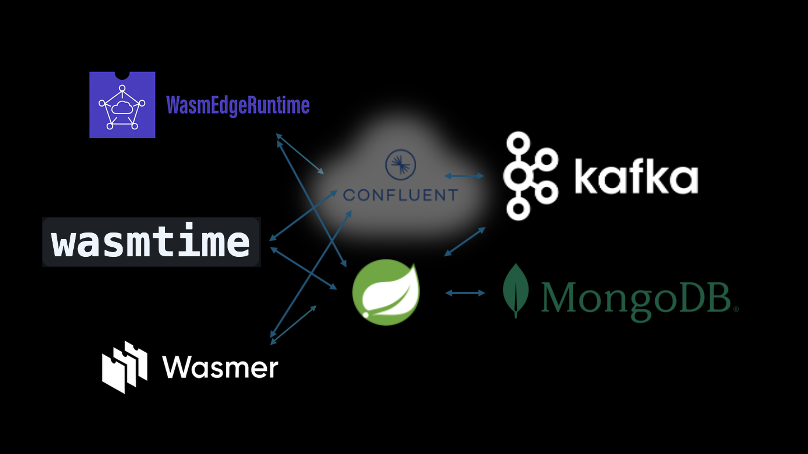
Solution 2 (direct): Everything goes directly to Kafka and MongoDB. Oracle Database is the underlying database and messaging engine, taking requests via Kafka, MongoDB, and REST APIs. This is the one I will dive into.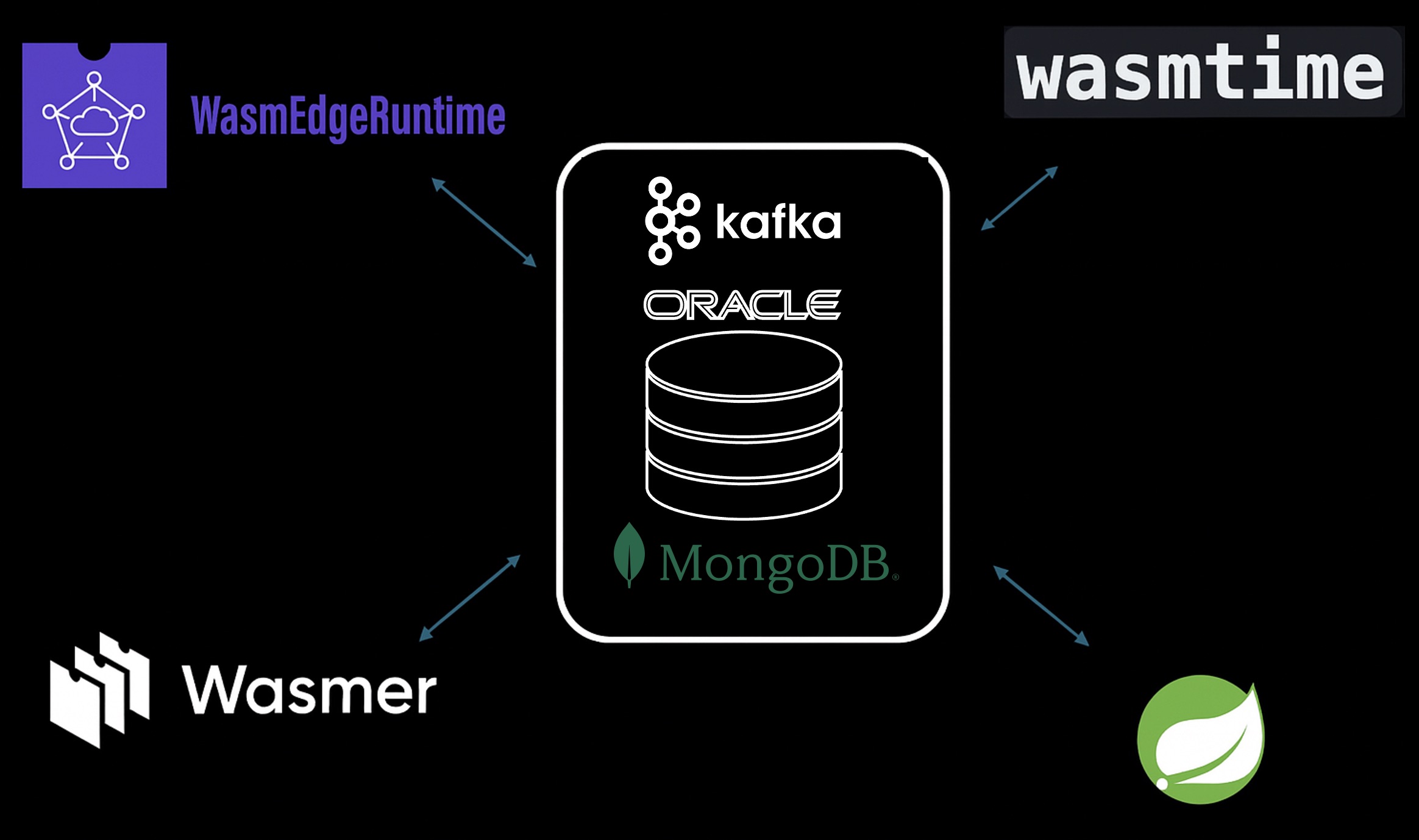
Game Flow
- Front end is written in three.js and node.js and is 3D WebXR compatible with multiple views/cameras, including dynamic first-person. It provides the game space area and a sidebar with player info, leaderboard, WASM engine, etc.
- The frontend sends messages about the player's cycle movement via the WASM engine (that the player chose in the UI). The WASM engine makes Kafka REST endpoints on the Oracle Database, which queues them. Fire and forget.
- Spring Boot dequeues the message from the Oracle Database using the Kafka API.
- Spring Boot generates move messages for the opponents/enemies WASM engines (the two engines that were not chosen in the UI by the player) using a very basic AI strategy (one aggressive, one defensive).
- Spring Boot sends the player and opponent/AI messages to the front end.
- Front End renders the 3D WebXR based on movement events from the three WASM engines.
- Player info and leader board info are accessed and maintained by both SQL via REST from the WASM engines and JSON via MongoDB API from Spring Boot.
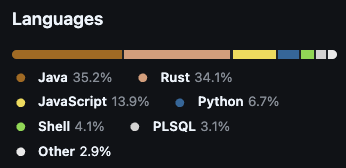
Languages Used
Implementation, Build, and Deployment
-
WasmEdge
- Built with
wasm32-wasip1 - Built and deployed in a container image
- Written in Rust
- Uses tokio and hyper for HTTPS calls to the Oracle Database for Kafka and SQL access
-
TOML
[dependencies] tokio = { version = "1", features = ["rt", "macros", "net", "time", "io-util"] } hyper = { version = "0.14", features = ["full"] } hyper-rustls = { version = "0.25", default-features = false, features = [ "http1", "tls12", "logging", "ring", "webpki-tokio", ] }Rustuse hyper::{Body, Client, Method, Request, Response, Server, Uri}; use hyper::service::{make_service_fn, service_fn}; use tokio::net::TcpListener; use serde::{Deserialize, Serialize}; use base64::{Engine as _, engine::general_purpose::STANDARD as BASE64}; use hyper_rustls::HttpsConnectorBuilder; async fn publish_to_oracle_kafka(event: &GameEvent) -> Result<()> { let oracle_config = get_oracle_config(); //currently env vars let kafka_payload = json!({ "records": [{ "key": format!("wasmedge-{}", SystemTime::now() .duration_since(UNIX_EPOCH) .unwrap() .as_secs()), "value": serde_json::to_string(event)? }] }); let auth = format!("{}:{}", oracle_config.username, oracle_config.password); let auth_header = format!("Basic {}", BASE64.encode(auth)); let base_url = format!("https://{}/ords/admin", oracle_config.host); let url = format!("{}/_/db-api/stable/database/txeventq/topics/{}", base_url, oracle_config.topic ); let uri: Uri = url.parse()?; let client = create_https_client(); let req = Request::builder() .method("POST") .uri(uri) .header("Content-Type", "application/json") .header("Accept", "application/json") .header("Authorization", &auth_header) .body(Body::from(kafka_payload.to_string()))?; let response = client.request(req).await?;
- Built with
-
Wasmtime
- Built with
wasm32-wasip2 - Written in Rust
- Uses waki for HTTPS calls to the Oracle Database for Kafka and SQL access
-
TOML
[package] name = "http-server" version = "0.1.0" edition = "2021" rust-version = "1.82" publish = false [lib] crate-type = ["cdylib"] [dependencies] waki = "0.4.2" serde = { version = "1.0", features = ["derive"] } serde_json = "1.0" regex = "1.10.2" # reduce wasm binary size [profile.release] lto = true strip = "symbols"Rustuse waki::{handler, ErrorCode, Request, Response, Client, Method}; use serde::{Deserialize, Serialize}; use serde_json::{json, Value}; match publish_to_oracle_kafka(&test_event) { Ok(_) => { let response = json!({ "status": "success", "runtime": "wasmtime", "castle": "Temporal Sanctuary", "message": "Oracle TxEventQ connectivity test successful", "test_event": test_event, "kafka_topic": get_kafka_topic(), "oracle_url": get_oracle_base_url(), "timestamp": get_timestamp() }); Response::builder() .header("Content-Type", "application/json") .header("Access-Control-Allow-Origin", "*") .body(response.to_string()) .build() }
- Built with
-
Wasmer
- Built with
wasm32-wasip1 - Wasmer is unique as it is deployed to Wasmer server (runs locally). Wasmer is free but requires an account, as it's tied to the cloud.
- Written in Python
- Uses Python libraries for HTTPS calls to the Oracle Database for Kafka and SQL access.
-
TOML
[dependencies] "wasmer/python" = "^3.12.6" [fs] "/src" = "./src" [[command]] name = "script" module = "wasmer/python:python" runner = "wasi" [command.annotations.wasi] main-args = ["/src/main.py"]Pythonimport urllib.request import urllib.error from http.server import HTTPServer, SimpleHTTPRequestHandler from urllib.parse import urlparse, parse_qs # OUTBOUND HTTP (to Oracle TxEventQ/Kafka) def safe_urlopen(request, timeout=30): return urllib.request.urlopen(request, timeout=timeout) # INBOUND HTTP SERVER class StatefulKafkaHandler(SimpleHTTPRequestHandler): def do_GET(self): # Handle GET requests def do_POST(self): # Handle POST requests def do_OPTIONS(self): # Handle CORS server = HTTPServer((host, port), StatefulKafkaHandler)
- Built with
-
Spring Boot with Kafka and MongoDB API via Oracle Database
- Oracle Database has built-in REST endpoints that provide most of the same calls as Confluent Kafka REST APIs and Java Kafka compatibility.
- In addition, Oracle Database provides transactional atomicity between messaging and database operations by allowing the underlying database to connect.
- Oracle Database has MongoDB API compatibility, and the same data can be accessed via SQL and REST.
-
Java
public KafkaProducer<String, String> oracleKafkaProducer() { Properties properties = new Properties(); properties.put("security.protocol", "SSL"); properties.put("oracle.net.tns_admin", tnsAdmin); properties.put("tns.alias", tnsAlias); properties.put("enable.idempotence", "true"); // Enable transactional Kafka capability properties.put("oracle.transactional.producer", "true"); //... ConsumerRecords<String, String> records = oracleKafkaConsumer.poll(Duration.ofMillis(1000)); ///... for (ConsumerRecord<String, String> record : records) { processMessage(record); } //Optionally any type of database work (including AI, spatial, graph, SQL, JSON, etc.) //can be done in the same transaction, atomically! Simply by getting the connection this way... Connection jdbcConnection = consumer.getDBConnection(); // Manual commit after processing all messages oracleKafkaConsumer.commitSync();Java@Value("${mongodb.oracle.uri:mongodb://admin:[email protected]:27017/admin?authMechanism=PLAIN&authSource=$external&ssl=true&retryWrites=false&loadBalanced=true}") private String mongoUri; @Override @NonNull protected String getDatabaseName() { logger.info("MongoDB Database Name: admin"); return "admin"; } @Override @Bean public MongoClient mongoClient() { logger.info("Creating MongoDB client with URI: {}", maskPassword(mongoUri)); try { // Parse the connection string ConnectionString connectionString = new ConnectionString(mongoUri); // Build client settings with explicit SSL configuration MongoClientSettings settings = MongoClientSettings.builder() .applyConnectionString(connectionString) .build(); logger.info("MongoDB client settings: {}", settings); MongoClient client = MongoClients.create(settings); //... /** * MongoDB Repository for PlayerInfo * Accesses Oracle JSON Duality View via MongoDB API */ @Repository public interface PlayerInfoRepository extends MongoRepository<PlayerInfo, String> { /** * Find player by email address */ Optional<PlayerInfo> findByPlayerEmail(String playerEmail); /** * Find players by name (case-insensitive) */ @Query("{'playerName': {$regex: ?0, $options: 'i'}}") List<PlayerInfo> findByPlayerNameIgnoreCase(String playerName);
-
PLSQL
- Create a table and a queue, expose them as REST (Kafka and Mongo are enabled implicitly).
- Java and JavaScript in the database - calls out to external services - UDF (User Defined Functions)
- Make callouts to WASM modules, Hugging Face, AI models, MCP, etc., This is not in the implementation of this game, but will be in the next blog, and I've shown how in early blogs.
PLSQLDBMS_AQADM.CREATE_DATABASE_KAFKA_TOPIC( topicname => 'WASI_CROSS_RUNTIME_TOPIC', partition_num => 5, retentiontime => 604800, partition_assignment_mode => 1 -- Required for OKafka compatibility ); -- JSON Duality View for Kafka compatibility CREATE JSON RELATIONAL DUALITY VIEW WASICYCLES_PLAYERINFO_DV AS SELECT JSON { '_id' : PLAYER_ID, 'playerName' : PLAYER_NAME, 'playerEmail' : PLAYER_EMAIL, 'gameTimestamp' : GAME_TIMESTAMP, 'playerScore' : PLAYER_SCORE, 'runtime' : RUNTIME, 'tshirtSize' : TSHIRTSIZE } FROM WASICYCLES_PLAYERINFO WITH INSERT UPDATE DELETE CHECK;Video Walkthrough
Opinions expressed by DZone contributors are their own.