

End2End Testing With TestContainers...and a Lot of Patience
This time I would like to show my experience creating an End2End test for a Camel integration application.
Join the DZone community and get the full member experience.
Join For FreeThis time I would like to show my experience creating an End2End test for a Camel integration application that connects these layers:
- Apache Kafka
- Apache ActiveMQ Artemis
- PostgreSQL
- Localstack ( AWS similar )
- Red Hat Ingress upload service
- Minio ( AWS similar )
- KIE server ( rules engine )
- Apache Camel rest endpoints. (<- the app)
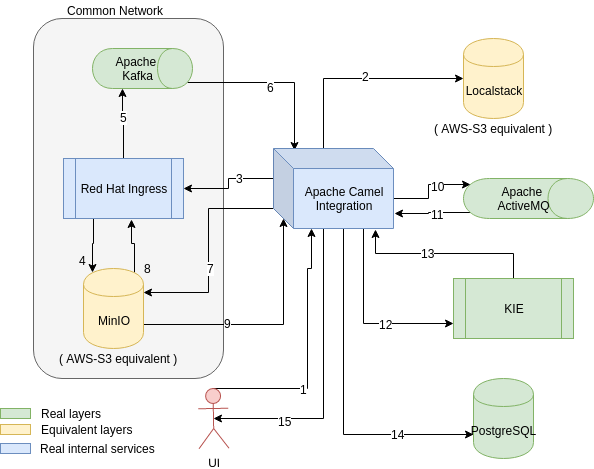
The application is a Spring Boot one, with several Apache Camel routes that expose a Rest endpoint to upload a file, then several steps of transformation (enrich), sending it to an external service that will validate it and send a message to an Apache Kafka broker. The integration app then will read that topic, process the message (with a file), split it, enrich it, send it to a KIE server, execute some rules to do some calculations and then receive its response as a report, and store it in JPA layer.
The approach chosen has been to use real instances of every layer and avoid mocks and fakes in the integration layer.
The main motivator is to execute this kind of test on the CI runner ( TravisCI in this case ), therefore we could start from a base version of Linux and install all the layers needed to our Camel app to use them, OR we could use Docker containers for each layer with ready to use instances. Guess what? we chose the latter.
The library that can help us with that is TestContainers, it helps us with the creation of Docker containers. It already has dedicated classes for some tools, but for the rest, it's easy to specify the docker image and start it.
You can check the code here: https://github.com/jonathanvila/xavier-integration/blob/end2end-integration-test/src/test/java/org/jboss/xavier/integrations/EndToEndTest.java
The easiest container to be created in PostgreSQL :
@ClassRule
public static PostgreSQLContainer postgreSQL = new PostgreSQLContainer()
.withDatabaseName("sampledb")
.withUsername("admin")
.withPassword("redhat");
This is a pre-bundled instance, and as we use a ClassRule the instance will get started automatically. If you create the instance out of a JUnit rule you will have to .start() the container. It will auto-create the database defined and with those particular credentials.
The next layer is the AMQ Artemis one, that will use a GenericContainer where we specify the DockerHub container image to use
xxxxxxxxxx
@ClassRule
public static GenericContainer activemq = new GenericContainer("vromero/activemq-artemis")
.withExposedPorts(61616, 8161)
.withLogConsumer(new Slf4jLogConsumer(logger).withPrefix("AMQ-LOG"))
.withEnv("DISABLE_SECURITY", "true")
.withEnv("BROKER_CONFIG_GLOBAL_MAX_SIZE", "50000")
.withEnv("BROKER_CONFIG_MAX_SIZE_BYTES", "50000")
.withEnv("BROKER_CONFIG_MAX_DISK_USAGE", "100");
Now I will take the opportunity to introduce the networking concept. TestContainers will expose random ports for each container to avoid any collision. You only need to specify the internal ports exposed and Tc will create random ports that you later can get doing activemq.getContainerIpAddress() to obtain the IP and activemq.getMappedPort(61616) to obtain the external port for that internal port.
Also here you can see the logging concept. In this case, we are echoing the internal log for the container into the logger. Defined at the top of the class as :
private static Loggerlogger =
LoggerFactory.getLogger(EndToEndTest.class);
For the Localstack environment, we will use an OOTB image where we will define which services we want to use. With this image, you can use any region, any bucket, and any credentials when you connect to it and it will store it anyway :
xxxxxxxxxx
@ClassRule
public static LocalStackContainer localstack = new LocalStackContainer()
.withLogConsumer(new Slf4jLogConsumer(logger).withPrefix("AWS-LOG"))
.withServices(S3);
In this particular use case, we need 4 containers to share the same network as they connect using the machine name not the IP. To allow this particularity Tc provides the Network concept.
You can create an instance of Network and use it in your containers .withNetwork, and they will be in the same network. And exposing the name defined in .withNetworkAliases
xxxxxxxxxx
Network network = Network.newNetwork(); GenericContainer minio = new GenericContainer<>("minio/minio") .withCommand("server /data") .withExposedPorts(9000) .withNetworkAliases("minio") .withNetwork(network) .withLogConsumer(new Slf4jLogConsumer(logger).withPrefix("MINIO-LOG")) .withEnv("MINIO_ACCESS_KEY", "BQA2GEXO711FVBVXDWKM") .withEnv("MINIO_SECRET_KEY", "uvgz3LCwWM3e400cDkQIH/y1Y4xgU4iV91CwFSPC"); GenericContainer createbuckets = new GenericContainer<>("minio/mc") .dependsOn(minio) .withNetwork(network) .withLogConsumer(new Slf4jLogConsumer(logger).withPrefix("MINIO-MC-LOG")) .withCopyFileToContainer(MountableFile.forClasspathResource("minio.sh"), "/").withCreateContainerCmdModifier(createContainerCmd -> createContainerCmd.withEntrypoint("sh", "/minio.sh", "minio:9000")); createbuckets.start();
Also, we can see that the createbuckets container will be created after the minio one because it uses the .dependsOn(minio)
This is particularly tricky as this network concept gave some issues not easy to find especially with Kafka and minio. At the beginning, we had a Docker-Compose file and this worked fine on local but not on Travis CI. So we decided to move the containers in the docker-compose to individual Testcontainers instances, and also use the OOTB Kafka container instead of a generic one using the image.
Another element of our infrastructure was the Red Hat Ingress service. We know the GitHub repo, and it has a Dockerfile to build the Docker image. So what we did was:
1. download the zip file from the GitHub project in a particular commit (the one we know it works)
2. unzip the file
3. change the folder name as apparently having a very long folder name causes the build process to fail
4. create the fly-build with Testcontainers
xxxxxxxxxx
GenericContainer ingress = new GenericContainer(
new ImageFromDockerfile() .withDockerfile(Paths.get("src/test/resources/insights-ingress-go/Dockerfile")))
.withExposedPorts(3000)
.withNetwork(network)
.withEnv("INGRESS_MINIOENDPOINT", "minio:9000")
.withEnv("INGRESS_KAFKABROKERS", "kafka:9092");
We use a new ImageFromDockerFile().withDockerfile(...file...) to start the build of the image that will be used in the container.
Once we have all our containers started, we can inject the endpoint URLs inspecting the containers. In this case, as we use Spring Boot we are using an ApplicationContextInitializer static inner class.
xxxxxxxxxx
public static class Initializer implements ApplicationContextInitializer {
public void initialize(ConfigurableApplicationContext configurableApplicationContext) {
[ .... start the containers ... ]
EnvironmentTestUtils.addEnvironment("environment",
configurableApplicationContext.getEnvironment(),
"amq.server=" + activemq.getContainerIpAddress(),
"amq.port=" + activemq.getMappedPort(61616),
.....
}
}
In the case of Kafka, we will use .getBootstrapServers()
For our project with rules, we first tried to use Business Central + KIE, but we had several problems trying to deploy the artifact from BC. So we changed the approach to deploy directly into KIE. So we configure KIE to connect to a maven repository and we send a REST call to it to deploy an artifact (along with all dependencies)
xxxxxxxxxx
kieContainerBody :
{"container-id" : "xavier-analytics_0.0.1-SNAPSHOT","release-id" : {"group-id" : "org.jboss.xavier","artifact-id" : "xavier-analytics","version" : "0.0.1-SNAPSHOT" } }
new RestTemplate().exchange(kieRestURL + "server/containers/xavier-analytics_0.0.1-SNAPSHOT", HttpMethod.PUT, new HttpEntity<>(kieContainerBody, kieheaders), String.class);
There was also a nice feature of Tc allowing us to modify the entypoint of a Docker container, and also copying a file in the container before creating it. With this, we create the buckets in the minio instance.
xxxxxxxxxx
.withCopyFileToContainer(MountableFile.forClasspathResource("minio.sh"), "/")
.withCreateContainerCmdModifier(createContainerCmd -> createContainerCmd.withEntrypoint("sh", "/minio.sh", "minio:9000"));
In the Camel part, we create the context without starting it, and we advise the S3 component to check later that the file has arrived at S3.
You can check all testing strategies used in Apache Camel here in my other post: https://aytartana.wordpress.com/2019/06/08/testing-apache-camel-with-spring-boot-my-experience/
Also mention that as some processes are async we have used Awaitility to be checking that the report has been created ( every 100 milliseconds ) and consider an error if in X milliseconds the report hasn't been created.
xxxxxxxxxx
new RestTemplate().postForEntity("http://localhost:" + serverPort + "/api/xavier/upload", getRequestEntityForUploadRESTCall("cfme_inventory-20190829-16128-uq17dx.tar.gz"), String.class);
await()
.atMost(timeoutMilliseconds_PerformaceTest, TimeUnit.MILLISECONDS)
.with().pollInterval(Duration.FIVE_HUNDRED_MILLISECONDS)
.until(() -> {
ResponseEntity workloadSummaryReport_PerformanceTest = new RestTemplate().exchange("http://localhost:" + serverPort + "/api/xavier/report/2/workload-summary", HttpMethod.GET, getRequestEntity(), new ParameterizedTypeReference() {});
return (workloadSummaryReport_PerformanceTest != null &&
workloadSummaryReport_PerformanceTest.getStatusCodeValue() == 200 &&
workloadSummaryReport_PerformanceTest.getBody() != null &&
workloadSummaryReport_PerformanceTest.getBody().getSummaryModels() != null);
});
Comments to the experience:
1. At the moment we can not see the KafkaContainer logs, but the Tc community is fixing it.
2. In the connection to minio, as Ingress is using the name not the IP to send the file, when it obtains a presigned URL (that takes also the IP into account) it gets minio:9000 as the host. We need to replace this with the IP address, but then minio will complain as the signature is not correct...
To solve this we send the HTTP Header "Host:minio:9000" and then it's solved.
Hope this experience may help you.
Published at DZone with permission of Jonathan Vila. See the original article here.
Opinions expressed by DZone contributors are their own.
Comments