

Event Streaming With MuleSoft
This article offers an integration pattern solution to transmitting order data as a stream at scale i.e., thousands of events per second.
Join the DZone community and get the full member experience.
Join For FreeEvent Streaming — A Brief Overview
Events are everywhere -- order placed, shares traded, health condition reported, temperature threshold reached, and so on.
Event streaming is “continuous” transmission along with real-time processing of events as it is being generated for making time-critical business decisions.
Sample use cases include click-stream data analysis to identify user behavior and optimizing the website in real-time, log/reporting analytics, machine learning-based alerts/actions.
At a high-level there are three stages in event processing:
- Generation (source/producer)
- Transmission (i.e., data movement)
- Processing (destination/consumer)
In many modern/IoT applications the event generator will potentially have the ability to transmit it as well. But in the enterprise setting events typically accumulate in a data store like database and from there it has to be transmitted to the destination like a data lake or warehouse for processing.
Sample Use Case
In a retail scenario, the order data (event) is generated by a Distributed Order Management (DOM) and then stored in an Order table. Now you need a solution to stream (continuously transfer at scale) the order data to the destination for analytics processing and take time-sensitive actions like forecasting inventory levels or predicting the next best offer in real-time.
This article offers a solution to solve the above use case of transmitting order data as a stream at scale i.e., thousands of events per second.
Below is the flow diagram and where MuleSoft capability fits in.
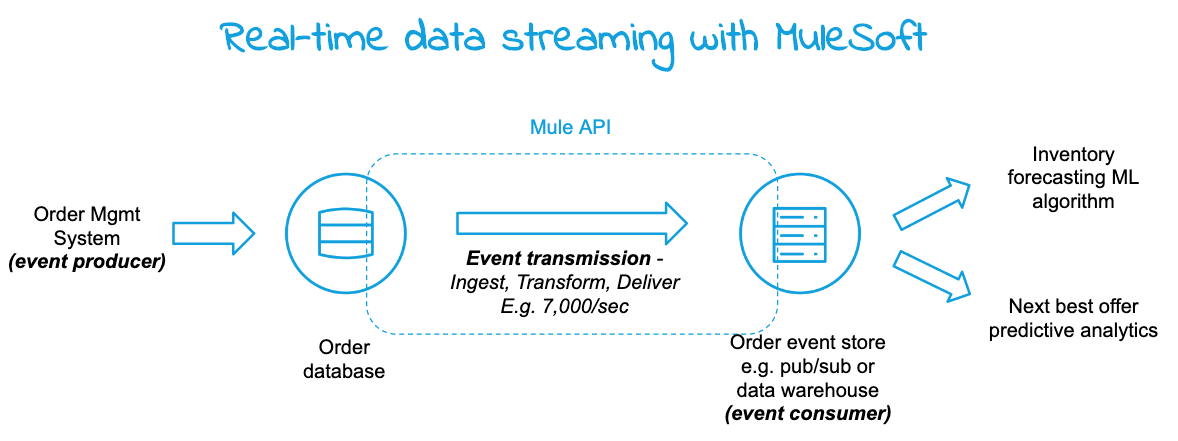
Note: MuleSoft natively supports the processing of input streams with different strategies that are different than transmitting data streams as explained in this article.
Solution Design
The solution provides an integration pattern design that will primarily focus on the continual transmission of events at scale from the event database to the event consumer. The design consists of the following three steps and here is a link to the Github project.
- Data ingestion
- Data transformation
- Data delivery
Data Ingestion
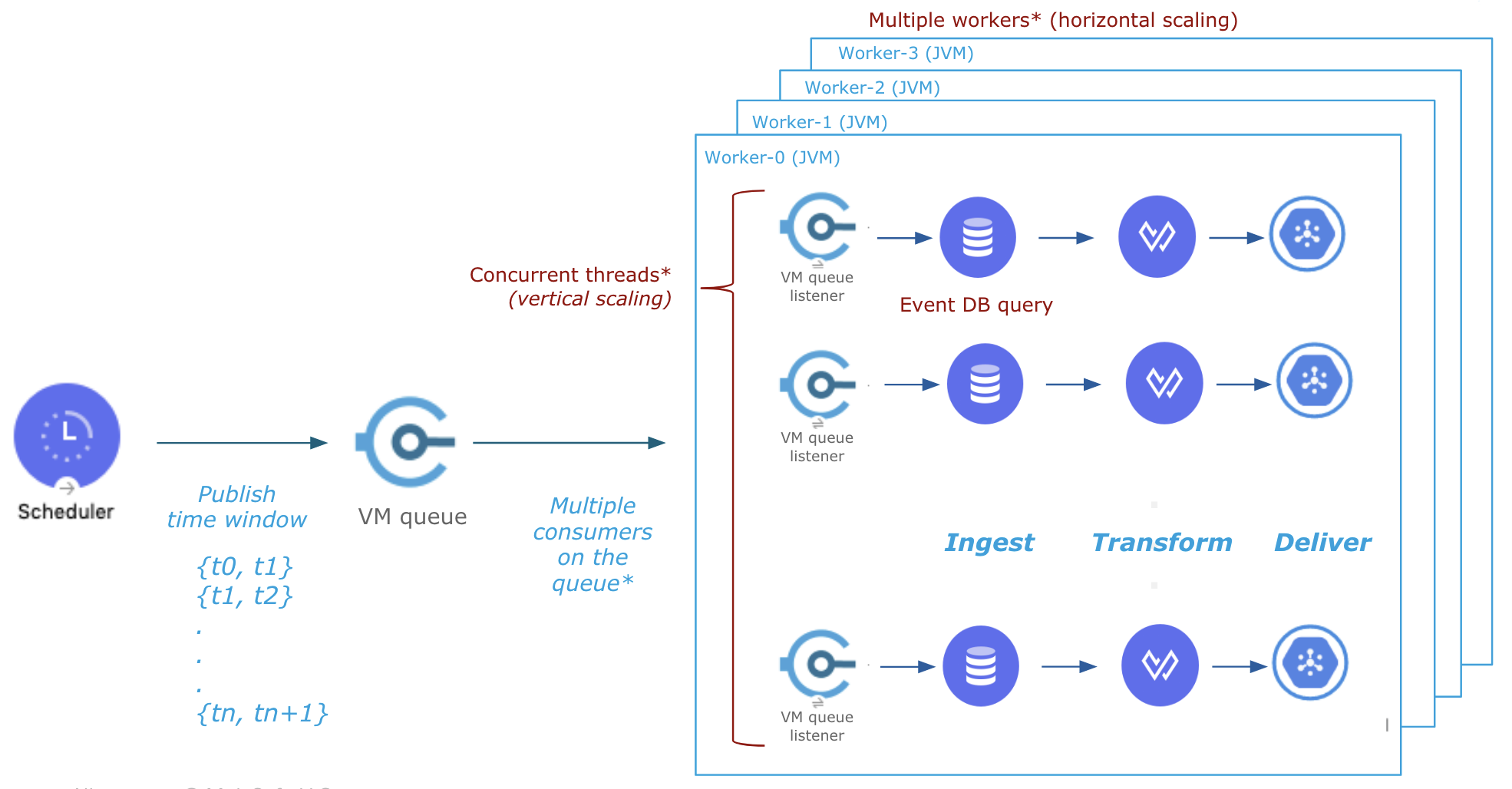
The first and the critical step is data ingestion and in this case, it is to fetch order records from the database as soon as it is inserted. This is achieved in two parallel steps:
- Continually publish time window ({t0, t1}, {t1, t2}..) covering the time scale
- Fetch records using the time window using multiple threads and/or workers for scale
A scheduler is used in step an above to publish the time window at the desired frequency e.g. every 100 ms. Note there will be scheduler only runs in the primary node in a multi-worker scenario.
A VM queue is used to publish and consume time windows. The database query is a simple one-line Select statement filtered by time window {t0, t1}, {t1, t2}, and so on (it is required that each event record has a timestamp column). See the design below.
 Data Transformation
Transformation can be as simple or complex as needed to meet the needs of the consumer which can be accomplished using Mule DataWeave script. In this case, the selected records are transformed into a JSON array.
Data Delivery
This step sends the transformed JSON array to the event destination for further processing. An out-of-the-box Mule connector could be used to post the payload to public cloud service or an on-premise data storage solution.
API-Led Approach
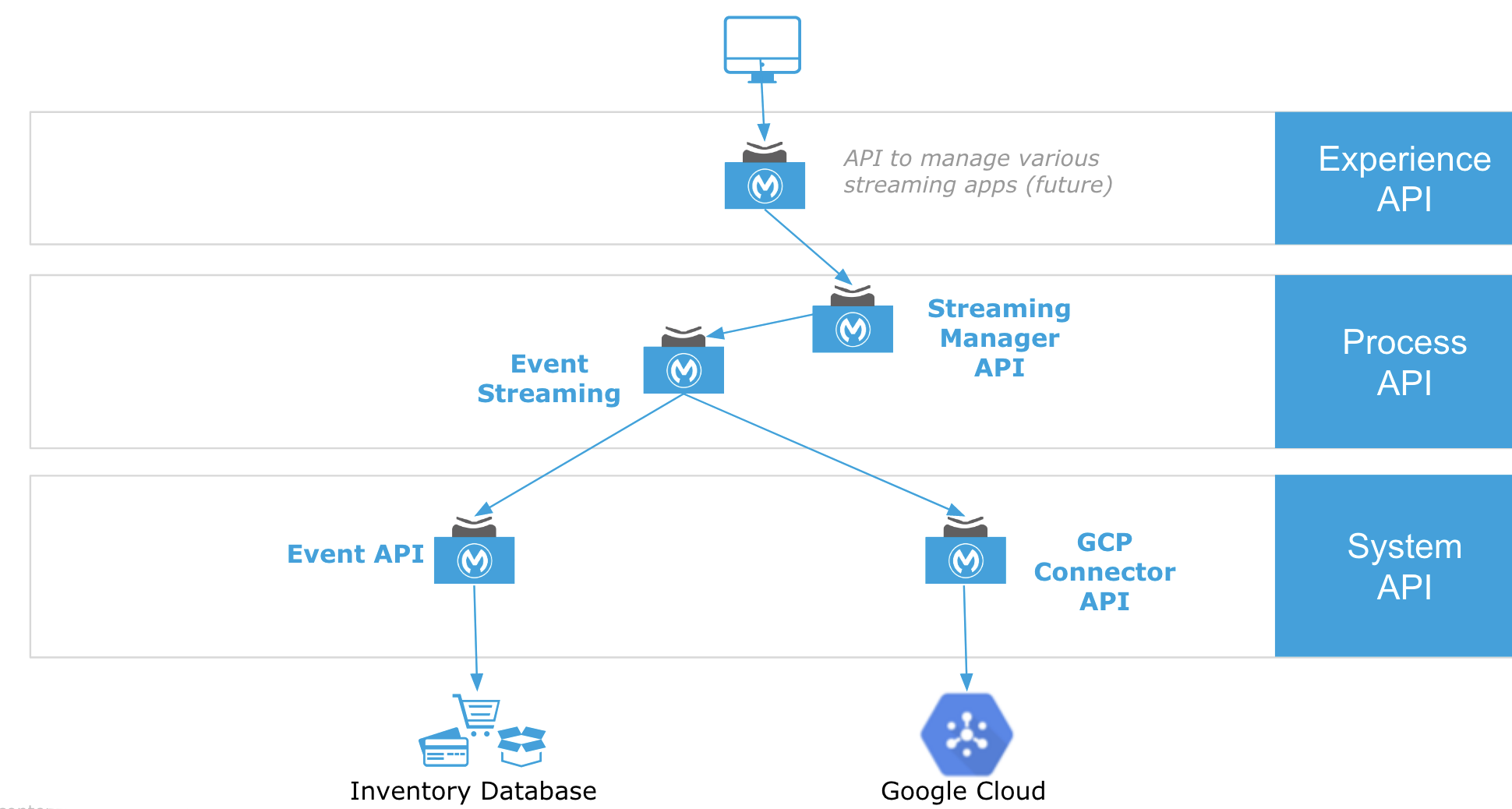
Below is the API-led design where Event Streaming is a headless API and Streaming Manager provides controls to start/stop streaming and rewind streaming start time. To simulate the event producer an Event System API is designed to continually load events into the Order database.
The solution design is performance tested in the following setting: Order table hosted in Oracle database in AWS, event streaming API running in MuleSoft CloudHub with 4 workers each 0.2 vCore, and the event destination in Google Cloud. At the lower end, the solution streamed 7,000 - 10,000 events/sec using less than 10% CPU leaving plenty of room for further scaling.
To mitigate any potential performance impact on the database server due to continuous concurrent select queries it is recommended to index the SQL where clause column (timestamp in this case) and to tune cache size.
Summary
In today's always-on business environment responding to market events and customer behavior in real-time is critical and event streaming/processing enables that. This article offers a solution to stream data at scale using the MuleSoft platform and provides an API-led approach creating a reusable integration design pattern.
Opinions expressed by DZone contributors are their own.
Comments