

Explaining Simple WSO2 Identity Server Kubernetes Deployment
This article goes through some of the basics of Kubernetes, specifically WSO2 Identity Server deployment.
 ·
·
Join the DZone community and get the full member experience.
Join For Free
Introduction
Kubernetes is a system with several concepts. such as deployment, ingress, service, service account. All those components work together to make a single solution. With this post, I will be going through each of these components by analyzing the problem they are trying to solve. Also, I will be using a Wso2 Identity Server example to provide a hands-on experience.
Prerequisites
Clone the repository: https://github.com/Buddhimah/identity-kubernetes
Setup the following:
Start the minikube cluster
xxxxxxxxxx
minikube start — kubernetes-version v1.18.1 — vm-driver=virtualbox — cpus 4 — memory 8192
If you are using macOS please go to
System Preferences -> Security & Privacy -> Allow -> Then allow the software corporation (in this case Oracle) [1]
In VirtualBox installation
To enable the NGINX Ingress controller, run the following command:
xxxxxxxxxx
minikube addons enable ingress
Add wso2is <minikube ip> to /etc/hosts
Cluster Partitioning
Let’s assume that our Kubernetes cluster is used by many users and has thousands of containers. In this case, the cluster will be more manageable if we can logically separate the cluster into a few partitions. This requirement is provided by the cluster using the concept namespace. Namespace separates resources of the cluster logically. But still, a resource in one namespace can communicate with a service in another namespace. This gives the capability to each namespace to maintain its own resources, authentication, and authorization policies and constraints. For the wso2 identity server example, you can create the namespace using the command
xxxxxxxxxx
kubectl apply -f identity-namespace.yaml
Authenticating Kubernetes Resources with the API Server
Kubernetes handle access control through service accounts. Each namespace has a default service account. This service account has the capability to authenticate the resources in the namespace and make it possible to communicate with Kubernetes API servers. When we create a service account the token controller observes that. Then it creates a secret that enables the k8s API server access. This secret will be added to the pods in that namespace referencing the service account.
You can create a simple service account using the following command
xxxxxxxxxx
kubectl apply -f identity-wso2is-service.yaml
Decouple Configuration from Application
Each and every application has its own set of configurations in most cases these configurations are provided through files. These files come with the containers. In a general use case, we can edit these files and use the application by applying the configuration. But in Kubernetes, these configurations are not directly accessible to the user.
In this case, you will have to use another concept in Kubernetes called volumes. It is a directory accessible to all containers running in a pod. There are many types of volumes and in this case, we will be using configMap type volume.
For the identity server, I have used a configMap to inject deployment.toml configurations.
First, we need to create the config map
kubectl apply -f identity-server-conf.yaml
Then you can define a volume as below with any name that will create a directory sharing with all containers. Here the configmap created earlier should be referenced
xxxxxxxxxx
volumes:
- name: identity-server-conf
configMap:
name: identity-server-conf
When referencing the config map from the container we specify the path that the configuration should go to and the volume that holds this config map.
xxxxxxxxxx
volumeMounts:
- name: identity-server-conf
mountPath: /home/wso2carbon/wso2-config- volume/repository/conf/deployment.toml
subPath: deployment.toml
Keep Track of Backend IP Addresses When They Are Dynamic
Kubernetes pods are not immortal; they kill and recreate due to various reasons. Hence the IP addresses assigned to these pods may vary from time to time. So that creates a problem on how to keep track of these backend pods by the front end. How the front end addresses these backend pods.
Services are introduced to resolve this problem. Through service, we use a selector and specify the labels of the applications that we need to address.
xxxxxxxxxx
spec:
selector:
deployment: wso2is
app: wso2is
So whatever their IP address is as long as they have the corresponding label they can be accessed through services. Even though different namespaces.
xxxxxxxxxx
kubectl apply -f identity-wso2is-service.yaml
Exposing Service to The Public
The application we are managed by Kubernetes at the end needs to be accessed using external users. If it is a web application it should be capable of accessing the content through a browser. Kubernetes provides three main options to resolve this use case.
Cluster IP
Using a cluster IP we can’t directly access the Kubernetes environment. We need to use the Kubernetes proxy.
Node Port
Node port is a port that will be created in each pod per service for external access. But only one node port can be configured per service. Also, this creates some issues when node IPs are changing.
Load Balancing
The most recommended way to do this is to use a load balancer. Here we can specify the host and the and a path. If these two rules are met we can ask the load balancer to route the traffic to a certain port in a Kubernetes service.
xxxxxxxxxx
rules:
- host: wso2is
http:
paths:
- path: /
backend:
serviceName: wso2is-service
servicePort: 9443
This port should be exposed as a container port in container deployment.
xxxxxxxxxx
kubectl apply -f identity-server-ingress.yaml

Declaring the Desired State of A Deployment
Before explaining this I will have to explain about a Kubernetes concept called controllers. There are few types of inbuilt controllers such as the replication controller, endpoints controller, namespace controller, and service accounts controller. Also you can define controllers. If you have gone through this tutorial from the beginning execute the following command:
xxxxxxxxxx
kubectl get pods -n kube-system
If you have enabled ingress in the earlier step you will see an output as follows:
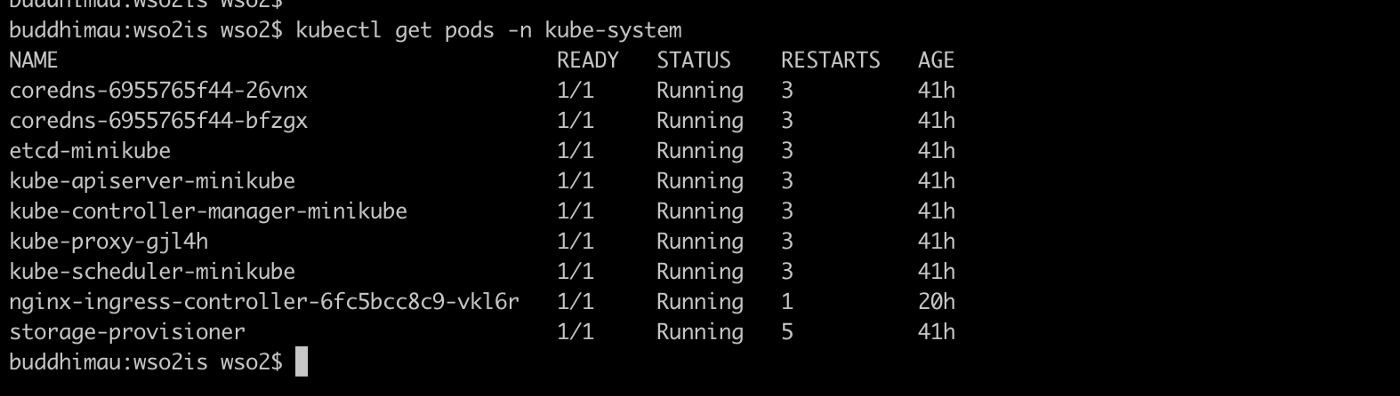
Here you can see a controller named nginx-ingress-controller. From the file identity-server-ingress.yaml what we do is we define the desired state of an nginx-ingress deployment. Then the controller listens to this definition and talks to the Kubernetes API server to create resources with respect to the desired definition. If for some reason the desired state changed the controller again make that change reverted and keep the desired state.
Hence for all the resources that we have created, we have a controller inbuilt. In the nginx-ingress case, we had to create a controller explicitly by enabling that in minikube.
For a pod deployment also we have the desired state. We specify the containers, Init containers, ports, number of replicas. When we execute the following command:
xxxxxxxxxx
kubectl apply -f identity-server-deployment.yaml
The deployment controller will create a deployment with the specs that we have provided in this file.
Execute the following command:
xxxxxxxxxx
kubectl get pods -n wso2
And you can see that there are two IS containers in running state and ready state.

Try deleting one container:
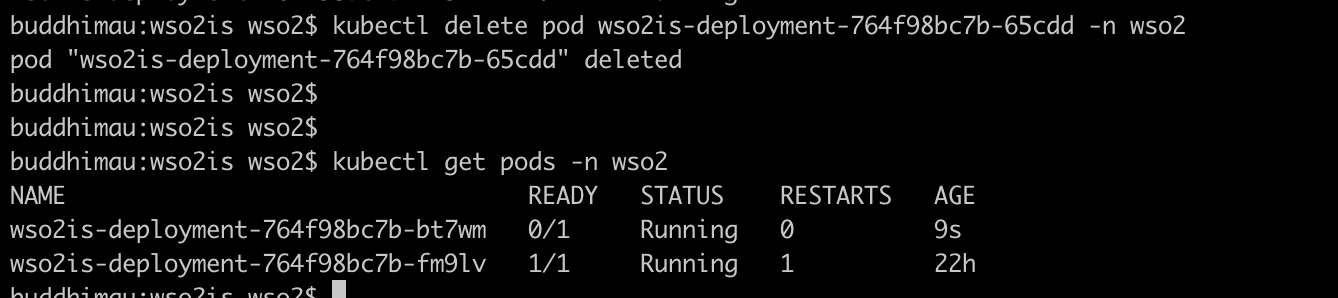
You can see that the controller automatically creates another container to replace the deleted container.
Finishing Off
The aim of this article is to go through the basic concepts in Kubernetes with hands-on examples. I haven’t tried to go deep on any of these concepts. There are many things I have yet to learn in Kubernetes. Here I have used the wso2 identity server example to demonstrate these concepts. If you have done all steps correctly when accessing the following from the browser you should be able to access the wso2 identity server management console.
Opinions expressed by DZone contributors are their own.
Comments