

Ext JS 4 CRUD example
while writing my spring-hibernate integration post i realize that we (as java developers) have so many frameworks available which can make life easy by rapidly developing so many common things using frameworks. this ease of development is not available in java particularly when you considering ui development, we still have to struggle with old, bad looking jsp with combination of css, jquery.
thank god we now have so many javascript toolkits, framework that make developers' lives easy by offering so many ready-to-use widgets. extjs is the most advanced among those client side ui frameworks.
today i am going to demonstrate to you how you can leverage extjs 4 to create crud application. in the next post i will try to use the same js code with spring mvc as a backend .
create a html page which include extjs library and aur books.js file.
<!doctype html>
<html lang="en">
<head>
  <meta charset="utf-8" />
  <title>extjs crud app</title>
  <link rel="stylesheet" type="text/css"
    href="http://cdn.sencha.com/ext/gpl/4.2.0/resources/css/ext-all.css">
  <script type="text/javascript"
    src="http://cdn.sencha.com/ext/gpl/4.2.0/ext-all.js"></script>
  <style>
  .book-add { background-image:url('images/book_add.png');}
  div#output {margin:100px;}
  </style>
  <script type="text/javascript" src="books.js"></script>
</head>
<body>
  <div id="output"></div>
</body>
</html>
here is the extjs crud code, i have combined it in a single file. you can follow the extjs 4 mvc folder structure.
ext.onready(function () {
  ext.define('techzoo.model.book', {
    extend: 'ext.data.model',
    fields: [
      {name: 'title', type: 'string'},
      {name: 'author',  type: 'string'},
      {name: 'price', type: 'int'},
      {name: 'qty',  type: 'int'}
    ]
  });

  ext.define('techzoo.store.books', {
    extend  : 'ext.data.store',
    model   : 'techzoo.model.book',
    fields  : ['title', 'author','price', 'qty'],
    data    : [
      { title: 'jdbc, servlet and jsp',
        author: 'santosh kumar', price: 300, qty : 12000 },
      { title: 'head first java',
        author: 'kathy sierra', price: 550, qty : 2500 },
      { title: 'java scjp certification',
        author: 'khalid mughal', price: 650, qty : 5500 },
      { title: 'spring and hinernate',
        author: 'santosh kumar', price: 350, qty : 2500 },
      { title: 'mastering c++',
        author: 'k. r. venugopal', price: 400, qty : 1200 }
    ]
  });

  ext.define('techzoo.view.bookslist', {
    extend: 'ext.grid.panel',
    alias: 'widget.bookslist',
    title: 'books list - (extjs 4 crud example - @ tousif khan)',
    store: 'books',
    initcomponent: function () {
      this.tbar = [{
        text    : 'add book',
        action  : 'add',
        iconcls : 'book-add'
      }];
      this.columns = [
        { header: 'title', dataindex: 'title', flex: 1 },
        { header: 'author', dataindex: 'author' },
        { header: 'price', dataindex: 'price' , width: 60 },
        { header: 'quantity', dataindex: 'qty', width: 80 },
        { header: 'action', width: 50,
          renderer: function (v, m, r) {
            var id = ext.id();
            var max = 15;
            ext.defer(function () {
              ext.widget('image', {
                renderto: id,
                name: 'delete',
                src : 'images/book_delete.png',
                listeners : {
                  afterrender: function (me) {
                    me.getel().on('click', function() {
                      var grid = ext.componentquery.query('bookslist')[0];
                      if (grid) {
                        var sm = grid.getselectionmodel();
                        var rs = sm.getselection();
                        if (!rs.length) {
                          ext.msg.alert('info', 'no book selected');
                          return;
                        }
                        ext.msg.confirm('remove book',
                          'are you sure you want to delete?',
                          function (button) {
                            if (button == 'yes') {
                              grid.store.remove(rs[0]);
                            }
                        });
                      }
                    });
                  }
                }
              });
            }, 50);
            return ext.string.format('<div id="{0}"></div>', id);
          }
        }
      ];
      this.callparent(arguments);
    }
  });

    ext.define('techzoo.view.booksform', {
      extend  : 'ext.window.window',
      alias   : 'widget.booksform',
      title   : 'add book',
      width   : 350,
      layout  : 'fit',
      resizable: false,
      closeaction: 'hide',
      modal   : true,
      config  : {
        recordindex : 0,
        action : ''
      },
      items   : [{
        xtype : 'form',
        layout: 'anchor',
        bodystyle: {
          background: 'none',
          padding: '10px',
          border: '0'
        },
        defaults: {
          xtype : 'textfield',
          anchor: '100%'
        },
        items : [{
          name  : 'title',
          fieldlabel: 'book title'
        },{
          name: 'author',
          fieldlabel: 'author name'
        },{
          name: 'price',
          fieldlabel: 'price'
        },{
          name: 'qty',
          fieldlabel: 'quantity'
        }]
      }],
      buttons: [{
        text: 'ok',
        action: 'add'
      },{
        text    : 'reset',
        handler : function () {
          this.up('window').down('form').getform().reset();
        }
      },{
        text   : 'cancel',
        handler: function () {
          this.up('window').close();
        }
      }]
    });

  ext.define('techzoo.controller.books', {
    extend  : 'ext.app.controller',
    stores  : ['books'],
    views   : ['bookslist', 'booksform'],
    refs    : [{
      ref   : 'formwindow',
      xtype : 'booksform',
      selector: 'booksform',
      autocreate: true
    }],
    init: function () {
      this.control({
        'bookslist > toolbar > button[action=add]': {
          click: this.showaddform
        },
        'bookslist': {
          itemdblclick: this.onrowdblclick
        },
        'booksform button[action=add]': {
          click: this.doaddbook
        }
      });
    },
    onrowdblclick: function(me, record, item, index) {
      var win = this.getformwindow();
      win.settitle('edit book');
      win.setaction('edit');
      win.setrecordindex(index);
      win.down('form').getform().setvalues(record.getdata());
      win.show();
    },
    showaddform: function () {
      var win = this.getformwindow();
      win.settitle('add book');
      win.setaction('add');
      win.down('form').getform().reset();
      win.show();
    },
    doaddbook: function () {
      var win = this.getformwindow();
      var store = this.getbooksstore();
      var values = win.down('form').getvalues();

      var action = win.getaction();
      var book = ext.create('techzoo.model.book', values);
      if(action == 'edit') {
        store.removeat(win.getrecordindex());
        store.insert(win.getrecordindex(), book);
      }
      else {
        store.add(book);
      }
      win.close();
    }
  });

  ext.application({
    name  : 'techzoo',
    controllers: ['books'],
      launch: function () {
        ext.widget('bookslist', {
          width : 500,
          height: 300,
          renderto: 'output'
        });
      }
    }
  );
});
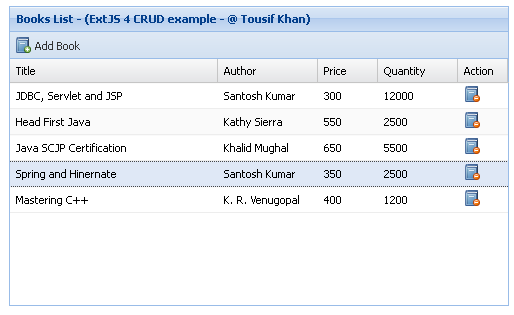
output:
open the html file in any browser, the output will look similar to below. you can click to add new book record in grid.
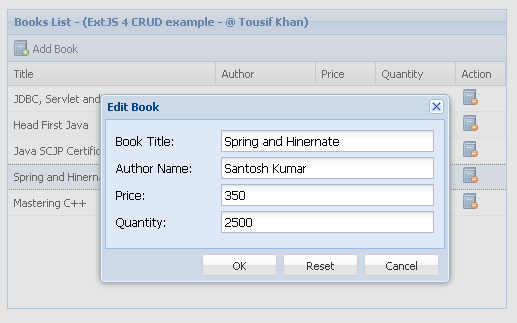
double click to any of the grid row to edit the record.
view live demo
Published at DZone with permission of Tousif Khan. See the original article here.
Opinions expressed by DZone contributors are their own.