

Faking Azure AD Identity in ASP.NET Core Unit Tests
Unit testing ASP.NET apps that use Microsoft Azure AD usually means working with an authenticated user. Here's how to make one for your tests.

Join the DZone community and get the full member experience.
Join For Freewhen testing asp.net core controllers in an application that uses azure ad, we usually need a current user, at least for some tests. as there is no authenticated user when unit testing, we need to create one on our own. this blog post shows how to create a claims identity for asp.net core unit tests.
to have an azure ad user available, we have to create a fake claims identity and fill it with claims that the test expects. then we create the instance of a constructor and initiate the controller and http context. the latter one contains identity.
consider the following controller action.
public iactionresult index()
{
    var name = user.identity.name;       // do something with the name

    return view();
}
the test like this will probably fail with an exception, as there is no code that deals with the current user identity.
[fact]
public void sampletest()
{
    var controller = new homecontroller();       controller.index();
}
let’s organize a typical claims identity with some claims to the controller.
[fact]
public void sampletest()
{
    var user = new claimsprincipal(new claimsidentity(new claim[]
    {
            new claim(claimtypes.nameidentifier, "somevaluehere"),
            new claim(claimtypes.name, "[email protected]")
            // other required and custom claims
    }));       var controller = new homecontroller();
    controller.controllercontext = new controllercontext()
    {
        httpcontext = new defaulthttpcontext { user = user }
    };       controller.index();
}
now we have a fake claims identity available, which our controller will use. when running this test in visual studio, we can see that controller has the current user now.
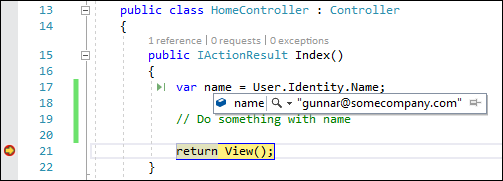
it is also possible to use factory classes for identity. in this case, we have one class for production, which returns the current identity the controller has. another class is for testing, and this class creates and returns fake identity. as i don’t see much benefit in using factories with no additional value, i suggest going with the directly created fake identity. creating the identity can be moved to some helper method in the test class if it is needed in multiple tests.
Published at DZone with permission of Gunnar Peipman. See the original article here.
Opinions expressed by DZone contributors are their own.
Comments