

File Attachment Handling in Mule 4 (Use of multipart/form-data)
The following illustration explains how an HTTP POST request can be configured for multiple files in a single request using RAML 1.0 and Mule version 4.1.4.
 ·
·
Join the DZone community and get the full member experience.
Join For FreeThe following illustration explains how an HTTP POST request can be configured for multiple files in a single request using RAML 1.0 and Mule version 4.1.4.
RAML 1.0 construct:
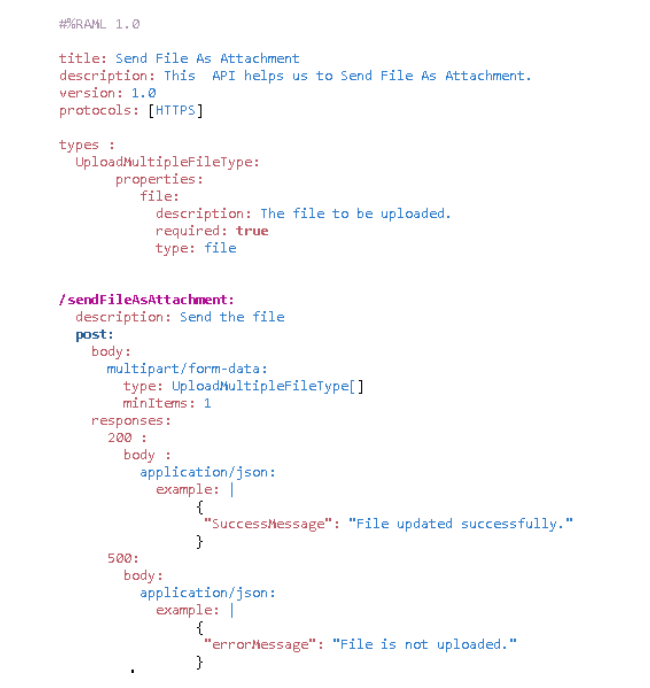
It has the 'type' abstarction for multiple file upload. And inside the the POST body, use it as a array along with multipart/form-data . 'minItems' represent the number of minimum items in the array. This can be used to make the field mandatory.
Now , to send the file in HTTP request from another Mule application the payload has to be set with certain parameters. Multipart content can be generated usnig Dataweave by building an object with list of parts (multiple file parts)each containing its header and content. The parts can have data other than file, e.g 'Contet-Type= text/plain'
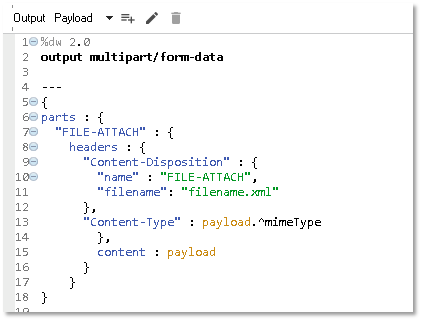
The example mentioned above is only one "part" configured in it. Several different data parts can be added in a single payload. Headers will have its metadata. Key and Filename will be added under "Content-Disposition." Content will have actual file content, and it can be read from payload or can be given directly. e.g:
jsonfile : {
      headers : {
        "Content-Disposition" : {
            "name": "jsonfile",
            "filename": "sample.json"
        },
        "Content-Type" : "application/json"
      },
      content : {
        Name: "John Doe",
        ID: "1234",
        Number: 01
      }
    }
Dataweave script can be sued to access the data coming in multipart. We have set the part key to "FILE-ATTACH" in above example. We can retrieve contents as:
%dw 2.0
output application/java
input payload multipart/form-data
---
payload.parts.'FILE-ATTACH'.content
Similarly, headers can be read as:
%dw 2.0
output application/java
input payload multipart/form-data
---
payload.parts.'FILE-ATTACH'.headers.'Content-Disposition'.filename
If in the flow the payload is not coming from the file itself and it is generated by DataWeave mapping or any other connector, then the "mime-type" of the payload has to be set to "application/octet-stream." Then it can be used while setting multi parts payload. This is because, after DataWeave, the mime type is set differently than required in the multi-part.
Opinions expressed by DZone contributors are their own.
Comments