

Using Flink, Kafka, and NiFi for Real-Time Airport Arrivals and Departures
Learn to build a streaming application using the best of NiFi, Kafka, and Flink for event-driven apps. OpenSky networks rest feeds provide all the data.
 CORE
·
CORE
·
Join the DZone community and get the full member experience.
Join For FreeIn this stage of development of our real-time data pipeline, we are starting to build up all of the feeds we need to be able to make smart decisions quickly and provide all the necessary data to AI and ML models to things like answer LLM/NLP chat questions on how should I go somewhere if I am leaving tomorrow, now, or soon. This will incorporate weather, air quality, roads, buses, light rail, rail, planes, social media, travel advisories, and more. As part of this, we will provide real-time notifications to users via Slack, Discord, Email, Web socket front-ends, and other dashboards. I am open to working with collaborators in open source or suggestions for end-user applications and other data processors like my friends at RisingWave, Timeplus, StarTree Pinot, LLM/Vector Database collaborators like Zilliz Milvus, IBM watsonx.ai, and others.
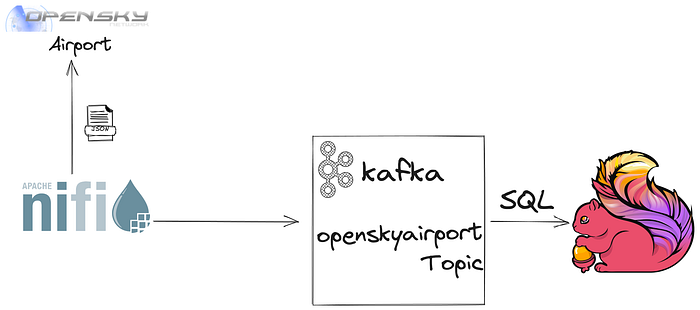
REST API To Obtain Airport Information
https://opensky-network.org/api/flights/arrival?airport=${airport}
&begin=${now():toNumber():divide(1000):minus(604800)}
&end=${now():toNumber():divide(1000)}
The above link utilizes the standard REST link and enhances it by setting the beginning date using NiFi’s Expression language to get the current time in UNIX format in seconds. In this example, I am looking at the last week of data for the airport departures and arrivals in the second URL.
We iterate through a list of the largest airports in the United States doing both departures and arrivals since they use the same format.
[
{"airport":"KATL"},
{"airport":"KEWR"},
{"airport":"KJFK"},
{"airport":"KLGA"},
{"airport":"KDFW"},
{"airport":"KDEN"},
{"airport":"KORD"},
{"airport":"KLAX"},
{"airport":"KLAS"},
{"airport":"KMCO"},
{"airport":"KMIA"},
{"airport":"KCLT"},
{"airport":"KSEA"},
{"airport":"KPHX"},
{"airport":"KSFO"},
{"airport":"KIAH"},
{"airport":"KBOS"},
{"airport":"KFLL"},
{"airport":"KMSP"},
{"airport":"KPHL"},
{"airport":"KDCA"},
{"airport":"KSAN"},
{"airport":"KBWI"},
{"airport":"KTPA"},
{"airport":"KAUS"},
{"airport":"KIAD"},
{"airport":"KMDW"}
]
Code
All source code for tables, SQL, HTML, Javascript, JSON, formatting, Kafka, and NiFi are made available. We also link to free open-source environments to run this code.
Schema Data
{"type":"record","name":"openskyairport",
"namespace":"dev.datainmotion",
"fields":[
{"name":"icao24","type":["string","null"]},
{"name":"firstSeen","type":["int","null"]},
{"name":"estDepartureAirport","type":["string","null"]},
{"name":"lastSeen","type":["int","null"]},
{"name":"estArrivalAirport","type":["string","null"]},
{"name":"callsign","type":["string","null"]},
{"name":"estDepartureAirportHorizDistance","type":["int","null"]},
{"name":"estDepartureAirportVertDistance","type":["int","null"]},
{"name":"estArrivalAirportHorizDistance","type":["int","null"]},
{"name":"estArrivalAirportVertDistance","type":["int","null"]},
{"name":"departureAirportCandidatesCount","type":["int","null"]},
{"name":"arrivalAirportCandidatesCount","type":["int","null"]},
{"name":"ts","type":["string","null"]},
{"name":"uuid","type":["string","null"]}
]
}
If you wish to create this in the Cloudera/Hortonworks Schema Registry, Confluent Schema Registry, NiFi Avro Schema Registry, or just in files, feel free to do so. NiFi and SQL Stream Builder can just infer them for now.
Example JSON Data
{
  "icao24" : "a46cc1",
  "firstSeen" : 1688869070,
  "estDepartureAirport" : "KEWR",
  "lastSeen" : 1688869079,
  "estArrivalAirport" : null,
  "callsign" : "UAL1317",
  "estDepartureAirportHorizDistance" : 645,
  "estDepartureAirportVertDistance" : 32,
  "estArrivalAirportHorizDistance" : null,
  "estArrivalAirportVertDistance" : null,
  "departureAirportCandidatesCount" : 325,
  "arrivalAirportCandidatesCount" : 0,
  "ts" : "1688869093501",
  "uuid" : "30682e35-e695-4524-8d1b-1abd0c7cffaf"
}
This is what our augmented JSON data looks like: we added ts and uuid to the raw data. We also trimmed spaces from callsign.
NiFi Flow To Acquire Data
In this updated version, we ingest from 25+ airports for arrivals and departures.
Split out individual records and slow them down for demo speed.
JSON Read to JSON Write and build out an AVRO Schema
For now, SQL returns all rows and all fields.
Write our JSON Records with avro.schema as a NiFi attribute.
Use UpdateRecord to add a timestamp and a unique ID.
Write out a stream of records to Kafka as JSON records openskyairport to our Kafka cluster.
Set everything as a parameter for easy deployment via NiFi CLI, CDF Public Cloud, or REST API.
Kafka Data Viewed in Cloudera Streams Messaging Manager (SMM)
SMM lets us view our Kafka data without changing active consumers.
We can view any JSON/AVRO records without affecting the live stream.
Flink SQL Table Against Kafka Topic (openskyairport)
CREATE TABLE `ssb`.`Meetups`.`openskyairport` (
  `icao24` VARCHAR(2147483647),
  `firstSeen` BIGINT,
  `estDepartureAirport` VARCHAR(2147483647),
  `lastSeen` BIGINT,
  `estArrivalAirport` VARCHAR(2147483647),
  `callsign` VARCHAR(2147483647),
  `estDepartureAirportHorizDistance` BIGINT,
  `estDepartureAirportVertDistance` BIGINT,
  `estArrivalAirportHorizDistance` VARCHAR(2147483647),
  `estArrivalAirportVertDistance` VARCHAR(2147483647),
  `departureAirportCandidatesCount` BIGINT,
  `arrivalAirportCandidatesCount` BIGINT,
  `ts` VARCHAR(2147483647),
  `uuid` VARCHAR(2147483647),
  `eventTimeStamp` TIMESTAMP(3) WITH LOCAL TIME ZONE METADATA FROM 'timestamp',
  WATERMARK FOR `eventTimeStamp` AS `eventTimeStamp` - INTERVAL '3' SECOND
) WITH (
  'scan.startup.mode' = 'group-offsets',
  'deserialization.failure.policy' = 'ignore_and_log',
  'properties.request.timeout.ms' = '120000',
  'properties.auto.offset.reset' = 'earliest',
  'format' = 'json',
  'properties.bootstrap.servers' = 'kafka:9092',
  'connector' = 'kafka',
  'properties.transaction.timeout.ms' = '900000',
  'topic' = 'openskyairport',
  'properties.group.id' = 'openskyairportflrdrgrp'
)
Flink SQL Query Against Kafka Table
select icao24, callsign, firstSeen, lastSeen, estDepartureAirport, arrivalAirportCandidatesCount,
      estDepartureAirportHorizDistance, estDepartureAirportVertDistance, estArrivalAirportHorizDistance,
      estArrivalAirportVertDistance, departureAirportCandidatesCount
from openskyairport
This is an example query. We can do things like add time windows, max/min/average/sum (aggregates), joins, and more. We can also set up upsert tables to insert results into Kafka topics (or in JDBC tables).
SQL Stream Builder (Apache Flink SQL/PostgreSQL) Materialized View in HTML/JSON
[{"icao24":"c060b9","callsign":"POE2136","firstSeen":"1689193028",
"lastSeen":"1689197805","estDepartureAirport":"KEWR",
"arrivalAirportCandidatesCount":"3","estDepartureAirportHorizDistance":"357",
"estDepartureAirportVertDistance":"24","estArrivalAirportHorizDistance":"591",
"estArrivalAirportVertDistance":"14","departureAirportCandidatesCount":"1"},{"icao24":"a9b85b","callsign":"RPA3462","firstSeen":"1689192822","lastSeen":"1689196463","estDepartureAirport":"KEWR","arrivalAirportCandidatesCount":"6","estDepartureAirportHorizDistance":"788","estDepartureAirportVertDistance":"9","estArrivalAirportHorizDistance":"2017","estArrivalAirportVertDistance":"30","departureAirportCandidatesCount":"1"},{"icao24":"a4b205","callsign":"N401TD","firstSeen":"1689192818","lastSeen":"1689198430","estDepartureAirport":"KEWR","arrivalAirportCandidatesCount":"4","estDepartureAirportHorizDistance":"13461","estDepartureAirportVertDistance":"24","estArrivalAirportHorizDistance":"204","estArrivalAirportVertDistance":"8","departureAirportCandidatesCount":"1"},{"icao24":"a6eed5","callsign":"GJS4485","firstSeen":"1689192782","lastSeen":"1689195255","estDepartureAirport":"KEWR","arrivalAirportCandidatesCount":"4","estDepartureAirportHorizDistance":"451","estDepartureAirportVertDistance":"17","estArrivalAirportHorizDistance":"1961","estArrivalAirportVertDistance":"56","departureAirportCandidatesCount":"1"},{"icao24":"a64996","callsign":"JBU1527","firstSeen":"1689192458","lastSeen":"1689200228","estDepartureAirport":"KEWR","arrivalAirportCandidatesCount":"5","estDepartureAirportHorizDistance":"750","estDepartureAirportVertDistance":"9","estArrivalAirportHorizDistance":"4698","estArrivalAirportVertDistance":"107","departureAirportCandidatesCount":"1"},{"icao24":"aa8548","callsign":"N777ZA","firstSeen":"1689192423","lastSeen":"1689194898","estDepartureAirport":"KEWR","arrivalAirportCandidatesCount":"4","estDepartureAirportHorizDistance":"13554","estDepartureAirportVertDistance":"55","estArrivalAirportHorizDistance":"13735","estArrivalAirportVertDistance":"32","departureAirportCandidatesCount":"1"}]
This JSON data can now be read on web pages, Jupyter notebooks, Python code, mobile phones, or wherever.
Materialized View Endpoint Creation

Our Dashboard Feed From That Materialized View

Step-by-Step Building an Airport Arrivals and Departures Streaming Pipeline
- NiFi: NiFi schedules REST Calls.
- NiFi: Calls Arrivals REST Endpoint with an iteration of all 25 airports
- NiFi: Calls Departure REST Endpoint with iterations of all 25 airports
- NiFi: Extracts Avro Schema for JSON data
- NiFi: Updates records adding a unique ID and timestamp for each record
- NiFi: (For demos, we split record batches into single records and drip feed 1 record per second.)
- NiFi: We publish records to Kafka topic:
openskyairport. - Kafka: Topic arrives in a cluster in order as JSON Records
- Flink SQL: Table built by inferring JSON data from Kafka topic
- SSB: Interactive SQL is launched as a Flink job on the Flink cluster in K8.
- SSB: Create a materialized view from SQL results.
- SSB: Hosts materialized view as JSON REST endpoint
- HTML/JSON: Dashboard reads JSON REST endpoint and feeds it to JQuery datatables.
- Data: Live and available data feed published via REST Endpoint, Kafka topic, Slack channel, Discord channel, and future sink. We will add Apache Iceberg and Apache Kudu storage. Please suggest other endpoints.
Video
References
- GitHub: tspannhw/pulsar-adsb-function
- FlightAware: Timothy Spann
- "Flight monitor for Cloudera Best In Flow contest"
- GitHub: tspannhw/raspberry-pi-adsb
- GitHub: tspannhw/java-adsb
- OpenSky Network
- GitHub: tspannhw/FLiP-Py-ADS-B
Data
Data Provided By OpenSky Network
Matthias Schäfer, Martin Strohmeier, Vincent Lenders, Ivan Martinovic and Matthias Wilhelm.
"Bringing Up OpenSky: A Large-scale ADS-B Sensor Network for Research".
In Proceedings of the 13th IEEE/ACM International Symposium on Information Processing in Sensor Networks (IPSN), pages 83-94, April 2014.
Published at DZone with permission of Timothy Spann. See the original article here.
Opinions expressed by DZone contributors are their own.
Comments