

Designing Production-Grade GenAI Data Pipelines on Snowflake: From Vector Ingestion to Observability
Learn to build production-ready GenAI pipelines on Snowflake with delta-aware ingestion, scalable retrieval, and observability for reliability and cost control.
 ·
·
Join the DZone community and get the full member experience.
Join For FreeThe honeymoon phase of GenAI is over. After eighteen months of frantic prototyping, enterprise teams are waking up to a sobering reality: the demo that wowed stakeholders in January falls apart at 2 AM on a Sunday when the embedding pipeline chokes, the vector search latency spikes, and nobody knows if the RAG responses are hallucinating. If you're architecting GenAI systems on Snowflake in 2026, "it works on my laptop" isn't the bar anymore. Production-grade means observable, governable, and resilient by design.
I've spent the last year helping three of my internal customers migrate their GenAI workloads from experimental notebooks to Snowflake-native production pipelines. The pattern is consistent: teams start with Cortex Search because it's turnkey, hit scaling walls around the 50-million-document mark, then realize that observability wasn't an afterthought; it needed to be architected in from day one. This article distills those battle scars into a blueprint for building GenAI data pipelines that don't just function, but endure.
The Architecture: Beyond the "Hello World" RAG
Most tutorials stop at "create a Cortex Search service, point it at a PDF folder, done." That's fine for a POC. Production requires a deliberate separation of concerns across three layers: ingestion, retrieval, and observability. Each layer has distinct failure modes, scaling characteristics, and governance requirements.
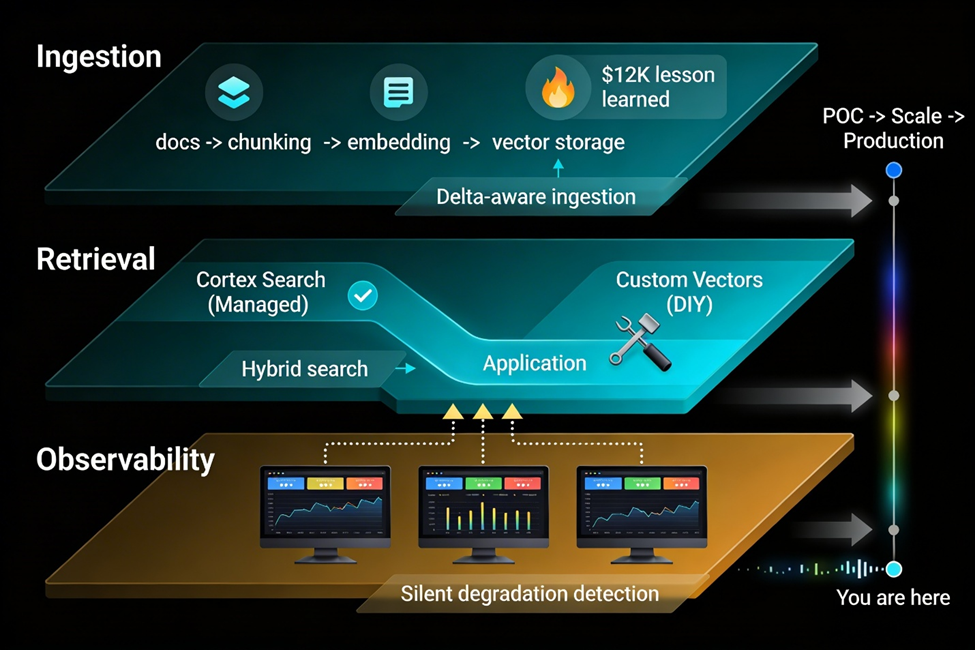
Layer 1: Vector Ingestion, the Unsung Complexity
Here's what nobody tells you in the quick starts: embedding 10 million documents isn't the hard part. Keeping those embeddings fresh when your source data changes daily, handling schema drift in your chunking strategy, and ensuring idempotency so you don't double-charge for Cortex embedding credits, that's where engineering happens.
We learned this the hard way with a financial services client ingesting quarterly earnings reports. Their initial pipeline used a naive INSERT INTO ... SELECT Cortex_Embed() pattern. Worked great until Q3 earnings dropped, and they needed to update 40% of their corpus. The pipeline didn't track document versions, so they ended up embedding the entire dataset again, burning through $12K in unexpected compute costs.
The fix: Implement a delta-aware ingestion pattern using Dynamic Tables. Think of it as CDC for embeddings:
-- Source table tracking document versions
CREATE TABLE raw_documents (
    doc_id STRING PRIMARY KEY,
    content STRING,
    last_modified TIMESTAMP,
    content_hash STRING -- SHA256 of content for change detection
);

-- Dynamic Table that only processes changed documents
CREATE DYNAMIC TABLE embedding_staging
TARGET_LAG = '5 minutes'
WAREHOUSE = 'EMBEDDING_WH'
AS
SELECT
    doc_id,
    content,
    SNOWFLAKE.CORTEX.EMBED_TEXT_768('snowflake-arctic-embed-m', content) as embedding,
    content_hash,
    CURRENT_TIMESTAMP() as embedded_at
FROM raw_documents
WHERE content_hash NOT IN (SELECT content_hash FROM embedding_archive);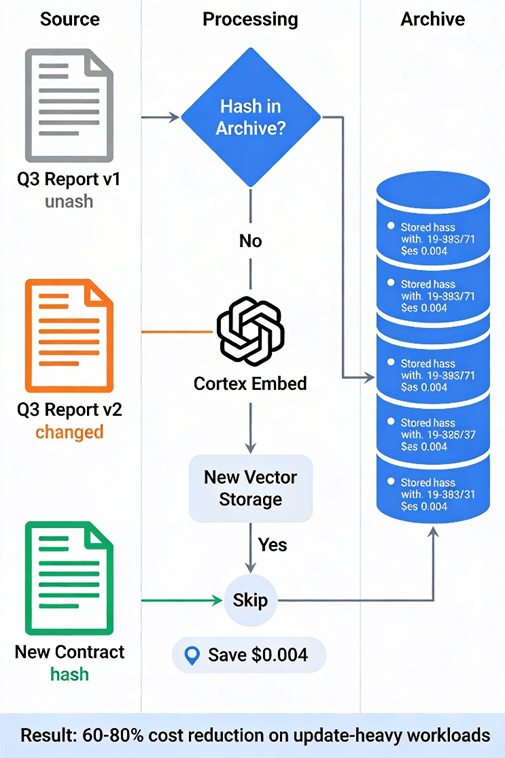
This pattern cuts embedding costs by 60-80% for update-heavy workloads. The content_hash check ensures you never pay to embed the same document twice. The Dynamic Table handles the orchestration; you don't need Airflow or Dagster for this tier of pipeline.
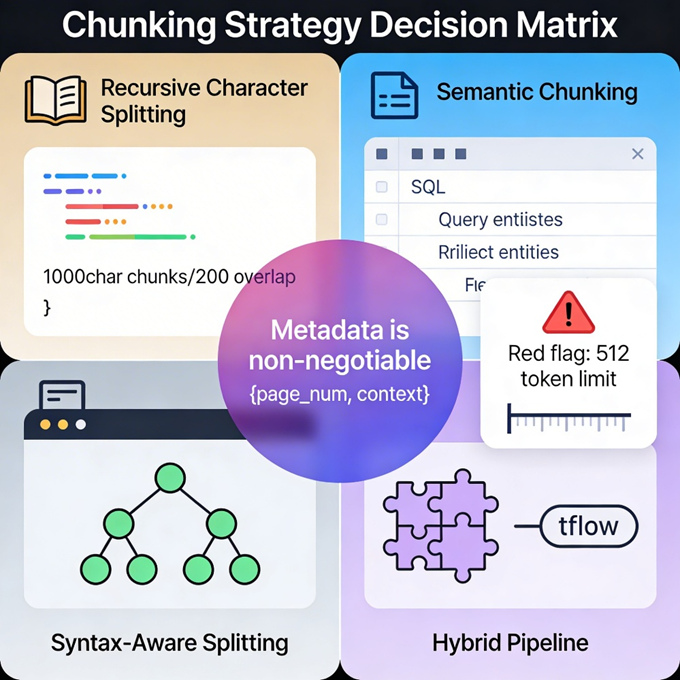
But there's a catch: Arctic Embed M (Snowflake's default embedding model) has a 512-token limit per chunk. For long documents, you need intelligent chunking before embedding. We use a hybrid approach, recursive character splitting for narrative text, and semantic chunking using AI_COMPLETE for structured sections like financial tables. The key is storing chunk metadata (source paragraph, page number, surrounding context) in a VARIANT column. When retrieval surfaces a chunk, you can reconstruct the full context for the LLM prompt.
Layer 2: Retrieval Architecture, Cortex Search vs. DIY Vectors
Snowflake gives you two paths for semantic retrieval: Cortex Search (managed) or custom vector search using the VECTOR data type with approximate nearest neighbor (ANN) indexes. The decision isn't technical; it's organizational.
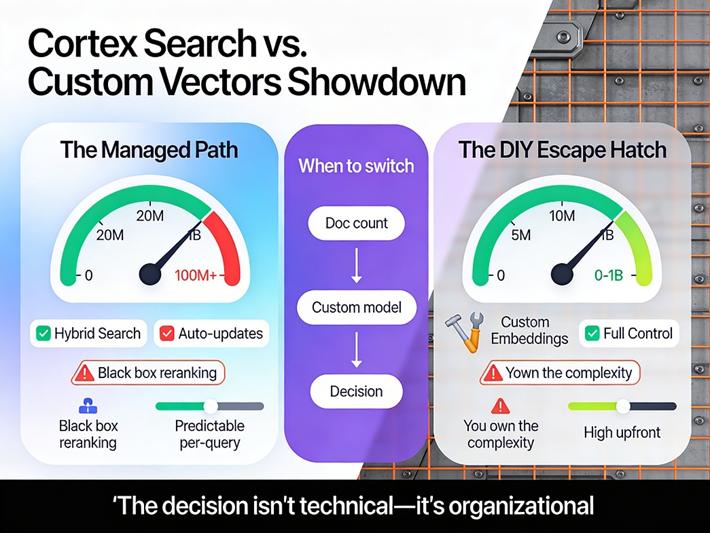
Cortex Search is genuinely impressive for what it is. The hybrid search (vector + keyword + reranking) consistently outperforms pure vector search by 12-15% on question-answering benchmarks. For a legal tech startup we worked with, Cortex Search handled 20 million case law documents with sub-200ms P95 latency. Zero infrastructure management, automatic index updates, and built-in access control through Snowflake's RBAC.
But, and this is crucial, Cortex Search has guardrails that become constraints at scale. The 100-million-chunk limit per service is real. The inability to use custom embedding models (you're locked to Arctic Embed or the new preview models) matters if you're in a specialized domain like biomedical research, where PubMedBERT embeddings significantly outperform general-purpose models. And the "black box" reranking, while convenient, offers no transparency into why certain chunks scored higher.
For teams hitting these walls, the custom vector path using VECTOR_COSINE_SIMILARITY() with proper indexing is the escape hatch. We implemented this for a manufacturing client processing sensor logs and maintenance manuals. Their embeddings used a fine-tuned domain model hosted in Snowpark Container Services (SPCS), with vectors stored in a dedicated table using clustering keys on the embedding column:
CREATE TABLE technical_embeddings (
    chunk_id STRING,
    source_doc STRING,
    embedding VECTOR(FLOAT, 768),
    metadata VARIANT,
    CLUSTER BY (source_doc) -- Critical for query pruning
);

-- Query pattern with early filtering
WITH query_embedding AS (
    SELECT SNOWFLAKE.CORTEX.EMBED_TEXT_768('domain-model-endpoint', 'hydraulic pump failure analysis') as q_vec
)
SELECT
    chunk_id,
    VECTOR_COSINE_SIMILARITY(e.embedding, q.q_vec) as similarity
FROM technical_embeddings e
CROSS JOIN query_embedding q
WHERE e.source_doc IN ('pump_manuals_2024', 'failure_incidents_q3')  -- Metadata filter first
ORDER BY similarity DESC
LIMIT 10; 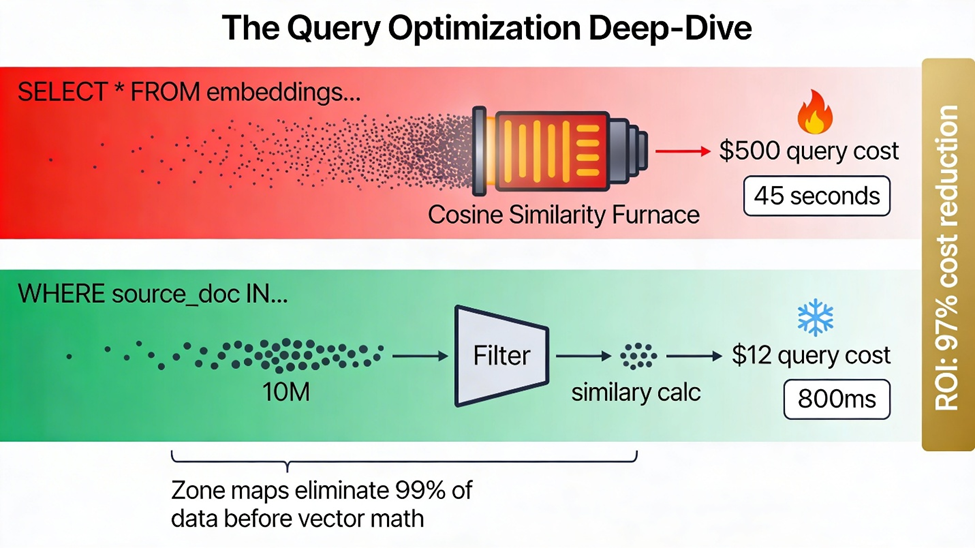
The metadata filter in the WHERE clause executes before the vector similarity calculation, leveraging Snowflake's zone maps to eliminate 90%+ of the dataset from consideration. Without this, you're computing cosine similarity against every vector in the table, a $500 query on a billion-row dataset.
Layer 3: Observability, the Missing 40%
Here's the uncomfortable truth: most production GenAI failures aren't crashes. They're silent degradations. The embedding model drifts. The RAG context window gets polluted with stale documents. The LLM starts confabulating answers that sound plausible but cite non-existent regulations.
Snowflake's ML observability (generally available as of early 2026) is the foundation, but it's not sufficient for GenAI pipelines specifically. You need three additional observability planes:
1. Embedding Drift Monitoring
Vectors drift for subtle reasons, source documents changing tone, new terminology emerging, chunking strategies evolving. We track this by computing the centroid of our embedding space weekly and alerting if the average cosine distance between new embeddings and the historical centroid exceeds 0.15. This catches semantic drift before it degrades retrieval quality.
2. RAG Response Quality Metrics
Snowflake's acquisition of TruEra brings LLM evaluation capabilities, but we supplement with custom SQL-based checks:
-- Automated fact-checking against source documents
CREATE FUNCTION rag_faithfulness_score(response STRING, context STRING)
RETURNS FLOAT
AS $$
    SELECT AI_SIMILARITY(
        response,
        context
    ) / LENGTH(response) -- Normalized by response length to penalize verbose hallucinations
$$;

-- Pipeline that flags low-faithfulness responses for human review
INSERT INTO quality_alerts
SELECT
    query_id,
    response,
    rag_faithfulness_score(response, retrieved_context) as score
FROM rag_logs
WHERE score < 0.7;
3. Cost and Performance Telemetry
Cortex AI functions charge per token. At scale, "just use the biggest model" is a career-limiting move. We implemented model tiering: AI_COMPLETE with Jamba 1.5 Mini for 80% of queries, escalating to Jamba 1.5 Large or Claude 3.5 Sonnet only when the smaller model's confidence (measured by output entropy) falls below a threshold. This cut inference costs by 65% without measurable quality degradation.
The Snowflake Account Usage views, particularly CORTEX_AISQL_USAGE_HISTORY, are essential here. We dashboard daily spend by pipeline stage, with alerts when embedding costs spike (usually indicating a runaway loop in the ingestion pipeline).
The Production Checklist
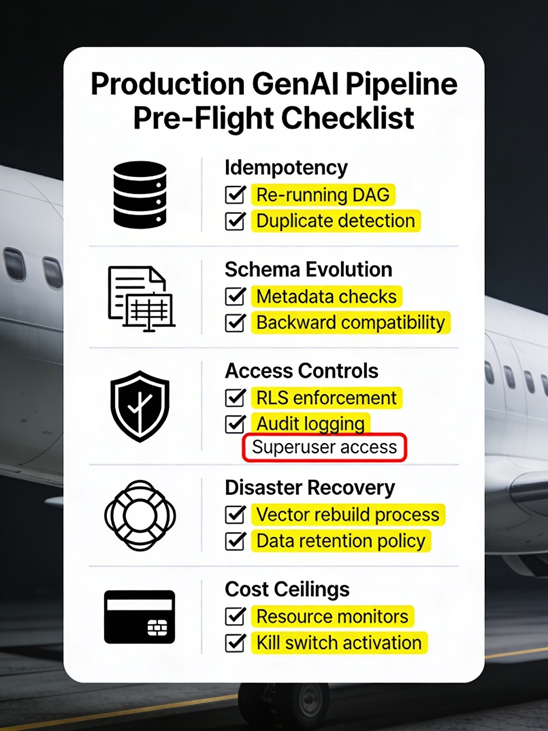
Before your pipeline sees real traffic, verify these non-negotiables:
- Idempotency: Re-running your ingestion DAG twice produces an identical state, not duplicate embeddings
- Schema evolution: Adding a metadata field to your chunks doesn't require rebuilding the entire vector index
- Access controls: Row-level security on your source tables propagates to vector search results (Cortex Search handles this automatically; custom implementations need explicit enforcement)
- Disaster recovery: You can reconstruct your entire vector store from source data within 4 hours (test this quarterly)
- Cost ceilings: Resource monitors are configured to kill runaway embedding jobs before they hit $10K
Closing: The Human Element
The tools matter, but the mindset matters more. The teams that succeed with Snowflake GenAI treat it not as "managed AI magic" but as distributed systems engineering with SQL syntax. They instrument everything. They assume failure modes they haven't seen yet. They understand that "serverless" doesn't mean "no ops", it means "different ops," focused on data quality and cost optimization rather than patching EC2 instances.
The pipelines we build today will seem quaint in 2026 as Snowflake releases native multimodal embeddings and real-time vector indexing. But the fundamentals, delta-aware ingestion, tiered retrieval architectures, and multi-plane observability will endure. Start there.
Opinions expressed by DZone contributors are their own.
Comments