

Streamline Your ELT Workflow in Snowflake With Dynamic Tables and Medallion Design
Dynamic Tables in Snowflake bring declarative, incremental ELT. Define SQL + freshness target, and Snowflake handles the orchestration, no dbt or Airflow needed.
Join the DZone community and get the full member experience.
Join For FreeSnowflake offers Dynamic Tables, a declarative way to build automated, incremental, and dependency-aware data transformations. They modernize your data pipelines by delivering real-time insights at scale, with minimal operational overhead.
What Are Dynamic Tables?
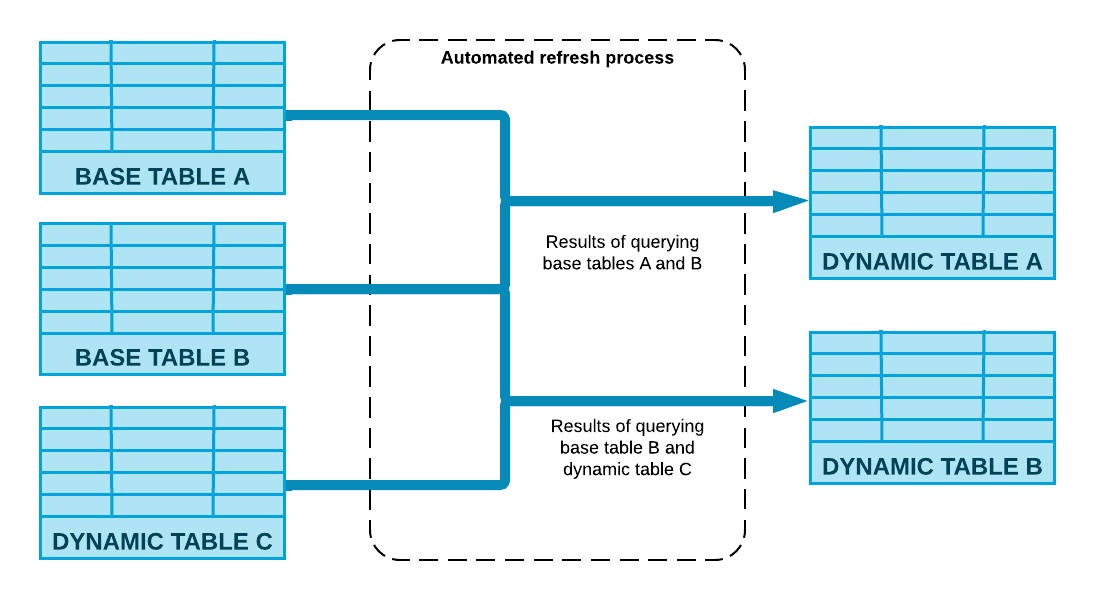
Dynamic Tables are auto-updating, materialized tables in Snowflake that handle your transformation logic for you. All you need to do is define:
- An SQL transformation query
- A target freshness (e.g.,
TARGET_LAG = '5 minutes')
Instead of manually orchestrating workflows using tools like Airflow or dbt Cloud, Snowflake does the heavy lifting. It tracks upstream changes and updates the table automatically—processing only the new or changed data.
The result? Faster pipelines, fresher insights, and a lot less work.
Key Benefits of Dynamic Tables
- Simplified ELT Pipelines – No need for external orchestrators
- Incremental Processing – Refreshes only changed data
- Freshness Guarantees – Auto-updates based on
TARGET_LAG - Compute Efficiency – Dynamically scales resources
- Smart Dependency Tracking – Refreshes downstream tables only when inputs change
- Pipeline Resilience – No manual jobs or cron schedules needed
Dynamic Tables vs. Views vs. Materialized Views
|
Feature |
View |
Materialized View |
Dynamic Table |
|
Storage |
No (virtual only) |
Yes (pre-computed & stored) |
Yes (automatically refreshed) |
|
Freshness |
Always current (on query) |
Manual or automatic refresh |
Maintained via TARGET_LAG |
|
Incremental Updates |
No |
Limited |
Yes |
|
Dependency Awareness |
No |
Partial |
Yes (automatic) |
|
Compute Usage |
On query |
On refresh |
On refresh (auto-managed) |
|
Use Case Fit |
Lightweight queries |
Reused aggregations |
Full ELT pipeline logic |
|
Orchestration Needed |
Yes (external) |
Often required |
No (self-orchestrating) |
The Medallion Architecture: A Layered Approach to ELT
The Medallion Architecture structures data into three logical layers:
|
Layer |
Description |
Purpose |
|
Bronze |
Raw, unprocessed data |
Captured from ingestion tools |
|
Silver |
Cleaned and validated |
Filtered and transformed data |
|
Gold |
Aggregated business data |
KPIs and analytics-ready output |
This model enhances modularity, observability and reusability in your data platform.
How Dynamic Tables Handle Ingested Workloads
Dynamic Tables are designed to operate directly on ingestion pipelines, enabling real-time or near-real-time data transformations without manual orchestration. It leverages Snowflake’s metadata tracking and automatically refresh the new data efficiently, delivering low-latency transformations regardless of the ingestion method.
Bronze Layer: Ingestion With Snowpipe, Fivetran, or Kafka Connect
1. Snowpipe + Dynamic Tables
Use Case:
Ideal for micro-batch, file-based ingestion.
Common scenarios include IoT telemetry, clickstream tracking, log data, and JSON/CSV drops into cloud storage (e.g., S3, GCS, or Azure Blob).
How It Works:
- Snowpipe continuously monitors a cloud storage stage (e.g., Amazon S3).
- As new files land, they’re automatically loaded into a raw table like
orders_rawvia an internalCOPY INTOoperation. - A Dynamic Table (e.g.,
cleaned_orders) is defined on top of this raw table. - Snowflake uses metadata tracking to detect and transform only the newly ingested records.
Dynamic Table Behavior:
- Incremental Refresh: Only new records are processed during each update.
- No Orchestration Needed: Snowflake automatically triggers refresh cycles based on your defined
TARGET_LAG. - High Resilience: Even if multiple files arrive at once, Snowflake efficiently batches and processes them in the background.
CREATE OR REPLACE DYNAMIC TABLE cleaned_orders
TARGET_LAG = '5 minutes'
WAREHOUSE = analytics_wh
AS
SELECT
  order_id,
  customer_id,
  order_amount,
  order_status,
  order_date
FROM orders_raw
WHERE order_status IS NOT NULL;
As new JSON order files land via Snowpipe, the cleaned_orders Dynamic Table is automatically refreshed—typically within 5 minutes—no cron jobs, no pipeline triggers required.
Best Practice:
Use FILE_NAME, METADATA$FILENAME, or ingestion timestamps to track batch provenance or deduplicate rows when necessary.
2. Fivetran + Dynamic Tables
Use Case:
Connector-based ingestion from SaaS apps like Salesforce, HubSpot, Stripe, or Shopify.
Perfect for batch or near-real-time ingestion from operational systems.
How It Works:
- Fivetran extracts data from source APIs and loads it into raw Snowflake tables (e.g.,
customers_raw). - These raw tables reflect either full snapshots or incremental deltas, depending on the connector type.
- A Dynamic Table (e.g.,
cleaned_customers) is defined on top of these raw inputs. - Snowflake automatically tracks metadata changes and triggers transformation without any external orchestration.
Dynamic Table Behavior:
- Automatic Refreshes: When Fivetran updates the raw tables, Snowflake detects the changes and refreshes downstream Dynamic Tables accordingly.
- Efficient Processing: Only rows impacted by upstream changes are transformed—nothing more.
- Self-Healing Pipelines: No need to manage sync schedules or refresh logic; it's all handled natively by Snowflake.
CREATE OR REPLACE DYNAMIC TABLE cleaned_customers
TARGET_LAG = '5 minutes'
WAREHOUSE = analytics_wh
AS
SELECT
  customer_id,
  first_name,
  last_name,
  email,
  is_active
FROM customers_raw
WHERE is_active = TRUE;
When Fivetran finishes syncing a batch of updated customer profiles, cleaned_customers picks them up and processes them automatically—no dbt job, no scheduler.
Best Practice:
Use soft deletes (e.g., an is_deleted or is_active flag) in source systems to allow filtering out stale rows in Silver layers via Dynamic Table logic.
3. Kafka Connect + Dynamic Tables
Use Case:
- High-frequency event-driven ingestion
- Common in real-time analytics, fraud detection, user interaction tracking, and application telemetry
How It Works:
- Kafka Connect sends event streams (JSON, Avro, or CSV) into Snowflake using the Snowflake Kafka Connector.
- Events are continuously appended to raw streaming tables like event_logs_raw or orders_raw.
- Dynamic Tables reactively pick up new events and apply transformations without human intervention.
Dynamic Table Behavior:
- High Responsiveness: Near-instant reaction to incoming event data, depending on
TARGET_LAG - Incremental by Design: Snowflake avoids reprocessing the full table and only operates on the new partitioned/event chunk
- Seamless Stream-to-Batch: You can achieve near-streaming performance with warehouse simplicity
CREATE OR REPLACE DYNAMIC TABLE real_time_metrics
TARGET_LAG = '1 minute'
WAREHOUSE = analytics_wh
AS
SELECT
  customer_id,
  COUNT(order_id) AS order_count,
  SUM(order_amount) AS total_value,
  MAX(event_time) AS last_activity
FROM orders_raw
GROUP BY customer_id;
real_time_metrics stays up to date within 1 minute of new events arriving from Kafka—making it ideal for real-time dashboards or alerting systems.
Best Practice:
To prevent duplicate processing (especially during replays), use deduplication logic like ROW_NUMBER() or leverage Kafka message metadata.
Dynamic Tables eliminate the need for polling, scheduling, or external orchestration tools. They offer:
- Performance Efficiency – Only process data that’s changed
- Cost Optimization – Minimize compute by avoiding full-table refreshes
- Near-Real-Time Analytics – Stay fresh with
TARGET_LAG-driven updates
Silver Layer: Cleaned and Validated Data
Dynamic Tables clean, standardize, and enforce rules:
CREATE OR REPLACE DYNAMIC TABLE cleaned_orders
TARGET_LAG = '5 minutes'
WAREHOUSE = analytics_wh
AS
SELECT
    order_id,
    customer_id,
    order_amount,
    order_status,
    order_date
FROM orders_raw
WHERE order_status IS NOT NULL;
sql
CopyEdit
CREATE OR REPLACE DYNAMIC TABLE cleaned_customers
TARGET_LAG = '5 minutes'
WAREHOUSE = analytics_wh
AS
SELECT
    customer_id,
    first_name,
    last_name,
    email,
    is_active
FROM customers_raw
WHERE is_active = TRUE;
Gold Layer: Aggregated, Business-Level Insights
Here we compute metrics for BI, ML, and reporting:
CREATE OR REPLACE DYNAMIC TABLE customer_order_summary
TARGET_LAG = '10 minutes'
WAREHOUSE = analytics_wh
AS
SELECT
    c.customer_id,
    c.first_name,
    c.last_name,
    COUNT(o.order_id) AS total_orders,
    SUM(o.order_amount) AS total_revenue,
    MAX(o.order_date) AS last_order_date
FROM cleaned_customers c
LEFT JOIN cleaned_orders o ON c.customer_id = o.customer_id
GROUP BY c.customer_id, c.first_name, c.last_name;
Monitoring Dynamic Table Health
Track refresh operations and diagnose issues easily:
SELECT *
FROM SNOWFLAKE.INFORMATION_SCHEMA.DYNAMIC_TABLE_REFRESH
Best Practices
- Set
TARGET_LAGvalues based on use case (lower = fresher = more compute) - Avoid overly deep transformation chains
- Use clear naming conventions (bronze_, silver_, gold_)
- Monitor refresh status via
INFORMATION_SCHEMA
Dynamic Tables and Medallion Architecture offer a scalable, declarative, and low-maintenance way to build ELT pipelines, whether you're ingesting via Snowpipe, Fivetran, or Kafka.
Snowflake ensures that only the right data is processed incrementally, efficiently, and reliably. This framework eliminates orchestration complexity, accelerates insights, and makes your analytics platform ready for real-time decision-making.
Opinions expressed by DZone contributors are their own.
Comments