

Getting Started With API Data Mapping
Successful integration requires mapping of standard and custom objects. Here are 5 steps to take to ensure effective mapping.
Join the DZone community and get the full member experience.
Join For FreeTo build a seamless API integration, you need to map data appropriately.
In other words, to create seamless cooperation between apps, you need to map the appropriate custom and standard data fields and objects from the endpoints your customers will be integrating to with your app.
Let’s go step-by-step through what you’ll need to consider when mapping data between your app and other API integrations. As an example, we’ll pretend we’re connecting your app with the Salesforce API and HubSpot API to facilitate the exchange of Contact and Company data.
Step 1: Data Discovery
First, your app needs to discover the data objects (in this example, Company and Contact), and their structure at the endpoint. You’ll need to discover standard data structures and custom data structures to facilitate an effective data map for your users. For a detailed review of Discovery APIs, read this post.
Step 2: Define a Default Map
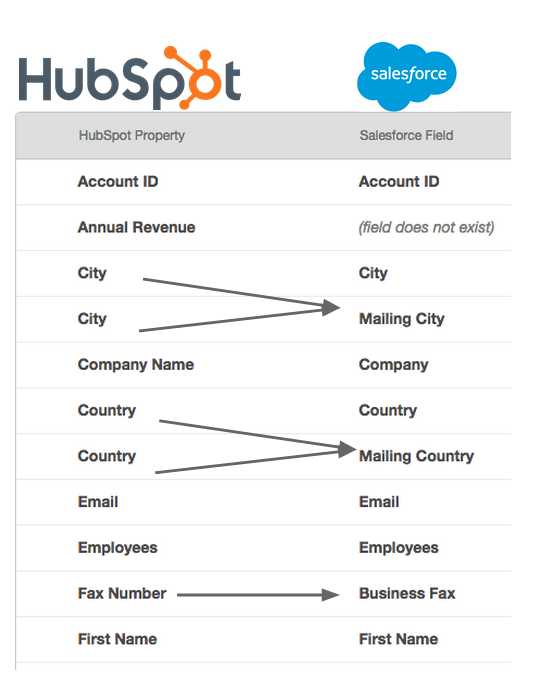
A default mapping is a template that will define how standard data structures from an endpoint will map into your applications’ data model. This mapping establishes the association of standard fields within a standard object, such as Company or Contact, into the fields within your application.
By creating this default mapping, you reduce the amount of work your users need to do by mapping standard fields such as city, state, street names, etc. into your app’s data structure.
The primary goal here is to save your users time by pre-mapping what you already know from the endpoint, reducing the effort they need to undertake when connecting to your app. Easier connectivity = happier customers.
Step 3: Map Custom Data From Each Instance
It’s fairly common in most SaaS applications to find custom data objects and custom fields within standard objects. Your customers will use these capabilities frequently, meaning default mapping will only be the beginning for a majority of your customers.
The key challenge will be that you need to support unique data maps at the instance level. The instance level data maps will be specific to each authenticated account of an endpoint (for example, each unique user that’s provisioning your app’s integration to HubSpot).
Unfortunately, there is no simple way to anticipate the type of data that will flow in (though defining user stories might help you anticipate…). Offer your users a dynamic experience and reduce time and cost by giving them full self-service control over these mappings.
Step 4: Make Your “Default” A Guideline, Not a Requirement
Companies use fields differently (sometimes adjacent to their original intended purpose) — it’s a fact of life. For example, at Cloud Elements, we’ve encountered companies that store latitude and longitude in Salesforce using the Street 2 Account object.
If your users are going to use standard fields for specialized purposes, they may need or want to map these fields into a different data field as it’s transferred through to your application. With this, it’s best to enable your users to override your default settings if they need to based on how they collect and transmit data to create a seamless, dynamic experience.
Step 5: Leverage Self-Service Data Mapping Tools
The optimal experience for your users is to have a user interface integrated with your app to facilitate data mapping from their cloud service apps into your data structure.
By doing so, your customers can make their own mappings using their best judgement and respond instantly to accommodate new data fields and objects.
(Spoiler alert: Cloud Elements can help you with this.)
But if there’s no time like the present and you need to build your own integration in-house ASAP, check out our Definitive Guide to API Integration to discover best practices and important factors to keep top of mind when you’re building.
Published at DZone with permission of Brian Busch. See the original article here.
Opinions expressed by DZone contributors are their own.
Comments