

Introduction to Spring Data Elasticsearch 5.5
Getting started with the latest version of Spring Data Elasticsearch 5.5 and Elasticsearch 8.18 as a NoSQL database for our data storage.
 CORE
·
CORE
·
Join the DZone community and get the full member experience.
Join For FreeIt's been a while since my first article dedicated to Spring Data Elasticsearch usage as a NoSQL database was published. A couple of articles with configuration changes or hints followed the first article. Therefore, the main goal of this article is to define a new baseline for the full Elasticsearch setup.
Note: All previous articles are listed at the end.
In this article, you will learn the following:
- How to set up an unsecured Elasticsearch and ElasticHQ with Docker images
- How to configure and use Spring Data Elasticsearch in our project
- How to expose a REST API for our data stored in Elasticsearch
Let's start with the setup of an unsecured Elasticsearch via Docker.
Set Up Elasticsearch
All upgrade notes/hints for Spring Data Elasticsearch in version 5.5.x can be found here. The latest technologies used in this article, compliant with the compatibility matrix, are:
- Spring Data Elasticsearch 5.5.4
- Spring Boot 3.5.6
- Elasticsearch 8.18.6
The unsecured Elasticsearch, including ElasticHQ, can be started easily with the Docker images available at https://hub.docker.com/.
Elasticsearch
Create Custom Network
First, we need to define our network to be used for connecting all desired services together. In this article, we connect Elasticsearch and ElasticHQ only. The network is called sat-elk-net.
docker network create sat-elk-netRun Unsecured Elasticsearch Docker Image
Elasticsearch can be started from the Docker image (see https://hub.docker.com/_/elasticsearch) with these arguments:
name– Define the desired Docker container namenet– Connect to the defined network (created in the first step)p– Remap Elasticsearch ports (to be accessible from the outside of the Docker container)discovery.type=single-node– Use a single-node cluster for our purpose (see https://www.elastic.co/guide/en/elasticsearch/reference/7.5/docker.html#docker-cli-run-dev-mode)xpack.security.enabled=falseelasticsearch:<TAG>– Define the Docker image name and the desired version
docker run -d \
    --name sat-elasticsearch-unsecured \
    --net sat-elk-net \
    -p 9200:9200 -p 9300:9300 \
    -e "discovery.type=single-node" \
    -e "xpack.security.enabled=false" \
    elasticsearch:8.18.6
Alternatively, when xpack.security.enabled
docker exec -it <CONTAINER_ID> bash
cd /usr/share/elasticsearch/config
echo "xpack.security.enabled: false" >> elasticsearch.yml
Verification
The Elasticsearch running locally can be verified by this CURL command:
curl http://localhost:9200/The expected output looks, e.g., like this:
{
  "name" : "2e40b9ac8236",
  "cluster_name" : "docker-cluster",
  "cluster_uuid" : "PZM1IcPMQpWv_XhyaNqpfg",
  "version" : {
    "number" : "8.18.6",
    "build_flavor" : "default",
    "build_type" : "docker",
    "build_hash" : "970b6c3ae853753ae66a12c1208c85a3c9728d92",
    "build_date" : "2025-08-25T22:05:47.180118464Z",
    "build_snapshot" : false,
    "lucene_version" : "9.12.1",
    "minimum_wire_compatibility_version" : "7.17.0",
    "minimum_index_compatibility_version" : "7.0.0"
  },
  "tagline" : "You Know, for Search"
}
ElasticHQ
ElasticHQ is a simplified monitoring and management tool for Elasticsearch clusters. Again, we can start it easily with this command (the arguments are pretty similar to the previous command):
docker run -d --name sat-elastichq --net sat-elk-net -p 5000:5000 elastichq/elasticsearch-hqVerification
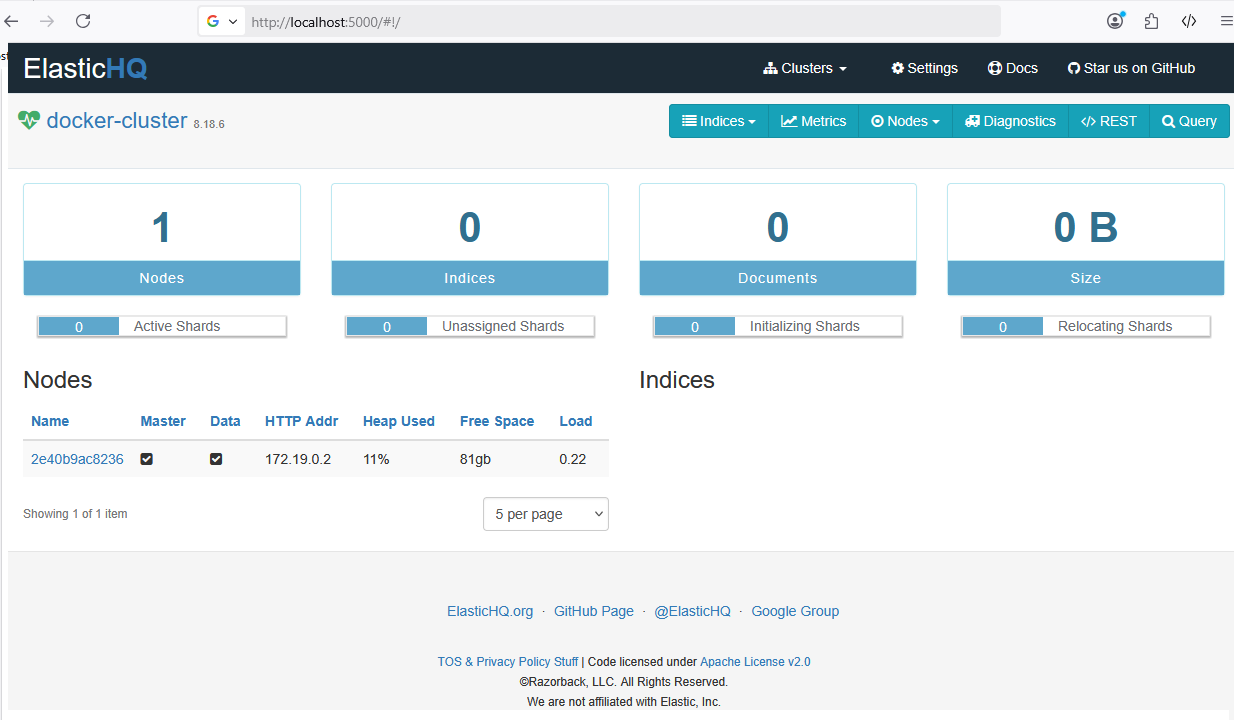
The correct integration between ElasticHQ and Elasticsearch can be verified by putting http://localhost:5000/#!/ in our browser and using the correct URL to the created Elasticsearch cluster (just a single node in our case).
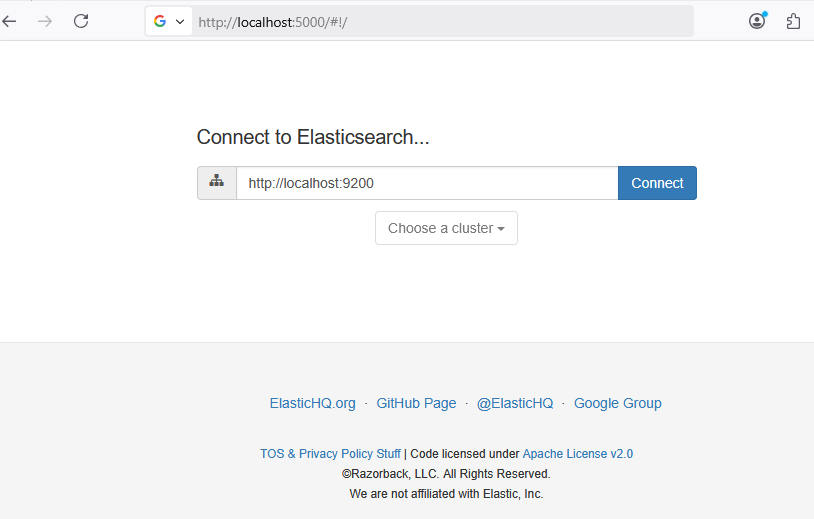
Note: We need to modify the "Connect to Elasticsearch" URL in case it's not running locally.
By clicking the Connect button, we should see a screen like this:
Set Up Spring Data Elasticsearch
Adding Spring Data Elasticsearch to our application is really straightforward. Besides the Maven dependency, there's also a configuration class defining the connection to Elasticsearch and the document mapping. The new configuration class is introduced for readiness for future extensions and changes.
Maven Dependency
First, we need to add spring-boot-starter-data-elasticsearch dependency in our Maven project (pom.xml) first. The latest available version can be found in the Maven Central repository.
<dependency>
	<groupId>org.springframework.boot</groupId>
	<artifactId>spring-boot-starter-data-elasticsearch</artifactId>
	<version>3.5.6</version>
</dependency>
Elasticsearch Client
Next, we should configure the Elasticsearch client in our application. For that, we have a new property group (in the configuration), the mapping Spring configuration class for our configuration group, and the Spring configuration class for our connection to Elasticsearch.
YAML Configuration
In order to have flexible Elasticsearch configuration, we enhance the application.yaml file with a new elk configuration group (any other meaningful name would work as well) containing these properties:
host– Used to define the host name where Elasticsearch is running (line 2). Note: the previous articles usedspring.elasticsearch.urisconfiguration item for the same purpose.security-enabled– Used for switching the security on and off (line 3). Currently, it's commented out (usingfalsedefault value).usernameandpassword– Represents the user credential used for the authentication (lines 4-5).
The new configuration group looks like this:
elk:
  host: localhost
  # security-enabled: false
  # username: elastic
  # password: elastic
Note: As you can see, most of the configuration items are commented out (lines 3-5) as they will be used in the next article (dedicated to using BASIC authentication). Our current concern here is to connect to the unsecured Elasticsearch, and just the host property is sufficient for that purpose.
Spring Configuration
Additionally, we add a properties class in order to simplify the configuration usage in our project. ElasticsearchProperties class is used for loading all the properties from the elk configuration group (line 2) as:
@Configuration
@ConfigurationProperties( prefix = "elk" )
@Getter
@Setter
public class ElasticsearchProperties {

    private boolean securityEnabled;
    private String host;
    private String username;
    private String password;

}
Unsecured Elasticsearch Configuration
The most important part of the client setup is located in the ElasticsearchUnsecuredConfig configuration class defined as:
- The configuration is effective only when the security is disabled in our configuration, see
elk.security-enabled=false(line 2). - The
ElasticsearchPropertiesinstance is injected (line 7) to access all the configuration properties. - A new bean for the
ClientConfigurationclass is defined (lines 10-14) with the desired configuration. Currently, just the host of the Elasticsearch is used here.
@Configuration
@ConditionalOnProperty(name = "elk.security-enabled", havingValue = "false")
@RequiredArgsConstructor
public class ElasticsearchUnsecuredConfig extends ElasticsearchConfiguration {

	@Getter
	private final ElasticsearchProperties elkProperties;

	@Override
	public ClientConfiguration clientConfiguration() {
		return ClientConfiguration.builder()
				.connectedTo(elkProperties.getHost())
				.build();
	}

}
Verification
When our Elasticsearch is running, we should be able to start our application and see an output like this:
  .   ____          _            __ _ _
 /\\ / ___'_ __ _ _(_)_ __  __ _ \ \ \ \
( ( )\___ | '_ | '_| | '_ \/ _` | \ \ \ \
 \\/  ___)| |_)| | | | | || (_| |  ) ) ) )
  '  |____| .__|_| |_|_| |_\__, | / / / /
 =========|_|==============|___/=/_/_/_/

 :: Spring Boot ::                (v3.5.3)

2025-06-10T08:47:56.151+02:00  INFO 224 --- [sat-elk] [  restartedMain] com.github.aha.sat.elk.ElkApplication    : Starting ElkApplication using Java 23 with PID 6224 (<spring-advanced-training>\sat-elk\target\classes started by hh310 in Z:\work\aha\gitrepos\spring-advanced-training\sat-elk)
2025-06-10T08:47:56.155+02:00  INFO 224 --- [sat-elk] [  restartedMain] com.github.aha.sat.elk.ElkApplication    : No active profile set, falling back to 1 default profile: "default"
2025-06-10T08:47:56.228+02:00  INFO 224 --- [sat-elk] [  restartedMain] m.e.DevToolsPropertyDefaultsPostProcessor : Devtools property defaults active! Set 'spring.devtools.add-properties' to 'false' to disable
2025-06-10T08:47:56.228+02:00  INFO 224 --- [sat-elk] [  restartedMain] m.e.DevToolsPropertyDefaultsPostProcessor : For additional web related logging consider setting the 'logging.level.web' property to 'DEBUG'
2025-06-10T08:47:57.114+02:00  INFO 224 --- [sat-elk] [  restartedMain] m.s.d.r.c.RepositoryConfigurationDelegate : Bootstrapping Spring Data Elasticsearch repositories in DEFAULT mode.
2025-06-10T08:47:57.189+02:00  INFO 224 --- [sat-elk] [  restartedMain] m.s.d.r.c.RepositoryConfigurationDelegate : Finished Spring Data repository scanning in 66 ms. Found 1 Elasticsearch repository interface.
2025-06-10T08:47:57.735+02:00  INFO 224 --- [sat-elk] [  restartedMain] mo.s.b.w.embedded.tomcat.TomcatWebServer  : Tomcat initialized with port 8080 (http)
2025-06-10T08:47:57.757+02:00  INFO 224 --- [sat-elk] [  restartedMain] mo.apache.catalina.core.StandardService   : Starting service [Tomcat]
2025-06-10T08:47:57.758+02:00  INFO 224 --- [sat-elk] [  restartedMain] mo.apache.catalina.core.StandardEngine    : Starting Servlet engine: [Apache Tomcat/10.1.41]
2025-06-10T08:47:57.816+02:00  INFO 224 --- [sat-elk] [  restartedMain] mo.a.c.c.C.[Tomcat].[localhost].[/]       : Initializing Spring embedded WebApplicationContext
2025-06-10T08:47:57.816+02:00  INFO 224 --- [sat-elk] [  restartedMain] mw.s.c.ServletWebServerApplicationContext : Root WebApplicationContext: initialization completed in 1587 ms
2025-06-10T08:47:58.663+02:00  INFO 224 --- [sat-elk] [  restartedMain] mo.s.b.d.a.OptionalLiveReloadServer       : LiveReload server is running on port 35729
2025-06-10T08:47:59.945+02:00  INFO 224 --- [sat-elk] [  restartedMain] mo.s.b.w.embedded.tomcat.TomcatWebServer  : Tomcat started on port 8080 (http) with context path '/'
2025-06-10T08:47:59.954+02:00  INFO 224 --- [sat-elk] [  restartedMain] mcom.github.aha.sat.elk.ElkApplication    : Started ElkApplication in 4.401 seconds (process running for 5.922)
City Domain
Our sat-elk application contains a city domain. Therefore, we can demonstrate Spring Data Elasticsearch usage there. The data in this domain is persisted with the City class which represents a mapping class to the document in Elasticsearch (it's an equivalent of JPA entity for Elasticsearch). The city domain provides simple CRUD operations in order to manage cities. The main features demonstrated here are:
- Upload cities as a CSV file
- Get city details
- Search for cities
Before we start, let's shed light on the already mentioned document and its mapping.
Document Mapping
All Spring Data projects are based on a standard mapping of data into a POJO class in order to provide simple and consistent persistence support and access to the data in the desired technology (the Elasticsearch in our case).
The simple City class represents an Elasticsearch document and maps all the fields from the CSV file to these attributes: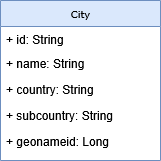
The class has these annotations in order to define necessary metadata (mainly for Elasticsearch purposes):
Document– To mark the class as the Elasticsearch document. Here, it specifies just an index name to define a storage in the Elasticsearch cluster. Note: There are more configuration options, but it's out of the scope of this article.Id– To specify the primary key of the document (usually it should beStringfor NoSQL technology).Field– To specify custom mapping (e.g., data type, data format, for sorting, etc.) when it is necessary. As you can see, there's no need to define it all the time. It's demonstrated here only on thenameattribute.JsonProperty– This annotation is not relevant for Elasticsearch mapping. It's needed by thejackson-dataformat-csvlibrary to support operations with CSV files.
import java.io.Serializable;

import org.springframework.data.annotation.Id;
import org.springframework.data.elasticsearch.annotations.Document;
import org.springframework.data.elasticsearch.annotations.Field;
import org.springframework.data.elasticsearch.annotations.FieldType;

import com.fasterxml.jackson.annotation.JsonProperty;

import lombok.AllArgsConstructor;
import lombok.Data;
import lombok.NoArgsConstructor;

@Document(indexName = City.INDEX)
@Data
@NoArgsConstructor
@AllArgsConstructor
public class City implements Serializable {

	private static final long serialVersionUID = 1L;

	public static final String INDEX = "city";

	@Id
	private String id;

	@JsonProperty("name")
	@Field(type = FieldType.Text, fielddata = true)
	private String name;

	@JsonProperty("country")
	private String country;

	@JsonProperty("subcountry")
	private String subcountry;

	@JsonProperty("geonameid")
	private Long geonameid;

}
More information about mapping details and their usage can be found in the Spring Data reference documentation or the Elasticsearch reference documentation.
Repository
Finally, we need to create a repository serving as an adapter to the Elasticsearch cluster for reading and storing data. For this purpose, we have a CityRepository interface defined as:
- It extends
ElasticsearchRepository(line 5) in order to inherit all common CRUD methods (e.g., fromCrudRepository). We just need to specify the used document type (Cityclass in our case) and the primary key type (Stringas already mentioned). - The repository can be empty (without any method), and it would work for reading and storing data (as already mentioned). However, the
findByCountrymethod is added (line 7) in order to demonstrate the ease of defining a specific search method.
import org.springframework.data.domain.Page;
import org.springframework.data.domain.Pageable;
import org.springframework.data.elasticsearch.repository.ElasticsearchRepository;

public interface CityRepository extends ElasticsearchRepository<City, String> {

	Page<City> findByCountry(String country, Pageable pageable);

}
Elasticsearch Usage
Now, it's time to add some REST endpoints utilizing the previously prepared components to connect to the Elasticsearch. There are three main features demonstrated here:
- Upload data from a CSV file
- Get a city detail
- Search for cities
Upload Data
As the fresh new Elasticsearch created in previous steps is still empty, we need to add some data into it. This data is based on open data from major cities across the world. The world-cities.csv file available here contains approximately. 26k cities (at least when it was downloaded by me last time). Its structure is very simply defined as:
name,country,subcountry,geonameid
les Escaldes,Andorra,Escaldes-Engordany,3040051
Andorra la Vella,Andorra,Andorra la Vella,3041563
...
The key part of the upload feature lies in the service component where an uploadFile method (lines 17-23) parses a CSV file (lines 25–37) and stores the parsed data in chunks (lines 39-50) into the Elasticsearch cluster. We use the saveAll method in our CityRepository in order to store all entities in the chunk altogether. The chunk size is 500 (see BULK_SIZE on line 6).
Most of this processing is out of the scope of this article. The real concern here is storing data in an Elasticsearch cluster realized by repository.saveAll(...) method (line 47).
@Service
@RequiredArgsConstructor
@Slf4j
public class CityService {

	private static final int BULK_SIZE = 500;

	final CityRepository repository;
	final ElasticsearchOperations esTemplate;
	final CsvMapper csvMapper = new CsvMapper();

	final CsvSchema schema = csvMapper
			.typedSchemaFor(City.class)
			.withHeader()
			.withColumnReordering(true);

	public void uploadFile(String csvFileName) {
		log.info("loading file {} ...", csvFileName);
		List<City> csvData = parseFile(csvFileName);
		log.info("{} entries loaded from CSV file", csvData.size());
		storeData(csvData);
		log.info("data loading finish");
	}

	List<City> parseFile(String csvFileName) {
		try {
			var csvFile = Path.of(csvFileName);
			return csvMapper
					.disable(FAIL_ON_MISSING_HEADER_COLUMNS)
					.readerFor(City.class)
					.with(schema)
					.<City>readValues(csvFile.toFile())
					.readAll();
		} catch (IOException e) {
			throw new ElkException(e);
		}
	}

	private void storeData(List<City> cities) {
		final var counter = new AtomicInteger();

		final Collection<List<City>> chunks = cities.stream()
				.collect(Collectors.groupingBy(it -> counter.getAndIncrement() / BULK_SIZE))
				.values();
		counter.set(0);
		chunks.forEach(ch -> {
			repository.saveAll(ch);
			log.info("bulk of cities stored [{}/{}] ...", counter.getAndIncrement(), chunks.size());
		});
	}

}
Of course, there has to be an endpoint to expose the upload feature. The new API is added by uploadFile method into theCityController class as:
@RestController
@RequestMapping(value = CityController.ROOT_PATH, produces = APPLICATION_JSON_VALUE)
@RequiredArgsConstructor
public class CityController {

	static final String ROOT_PATH = "/api/cities";

	final CityService service;

	@PostMapping("/upload")
	@ResponseStatus(code = NO_CONTENT)
	public void uploadFile(String filename) {
		service.uploadFile(filename);
	}

}
We can verify our first REST endpoint here by uploading a CSV file via the POST (HTTP) method on /api/cities/upload path as:
http://localhost:8080/api/cities/upload?filename=<PATH_TO_FILE>/world-cities.csvThe application logs from the data upload look like this:
2025-09-24T08:32:05.653+02:00  ... CityService    : loading file Z:/work/aha/dev/world-cities.csv ...
2025-09-24T08:32:05.755+02:00  ... CityService    : 26467 entries loaded from CSV file
2025-09-24T08:32:06.330+02:00  ... CityService    : bulk of cities stored [0/53] ...
2025-09-24T08:32:06.561+02:00  ... CityService    : bulk of cities stored [1/53] ...
...
2025-09-24T08:32:12.550+02:00  ... CityService    : bulk of cities stored [52/53] ...
2025-09-24T08:32:12.551+02:00  ... CityService    : data loading finished
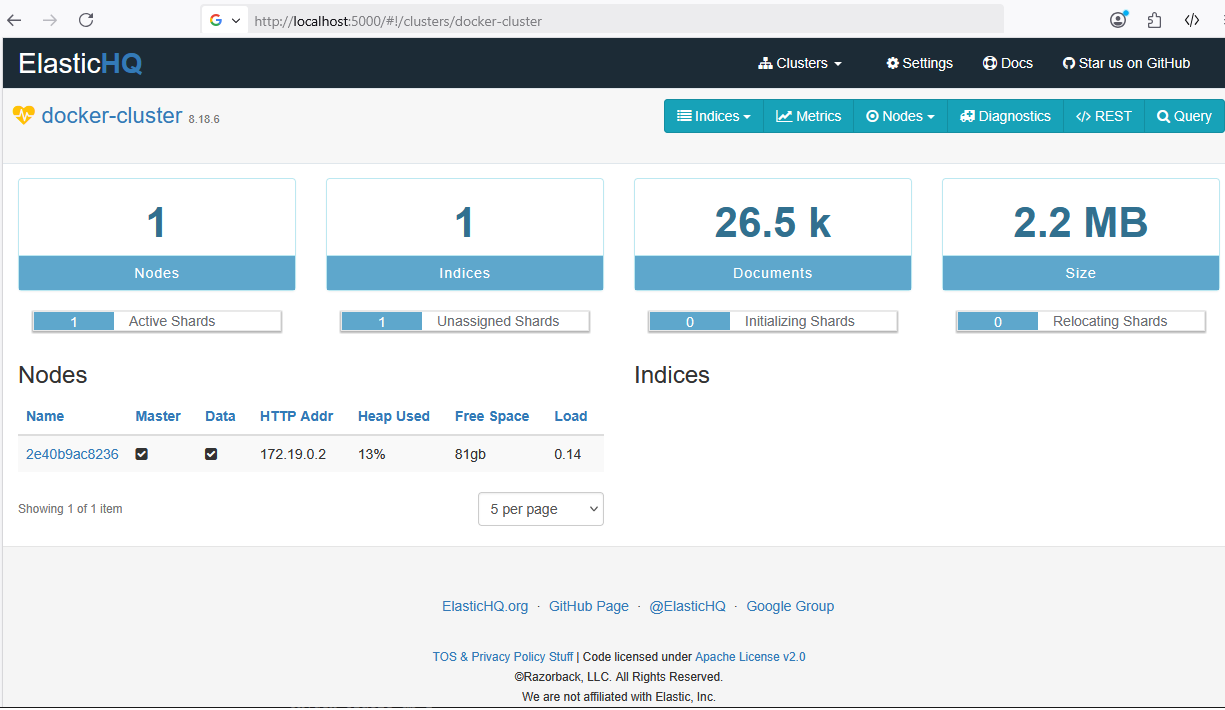
The existence of the uploaded data can also be verified in the ElasticHQ. We can see changes in our Elasticsearch cluster. One new index is added with more than 26k documents.
Retrieve Data
Reading data from our Elasticsearch cluster via Spring Data Elasticsearch is very easy, convenient, and straightforward. It's similar to the usage of Spring Data for any other technology (e.g., JPA or Redis). The article covers retrieving data for:
- Get a city detail based on the given city ID
- Search for cities in the country with static and dynamic queries
Get One City
One of the most important features, when working with data, is getting the document details. We don't need to implement anything on the repository level in order to retrieve a single document requested by its ID. Spring Data provides thefindById method for us in their CrudRepository class..
Our CityService class is straightforward and provides findById method as:
public City findById(String cityId) {
	return repository.findById(cityId).orElseThrow(() -> new ElkException("City with ID=" + cityId + " was not found!"));
}
As it could be mentioned in the CrudRepository class, the findById method returns Optional<T>. Therefore, we need to decide how to handle this situation in our service layer. We just throw an exception when the city instance is not found by the given ID.
In order to expose it as a REST API, we add the getById method in the CityController class as:
- The endpoint is exposed on http://localhost:8080/api/cities/{id} URL (line 1). The desired document ID is passed as
{id}in the path. - The
findByIdmethod is delegated to the service (see line 3).
@GetMapping("/{id}")
public City getById(@PathVariable String id) {
	return service.findById(id);
}
To test our new feature, we can call http://localhost:8080/api/cities/mv9sepkB_odA0NUSFQaT and see the response like this:
{
  "id": "mv9sepkB_odA0NUSFQaT",
  "name": "Beroun",
  "country": "Czechia",
  "subcountry": "Central Bohemia",
  "geonameid": 3079467
}
Note: The used ID was picked up from a find response implemented in the next step.
Find Cities with Static Query
When we want to search cities, the simplest approach is to use a "static" query.
The static query means the defined method in our repository interface. Therefore the search is driven and using all the passed arguments (we cannot change them dynamically). It's very efficient as we don't need to write a single line (we only need to define the desired method correctly). The Spring Data translates the method name into a query implementation automatically for us. More information is available on naming convention page.
In our case, we have the findByCountry method in CityRepository class (see above) like this:
Page<City> findByCountry(String country, Pageable pageable);The rest of the search (service and controller) is straightforward. We extend our CityService class with searchByCountry method as:
public Page<City> searchByCountry(String country, Pageable pageable) {
	return repository.findByCountry(country, pageable);
}
And add searchByCountry method in CityController class as:
@GetMapping("/country/{country}")
public Page<City> searchByCountry(@PathVariable("country") String country, Pageable pageable) {
	return service.searchByCountry(country, pageable);
}
The static search feature (to find all cities, e.g., from the Czech Republic) can be verified on http://localhost:8080/api/cities/country/czechia?sort=name,desc with this output:
{
  "content": [
    {
      "id": "QP9sepkB_odA0NUSFQaS",
      "name": "Žďár nad Sázavou",
      "country": "Czechia",
      "subcountry": "Vysočina",
      "geonameid": 3061695
    },
    ...
    {
      "id": "Sf9sepkB_odA0NUSFQaS",
      "name": "Uherské Hradiště",
      "country": "Czechia",
      "subcountry": "Zlín",
      "geonameid": 3063739
    }
  ],
  "page": {
    "size": 20,
    "number": 0,
    "totalElements": 96,
    "totalPages": 5
  }
}
Search for Cities With Dynamic Query
The static query is very easy to use, but it isn't sufficient in many cases. Sometimes, we need a combination of different arguments, or we want to ignore some argument when it doesn't contain a desired value. The "dynamic query" term is used here when there's a need for adjusting the query according to the desired search criteria (e.g., name or country attribute here).
For the dynamic query feature, we need to add a search method into the CityService class which just wraps and simplifies the real logic provided by the search method located in the ElasticsearchOperations class. Our search method in the CityService class has three steps:
- First, we trigger a
searchHitsmethod (line 3) to search for the data in the Elasticsearch. - Next, the found result is converted from the
SearchHitstoSearchPage(line 4). - Finally, the
SearchPageis converted again, but this time it's converted to the desiredPage<City>type (line 5).
@SuppressWarnings("unchecked")
public Page<City> search(String name, String country, String subcountry, Pageable pageable) {
	var result = searchHits(name, country, subcountry, pageable);
	var searchPage = SearchHitSupport.searchPageFor(result, pageable);
	return (Page<City>) SearchHitSupport.unwrapSearchHits(searchPage);
}
The key part in the search plays searchHits method with this behavior:
- First, a
Queryinstance is built by thebuildSearchQuerymethod (line 4). - Next, we assign the
pageableinstance to the newquery(line 5) in order to restrict our search accordingly. - Finally, we trigger the search on
esTemplateinstance (i.e., theElasticsearchOperationsclass) by passing ourqueryinstance andCity.class(the desired document class).
ElasticsearchOperations esTemplate;

SearchHits<City> searchHits(String name, String country, String subcountry, Pageable pageable) {
	CriteriaQuery query = buildSearchQuery(name, country, subcountry);
	query.setPageable(pageable);
	return esTemplate.search(query, City.class);
}
The buildSearchQuery method (as mentioned above) evaluates all passed arguments (e.g., lines 3-5 for the name argument) and adds the desired expression to the criteria query. Here, we can use expressions like is, contains, and, not, expression, etc. More details on constructing the query can be found in the reference documentation.
private CriteriaQuery buildSearchQuery(String name, String country, String subcountry) {
	var criteria = new Criteria();
	if (name!=null) {
		criteria.and(new Criteria("name").contains(name));
	}
	if (country!=null) {
		criteria.and(new Criteria("country").expression(country));
	}
	if (subcountry!=null) {
		criteria.and(new Criteria("subcountry").is(subcountry));
	}
	return new CriteriaQuery(criteria);
}Note: Of course, we can move the buildSearchQuery logic into CityRepository class. It's just my personal preference to have it here.
The last piece in this feature is extending our controller with the new REST endpoint. Exposing REST API for it in the CityController class is similar to the static query. You can find such code in the search method available below.
@GetMapping
public Page<City> search(@RequestParam(name = "name", required = false) String name,
		@RequestParam(name = "country", required = false) String country,
		@RequestParam(name = "subcountry", required = false) String subcountry, Pageable pageable) {
	return service.search(name, country, subcountry, pageable);
}
The new API for dynamic search can be verified on http://localhost:8080/api/cities?name=be&country=czechia&subcountry=bohemia&size=5&sort=name with this output:
{
  "content": [
    {
      "id": "m_9sepkB_odA0NUSFQaT",
      "name": "Benešov",
      "country": "Czechia",
      "subcountry": "Central Bohemia",
      "geonameid": 3079508
    },
    {
      "id": "mv9sepkB_odA0NUSFQaT",
      "name": "Beroun",
      "country": "Czechia",
      "subcountry": "Central Bohemia",
      "geonameid": 3079467
    },
    {
      "id": "lv9sepkB_odA0NUSFQaT",
      "name": "Brandýs nad Labem-Stará Boleslav",
      "country": "Czechia",
      "subcountry": "Central Bohemia",
      "geonameid": 3078837
    }
  ],
  "page": {
    "size": 5,
    "number": 0,
    "totalElements": 3,
    "totalPages": 1
  }
}
Conclusion
This article has covered the basics of Spring Cloud Elasticsearch usage with Spring Data Elasticsearch 5.5 and Elasticsearch 8.18. We began with the preparation of an Elasticsearch cluster (in development mode) and configured Spring Data in our project. Next, all the important classes used by Spring Data Elasticsearch (e.g., the repository and City document) were created. In the end, we implemented REST endpoints for uploading and searching city data in our Elasticsearch cluster. The complete source code demonstrated above is available in my GitHub repository.
In the next article, the usage of Spring Data Elasticsearch with basic authentication will be covered.
Note: The additional application details can be found in these previous articles:
Opinions expressed by DZone contributors are their own.
Comments