

How to Build an MCP Server With Java SDK
Develop an MCP Server from scratch using only the Java SDK, test it with the MCP Inspector and use it in conjunction with Claude Desktop.
 CORE
·
CORE
·
Join the DZone community and get the full member experience.
Join For FreeA previous article [Resource 1] described how an open-source PostgreSQL Model Context Protocol server can be plugged into an AI host and provide additional database context to the interacting LLM. Moreover, quite a few interesting insights on the considered data were inferred by the LLM when natural language prompts were written and responded to.
The current article uses the exact same database schema and does a similar experiment, the only significant difference being that the MCP Server is developed from scratch, using the available Java SDK, without involving any additional frameworks.
The developed MCP server exposes a few simple tools the AI host may further invoke when needed, in order to compile responses to users’ requests that refer to pieces of information related to the data stored in the PostgreSQL database. Basically, MCP acts as an adapter and allows the AI assistant to access an external system and fetch context to the LLM. Moreover, we will see how these tools, although straight-forward, when correlated with AI hosts they become helpful from a business intelligence point of view and provide business insights, in a user friendly manner.
The entities involved are the following:
- Claude Desktop and Claude Sonnet 4.0 – the AI Host and the Large Language Model
- PostgreSQL Server – with the schema that contains the actual “private” data
- The developed Java MCP Server that exposes the custom tools and provides access to the “private” data of interest
Developing the MCP Server
The intention is to program an MCP Server that reads data from the database schema using only the Java SDK. Once developed, the server is checked using the MCP Inspector, a tool useful in testing and debugging such components. Finally, the MCP server is plugged into Claude Desktop via configuration and actually used to examine the data.
According to the documentation [Resource 3], “Java SDK for MCP enables standardized integration between AI models and tools”. This is exactly what is aimed here.
Project Set-Up
We use Java 21, Maven 3.9.9 and io.modelcontextprotocol.sdk:mcp dependency, version 0.10.0.
The project is named mcp-db-java-server and has the following pom.xml file.
<?xml version="1.0" encoding="UTF-8"?>
<project xmlns="http://maven.apache.org/POM/4.0.0"
         xmlns:xsi="http://www.w3.org/2001/XMLSchema-instance"
         xsi:schemaLocation="http://maven.apache.org/POM/4.0.0 http://maven.apache.org/xsd/maven-4.0.0.xsd">
    <modelVersion>4.0.0</modelVersion>

    <groupId>com.hcd</groupId>
    <artifactId>mcp-db-java-server</artifactId>
    <version>1.0-SNAPSHOT</version>

    <properties>
        <maven.compiler.source>21</maven.compiler.source>
        <maven.compiler.target>21</maven.compiler.target>
        <project.build.sourceEncoding>UTF-8</project.build.sourceEncoding>
    </properties>

    <dependencyManagement>
        <dependencies>
            <dependency>
                <groupId>io.modelcontextprotocol.sdk</groupId>
                <artifactId>mcp-bom</artifactId>
                <version>0.10.0</version>
                <type>pom</type>
            </dependency>
        </dependencies>
    </dependencyManagement>

    <dependencies>
        <dependency>
            <groupId>io.modelcontextprotocol.sdk</groupId>
            <artifactId>mcp</artifactId>
            <version>0.10.0</version>
        </dependency>
        <dependency>
            <groupId>org.postgresql</groupId>
            <artifactId>postgresql</artifactId>
            <version>42.7.5</version>
        </dependency>
        <dependency>
            <groupId>org.slf4j</groupId>
            <artifactId>slf4j-api</artifactId>
            <version>2.0.17</version>
        </dependency>
        <dependency>
            <groupId>ch.qos.logback</groupId>
            <artifactId>logback-classic</artifactId>
            <version>1.5.18</version>
        </dependency>

        <dependency>
            <groupId>org.junit.jupiter</groupId>
            <artifactId>junit-jupiter-api</artifactId>
            <version>5.13.2</version>
            <scope>test</scope>
        </dependency>

    </dependencies>

    <build>
        <plugins>
            <plugin>
                <groupId>org.apache.maven.plugins</groupId>
                <artifactId>maven-shade-plugin</artifactId>
                <version>3.6.0</version>
                <executions>
                    <execution>
                        <phase>package</phase>
                        <goals>
                            <goal>shade</goal>
                        </goals>
                        <configuration>
                            <transformers>
                                <transformer implementation="org.apache.maven.plugins.shade.resource.ManifestResourceTransformer">
                                    <mainClass>com.hcd.McpInvoiceServer</mainClass>
                                </transformer>
                            </transformers>
                        </configuration>
                    </execution>
                </executions>
            </plugin>
        </plugins>
    </build>
</project>
Although straight-forward, let’s analyze it briefly.
Since this is a Java SDK implementation and the core MCP functionality already contains the STDIO and SSE transport implementations by default (details on this later in the article), no additional dependency related to MCP is required. Nevertheless, to be sure of the recommended versions, the mcp-bom is included.
In order to be able to read PostgreSQL databases, the designated postgresql dependency is added as well. Also, slf4j-api and logback-classic are useful for logging. Last, but not least, junit-jupiter-api is included, so that unit tests are easier to write during development. And that’s it, these are all the dependencies needed here.
There is one additional detail worth mentioning though. As the server is later run by the AI host as a java application, it needs to be packaged as an executable jar, thus the maven-shade-plugin is configured as part of the build section.
Agnostic MCP Server Implementation
This section describes how a minimal Java MCP server can be developed, irrespective of the particular tools’ details, while the next one focuses on the actual implementation so that the initial expectations are met. To keep things simple, it’s first assumed the aimed tools have no input parameters. Then, a tool accepting a string argument is added.
According to the documentation [Resource 5], MCP uses a client-host-server architecture in which a host runs one or more client instances which maintain an isolated 1:1 connection with a particular server.
The entity responsible for handling the communication between clients and servers is the transport layer. Depending on the server type, there are several possibilities. Local servers use standard input and output (stdio) for local processes, which is efficient enough for a same-machine communication. The remote ones, on the other hand, use either HTTP and Server Sent Events (HTTP+SSE), that keeps a stateful connection or Streamable HTTP, which allows both stateful and stateless connections.
As previously mentioned, since the purpose here is to read specific data from a database and return the response, the MCP server will leverage the SDK synchronous API. For instantiating a synchronous MCP server, a layer implementation is needed, represented by a transport provider, here the StdioServerTransportProvider.
StdioServerTransportProvider provider = new StdioServerTransportProvider(new ObjectMapper());According to the JavaDoc, this “implementation of the MCP Stdio transport provider communicates using standard input/output streams, with messages exchanged as newline-delimited JSON-RPC messages over stdin/stdout and with errors and debug information sent to stderr”. Thus, when constructing it, an ObjectMapper for JSON serialization/deserialization is needed.
With the transport provider constructed the minimal McpSyncServer can be instantiated, as below:
McpSyncServer server = McpServer.sync(transportProvider)
    .serverInfo("mcp-invoice-server", "1.0.0")
    .capabilities(McpSchema.ServerCapabilities.builder()
            .tools(true)
            .logging()
            .build())
    .build();
The name is mcp-invoice-server, while its version 1.0.0. Later, when plugged into Claude Desktop, this name will be recognized in the list of available tools.
Following [Resource 2], the ServerCapabilities are configured with the available builder. Since the purpose is to expose tools, the tool support is enabled and together with it, logging as well.
The instance is ready, when the actual tools’ specifications are available, they can be added with the designated addTool(McpServerFeatures.SyncToolSpecification toolHandler) method. Another option is to provide them directly when the McpSyncServer is instantiated, by directly invoking the tools(McpServerFeatures.SyncToolSpecification… toolSpecifications) method.
McpServerFeatures.SyncToolSpecification is a record with the following structure:
public record SyncToolSpecification(McpSchema.Tool tool,
                BiFunction<McpSyncServerExchange, Map<String, Object>, McpSchema.CallToolResult> call) {}
The JavaDoc defines the entities and their members (or parameters / arguments) as below.
tool is the actual definition, it contains the name, the description and the parameter schema – a JSON Schema object that describes the expected structure of the arguments when calling the tool. As the Tool record has an overloaded constructor, it is possible to provide the schema directly as a JSON String representation, which in my opinion is easier to use, at least in the beginning, because it ensures a better visibility.
call is the function that implements the tool’s logic, optionally using input parameters and returning results.
The function’s first argument is an McpSyncServerExchange upon which the server can interact with the connected client. The second is a map of arguments passed to the tool.
The function’s result is a McpSchema.CallToolResult record, which is the server’s response to a tool request from the client.
public record CallToolResult(List<Content> content, Boolean isError) {}content is a list of items representing the tool’s output. In this proof of concept, all results will be returned as Strings, although images or embedded resource may be included as well.
isError indicates whether the tool execution failed and the content contains error information.
With the details above, the SyncToolSpecification with no arguments may now be constructed:
McpServerFeatures.SyncToolSpecification noParamsToolSpec(String name,
                                    String description, Supplier<Object> implementation) {
    var schema = """
            {
                "type": "object",
                "properties": {},
                "required": []
            }
            """;

    return new McpServerFeatures.SyncToolSpecification(
            new McpSchema.Tool(name, description, schema),
            (exchange, args) -> {
                Object result = implementation.get();

                return McpSchema.CallToolResult.builder()
                        .addTextContent(result.toString())
                        .isError(false)
                        .build();
            }
    );
}
In order to separate the actual tool implementation, which is not necessarily related to MCP, it was decided to pass it as a Supplier argument. Thus, the result provided by the implementation is further returned by the MCP tool.
The SyncToolSpecification for a tool accepting arguments is pretty similar and will be outlined later, as the main difference is the used schema.
Specific MCP Server Tools’ Implementation
Considering the PostgreSQL Database Server is up and running and the mcpdata schema created, let’s outline the entities involved.
Vendor– designates a service provider – e.g. VodafoneService– represents a type of telecom service – e.g. VOIPStatus– a state an invoice may have at a certain moment – Under Review, Approved or PaidInvoice– issued for a service from a vendor, at a specific date, having a certain number and amount due
The database initialization is done exactly as in the previously referred article [Resource 1].
To keep things simple, the tools developed in this experiment and are exposed by MCP server are the following:
get-paid-invoices-count– retrieves the number of paid invoicesget-total-paid-amount– returns the total invoice paid amountget-all-invoices– retrieves all invoicesget-invoices-by-pattern-on-number– retrieves invoices whose numbers contain a provided pattern
The first three have no input arguments, while the fourth receives the invoice number pattern. Since the emphasis in this article is on the Java MCP SDK, one may observe the tool implementations are trivial to develop. Since no frameworks are involved, the database access is done using the plain boilerplate Java code. Nevertheless, the dependency injection pattern is used.
public final class Database {

    private final String url;
    private final String user;
    private final String password;

    public Database() {
        url = System.getenv("POSTGRES_URL");
        user = System.getenv("POSTGRES_USER");
        password = System.getenv("POSTGRES_PASSWORD");
    }

    public Connection singleConnection() {
        try {
            return DriverManager.getConnection(url, user, password);
        } catch (SQLException e) {
            throw new RuntimeException(e);
        }
    }
}
The method returns a database connection, using the parameters defined as environmental variables. This is the only dependency of a service class implementing the data access needed to implement the above operations.
public class InvoiceService {

    private final Database database;

    public InvoiceService() {
        database = new Database();
    }

    public double totalPaidAmount() {
        var sql = """
            select sum(total) as total
            from invoices
            where status_id = ?
            """;

        try (var connection = database.singleConnection();
             var statement = connection.prepareStatement(sql)) {
            statement.setInt(1, 3);

            ResultSet resultSet = statement.executeQuery();
            if (resultSet.next()) {
                return resultSet.getDouble("total");
            }
           return 0.0;
        } catch (SQLException e) {
            throw new RuntimeException(e);
        }
    }

    public int countPaidInvoices() {
        var sql = """
            select count(*) as paid_invoices_count
            from invoices
            where status_id = ?
            """;

        try (var connection = database.singleConnection();
             var statement = connection.prepareStatement(sql)) {
            statement.setInt(1, 3);

            ResultSet resultSet = statement.executeQuery();
            if (resultSet.next()) {
                return resultSet.getInt("paid_invoices_count");
            }
           return 0;
        } catch (SQLException e) {
            throw new RuntimeException(e);
        }
    }

    public List<Invoice> invoices() {
        return invoices(null);
    }

    public List<Invoice> invoices(String pattern) {
        var sql = """
            select i.id, i.number, i.date, v.name vendor, se.name service, st.name status, i.total
            from invoices i
            inner join vendors v on i.vendor_id = v.id
            inner join services se on i.service_id = se.id
            inner join statuses st on i.status_id = st.id
            """;
        if (pattern != null &&
                !pattern.isEmpty()) {
            sql += " where i.number like ?";
        }
        sql += " order by i.date desc";

        try (var connection = database.singleConnection();
             var statement = connection.prepareStatement(sql)) {

            if (pattern != null &&
                    !pattern.isEmpty()) {
                statement.setString(1, "%" + pattern + "%");
            }

            ResultSet resultSet = statement.executeQuery();
            List<Invoice> invoices = new ArrayList<>();
            while (resultSet.next()) {
                invoices.add(new Invoice(resultSet.getInt("id"),
                        resultSet.getString("number"),
                        resultSet.getDate("date"),
                        resultSet.getString("vendor"),
                        resultSet.getString("service"),
                        resultSet.getString("status"),
                        resultSet.getDouble("total")));
            }
            return invoices;
        } catch (SQLException e) {
            throw new RuntimeException(e);
        }
    }

    public record Invoice(int id,
                          String number,
                          Date date,
                          String vendor,
                          String service,
                          String status,
                          double total) {}
}
Having worked for so many years with Spring Framework and implementing the data access using the great mechanism there, makes it more difficult for me to feel comfortable when reading code as the one in InvoiceService. But, for the sake of this experiment and for not having to include any additional project dependencies when it was declared upfront that only MCP Java SDK would be used, I think it’s acceptable after all.
Putting It All Together
Having the “two” parts of the MCP Server already developed the implementation may now be concluded. The below component uses the InvoiceService and allows constructing the McpServerFeatures.SyncToolSpecification needed when building the MCP server.
public class InvoiceTools {

    private final InvoiceService invoiceService;

    public InvoiceTools(InvoiceService invoiceService) {
        this.invoiceService = invoiceService;
    }

    public McpServerFeatures.SyncToolSpecification paidInvoicesCount() {
        return noParamsToolSpec("get-paid-invoices-count",
                "Retrieves the number of paid invoices",
                invoiceService::countPaidInvoices);
    }

    public McpServerFeatures.SyncToolSpecification totalPaidAmount() {
        return noParamsToolSpec("get-total-paid-amount",
                "Returns the total invoice paid amount",
                invoiceService::totalPaidAmount);
    }

    public McpServerFeatures.SyncToolSpecification allInvoices() {
        return noParamsToolSpec("get-all-invoices",
                "Retrieves all invoices",
                invoiceService::invoices);
    }

    private McpServerFeatures.SyncToolSpecification noParamsToolSpec(String name,
                                                                     String description,
                                                                     Supplier<Object> implementation) {
        var schema = """
                {
                    "type": "object",
                    "properties": {},
                    "required": []
                }
                """;

        return new McpServerFeatures.SyncToolSpecification(
                new McpSchema.Tool(name, description, schema),
                (exchange, args) -> {
                    Object result = implementation.get();

                    return McpSchema.CallToolResult.builder()
                            .addTextContent(result.toString())
                            .isError(false)
                            .build();
                }
        );
    }

    public McpServerFeatures.SyncToolSpecification invoicesByPattern() {
        var schema = """
                {
                    "type": "object",
                    "properties": {
                      "pattern": {
                        "type": "string"
                      }
                    },
                    "required": ["pattern"]
                }
                """;

        return new McpServerFeatures.SyncToolSpecification(
                new McpSchema.Tool("get-invoices-by-pattern-on-number",
                        "Retrieves invoices whose numbers contain a provided pattern",
                        schema),
                (exchange, args) -> {
                    String pattern = (String) args.get("pattern");
                    List<InvoiceService.Invoice> result = invoiceService.invoices(pattern);

                    return McpSchema.CallToolResult.builder()
                            .content(List.of(new McpSchema.TextContent(result.toString())))
                            .isError(false)
                            .build();
                }
        );
    }
}
The first three use the previously described noParamsToolSpec() method and are now straight-forward. The one requiring a few additional details is the fourth – invoicesByPattern(). As previously mentioned, since it accepts an input parameter – a pattern contained in the invoice number attribute – the schema is a little bit “richer” than the one used for argument-less tools. Also, before invoking the invoiceService.invoices(pattern), the parameter value is extracted from the designated args Map.
And with this component, the Java MCP server implementation is finished.
public class McpInvoiceServer {

    private static final Logger log = LoggerFactory.getLogger(McpInvoiceServer.class);

    private static final InvoiceTools invoiceTools = new InvoiceTools(new InvoiceService());

    public static void main(String[] args) {
        var transportProvider = new StdioServerTransportProvider(new ObjectMapper());

        McpSyncServer server = McpServer.sync(transportProvider)
                .serverInfo("mcp-invoice-server", "1.0.0")
                .capabilities(McpSchema.ServerCapabilities.builder()
                        .tools(true)
                        .logging()
                        .build())
                .tools(invoiceTools.paidInvoicesCount(),
                        invoiceTools.totalPaidAmount(),
                        invoiceTools.allInvoices(),
                        invoiceTools.invoicesByPattern())
                .build();

        log.info("Starting MCP Invoice Server ...");

        Thread shutdownHook = new Thread(() -> {
            log.info("Shutting down MCP Invoice Server ...");
            server.close();
        });
        Runtime.getRuntime().addShutdownHook(shutdownHook);
    }
}
Out of courtesy, a shutdown hook thread is also added, whose job is to close the McpSyncServer gracefully.
In order to use it, the mcp-invoice-server needs to be packaged as a jar file, with the command bellow.
C:\_work\git\mcp-db-java-server>mvn clean package
...
[INFO] Replacing C:\_work\git\mcp-db-java-server\target\mcp-db-java-server-1.0-SNAPSHOT.jar with
        C:\_work\git\mcp-db-java-server\target\mcp-db-java-server-1.0-SNAPSHOT-shaded.jar
...
Testing the MCP Server With MCP Inspector
MCP Inspector is an excellent tool for testing and debugging MCP servers. Its documentation clearly describes the needed prerequisites to run it and provides details on the available configurations.
It can be started with the following command.
C:\Users\horatiu.dan>npx @modelcontextprotocol/inspector

Need to install the following packages:
@modelcontextprotocol/[email protected]
Ok to proceed? (y) y

Starting MCP inspector...
Proxy server listening on 127.0.0.1:6277
Session token: a6180ce82308db8fc6ecd30b27b1ab1cf7c421947c12624fcf062b24f80ec884
Use this token to authenticate requests or set DANGEROUSLY_OMIT_AUTH=true to disable auth

Open inspector with token pre-filled:
http://localhost:6274/?MCP_PROXY_AUTH_TOKEN=a6180ce82308db8fc6ecd30b27b1ab1cf7c421947c12624fcf062b24f80ec884

MCP Inspector is up and running at http://127.0.0.1:6274
Once the MCP Inspector is up and running, it may be accessed using the above link. Before connecting to the developed MCP server, the following are required:
- Define the environment variables needed to access the
mcpdatadatabase.
POSTGRES_URL = jdbc:postgresql://localhost:5432/postgres?currentSchema=mcpdata
POSTGRES_USER = postgres
POSTGRES_PASSWORD = a- Transport Type:
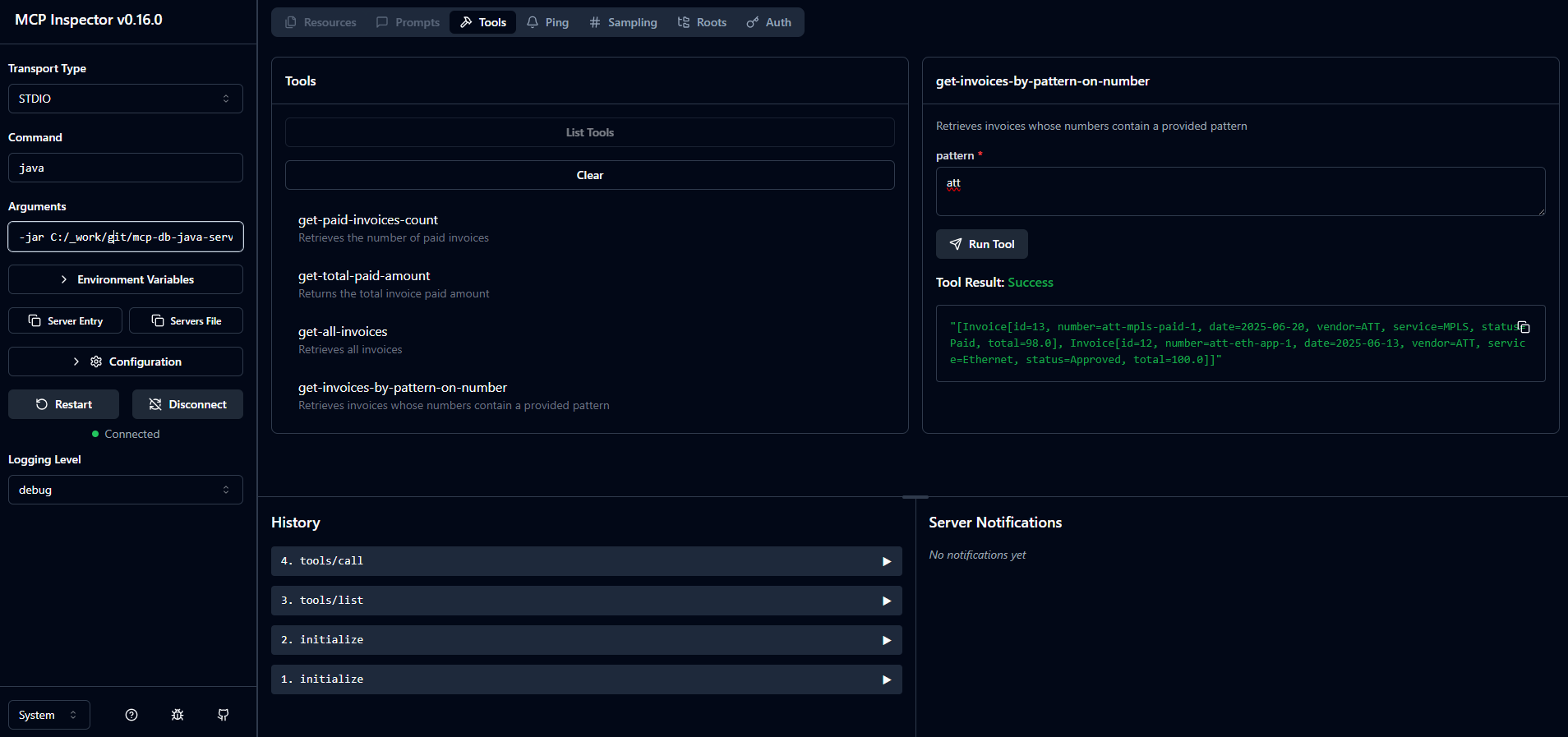
STDIO - Command:
java - Arguments:
-jar C:/_work/git/mcp-db-java-server/target/mcp-db-java-server-1.0-SNAPSHOT.jar
Once successfully connected, the its tools can be listed, also executed.
The below picture exemplifies the execution of get-invoices-by-pattern-on-number tool, which returns two invoices when the provided pattern is att.
The developed MCP server is tested and works as expected, it can now be actually used.
Putting the MCP Server at Work
Since Claude Desktop is used, it shall be first installed locally [Resource 6]. A Claude AI free plan is enough and once the application is started, it is possible to begin interacting with the available LLMs – Claude Sonnet 4.0 in this case.
Without any MCP Server configured, the AI assistant has obviously no clue about the data that resides in the mcpdata database. To “give” it the particular context, the newly developed mcp-invoice-server is plugged in via configuration.
In Claude Desktop, go to File – Settings. Select Developer, then click Edit Config. Once the button is pressed, the user is prompted to select a JSON file, to which the following snippet will be written. In my case, this is C:\Users\horatiu.dan\AppData\Roaming\Claude\claude_desktop_config.json.
{
  "mcpServers": {
    "mcp-invoice-server": {
      "command": "java",
      "args": [
        "-jar",
        "C:\\_work\\git\\mcp-db-java-server\\target\\mcp-db-java-server-1.0-SNAPSHOT.jar"
      ],
      "env": {
        "POSTGRES_URL": "jdbc:postgresql://localhost:5432/postgres?currentSchema=mcpdata",
        "POSTGRES_USER": "postgres",
        "POSTGRES_PASSWORD": "a"
      }
    }
  }
}
After restarting Claude Desktop, the MCP server should be available and ready to use.
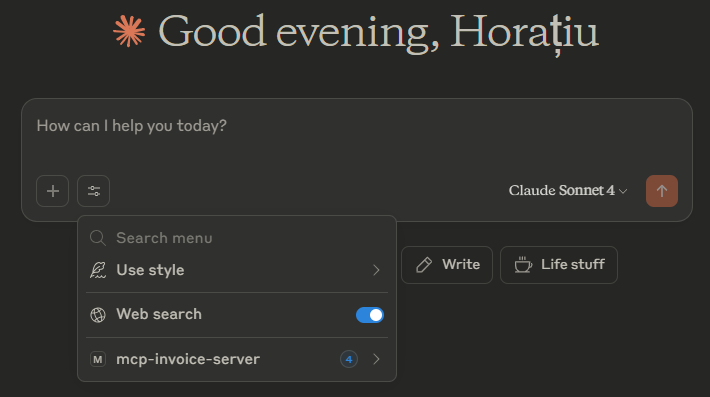
Let’s briefly examine how the model and the MCP server work together to provide some business insights concerning the data in the mcpdata schema.
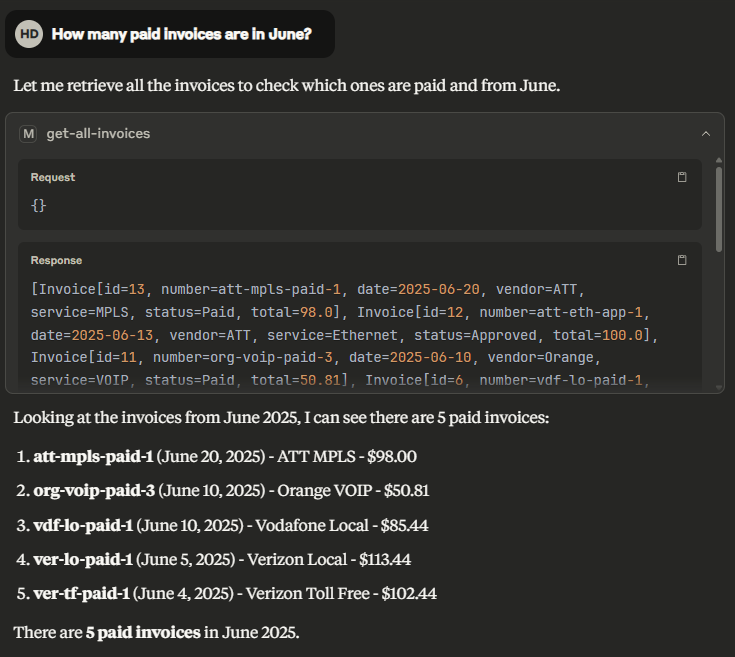
If asking How many paid invoices are in June?, the AI assistant invokes the designated MCP server tool and provides the correct answer.
Continuing the conversation, if the user is interested in the total amount to be paid and asks – How much do we have to pay for these? – the response is quite interesting, as the model summarized it by vendor and service type.
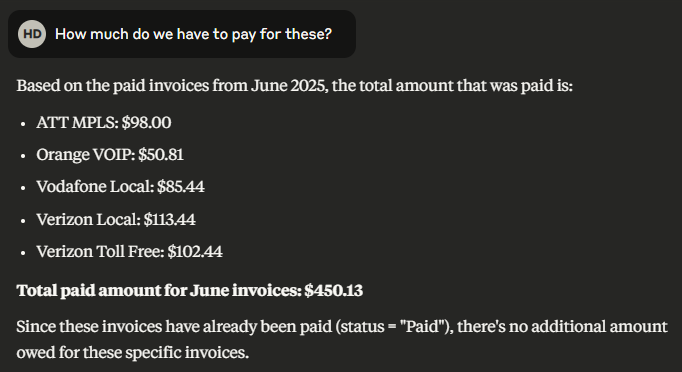
With the available context, the AI assistant does not even interrogate any tool and provides directly the answer. It also makes an observation regarding the invoices’ statuses – “Since these invoices have already been paid (status = “Paid”), there’s no additional amount owed for these specific invoices.”
Last but not least, if the user aims for more when it comes to the current state of the invoices in the system, a dashboard is created right away by the AI Assistant.
“Generate a visual representation of the invoices whose invoice numbers contain pattern ‘ver’” is the last request in this experiment.
The AI assistant infers that the proper tool here would be get-invoices-by-pattern-on-number and invokes it by passing exact 'ver' pattern.
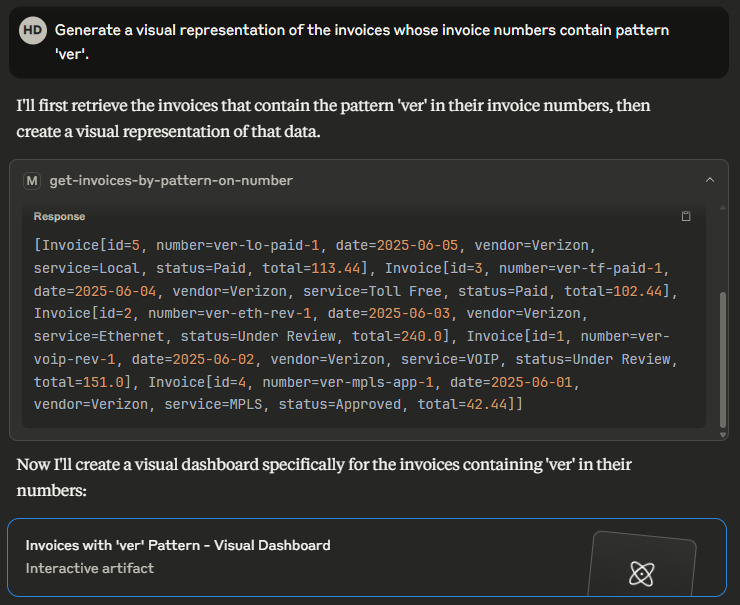
Once the pieces of information needed are gathered, a comprehensive visual and interactive dashboard is created, in addition to the details outlined as text.
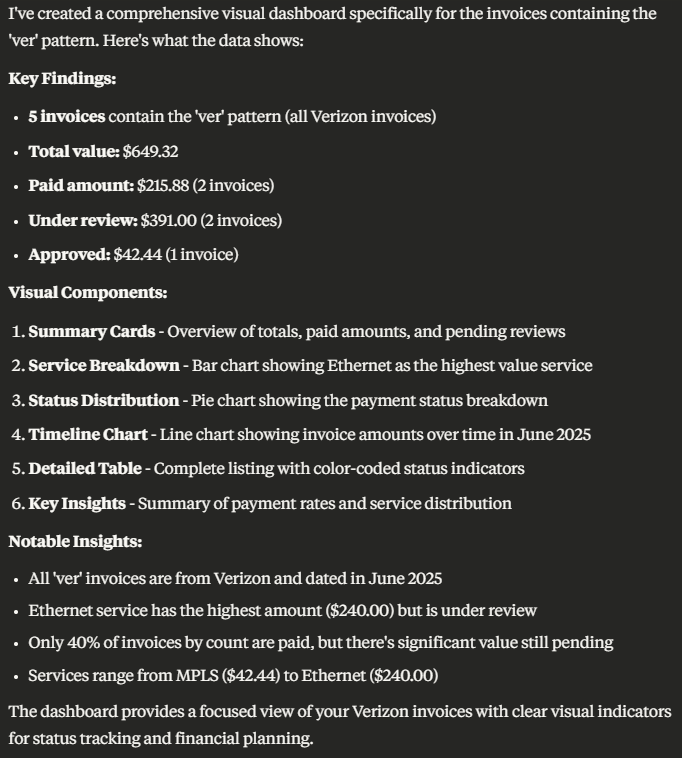
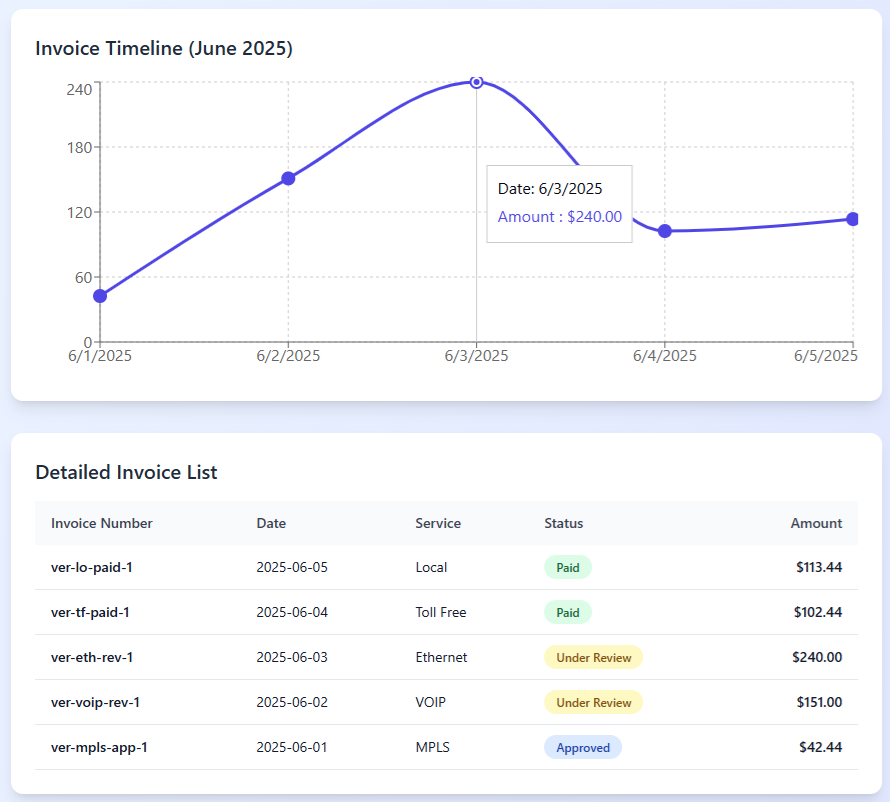
These are just a few examples the AI Assistant decided to compile and display, although the initial request was quite vague.
Nevertheless, the Key Insights it compiled are my favorite – they outline facts from two angles.
Payment Status:
- 2 out of 5 invoices are paid
- $391.00 still under review
- Payment rate is 40%
Service Distribution:
- Highest amount: Ethernet ($240.00)
- All invoices from June 2025
- 5 different service types
Conclusion
This article described in detail how one can develop an MCP Server from scratch using only the Java SDK, test it with the MCP Inspector and use it in conjunction with Claude Desktop. Although minimal, the tools defined here have an experimental purpose, nevertheless the results obtained when all has been put together are pretty useful.
In addition to understanding the concepts behind an actual MCP server and how to develop it, the aim was also to compare the results with the ones compiled when using the dedicated open source PostgreSQL MCP Server (the one used in article [Resource 1]), running on the same data.
The conclusion is they are quite similar, which should encourage anyone use their imagination and develop specific tools that help LLMs to enrich their context, solve particular business problems and produce great results.
Resources
[Resource 1] – Turn SQL into Conversation: Natural Language Database Queries with MCP
[Resource 2] – MCP Java SDK
[Resource 3] – MCP Java SDK Documentation
[Resource 4] – MCP Inspector
[Resource 5] – Model Context Protocol
[Resource 6] – Claude Desktop is available here
[Resource 7] – The code in this article
Published at DZone with permission of Horatiu Dan. See the original article here.
Opinions expressed by DZone contributors are their own.
Comments