

How to Enable HTTPS on a Spring Boot Application
In this article, see a tutorial on how to enable HTTPS on a Spring Boot application.
Join the DZone community and get the full member experience.
Join For FreeHTTPS is a secure version of HTTP designed to provide Transport Layer Security (TLS) [the successor to Secure Sockets Layer (SSL)], the padlock icon in the address bar that establishes an encrypted connection between a web server and a browser. HTTPS encrypts every data packet to transmit in a secure way and protects sensitive data from an eavesdropper or hacker.
You can implement HTTPS by installing the SSL certificates on your web application. You can use either certificate issued by trusted Certificate Authorities (CA) or Self-Signed Certificate.
For development and learning purposes, you could use the Self-Signed Certificate. You would generate the Self Signed Certificate by using the Java Keytool.
Self-Signed Certificate
You can generate the certificates by using Keytool located under the JDK bin folder. For example, C:\Program Files\Java\jdk1.8.0_161\bin. There are two Self-Signed Certificates that are available, as shown below.
- JKS(Java Key Store) is easy to access from your own Java apps. JKS is limited only to Java and not accessible from outside Java.
- PKCS12: Public Key Cryptographic Standards, on the other hand, are a language-neutral way to store encrypted private keys and certificates and have been around long enough that it's supported just about everywhere.
You might also like: All About Spring Boot [Tutorials and Articles]
How to Generate Self-Signed Certificate
Type cmd in the search field in windows to locate the Command Prompt and right-click by Run as administrator. Use the keytool command as below. You could mention the certificate name that you want, shown below.
C:\Program Files\Java\jdk1.8.0_161\bin>
keytool -genkeypair -alias selfsigned_localhost_sslserver -keyalg RSA -keysize 2048 -storetype PKCS12 -keystore ebininfosoft-ssl-key.p12 -validity 3650
The self-signed certificate is protected by password. Enter the password and other details as shown on the below screenshot.
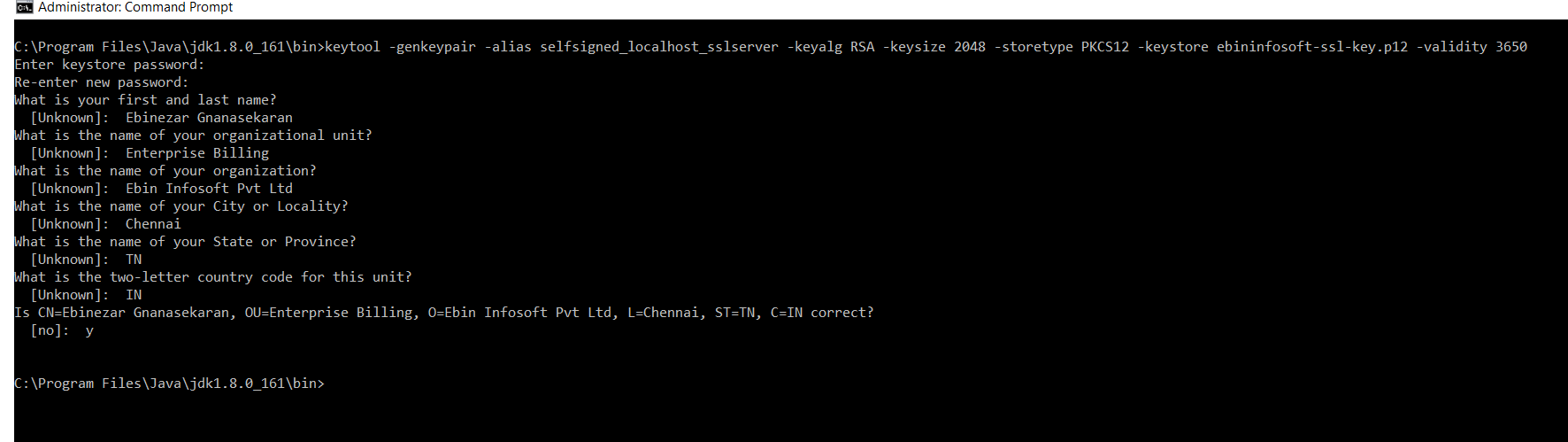
Once you've followed the above steps, the PKS key is created and stored under the JDK Bin folder.
Applying the SSL to Spring Boot Application
- Copy the ebininfosoft-ssl-key from the JDK bin folder and place it under the src/main/resources on your Spring Boot Application.
- Add the SSL Key information into application.properties as shown below.
#SSL Key Info
security.require-ssl=true
server.ssl.key-store-password=India
server.ssl.key-store=src/main/resources/ebininfosoft-ssl-key.p12
server.ssl.key-store-type=PKCS12
POM.XML
Below is the POM.xml that I used to specify the Spring Boot dependency.
xxxxxxxxxx
<dependencies>
<dependency>
<groupId>org.springframework.boot</groupId>
<artifactId>spring-boot-starter-web</artifactId>
</dependency>
<dependency>
<groupId>org.springframework.boot</groupId>
<artifactId>spring-boot-starter-data-jpa</artifactId>
</dependency>
<dependency>
<groupId>com.h2database</groupId>
<artifactId>h2</artifactId>
<scope>runtime</scope>
</dependency>
<dependency>
<groupId>org.springframework.boot</groupId>
<artifactId>spring-boot-starter-test</artifactId>
<scope>test</scope>
<exclusions>
<exclusion>
<groupId>org.junit.vintage</groupId>
<artifactId>junit-vintage-engine</artifactId>
</exclusion>
</exclusions>
</dependency>
</dependencies>
Controller
The simple HomeController used to demonstrate the HTTPS Get request for your reference.
xxxxxxxxxx
import org.springframework.web.bind.annotation.RequestMapping;
import org.springframework.web.bind.annotation.RequestMethod;
import org.springframework.web.bind.annotation.RestController;
("/home")
public class HomeController {
(value = "/", method = RequestMethod.GET)
public String hello() {
return "welcome to spring boot application";
}
}
If you hit the Rest Endpoint (http://localhost:8080/home/) without HTTPS, you would get the below message in the browser.
"Bad Request"
This combination of host and port requires TLS.
If you hit the URL with HTTPS (https://localhost:8080/home/), you would get the response as below.
"Welcome to Spring Boot application."
I have placed the Source code for HTTPS spring boot along with CRUD operation using H2 in GitHub. Please refer the Java code from GitHub https://github.com/ebinezargnan/Billing
Further Reading
Opinions expressed by DZone contributors are their own.
Comments