

How To Find and Fix Goroutine Leaks in Go
Learn how to identify and fix goroutine leaks in Go applications using different techniques like monitoring, profiling, and tools like Prometheus and Grafana.
 CORE
·
CORE
·
Join the DZone community and get the full member experience.
Join For FreeGoroutines are a key feature of the Go programming language, allowing for efficient concurrent programming. However, improper use of goroutines can lead to leaks, where goroutines are left running indefinitely, consuming memory and other resources. This article will guide you through identifying and fixing goroutine leaks, ensuring your Go applications run smoothly and efficiently.
Understanding Goroutine Leaks
A goroutine leak occurs when goroutines that are no longer needed are not properly terminated. This can happen due to several reasons:
- Blocking operations: Goroutines waiting on channels, mutexes, or other synchronization primitives that never release.
- Infinite loops: Goroutines stuck in loops that never exit.
- Dangling Goroutines: Goroutines that are no longer referenced but still running.
Detecting Goroutine Leaks
Detecting goroutine leaks can be challenging, but there are several techniques and tools you can use:
1. Monitoring Goroutine Count
Regularly monitoring the number of running goroutines can help identify leaks. You can use the runtime package to get the current goroutine count:
package main

import (
    "fmt"
    "runtime"
    "time"
)

func monitorGoroutines() {
    for {
        time.Sleep(5 * time.Second)
        fmt.Printf("Number of goroutines: %d\n", runtime.NumGoroutine())
    }
}

func main() {
    go monitorGoroutines()
    // Your application code here
}
2. Profiling With pprof
The pprof package provides profiling tools that can help identify goroutine leaks. You can generate and examine profiles to find goroutines that are not terminating.
package main

import (
    "net/http"
    _ "net/http/pprof"
)

func main() {
    go func() {
        http.ListenAndServe("localhost:6060", nil)
    }()
    // Your application code here
}
Run your application and navigate to this localhost to see a detailed goroutine profile.

3. Static Analysis Tools
Static analysis tools like golangci-lint can help identify common patterns that lead to goroutine leaks.
golangci-lint run4. Monitoring
- Install Prometheus: Follow the official Prometheus documentation to install Prometheus.
- Export Go metrics: Use the
prometheus-go-clientto export Go runtime metrics.
package main

import (
    "net/http"
    "github.com/prometheus/client_golang/prometheus"
    "github.com/prometheus/client_golang/prometheus/promhttp"
)

func main() {
    go func() {
        http.Handle("/metrics", promhttp.Handler())
        http.ListenAndServe(":2112", nil)
    }()
    // Your application code here
}
3. Configure Prometheus: Add a job to your prometheus.yml to scrape metrics from your Go application.
scrape_configs:
  - job_name: 'go_app'
    static_configs:
      - targets: ['localhost:2112']
4.0 Visualize metrics using Prometheus: Use Prometheus UI to visualize the number of goroutines over time and set up alerts if the count exceeds a certain threshold.
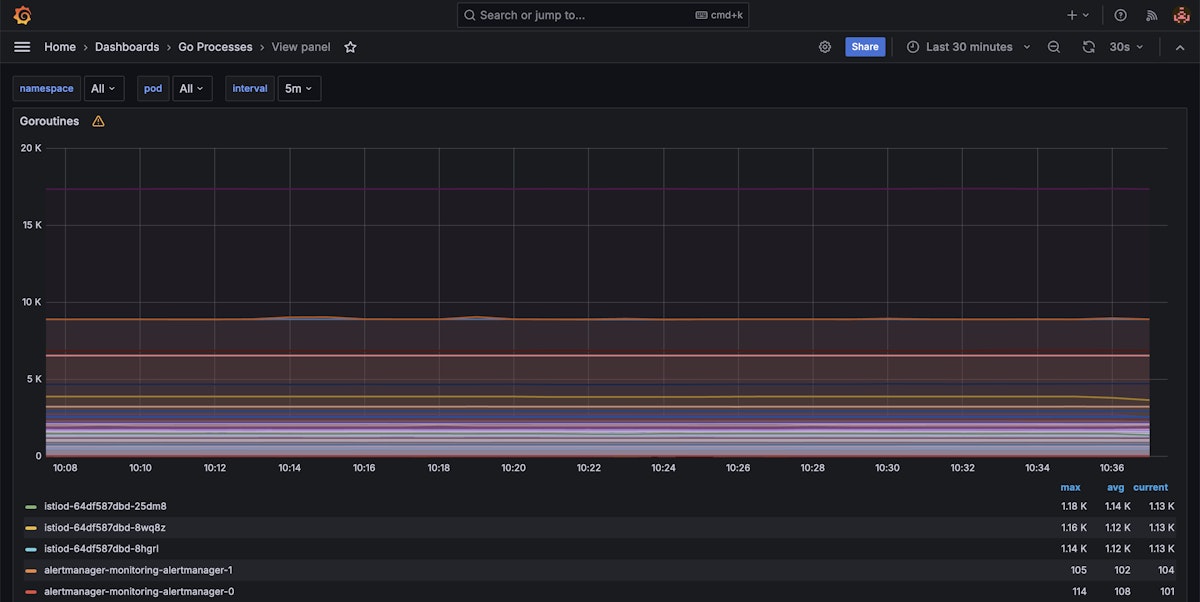
4.1 Visualize metrics using Grafana: Use Grafana to visualize the number of goroutines over time and set up alerts if the count exceeds a certain threshold. Grafana can integrate with Prometheus to provide rich dashboards and alerting capabilities.
- Install Grafana: Follow the official Grafana documentation to install Grafana.
- Add Prometheus data source: In the Grafana UI, add Prometheus as a data source by navigating to Configuration -> Data Sources -> Add a data source, and select Prometheus.
- Import dashboard: You can use pre-built dashboards or create your own. For example, import a Go Processes dashboard from Grafana's community dashboards: Go Processes Dashboard.
- Create alerts: Set up alerts in Grafana to notify you when the number of goroutines exceeds a predefined threshold.
Here's an example of a Grafana dashboard visualizing goroutine metrics:
Fixing Goroutine Leaks
Once you've identified a goroutine leak, the next step is to fix it. Here are some common strategies:
1. Properly Closing Channels
Ensure channels are closed to unblock goroutines waiting on them.
package main

import (
    "fmt"
    "time"
)

func worker(ch <-chan int) {
    for val := range ch {
        fmt.Println(val)
    }
    fmt.Println("Worker done")
}

func main() {
    ch := make(chan int)
    go worker(ch)

    time.Sleep(2 * time.Second)
    close(ch)
    time.Sleep(1 * time.Second) // Give worker time to finish
}
2. Using Context for Cancellation
The context package is a powerful way to manage goroutine lifecycles, allowing you to cancel goroutines when they are no longer needed.
package main

import (
    "context"
    "fmt"
    "time"
)

func worker(ctx context.Context) {
    for {
        select {
        case <-ctx.Done():
            fmt.Println("Worker stopped")
            return
        default:
            fmt.Println("Working...")
            time.Sleep(500 * time.Millisecond)
        }
    }
}

func main() {
    ctx, cancel := context.WithCancel(context.Background())
    go worker(ctx)

    time.Sleep(2 * time.Second)
    cancel()
    time.Sleep(1 * time.Second) // Give worker time to finish
}
3. Avoiding Infinite Loops
Ensure loops within goroutines have proper exit conditions.
package main

import (
    "fmt"
    "time"
)

func worker(done chan bool) {
    for {
        select {
        case <-done:
            fmt.Println("Worker done")
            return
        default:
            fmt.Println("Working...")
            time.Sleep(500 * time.Millisecond)
        }
    }
}

func main() {
    done := make(chan bool)
    go worker(done)

    time.Sleep(2 * time.Second)
    done <- true
    time.Sleep(1 * time.Second) // Give worker time to finish
}
Conclusion
Goroutine leaks can cause your Go applications to use too much memory and run poorly. To avoid this, you can monitor the number of goroutines and use tools like pprof for profiling, and analyzing your code with tools like golangci-lint.
Prometheus and Grafana can help you keep an eye on goroutines and get alerts when something goes wrong. By following these steps, you can find and fix goroutine leaks, keeping your applications running smoothly and efficiently.
Published at DZone with permission of Suleiman Dibirov. See the original article here.
Opinions expressed by DZone contributors are their own.
Comments