

How to Implement Flutter Barcode Scanner From Scratch
Since the new Flutter is not compatible with the old one, I refactored the APIs of the Flutter barcode plugin and added a new method to scan by video stream in real-time.
Join the DZone community and get the full member experience.
Join For FreeAbout two years ago, I wrote an article sharing how to build a Flutter barcode plugin with Dynamsoft Barcode Reader step by step. At that time, Flutter was still under development and only supported Android and iOS. Nowadays, Google has released Flutter 2, which allows developers to build apps for mobile, web, and desktop from a single codebase. If you want to build cross-platform apps, it is worth putting much effort into Flutter from now on. Since the new Flutter is not compatible with the old one, I decide to refactor the APIs of the Flutter barcode plugin and add a new method to support barcode scanning by video stream in real-time.
Flutter Barcode SDK Plugin
In the following paragraphs, I will demonstrate how to develop a Flutter barcode plugin that supports reading barcodes from an image file and image buffer, as well as how to publish the plugin to pub.dev.
Developing Flutter Barcode SDK Plugin With Dynamsoft Barcode Reader
My current plan is to make the plugin work for Android. Therefore, I create the plugin package as follows:
flutter create --org com.dynamsoft --template=plugin --platforms=android -a java flutter_barcode_sdk
To add code for other platforms, such as iOS, to the plugin project, I can run:
flutter create --template=plugin --platforms=ios .
The plugin API is defined in the lib/flutter_barcode_sdk.dart file, which is the bridge between Dart code and platform-specific code. A android/src/main/java/com/dynamsoft/flutter_barcode_sdk/FlutterBarcodeSdkPlugin.java file is generated as the Android entry point.
Dart Code
Let’s get started with lib/flutter_barcode_sdk.dart.
The first step is to define a BarcodeResult class, which contains barcode format, result, and coordinate points, for deserializing JSON data returned from platform-specific code:
xxxxxxxxxx
class BarcodeResult {
final String format;
final String text;
final int x1;
final int y1;
final int x2;
final int y2;
final int x3;
final int y3;
final int x4;
final int y4;
BarcodeResult(this.format, this.text, this.x1, this.y1, this.x2, this.y2,
this.x3, this.y3, this.x4, this.y4);
BarcodeResult.fromJson(Map<dynamic, dynamic> json)
: format = json['format'],
text = json['text'],
x1 = json['x1'],
y1 = json['y1'],
x2 = json['x2'],
y2 = json['y2'],
x3 = json['x3'],
y3 = json['y3'],
x4 = json['x4'],
y4 = json['y4'];
Map<String, dynamic> toJson() => {
'format': format,
'text': text,
'x1': x1,
'y1': y1,
'x2': x2,
'y2': y2,
'x3': x3,
'y3': y3,
'x4': x4,
'y4': y4,
};
}
Create methods decodeFile() and decodeImageBuffer() respectively for picture and video stream scenarios:
xxxxxxxxxx
List<BarcodeResult> _convertResults(List<Map<dynamic, dynamic>> ret) {
return ret.map((data) => BarcodeResult.fromJson(data)).toList();
}
Future<List<BarcodeResult>> decodeFile(String filename) async {
List<Map<dynamic, dynamic>> ret = List<Map<dynamic, dynamic>>.from(
await _channel.invokeMethod('decodeFile', {'filename': filename}));
return _convertResults(ret);
}
Future<List<BarcodeResult>> decodeImageBuffer(
Uint8List bytes, int width, int height, int stride, int format) async {
List<Map<dynamic, dynamic>> ret = List<Map<dynamic, dynamic>>.from(
await _channel.invokeMethod('decodeImageBuffer', {
'bytes': bytes,
'width': width,
'height': height,
'stride': stride,
'format': format
}));
return _convertResults(ret);
}
The _convertResults() function is used to convert List<Map<dynamic, dynamic>> type to <List<BarcodeResult>> type.
Java Code
When invoking Flutter API, the Android onMethodCall() function will be triggered:
xxxxxxxxxx
public void onMethodCall( MethodCall call, Result result) {
switch (call.method) {
case "getPlatformVersion":
result.success("Android " + android.os.Build.VERSION.RELEASE);
break;
case "decodeFile": {
final String filename = call.argument("filename");
List<Map<String, Object>> results = mBarcodeManager.decodeFile(filename);
result.success(results);
}
break;
case "decodeFileBytes": {
final byte[] bytes = call.argument("bytes");
List<Map<String, Object>> results = mBarcodeManager.decodeFileBytes(bytes);
result.success(results);
}
break;
case "decodeImageBuffer": {
final byte[] bytes = call.argument("bytes");
final int width = call.argument("width");
final int height = call.argument("height");
final int stride = call.argument("stride");
final int format = call.argument("format");
final Result r = result;
mExecutor.execute(new Runnable() {
public void run() {
final List<Map<String, Object>> results = mBarcodeManager.decodeImageBuffer(bytes, width, height, stride, format);
mHandler.post(new Runnable() {
public void run() {
r.success(results);
}
});
}
});
}
break;
default:
result.notImplemented();
}
}
Here are the basic steps for platform-specific code:
- Extract the arguments from the Dart framework.
- Process the image data.
- Return the results.
The decodeImageBuffer method is designed for camera stream. To avoid blocking the main thread, I use SingleThreadExectuor to deal with the CPU-intensive work in a worker thread.
Publishing Flutter Barcode SDK Plugin to Pub.dev
Prior to publishing the plugin, you’d better pass analysis by running the command:
flutter pub publish --dry-run
If there is no error, you can publish the package to pub.dev:
flutter pub publish
I have successfully published the Flutter barcode SDK to https://pub.dev/packages/flutter_barcode_sdk.
Flutter Barcode Scanner
Once the plugin is done, it is time to build a barcode scanner app with a few lines of Dart code.
First, I add the Flutter camera plugin and flutter_barcode_sdk to the pubspec.yaml file:
xxxxxxxxxx
dependencies:
camera:
flutter_barcode_sdk:
Then, initialize the camera and barcode reader objects in main.dart:
xxxxxxxxxx
CameraController _controller;
Future<void> _initializeControllerFuture;
FlutterBarcodeSdk _barcodeReader;
bool _isScanAvailable = true;
bool _isScanRunning = false;
String _barcodeResults = '';
String _buttonText = 'Start Video Scan';
void initState() {
super.initState();
_controller = CameraController(
widget.camera,
ResolutionPreset.medium,
);
_initializeControllerFuture = _controller.initialize();
_initializeControllerFuture.then((_) {
setState(() {});
});
_barcodeReader = FlutterBarcodeSdk();
}
The app consists of a camera view, a text widget and two button widgets:
xxxxxxxxxx
Widget build(BuildContext context) {
return Column(children: [
Expanded(child: getCameraWidget()),
Container(
height: 100,
child: Row(children: <Widget>[
Text(
_barcodeResults,
style: TextStyle(fontSize: 14, color: Colors.white),
)
]),
),
Container(
height: 100,
child: Row(
mainAxisAlignment: MainAxisAlignment.spaceEvenly,
children: <Widget>[
MaterialButton(
child: Text(_buttonText),
textColor: Colors.white,
color: Colors.blue,
onPressed: () async {
try {
// Ensure that the camera is initialized.
await _initializeControllerFuture;
videoScan();
// pictureScan();
} catch (e) {
// If an error occurs, log the error to the console.
print(e);
}
}),
MaterialButton(
child: Text("Picture Scan"),
textColor: Colors.white,
color: Colors.blue,
onPressed: () async {
pictureScan();
})
]),
),
]);
}
In the videoScan() function, I invoke startImageStream() to continuously get the latest video frame and call the barcode decoding API:
xxxxxxxxxx
void videoScan() async {
if (!_isScanRunning) {
setState(() {
_buttonText = 'Stop Video Scan';
});
_isScanRunning = true;
await _controller.startImageStream((CameraImage availableImage) async {
assert(defaultTargetPlatform == TargetPlatform.android ||
defaultTargetPlatform == TargetPlatform.iOS);
int format = FlutterBarcodeSdk.IF_UNKNOWN;
switch (availableImage.format.group) {
case ImageFormatGroup.yuv420:
format = FlutterBarcodeSdk.IF_YUV420;
break;
case ImageFormatGroup.bgra8888:
format = FlutterBarcodeSdk.IF_BRGA8888;
break;
default:
format = FlutterBarcodeSdk.IF_UNKNOWN;
}
if (!_isScanAvailable) {
return;
}
_isScanAvailable = false;
_barcodeReader
.decodeImageBuffer(
availableImage.planes[0].bytes,
availableImage.width,
availableImage.height,
availableImage.planes[0].bytesPerRow,
format)
.then((results) {
if (_isScanRunning) {
setState(() {
_barcodeResults = getBarcodeResults(results);
});
}
_isScanAvailable = true;
}).catchError((error) {
_isScanAvailable = false;
});
});
} else {
setState(() {
_buttonText = 'Start Video Scan';
_barcodeResults = '';
});
_isScanRunning = false;
await _controller.stopImageStream();
}
}
The pictureScan() function reads barcode from an image and show the image and results on a picture screen:
xxxxxxxxxx
void pictureScan() async {
final image = await _controller.takePicture();
List<BarcodeResult> results = await _barcodeReader.decodeFile(image?.path);
Navigator.push(
context,
MaterialPageRoute(
builder: (context) => DisplayPictureScreen(
imagePath: image?.path,
barcodeResults: getBarcodeResults(results)),
),
);
}
Finally, I can build and run the app:
flutter run
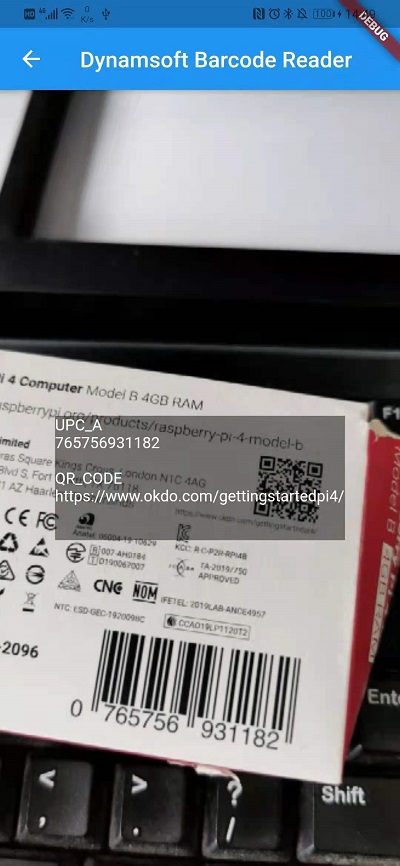
A test for recognizing the 1D barcode and QR code on the Raspberry Pi packing box.
Video Barcode Scan

Picture Barcode Scan
Pre-requisites
iOS, Web, and Windows.
Source Code
Published at DZone with permission of Xiao Ling. See the original article here.
Opinions expressed by DZone contributors are their own.
Comments