

Publishing Flutter Packages to JFrog Artifactory
JFrog centralizes and secures Flutter packages for internal development. This guide outlines the steps to publish Flutter packages to JFrog Artifactory.
Join the DZone community and get the full member experience.
Join For FreeJFrog is a comprehensive package manager designed to centralize and secure all the packages required for internal development within an organization, including applications, libraries, and components. It also facilitates the management of open-source libraries with robust security guardrails. This centralized approach provides enterprises with a structured and transparent method for managing open-source software and securing internally developed packages.
There is well-defined documentation available for incubating JFrog for Java Technology and JavaScript/npm. With respect to the Flutter packages, I didn’t find detailed documentation, so I thought of outlining the scenarios and the resolution that I came up with.
Flutter packages are currently not scanned for security (Software Composition Analysis or Static Application Security Testing) by JFrog. On a side note, GitHub Advance Security also doesn’t provide solutions for scanning.
The picture below gives you an idea of how the Flutter packages are consumed by a Flutter app.

To ensure the Flutter packages are published to the JFrog artifactory, we first need to look at how the current Flutter packages are published. They could be either published as public packages ( in pub.dev) or as private packages (not published in pub.dev but referred to as the GitHub URL in the dependencies section of pubspec.yaml).
Reference about the Flutter package is available here.
How to Configure Flutter Packages in JFrog
Let us consider a scenario where customer_orderbook package is having a dependency on orderbookhistory plugin package. Both of these are not yet hosted or published in JFrog.

In our scenario, these packages are not published in pub dev but are private packages. To publish these packages to JFrog Artifactory, please follow the below steps.
Step 1
Repositories have to be created in JFrog as follows: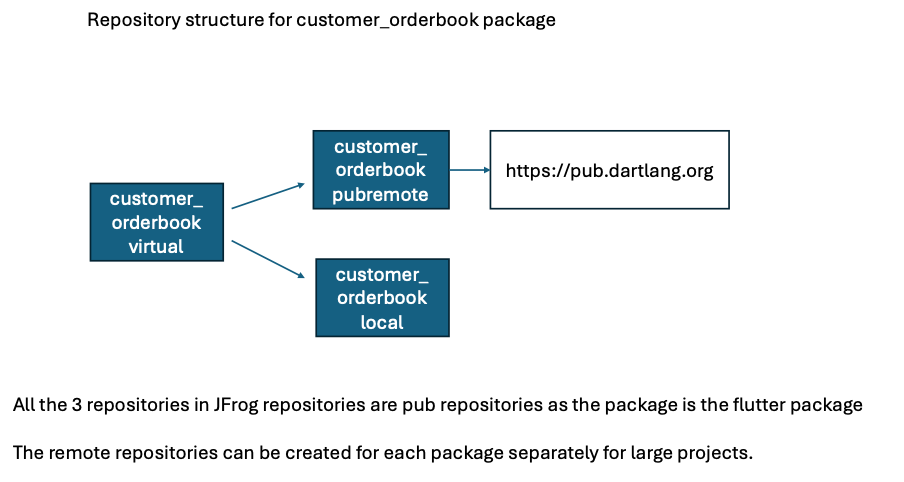
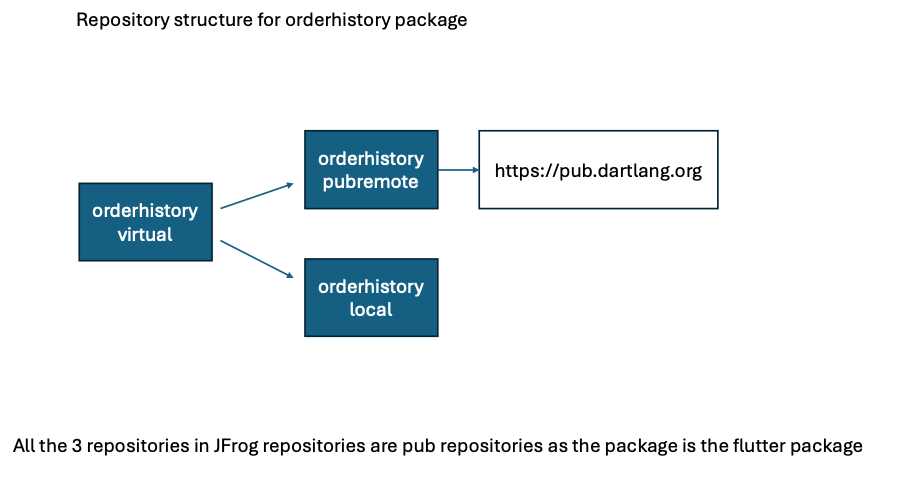
For more information about the steps to create the repositories and the configurations to be set up, please refer here.
Step 2
Updates are to be made in the pubspec.yaml for both packages.
For the orderhistory plugin package, the current pubspec.yaml is as below:
orderhistory pubspec.yaml with no publish_to attribute
name: orderhistory_sdk

description: A wrapper around the order history library

version: 0.6.4

environment:
  sdk: '>=3.1.0 <4.0.0'
  flutter: '>=3.13.9'

dependencies:
  equatable: ^2.0.5
  flutter:
    sdk: flutter
  json_annotation: ^4.8.1

flutter:
  # This section identifies this Flutter project as a plugin project.
  plugin:
    androidPackage: com.sf.plugins.orderhistory_sdk
    pluginClass: OrderHistorySdkPlugin
The above needs to be updated as per the below:
orderhistory pubspec.yaml with the publish_to referring to JFrog virtual repo URL
name: orderhistory_sdk

description: A wrapper around the order history library

version: 0.6.4

publish_to: https://yourorg.jfrog.io/artifactory/api/pub/orderhistory-virtual

environment:
  sdk: '>=3.1.0 <4.0.0'
  flutter: '>=3.13.9'

dependencies:
  equatable: ^2.0.5
  flutter:
    sdk: flutter
  json_annotation: ^4.8.1

flutter:
  # This section identifies this Flutter project as a plugin project.
  plugin:
    platforms:
      android:
        package: com.sf.plugins.orderhistory_sdk
        pluginClass: OrderHistorySdkPlugin
      ios:
        pluginClass: OrderHistorySdkPlugin
After updating the pubspec.yaml, execute dart pub publish either through the workflow or through the terminal, your package will be published to JFrog artifactory.
Now that the orderhistory package is published to JFrog, you will need to make the changes in the customer_orderbook pubspec.yaml as per the below instructions.
For the customer_orderbook plugin package, the current pubspec.yaml is as below:
customer_orderbook pubspec.yaml with the package dependency referring to the git URL
name: customer_orderbook

description: Wrapper for customer order book library

version: 1.0.5

publish_to: none

homepage: https://github.com/yourorg/customer_orderbook

environment:
  sdk: '>=3.1.2 <4.0.0'
  flutter: '>=1.17.0'

dependencies:
  orderhistory_sdk:
    git:
      url: ssh://[email protected]/yourorg/orderhistory_sdk.git
      ref: 0.6.4
  dio: ^5.4.3+1
  equatable: ^2.0.5
  flutter:
    sdk: flutter
  logging: ^1.2.0

flutter:
The above needs to be updated as per the below:
customer_orderbook pubspec.yaml with the package dependency referring to the Artifactory
name: customer_orderbook

description: Wrapper for customer order book library

version: 2.0.4

publish_to: https://yourorg.jfrog.io/artifactory/api/pub/customer_orderbook-virtual

homepage: https://github.com/yourorg/customer_orderbook

environment:
  sdk: '>=3.1.2 <4.0.0'
  flutter: '>=1.17.0'

dependencies:
  orderhistory_sdk:
    hosted:
      name: orderhistory_sdk
      url: https://yourorg.jfrog.io/artifactory/api/pub/orderhistory-lib-virtual
    version: ^0.6.4
  dio: ^5.4.3+1
  equatable: ^2.0.5
  flutter:
    sdk: flutter
  logging: ^1.2.0

flutter:
Now, when you execute dart pub publish, the customer_orderbook package will be published to JFrog Artifactory.
Step 3
After completing steps 1 and 2, the customer orderbook package can be imported by any Flutter app.
Conclusion
In conclusion, while JFrog provides a centralized and secure solution for managing internal and external packages, it is important to note that Flutter packages are currently not supported by JFrog XRay for security scanning. Despite this limitation, following the outlined steps can still streamline the Flutter development process and ensure efficient package management. This approach enhances the development workflow and provides a structured method for maintaining and distributing packages within the enterprise.
Opinions expressed by DZone contributors are their own.
Comments