

How to Turn Your GitHub Page Into a Personalized Resume
It's incredibly easy to get your own GitHub CV. In this article, Rob Hinds explains the process behind making his and explains how you can make your own.

Join the DZone community and get the full member experience.
Join For FreeA little while ago, I decided that I wanted to update my CV. I figured that given I am in tech, it made sense for my CV to be online. I was aware of GitHub Pages, which give you a nice-looking URL. This seemed like a perfect location for me to put my tech CV.
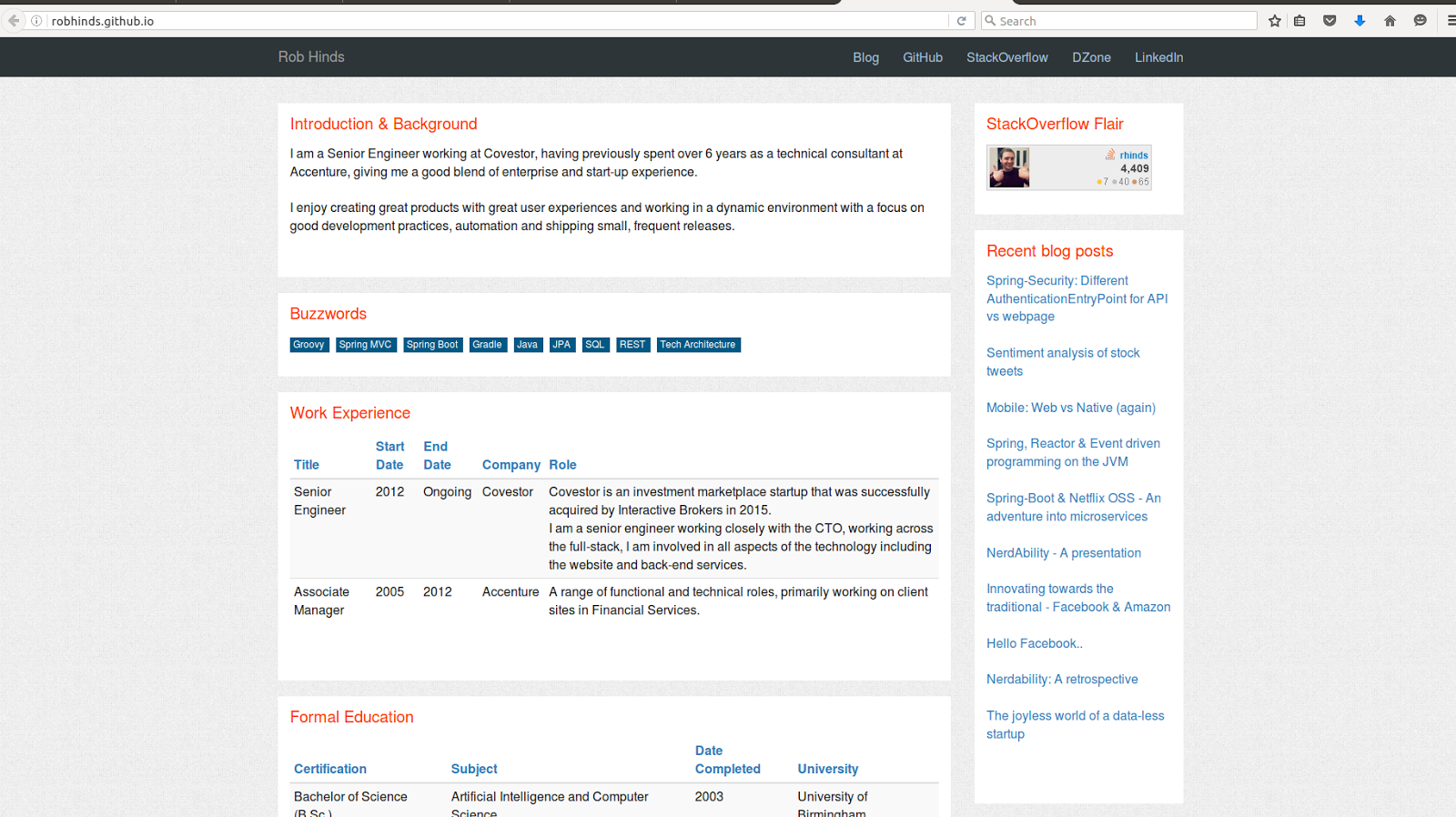
http://robhinds.github.io/
Once I had it looking pretty decent and had updated to modern Bootstrap styling so that it was fully responsive, I thought I would stick it on GitHub as a GitHub page. GitHub provides support for everyone to have a free hosted page with normal HTML, JS resources, etc. (which is pretty nice of them!) and gives you a nice, share-able URL like http://{username}.github.io.
While reading about GitHub pages, I noticed that they have native support for Jekyll (a static HTML generator tool for building websites), which is when I had my second realisation of the day: I could make my CV open-source-able by making it a configurable Jekyll projects that lets users just update some config in their GitHub account, and hey presto — they have a nicely styled, personalised tech CV!
So I started porting it over to Jekyll, which just involved moving the configurable, user-specific items into a config file (_config.yml) and then breaking the HTML sections into fragments to make it more manageable to understand what is going on. The idea of Jekyll is pretty straight-forward. It is just a simple tokenized, template approach to putting together static HTML output. However, it does work well and I really didn't find myself wanting for anything in the process. The GitHub native support was also really nice because all I needed to do was just upload the source of the project to my GitHub account and GitHub handled the build and serving of the site out of the box!
# Site settings
title: Rob Hinds
twitter_username: rob_hinds
name: Rob Hinds

#User specific content
#Links that will appear in the navbar
primarylinks:
 - title: Blog
   url: http://automateddeveloper.blogspot.com/
 - title: GitHub
   url: https://github.com/robhinds
 - title: DZone
   url: https://dzone.com/users/899489/rhinds.html

#Any buzzword skills you want to include
skills:
 - Groovy
 - Spring MVC
 - Spring Boot

#Blogfeed is optional - including this will add JS to call the feed and populate blog list
blogfeed: http://automateddeveloper.blogspot.com/feeds/posts/default

#Work experience is required
roles:
 - title: Senior Engineer
   start: 2012
   end: Ongoing
   employer: Covestor
   description: Covestor is an investment marketplace startup that was successfully acquired by Interactive Brokers in 2015. <br/> I am a senior engineer working closely with the CTO, working across the full-stack, I am involved in all aspects of the technology including the website and back-end services.

#Education is required
education:
 - level: Bachelor of Science (B.Sc.)
   date: 2003
   subject: Artificial Intelligence and Computer Science
   school: University of Birmingham

#This section is optional (as is the image link below)
coursera:
   profileurl: https://www.coursera.org/user/i/c6362b4056f755a04bef6a791a62102b
   courses:
    - title: Functional Programming Principles in Scala
      link: https://www.coursera.org/course/progfun
      optionalimage: https://d1z850dzhxs7de.cloudfront.net/topics/progfun/small-icon.hover.png
      date: September 16, 2013

#List of interesting Github repo/projects to include - optional
github:
 - robhinds/twitter-sentiment-analysis
 - robhinds/spring-reactor-twitter
 - robhinds/microservices

#Stackoverflow flair is optional
stackoverflow:
   profileurl: http://stackoverflow.com/users/258813/rhinds
   flairimageurl: http://stackoverflow.com/users/flair/258813.png

#Mobile apps section is optional
apps:
 - name: Chuck the Quiz
   platform: Android
   url: https://play.google.com/store/apps/details?id=com.tmm.android.chuck&feature=search_result#?t=W251bGwsMSwxLDEsImNvbS50bW0uYW5kcm9pZC5jaHVjayJd
   description: A basic early Android app (open sourced)

#An additional info freetext section is optional at the bottom of the page - can be text or HTML
additionalinfo: |
   <strong>JVM</strong>: I am experienced in a variety of Java API’s and frameworks. I have recently worked with Spring 4, Spring Boot, JPA (Hibernate and EclipseLink) in addition to others.  In my current role Groovy is the primary language used - and I am familiar with many of the languages features and quirks (including writing <a target='_blank' href="https://dzone.com/articles/functional-programming-groovy">Functional Programming style groovy</a>).
And that's all that the configuration it takes! The YAML format is pretty readable; it largely just works with indenting. Hopefully, after taking a look over the nested sections of data, it's fairly easy to understand how you can modify parts to make it customizable.
You can see my GitHub CV page here. Out of the box, you can configure lots of aspects: custom text blocks, key skills, blogs, apps, GitHub projects, StackOverflow, etc.
How Can You Have a Custom GitHub CV?
It really is super simple to get your own GitHub CV.
- Create a GitHub account (if you don't already have one)
- Go to the project repository and fork the repository.
- Change the name of the repository (in the settings menu) to {{yourusername}}.github.io.
- Edit the /_config.yml file in your repository. It should be pretty straight-forward as to what the links and details are that you need to add.
- Visit your new profile page ({{yourusername}}.github.io) and start sharing it!
Published at DZone with permission of Rob Hinds. See the original article here.
Opinions expressed by DZone contributors are their own.
Comments