

Identity in Action
A practical guide to SSO migration covering risks, MFA, phased rollout, and governance to ensure secure identity transitions without disruption.
Join the DZone community and get the full member experience.
Join For FreeSwitching from one single sign-on (SSO) vendor to another is a complex process that involves more than just changing technologies. This is a high-stakes identity operation that impacts security, user experience, following the rules, accessing applications, and keeping things running smoothly. It's not the same as moving a reporting tool or a collaboration platform because SSO is at the front door of every application in your environment. If you set it up wrong, everything will stop working.
But the biggest danger of SSO migrations is not that they won't work. The little things that go wrong are the most annoying
- Users being locked out of apps that are important to the business
- Accounts being left alone that were never deprovisioned
- MFA enrollments disappearing without a word and
- Helpdesk queues are getting longer on the morning of cutover because there was no communication about the change.
This guide discusses the best ways to move to cloud SSO and the most important things to keep in mind. It discusses everything from getting the identity estate ready for the move of integrations to phased rollout strategies, making the user experience as smooth as possible, and planning for MFA migration.
Why Businesses Change SSO Providers
Companies don't usually change their SSO platforms on a whim. One of the following things usually makes it happen:
- Acquisition of a vendor or announcement of the end of a product's life.
- Cost consolidation or figuring out how to use enterprise licenses.
- Standardizing platforms under a broader cloud strategy.
- Requirements for compliance or regulation that the current business can't meet.
- Issues with scalability, performance, or missing features in the current platform.
- A merger or acquisition that introduces a second identity domain.
Whatever the reason, migration causes compounding risk since SSO is foundational infrastructure, not an individual application.
3 Types of Migration Approaches and Their Differences
There are three main ways to move to SSO, and each one has its risks and effects on governance.
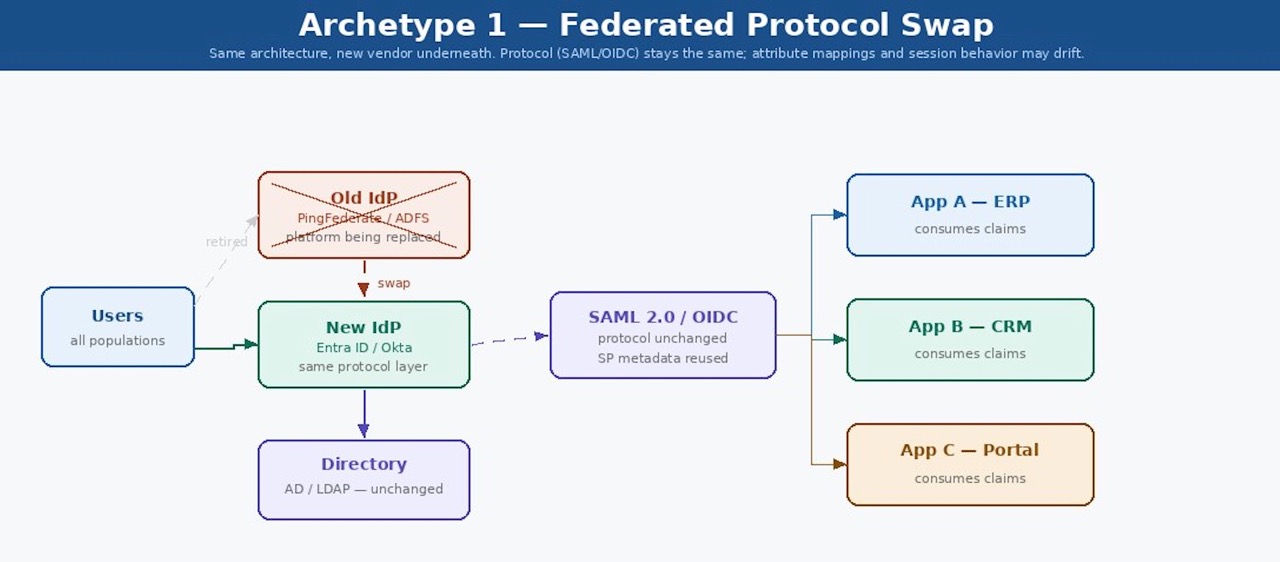
Federated Protocol Swap
Retain the same IdP architecture but replace the vendor platform underneath. For example, moving from PingFederate to Entra ID External Identities. The protocol (SAML, OIDC, SCIM) may remain the same, but attribute mappings, claim transformations, and session behaviors differ in ways that are often not clear until something breaks in production.
Full IdP Replacement
The old IdP is completely removed, and a new one is put in its place. Need to set up, test, and cut over every connection with a service provider (SP) again. This type has the most risk, and it's also the one that most businesses don't consider.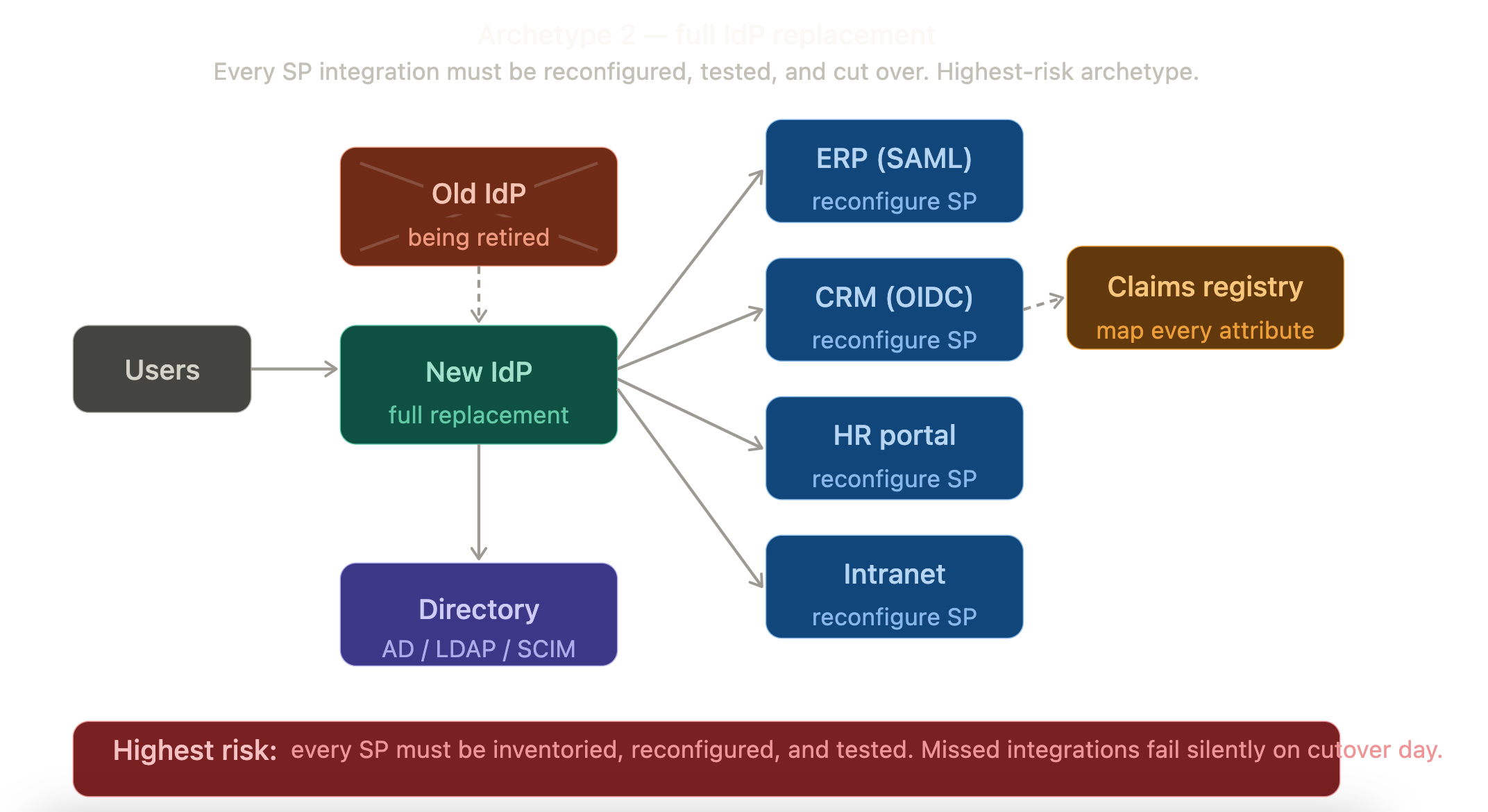
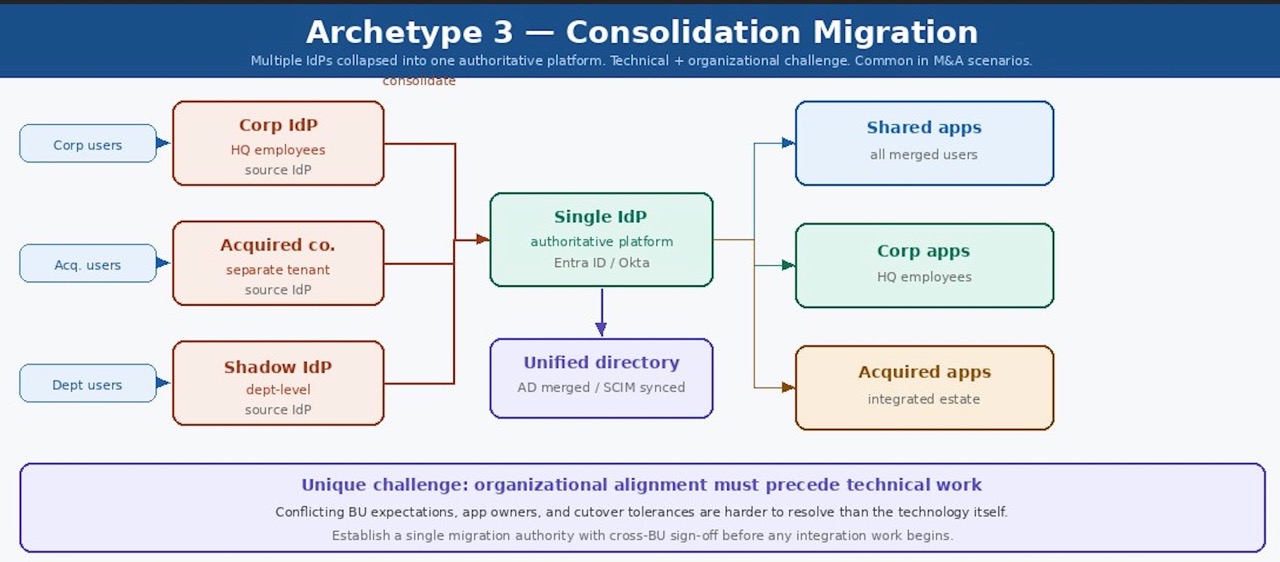
Consolidation Migration
A single authoritative platform brings together many IdPs. Such an event can happen when companies merge or acquire another. There are technical and organizational problems, such as different business units having different app owners, SLAs, and levels of tolerance for disruption. Governance alignment needs to happen before any technical work can begin.
Migration Process: The 7 Steps
- Audit and clean up
- Plan and Prepare
- MFA Migration
- Communication Planning
- Phased Rollout
- Governance Consideration
- Decommission and close out

Step 1: Audit and Clean up
Most organizations rush, ignore, and migrate everything, including unused applications, inactive users, orphaned accounts, and integrations that have remained unused for three years. These don't break, but leave a security risk.
Following validations reduces testing and inventory.
Create a complete, clean list of applications:
- Validate against the CMDB or application catalog.
- Validate apps being used.
- Validate access logs from SIEM.
- Validate against IGA platforms.
- Reduce redundant applications.
Create a complete, clean list of valid users:
- Active users.
- Exclude accounts with no activity for 90 days.
- Exclude dormant accounts whose passwords were never changed.
- Validate against IGA platforms and HR systems.
Mark the unused applications for the decommissioning process. Note down the protocols used (SAML, OIDC, WS-Federation, or legacy), application owners, attributes and claims, MFA requirements, CA policies, and session time-out configurations.
Step 2: Plan and Prepare
Every application that relies on SSO consumes identity attributes passed in SSO protocols. New IdPs rarely use the same attributes and often have case-sensitive and format changes. These mismatches cause silent authentication failures and will be extremely difficult to diagnose during cutover.
Application Metadata
- Prepare the claims transformation registry.
- Confirm the case and formats.
- Validate transformation rules.
Redirect URLs
For each application, configure a transparent redirect from the legacy IdP login URL (or intranet homepage) to the new IdP's login endpoint. The user will not experience major changes. The only change a user would notice would be the new MFA prompt.
Rollback Process
- Identify when you should roll back.
- Who will be able to make the rollback decision?
Rollbacks generally occur in the following use cases:
- The rate of successful authentications drops below 95%.
- Validate SSO failures for major applications.
- More calls to the help desk than usual during the first 2 days of migration.
Migration go-live
- Documentation regarding new login flow end-to-end
- Plan for extended staff during the migration.
- Validate helpdesk access to the new platform.
- Identify and set up escalation contacts for issues that the helpdesk cannot resolve.
Step 3: MFA Migration
Prepare a complete inventory of existing MFA enrollments that includes
- How many users have MFA enrolled vs. password only?
- What factors are in use?
- Authenticator Apps – Need to re-enroll
- SMS – Same phone number and email can be used.
- Hardware token – FIDO2/WebAuthn keys can be reused if the new vendor supports it
- Biometrics – Need to re-enroll.
- How many and which users have only a single factor enrolled?
Follow the steps for re-enrollment:
- Open the self-service enrollment portal.
- Phone numbers and emails can be reused (since they remain the same).
- Send advance communications at least two weeks out, explaining what will change and why.
- Track re-enrollment completion rates by department and group.
- Send follow-up emails, including deadlines.
- Set up a plan to re-enroll privileged accounts.
Step 4: Communication Plan
Communication is a major step in the migration process and should be tracked as a separate workstream, treated with its timeline, owners, deadline, and success metrics.
There are three different audiences involved in SSO migration.
- End users who simply need to know what will change and what to do.
- Helpdesk and IT staff who need operational readiness confirmations.
- Stakeholders who need status updates and risk visibility.
Major email templates include:
- General Updates
- MFA-Enrollment Notices
- Cut Over Day notification
Step 5: Phased Rollout
Never perform a cutover for the entire organization. Instead, choose a phased rollout. This reduces risk, helps validate configurations in production with real users and real traffic, and provides time to identify issues before affecting most of the organization.
- First Phase—Technology users
- Internal IT staff.
- Identity administrator.
- Helpdesk personnel.
- power users.
- Second Phase - High-frequency application users like
- ERP applications
- CRM applications
- Collaboration platform
- BI tools
- Third Phase—General user population
- Lower-risk departments
- Exceptions and low-activity users
- Contractors
- Users who log in very less
- Third-party users
Step 6: Governance Considerations
To ensure successful migration and validations, consider the following governance aspects:
Changes to IGA Solutions
- JML changes
- Provisioning accounts in IDP with required attributes for SSO claims.
- Disabling or deletion of accounts during terminations.
- User transfers: changes to account attributes and group memberships.
- Changing birthright roles
- Update with new SSO groups.
- Cleanup of legacy vendor applications.
Audit Log Monitoring
- Onboard logs from new vendor to SIEM
- Set up alerts for notifications, including
- Authentication failures
- CA policy failures
- Password failures
- Token expiration
Non-Human Identities
- Create a separate inventory of NHA accounts and migrate their credentials to the new system.
- These include accounts with no owners.
Step 7: Decommission and Close Out
The process can move forward once all the checks are done and the MFA enrollments are at acceptable levels. Monitor the new system for 30 days and plan for the decommissioning of the old SSO solution.
Conclusion
SSO is the authentication layer for all the applications in the organization. Performing migration without a proper plan includes risk.
Most companies follow one or a combination of the above-described approaches. Adhering to a proper plan with communication and the right strategies will never make you think about rollback strategies.
Opinions expressed by DZone contributors are their own.
Comments