

Why Incomplete Documentation Is a Security Vulnerability in SaaS
Security isn’t just firewalls and tools — bad documentation can cause breaches. Treat docs like code, keep them consistent, and automate updates to stay secure.
Join the DZone community and get the full member experience.
Join For FreeMany SaaS teams pay more attention to encryption, firewalls, and compliance checks. They often overlook an essential asset: documentation.
Documentations may not be as exciting as a new firewall or security tool. However, unclear, outdated, or incomplete setup guides, API references, and internal runbooks can lead to security gaps.
Imagine this: An internal guide casually says, “Set up your S3 bucket (Amazon storage) for access,” but does not explain the correct permissions and what should be avoided. If a poorly configured bucket causes a data leak, it will be too late before your security team realizes the doc was the problem.
This example isn’t just a hypothetical case; research shows 31% of organizations link cloud data breaches to human error. Poorly written documentation isn’t just inconvenient; it creates hidden security risks. In this article, I’ll explain the risk of improper documentation and how SaaS teams can make their docs clear, consistent, and security-focused.
What Security Risks Hide in Documentation?
When people think of SaaS security risks, documentation barely gets a mention. Poor documentation is just as critical as an unpatched vulnerability. Mistakes in documentation are often the source of improper cloud configuration. According to IBM’s Cost of a Data Breach Report, cloud misconfiguration is the most common attack vector after phishing and stolen credentials.
Let’s take a look at the most common risks hiding in technical documentation:
1. Poorly Explained Instructions
Improper setups happen when documentation instructions are either too general or too hard to understand. If a guide instructs users to“Enable Access” without setting clear boundaries, engineers may unintentionally use settings that are too open, leaving vital resources exposed.
2. Outdated Methods
The SaaS environment changes fast, and it is dangerous to trust outdated guides. For example, a guide may instruct an engineer to use an old encryption protocol or an API that’s no longer supported. This leaves a false sense of security; meanwhile, vulnerabilities remain unaddressed. If one engineer uses outdated measures, it can cause risks that affect the whole team.
3. Missing Steps
When documentation skips specific steps, like instructions, permissions validation, or security checks, it forces engineers to do guesswork. Incomplete documentation doesn’t just waste time; it poses security risks. Even well-intentioned guesses can still introduce vulnerabilities.
4. Inconsistent Wording
Engineers can get instructions wrong when different documents use different words for the same method. For example, one document calls it “root access” while another calls it “admin rights”. A simple wording inconsistency can create security gaps.
Using inconsistent words in documentation is a problem because:
- Engineers can misunderstand terms and give too many permissions
- It can cause improper setup to spread across systems, affecting several services
- Security checks and audits become unreliable and confusing
- Inconsistent terms can slow down incident response or cause mistakes
Inadequate documentation doesn’t just frustrate engineers — it also opens the doors for cyber attackers.
Key Findings from Industry Reports
Poor documentation rarely draws immediate attention, and that is precisely what allows it to fuel many cloud security incidents quietly. This outline highlights key reports from respected sources that identify misconfigurations and human errors as primary causes of security vulnerabilities.
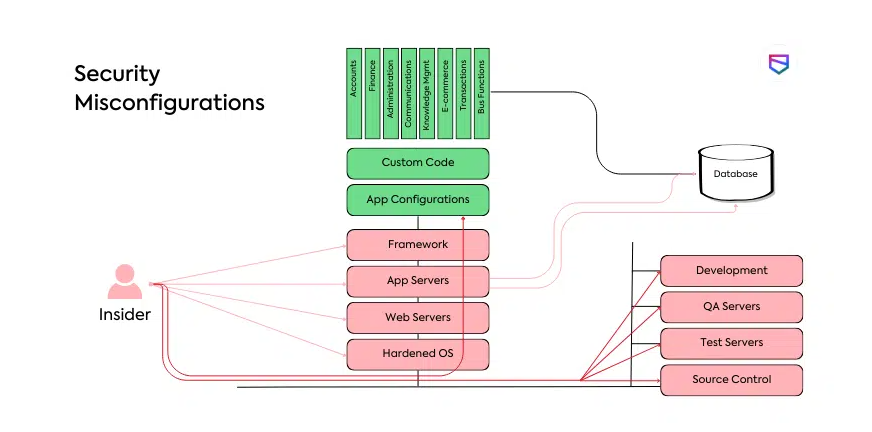
1. Check Point – 2025 Cloud Security Report
This report from Check Point states that 61% of organizations reported a cloud security incident, with misconfiguration being the leading cause.
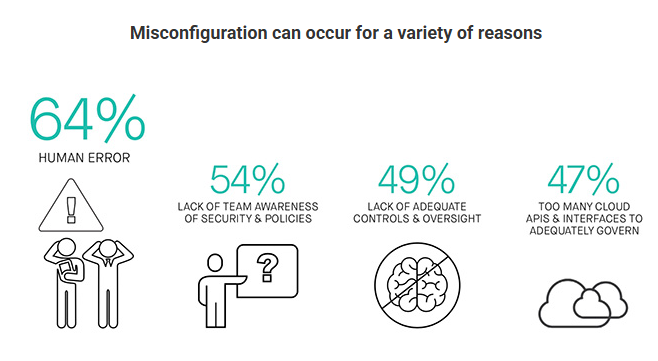
2. IBM Security-2025 Cost of a Data Breach Report
According to IBM’s Cost of a Data Breach report, 26% of data breaches were caused by human errors.
How Poor Documentation Slows Down Incident Response in SaaS
When a security breach occurs, every second is important. However, if documentation is incomplete or outdated, it only slows down response from teams, and the damage becomes worse.
Here is how poor documentation can turn a manageable incident into a costly disaster:
1. Slower Detection
If there is no proper documentation of the systems running and their normal behaviour, responders first waste a significant amount of time trying to figure these things out rather than acting quickly to reduce the incident’s impact.
2. Delayed Containment
Having incomplete documentation that lacks a clear record of accounts, integrations, APIs, and permissions can cause delays during an attack. It can leave teams confused, as they might not know which access point to shut down first. This delay gives attackers more time to navigate the system and gain greater control over it.
3. Repeat Mistakes
Without adequate documentation on patches and fixes, the same problem might resurface and cause another security breach.
4. Higher Costs
Time is money in security incidents–the more time you spend responding to a security breach, the higher the cost. A Slower response only makes things worse than they already are; attackers can steal and corrupt more data, which makes recovery more expensive.
The worst part? Your reputation also takes a hit. Winning back trust (through compensation, discounts, or PR campaigns) demands even more resources.
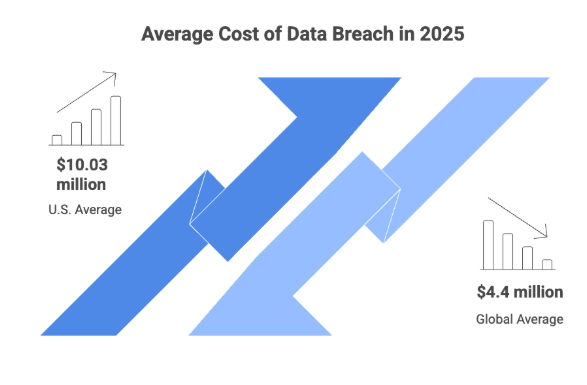
And this isn’t just theory. IBM’s 2025 Cost of a Data Breach Report shows that even though the average time to identify and contain a data breach dropped from 257 days to 241 days, the average cost of a data breach in the US still rose by 9%, mainly because of regulatory fines and higher detection costs.
Why Teams Overlook Documentation
Why do teams neglect documentation if it is so vital to security? The truth is, documentation often takes a backseat to other priorities. Here is why:
1. Focus On Tools Over Processes
Many organizations believe purchasing new security tools will resolve their problems. Firewalls, SIEMs, and monitoring platforms are powerful tools; however, the key consideration is how people use them. Without adequate documentation, teams waste a lot of time guessing how to use these systems, which often leads to misconfigurations.
2. Rushed Development
A lot of startups and SaaS teams work under a lot of pressure just to rapidly release new features and meet customers’ needs. Writing or revising documentation becomes an afterthought. The engineers already know how the system works in their heads, but there is no guide for others to follow. The lack of adequate documentation here creates blind spots that attackers can exploit.
3. No clear responsibility
Documentation is often left undefined and not clearly assigned to a particular team. Developers think security teams should handle it, Security assumes DevOps teams would, DevOps expect the product team to do it. In the end, no one takes responsibility.
4. Low priority in Team Culture
Let’s be honest, most engineers find documentation boring. It is not as exciting as building and shipping features. Good documentation isn’t always rewarded, but speed is, and this creates a culture where documentation is put aside to be fixed “ later,” but later rarely comes.
How to Improve Documentation for Security
1. Write With Security in Mind
i. Security documentation can only be helpful when it is easy to understand. Write instructions in plain language to ensure that anyone on the security or engineering team can follow them, even when they are under pressure and time is limited.
Examples of using Jargon in documentation and a simplified version:
- Jargon: Utilize multi-factor authentication protocols via cryptographic token-based solutions.
- Simplified version: Use two-step verification with security codes.
ii. Roles and responsibilities: Clearly define who responds during an incident, who approves configuration changes, and who monitors alerts. Clear roles and responsibilities help avoid confusion during incidents that require immediate response.
iii. Permissions: Access controls should be documented to ensure that team members know who can view, edit, or share sensitive data.
2. Keep Documents Updated
Having outdated documentation is as bad as having none at all. When new tools, configurations, and policies are being rolled out, documentation should also be revised to reflect those changes. Your team can use simple methods like reminders, to-do lists, or adding documentation as part of standard system changes to ensure it is always correct and up to date. Old instructions should be removed quickly to prevent mistakes during incidents.
3. Use a Consistent Format
Scattered documentation and inconsistent formats waste a significant amount of time, especially during the heat of a security incident. Use templates for incident response runbooks, onboarding procedures, or troubleshooting guidelines. This ensures teams know exactly where to look. Having a consistent and well-structured documentation helps engineers spend more time fixing problems rather than searching for instructions.
4. Version Control and Access Control Practice
Security documentation needs to be handled like code. Storing docs in platforms like Git, Confluence, or Notion with version history makes it very easy to track changes and roll back when mistakes occur. Access controls also matter; sensitive documents should be edited only by appropriate personnel. This prevents errors or unauthorized edits from weakening security.
5. Regular Review and Audit
Documentations need periodic checks to remain valuable and secure. It must be reviewed at least every few months, or upon extensive system upgrades, to identify security gaps before cyber attackers leverage them.
Documentation also needs to be included in compliance audits for standards such as Security for Customer Data (SOC 2), International Security Standard (ISO 27001), and the Health Insurance Portability and Accountability Act in the U.S. (HIPAA). Peer review is also very important. Another team member can identify missing steps or unclear data that the original writer may have overlooked.
6. Train Teams on Using Documentation
Even the best documentation is ineffective if nobody understands how to use it. Security teams must include documentation in the onboarding process of new hires and conduct routine tests where engineers practice responding to simulated incidents using the documentation. This training instils confidence and ensures the documentation will function in reality, not just in theory.
7. Automate Where Possible
Manual tools are slow, and there is always a risk of human error. Wherever possible, connect documentation to documentation. This not only reduces errors but also ensures that documentation is in sync with the rapidly changing SaaS environments. With automation in place, teams can always rely on accurate documentation.
Conclusion
Poor documentation is a significant security risk that can cause damage if left unaddressed. Instructions should be easy to understand, consistent, and revised to prevent losing valuable time during incidents. Think of documentation as part of your security toolkit, and not just paperwork.
For SaaS teams, treat documentation the same way you do with code. Improving the way you write, review, and manage documentation doesn’t just make work easier for engineers; it reduces risks, cuts costs, and strengthens customers’ trust.
Having strong documentation today means fewer security headaches tomorrow.
Published at DZone with permission of Favour Efeoghene. See the original article here.
Opinions expressed by DZone contributors are their own.
Comments