

Intent-Driven AI Frontends: AI Assistance to Enterprise Angular Architecture
An Angular application assisted by AI can convert natural language requests into data queries while maintaining complete control over execution and governance.
Enterprise Application have fixed/ predefined UI/ layout which is developed for static layout output and generated fixed format report having different filters. As per business need over the period, this requires frequent changes/enhancement to the application. This leads to duplicated logic, increasing maintenance costs, and a constant flow of minor data requests from business users who prefer quick answers over entirely new features.
At the same time, improvements in artificial intelligence, especially large language models, have greatly enhanced a system’s ability to understand natural language and turn it into structured outputs like queries or configurations. When applied carefully, this creates a new way to interact with data: conversational access built into current applications.
This application demonstrates how Angular applications can use AI-Assisted Interface which allows users to request data as per need. Instead of navigating through multiple screens, users can use a single page to request different type of data as per business demand. This is a great user experience and also cost effective. When users prompts for the data, the application processes the prompt into background SQL queries to request from the Database. This provides flexibility to generate data dynamically.
Importantly, AI is used only to understand intent.
The main role of the application is to allow users to ask for any information related to the application using natural language, while all essential functions — like validation, authorization, query execution, and presentation — stay completely managed by the Angular application, leading to a flexible but well-regulated frontend structure.
Traditional Enterprise Angular Applications: Current Limitations
Enterprise Angular applications are usually built around screen-driven interaction models. Data access happens through views, dashboards, tables, and filter combinations that meet expected user needs. This approach works well for clearly defined workflows that can be repeated. It offers strong control over how data is shown and accessed.
However, as applications grow and business needs change, this model shows its limitations. New requests rarely fit perfectly with the existing screens. A minor adjustment in the way data is grouped, filtered, or compared usually necessitates changes to existing components or the development of new ones.As time goes on, frontend teams gather more views that vary only slightly, resulting in duplicated logic, inconsistent behavior, and increased maintenance expenses.
From an architectural viewpoint, the frontend increasingly becomes the place where data intent is hard-coded. Filters, aggregations, and assumptions about user queries are directly built into components. This tight coupling makes changes costly. Showing the day to day data request with some tweaks like grouping together or requesting customer specific data can lead to development, testing cycles.
Another frequent issue arises is the backlog stories of minor data related requests from the business users. These requests are often valid but too specific to justify dedicated UI work. Due to this dependency, users need to wait for improvements, rely on some external tools or request Adhoc to support/ BAU team to address the request as per business demand.
While Angular itself is not the limiting factor, the traditional interaction model creates unnecessary restrictions.
Why AI Naturally Integrates into Modern Angular Applications
Modern Angular applications are designed with a clear division of responsibilities, a reactive data flow, and clear distinctions between user interaction, business logic, and data access.
Having above features and capability makes Angular a great platform for incorporating AI features to support as additional layer to improve better application reliability, user experience and cost effective. AI is great at understanding unclear or unstructured input, like natural language. This is closely linked to frontend tasks, where user intent is often suggested and hard to specify with just strict UI controls.
By incorporating AI at the interaction layer, Angular applications can transform user-friendly input into structured requests without altering downstream systems. The structure of Angular effectively supports this integration. Standalone components and services enable AI-driven intent interpretation to be encapsulated as a separate feature, while signals and reactive patterns ensure a smooth flow of results through the UI.
This method guarantees that AI-generated outputs do not directly disrupt execution paths. Instead, AI suggestions are processed through existing validation, authorization, and orchestration procedures ensuring predictability and governance. Additional key benefits of AI in angular is the adaptability and better perform more it is being use. AI can be rollout in phases and enhanced as application grows. Teams can start with specific use cases, like read-only data queries or intent-based searches, and gradually expand as they build confidence.Feature flags, role-based access, and environment-specific settings allow for safe options, better user control and target different environment with access control.
Most importantly, Angular applications emphasize testability and determinism. When AI is utilized as an interpreter rather than an executor, its outputs can be tested, limited, and monitored just like any other input. This allows frontend teams to effectively utilize AI’s flexibility.
Implementation Details: Angular Components and Services (with Code Snippets)
This proof of concept is created as an intent-driven data access interface using Angular 21. The main design objective is to keep AI (or any intent interpretation logic) limited and interchangeable, while making sure that all essential tasks — validation, authorization, execution, and presentation — stay under the control of the Angular application.
The architecture of the implementation is divided into four layers:
- User Interaction Layer (Angular standalone component)
- Application Orchestration Layer (single control-point service)
- Intent Interpretation Layer (rules today, AI tomorrow)
- Data Execution Layer (local SQL for POC; API in production)
User Interaction Layer: Standalone Component + Signals
The UI component takes natural language requests and displays results. It does not create SQL or connect to the database directly. Angular signals ensure that state updates are predictable and efficient.
type ChatMessage = {
 role: 'user' | 'assistant';
 text: string;
 sql?: string;
 rows?: Array<Record<string, any>>;
};

@Component({
 selector: 'app-query-assistant',
 standalone: true,
 imports: [CommonModule, FormsModule],
 templateUrl: './query-assistant.component.html',
 styleUrl: './query-assistant.component.scss'
})
export class QueryAssistantComponent {
 input = signal('');
 loading = signal(false);
 showSql = signal(true);

 messages = signal<ChatMessage[]>([
   {
     role: 'assistant',
     text: `Ask me about employees/departments. Try:
- "list employees"
- "employees in engineering"
- "headcount per department"
- "highest salary"
- "employees in Dallas"`
   }
 ]);
 constructor(private query: QueryOrchestrationService) {}

 async send(): Promise<void> {
   const q = this.input().trim();
   if (!q || this.loading()) return;

   this.messages.update(m => [...m, { role: 'user', text: q }]);
   this.input.set('');
   this.loading.set(true);

   try {
     const result = await this.query.execute(q);
     this.messages.update(m => [
       ...m,
       { role: 'assistant', text: result.message, sql: result.generatedSql, rows: result.rows }
     ]);
   } finally {
     this.loading.set(false);
   }
 }

 tableColumns(rows: Array<Record<string, any>>): string[] {
   return rows?.length ? Object.keys(rows[0]) : [];
 }
}
Template Binding: Signals-Friendly ngModel
Signals cannot be used with [(ngModel)]="input()". The signal-safe pattern is explicit:
<div class="page">
 <header class="header">
   <div>
     <h1>Employee Data Intent-Driven Interface (Angular 21 + Local SQLite)</h1>
     <p>Natural language → SQL → local DB results (POC).</p>
   </div>

   <label class="toggle">
     <input type="checkbox" [checked]="showSql()" (change)="showSql.set(!showSql())" />
     Show generated SQL
   </label>
 </header>

 <section class="query">
   <div class="bubble"
        *ngFor="let m of messages()"
        [class.user]="m.role === 'user'"
        [class.assistant]="m.role === 'assistant'">

     <div class="role">{{ m.role }}</div>
     <div class="text">{{ m.text }}</div>
     <pre class="sql" *ngIf="showSql() && m.sql">{{ m.sql }}</pre>
     <div class="table-wrap" *ngIf="m.rows?.length">
       <table>
         <thead>
           <tr>
             <th *ngFor="let c of tableColumns(m.rows!)">{{ c }}</th>
           </tr>
         </thead>
         <tbody>
           <tr *ngFor="let r of m.rows">
             <td *ngFor="let c of tableColumns(m.rows!)">{{ r[c] }}</td>
           </tr>
         </tbody>
       </table>
     </div>
   </div>
 </section>

 <footer class="composer">
   <input
     [ngModel]="input()"
     (ngModelChange)="input.set($event)"
     (keyup.enter)="send()"
     placeholder="Ask a question…"
     [disabled]="loading()"
   />

   <button (click)="send()" [disabled]="loading() || !input().trim()">
     {{ loading() ? 'Thinking…' : 'Send' }}
   </button>
 </footer>
</div>
Application Orchestration Layer
The orchestration service manages intent translation, validation, and data execution. All guardrails are applied in this layer.
export type ChatResult = {
 generatedSql?: string;
 rows?: Array<Record<string, any>>;
 message: string;
};

@Injectable({ providedIn: 'root' })
export class QueryOrchestrationService {
 constructor(private db: DbService, private nl2sql: Nl2SqlService) {}

 async execute(nl: string): Promise<ChatResult> {
   await this.db.init();
   const translation = this.nl2sql.translate(nl);
   if (!translation) {
     return {
       message: `I couldn't map that question to SQL (POC rules). Try: "list employees", "employees in engineering", "headcount per department", "highest salary", "employees in Dallas".`
     };
   }

   const rows = this.db.query(translation.sql, translation.params ?? []);
   const msg = rows.length ? `Found ${rows.length} row(s).` : `No results found.`;

   return {
     generatedSql: translation.sql.trim(),
     rows,
     message: `${translation.explanation ?? 'Query executed.'} ${msg}`
   };
 }
}
Intent Translation Layer (Nl2SqlService)
The Nl2SqlService converts natural language requests into structured SQL statements. In this proof of concept, translation is implemented using deterministic rules. AI apis can be used to determine the query too.
@Injectable({ providedIn: 'root' })
export class Nl2SqlService {
 translate(nl: string): SqlTranslation | null {
   const text = nl.trim().toLowerCase();
   if (this.matchesAny(text, ['list employees', 'show employees', 'all employees'])) {
     return {
       sql: `
         SELECT e.id, e.first_name, e.last_name, e.title, d.name AS department, e.location, e.salary, e.hired_date
         FROM employees e
         JOIN departments d ON d.id = e.department_id
         ORDER BY e.id
       `,
       explanation: 'Listing all employees with department.'
     };
   }
   const deptMatch = text.match(/employees in (engineering|finance|hr|sales|support)/);
   if (deptMatch) {
     const dept = this.toTitleCase(deptMatch[1]);
     return {
       sql: `
         SELECT e.id, e.first_name, e.last_name, e.title, d.name AS department, e.location, e.salary
         FROM employees e
         JOIN departments d ON d.id = e.department_id
         WHERE d.name = ?
         ORDER BY e.salary DESC
       `,
       params: [dept],
       explanation: `Employees in ${dept}.`
     };
   }
   if (this.matchesAny(text, ['count employees by department', 'employees per department', 'headcount per department'])) {
     return {
       sql: `
         SELECT d.name AS department, COUNT(*) AS headcount
         FROM employees e
         JOIN departments d ON d.id = e.department_id
         GROUP BY d.name
         ORDER BY headcount DESC
       `,
       explanation: 'Headcount grouped by department.'
     };
   }
   if (this.matchesAny(text, ['highest salary', 'top salary', 'max salary', 'who is paid the most'])) {
     return {
       sql: `
         SELECT e.first_name, e.last_name, d.name AS department, e.title, e.salary
         FROM employees e
         JOIN departments d ON d.id = e.department_id
         ORDER BY e.salary DESC
         LIMIT 1
       `,
       explanation: 'Highest paid employee.'
     };
   }

   const cityMatch = text.match(/employees in (dallas|chicago|austin)/);
   if (cityMatch) {
     const city = this.toTitleCase(cityMatch[1]);
     return {
       sql: `
         SELECT e.first_name, e.last_name, d.name AS department, e.title, e.location
         FROM employees e
         JOIN departments d ON d.id = e.department_id
         WHERE e.location = ?
         ORDER BY d.name, e.last_name
       `,
       params: [city],
       explanation: `Employees in ${city}.`
     };
   }
   return null;
 }
Local Run:
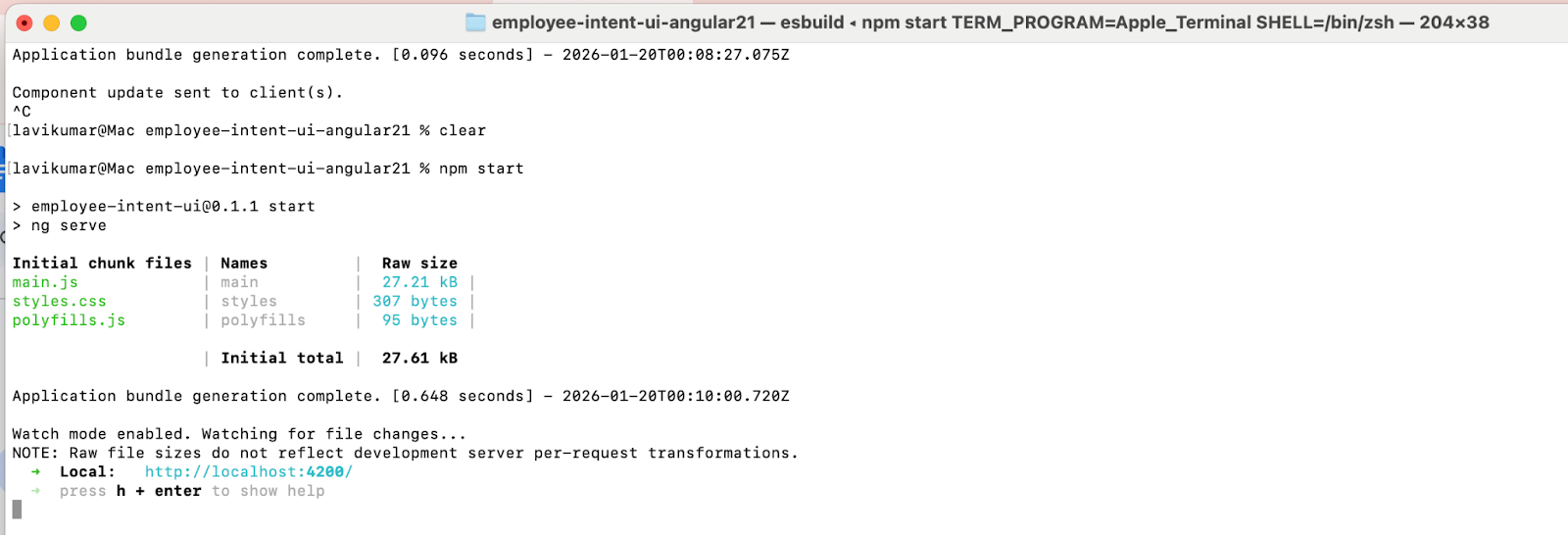
Run ng serve, application runs on https://localhost:4200
Browser Result: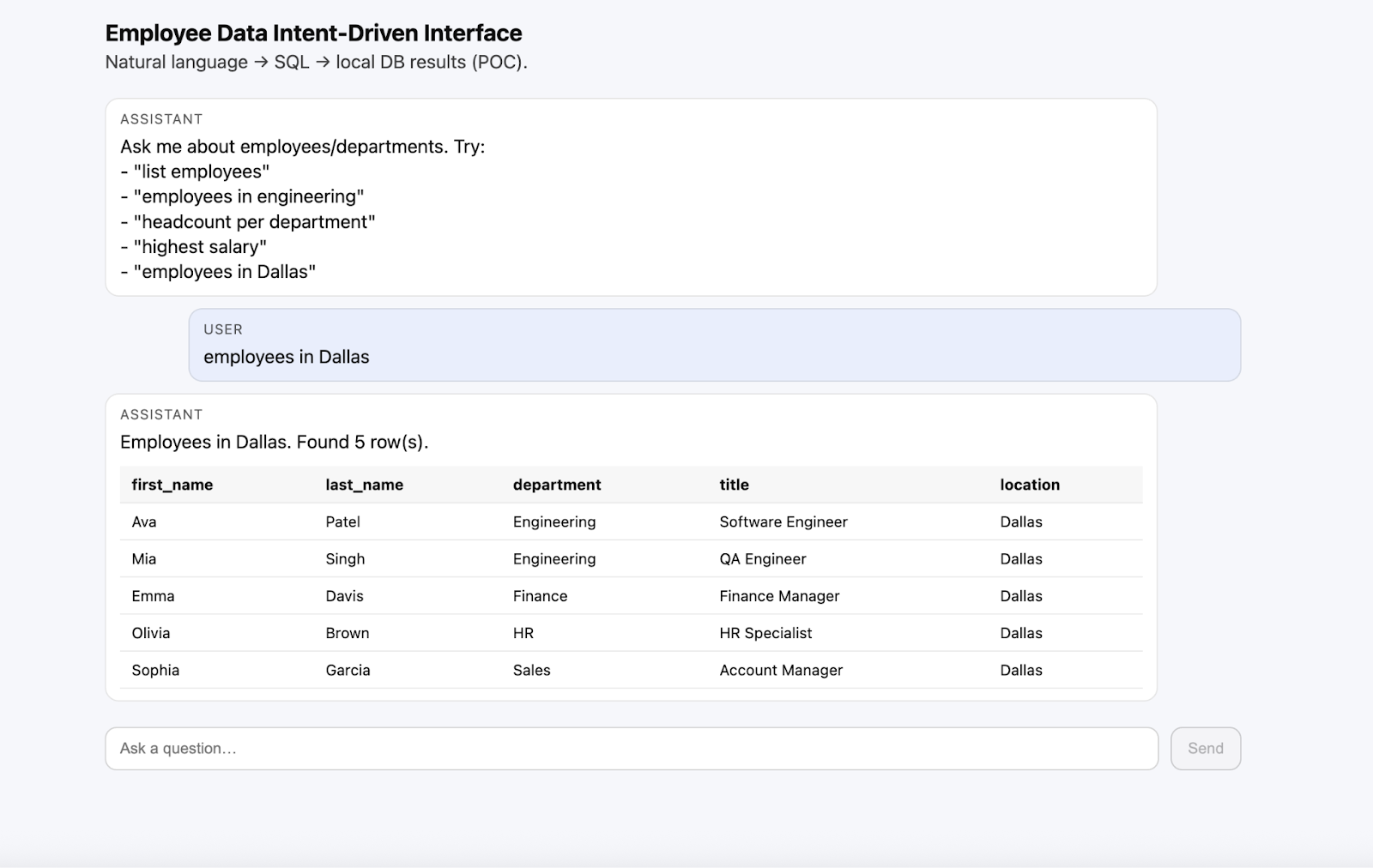
Conclusion
The system divides user interaction, orchestration, intent translation, and data execution into clear Angular components and services. Requests in natural language are converted into structured queries, while the Angular application fully manages validation, execution, and presentation. It also demonstrates how enterprise applications can transform the experience of existing applications using additional layer of AI within Angular applications.
Opinions expressed by DZone contributors are their own.