

ITBench, Part 2: ITBench User Experience – Democratizing AI Agent Evaluation
This post dives into how ITBench enables realistic AI agent evaluation through streamlined onboarding, automated benchmarking, and operationally relevant metrics.
 ·
·
Join the DZone community and get the full member experience.
Join For Free(Note: A link to the previous article published in this series can be found at the conclusion of this article.)
In the first blog post of this series we introduced ITBench, IBM Research's groundbreaking framework that brings scientific rigor to AI agent evaluation in enterprise IT environments.
The journey from conceptual AI capabilities to production-ready automation tools represents one of the most significant gaps in current AI technology adoption. Traditional benchmarking approaches, while valuable for measuring model performance on isolated tasks, fail to capture the intricate complexities of enterprise IT environments where failures cascade and local decisions can carry substantial extended operational consequences. ITBench offers a systematic methodology for assessing AI agent effectiveness across three critical domains of modern IT operations: Site Reliability Engineering, Compliance and Security Operations, and Financial Operations.
In this second blog post we take you step by step onto the journey of measuring whether your AI agents are truly effective at real-world IT tasks.
User Experience
The user’s journey begins with the simple installation of the ibm-itbench GitHub app into a user's private repository, followed by a form-based agent registration process that captures essential agent metadata and configuration details. The final step enables users to launch comprehensive evaluations either with their custom agents or with baseline implementations provided by the platform.
Streamlined Onboarding Process
ITBench's user experience prioritizes accessibility. The registration process involves just a few steps:
- GitHub App Installation: Users install the ibm-itbench GitHub app into their private repository
- Agent Registration: A simple form-based process captures agent metadata and configuration
- Benchmark Submission: Users can launch evaluations with their custom agents or leverage provided baseline implementations
Push-Button Workflows
One of ITBench's standout features is its emphasis on "push-button workflows", as the platform workflows automate:
- Environment provisioning and de-provisioning
- Scenario deployment and triggering
- Data collection and metric computation
- Results aggregation and visualization
This accessibility-first approach reflects a deep understanding of the barriers that typically prevent rigorous AI agent evaluation. Research teams, constrained by time and resources, often resort to simplified testing scenarios that bear little resemblance to production environments. On the other hand, enterprise practitioners, lacking specialized benchmarking expertise, struggle to assess how their AI investments translate into operational improvements. ITBench dissolves these barriers through the "push-button workflows” as automated processes that handle environment provisioning, scenario deployment, data collection, and results visualization without requiring manual intervention. This approach removes friction that traditionally prevented researchers from conducting enterprise specific evaluations.
Multiple Entry Points
The platform's support of diverse user needs further demonstrates its commitment to democratization. Ready-to-use agents provide immediate experimentation opportunities for organizations seeking quick assessments of AI capabilities. Custom agent integration APIs accommodate research teams developing novel approaches. Community-driven scenario contributions ensure the platform evolves to address emerging challenges. Academic and industry partnerships create pathways for collaborative advancement. This multi-faceted approach acknowledges that AI agent evaluation serves different purposes for different stakeholders while maintaining consistent standards across all use cases.
Recognizing diverse user needs, ITBench provides several ways to engage:
- Ready-to-Use Agents: Baseline implementations for immediate experimentation
- Custom Agent Integration: APIs and documentation for bringing your own agents
- Scenario Contributions: Community-driven expansion of test scenarios
- Research Collaboration: Open framework for academic and industry partnerships
Metrics That Matter: Beyond Simple Success Rates
While traditional benchmarks often rely on binary success measurements, ITBench introduces evaluation criteria that reflect the nuanced nature of IT operations. The Pass@1 metric establishes a baseline by measuring whether an agent's response matches expected ground truth, but this represents merely the foundation of a more comprehensive assessment framework.
The platform's most innovative contribution lies in the Normalized Topology-Aware Match (NTAM), a metric that evaluates fault diagnosis within the context of system topology. This approach acknowledges that in complex enterprise environments, identifying a related component as the source of an issue may be as valuable as pinpointing the exact failing element. Such nuanced evaluation reflects real-world troubleshooting practices where experienced engineers often work through chains of interdependent systems to isolate problems.
Operational efficiency measures further distinguish ITBench from academic benchmarks. Mean Time to Diagnosis and Mean Time to Repair metrics directly correspond to industry-standard SRE practices, ensuring that evaluation results translate immediately into actionable insights for practitioners. These measurements capture not only whether an AI agent can solve problems but how quickly and efficiently it operates—critical factors for production maintenance windows and deployment decisions.
Behind the Scenes: Technical Implementation
System Components
Figure 1 illustrates the component diagram of ITBench, which is composed of the following key elements:
- Bench API Server: The central coordination service responsible for managing task scenarios and benchmark results, interacting with bench runners and agents (via Agent Harness).
- Bench Runner: A subsystem that prepares and manages the lifecycle of the target environments across scenarios. The bench runner also conducts post-execution benchmark evaluation by analyzing differences between actual and expected environment states.
- Environment: The real system environment, such as Kubernetes clusters or RHEL machines, configured based on the scenario by the bench runner. This is the environment on which the agent operates in order to achieve a provided goal.
- Agent Harness: A client-side runtime interface launched by the Agent Developer. It embeds the agent and communicates with the Bench API Server to receive tasks and report status.
- Agent: The software entity implemented by the Agent Developer, for example an autonomous agent or multi-agent application on CrewAI. It is embedded in the harness and executed against benchmark tasks with specific environments. The agent is expected to understand a provided task goal and solve the problem interacting with the environment using the credentials provided by the Agent Harness.
- GitHub Platform: The public-facing interface through which benchmark requests and public leaderboard updates are managed. It includes:
- Issues: Used by Agent Developers to request Agent Registration and Benchmark Registration.
- User’s Private Repository: A secure location where the credentials used by the Agent Harness to access the Bench API Server are managed.
- GitHub Action: Acts as an integration point that orchestrates the interaction with Bench API Server, enabling automation and synchronization.
- Leaderboard: Displays the users' benchmark results providing ranking and views customization.
In certain scenarios, such as those involving CISO scenarios, the benchmark must be executed entirely on the Agent Developer's side. In this case, the Agent Developer not only launches the Agent Harness, but also prepares an environment and runs the Bench Runner locally. While this option may introduce additional setup complexity, it ensures full control over the end to end execution and eliminates wait times associated with shared infrastructure.
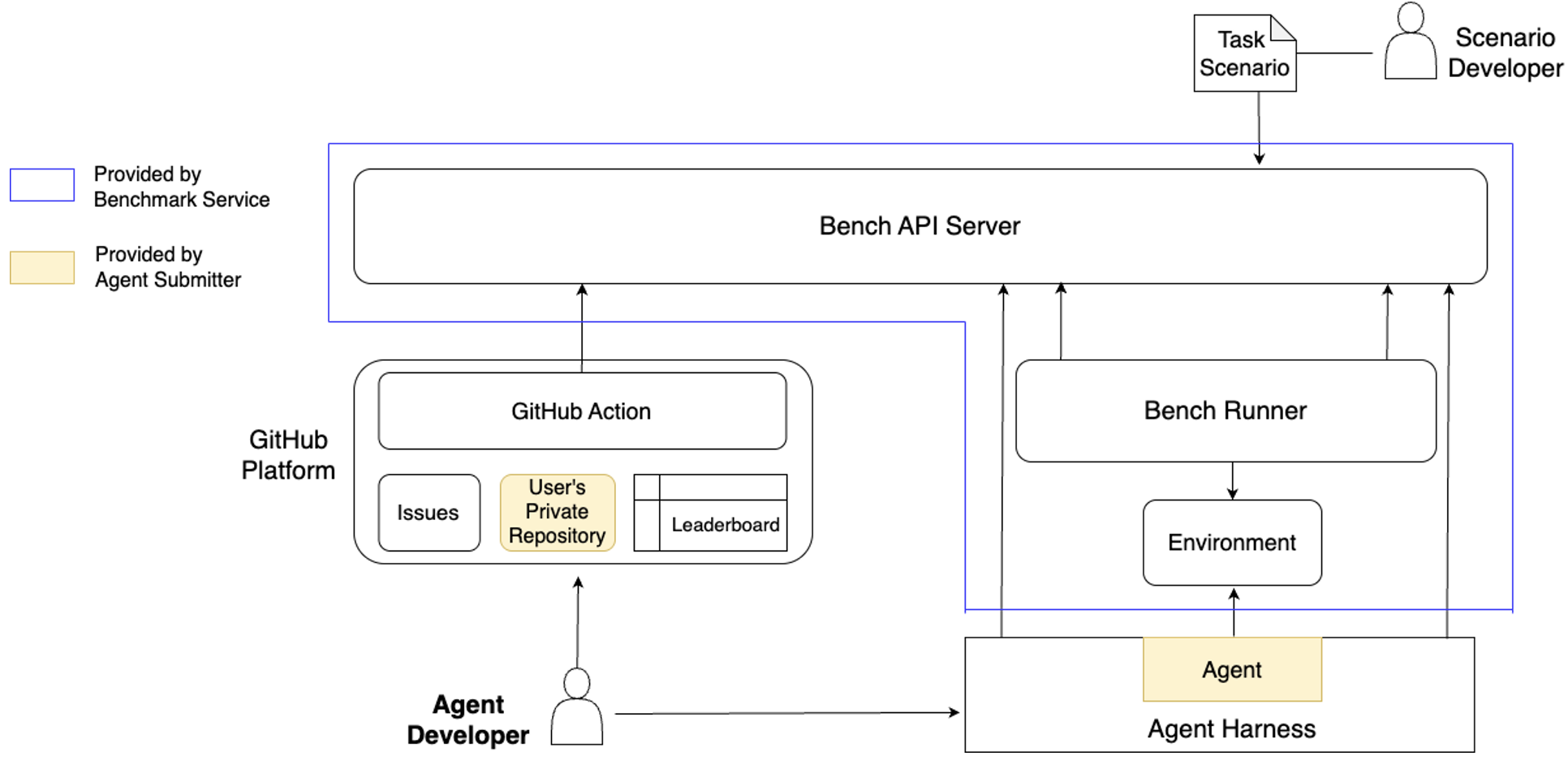
Figure 1. Component diagram of ITBench. Bench Runner and Environment are typically provisioned by the benchmark service; they can alternatively be launched by the Agent Developer in certain (e.g., CISO) scenarios
Benchmark Execution Workflow
Figure 2 illustrates the workflow sequence among the components introduced in Figure 1, capturing the full lifecycle of a benchmark from agent registration to result publication on the Leaderboard.
The process begins with an Agent Developer creating a GitHub issue for Agent Registration, specifying the scenario type, task complexity, and the URL of a private repository (User's Private Repository). Upon successful registration, the Bench API Server returns credentials that the Agent Harness will later use to communicate with the server. These credentials are pushed to the specified user private repository.
Next, the Agent Developer creates a Benchmark Registration issue for the registered agent. This triggers the Bench API Server to create a new benchmark job. A Bench Runner, which continuously polls the server for jobs, fetches this benchmark job and the corresponding task scenario, and begins setting up the target Environment.
GitHub Action continuously polls the benchmark status and updates the benchmark issue with the status accordingly. The Agent Developer starts the Agent Harness, providing it with the credentials retrieved earlier. The harness thus also begins polling the API server, waiting for the benchmark status to become "Ready".
Once the environment is fully provisioned, the Bench Runner updates the benchmark status to "Ready" and uploads the access information to the API server. At this point, the Bench Runner starts polling the agent status to detect when the agent finished the tasks.
As soon as the benchmark is marked "Ready", the Agent Harness fetches the task goal and environment access information, and invokes the embedded Agent. Once the agent completes its execution, the harness updates the agent status to "Finished", which triggers the Bench Runner to begin its evaluation. Upon completing the evaluation, the runner uninstalls the environment, updates the benchmark status to "Finished", and stores the evaluation result as the benchmark result.
A single benchmark consists of multiple scenarios. This entire process—environment setup, agent execution, and evaluation—is automatically repeated for each scenario by the Agent Harness and Bench Runner. The GitHub Action updates the issue comment incrementally with the results of each scenario.
Finally, after all scenarios were executed, GitHub Action upon detecting the benchmark’s overall completion, fetches the aggregated results across all scenarios, and publishes them as an overall benchmark result onto the Leaderboard.
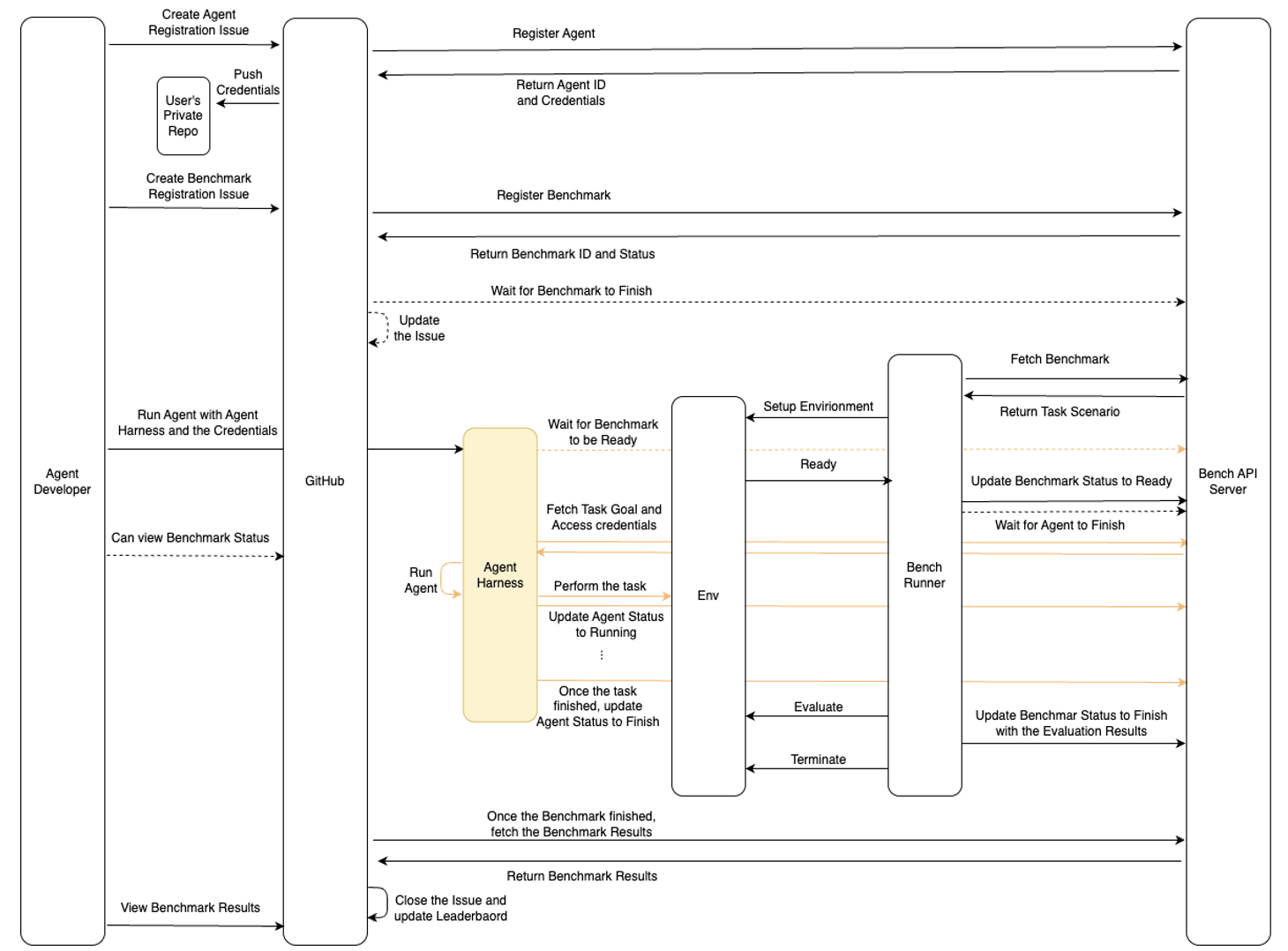
Figure 2: Benchmark execution workflow showing interactions among the ITBench components Agent Developer, GitHub, Agent Harness, Bench Runner, Environment, and Bench API Server.
Scenario Development
Each task scenario in ITBench is implemented as a containerized unit to enable the Bench Runner to orchestrate the scenario lifecycle automation from setup, evaluation, to de-provisioning. The structure and expected behavior of a scenario are based on the manual benchmark process published as a sample task scenario tutorial.
To support this automation, each scenario implements five make targets:
- deploy sets up the target environment, such as RHEL machines or Kubernetes clusters. This target is invoked during the phase of setup environment in Figure 2.
- fault_injection introduces scenario-specific conditions. For example, in an SRE scenario, it may inject an incident; in a CISO scenario, it may simulate a compliance violation. This target is invoked after the deploy finished.
- get_status is polled periodically by the Bench Runner to check the current state of the environment. The scenario must respond with a JSON object that includes condition types such as Deployed, FaultInjected, and Destroyed, indicating the progress of setup or de-provisioning.
-
JSON
{
  "status": {
    "conditions": [
      {
        "type": "Deployed",
        "status": "True",
        "lastTransitionTime": "2025-07-14T06:42:19Z",
        "reason": "DeploymentSuccess"
      },
      {
        "type": "FaultInjected",
        "status": "False",
        "lastTransitionTime": "2025-07-14T06:42:19Z",
        "reason": "FaultInjectionPending"
      },
      {
        "type": "Destroyed",
        "status": "False",
        "lastTransitionTime": "2025-07-14T06:42:19Z",
        "reason": ""
      }
    ]
  }
}
-
- evaluate is triggered after the agent completes the task. It compares the current environment state with the expected one and returns a JSON object containing a pass field (boolean) and an optional details field, which can include logs, evidence, or performance metrics. While the benchmark results currently use only the passflag and the agent execution time, we are actively extending support for richer evaluation metrics. For example, in SRE scenarios, metrics such as Mean Time to Diagnosis and Mean Time to Repair are already included in the details field and used for aggregation.
-
JSON
{
  "pass": true,
  "details": {
    "...": "arbitrary JSON data such as logs or metrics"
  }
}
-
- destroy is called after evaluation to de-provision the environment.
Scenario Developers implement these scenario targets and build the corresponding container using the Bench Runner base image (quay.io/it-bench/bench-runner-base:latest) provided by ITBench-Utilities to serve as the Bench Runner.
Agent Harness
The Agent Harness serves as a wrapper around the agent, acting as an intermediary between the agent and the Bench API Server. It is responsible for communicating with the server to detect when the environment and scenario are ready, executing the agent accordingly, and submitting the agent’s output back to the server.
The agent runs inside a Docker container, and all paths defined in the harness configuration refer to locations within the container's filesystem. The behavior of the Agent Harness is configured using a YAML file with the following fields:
path_to_data_provided_by_scenario: /tmp/agent/scenario_data.json
path_to_data_pushed_to_scenario: /tmp/agent/agent_data.txt
run:
  command: ["/bin/bash"]
  args:
    - -c
    - |
<your command to run Agent>- path_to_data_provided_by_scenario: This field defines the path where the scenario's environment information is stored. When the Agent Harness runs the command, the scenario data such as Kubeconfig is fetched from the Bench API Server and saved at this location.
- path_to_data_pushed_to_scenario: This field defines the path where the agent’s output results should be stored. The Agent Harness uploads this file back to the server for evaluation.
- run.command and run.args: These specify how the agent should be executed inside the container.
To execute the harness, users build a Docker image using the Agent Harness base image (quay.io/it-bench/agent-harness-base:latest) provided by ITBench-Utilities and install their agent and its dependencies. A simplified Dockerfile might be:
FROM quay.io/it-bench/agent-harness-base:latest
COPY your-agent-code /etc/agent
WORKDIR /etc/agent
RUN pip install -r requirements.txt
ENTRYPOINT ["/your-entrypoint.sh"]
A complete example of the Agent Harness configuration for the CISO Agent, along with detailed explanations of each field, is available at: https://github.com/itbench-hub/ITBench/blob/main/docs/how-to-launch-benchmark-ciso.md#option-2-use-your-own-agent
Extensibility and Community Integration
The platform's extensibility framework demonstrates a forward-thinking architectural design. ITBench platform's modular design is intended for community contributions as follows:
- Standardized scenario specification formats
- Plugin architecture for new evaluation metrics
- Flexible configuration for custom agent integrations
- Documentation and examples for scenario development
Standardized scenario specification formats enable community contributions without compromising evaluation consistency. Plugin architectures accommodate new evaluation metrics as the field evolves. The Agent Harness configuration enables flexible integration for custom agents, ensuring that the platform remains relevant as AI technologies advance. Comprehensive documentation and examples lower the barrier for scenario development, encouraging broader community participation.
Perhaps the most valuable contribution of ITBench lies in its unflinching assessment of current AI agent capabilities. The initial evaluation results provide a sobering reality check: state-of-the-art models achieve only 13.8% success rates on SRE scenarios, 25.2% on CISO scenarios. These numbers, far from representing failures, establish crucial baselines that ground industry expectations in empirical evidence.
These results serve multiple audiences with different implications. For organizations considering AI agent adoption, the numbers provide essential context for setting realistic expectations and developing appropriate integration strategies. For researchers and developers, they establish clear improvement targets while highlighting specific areas requiring innovation. For the broader AI community, they demonstrate the value of rigorous evaluation in understanding the true state of the field.
Looking Forward: Community-Driven Innovation
ITBench's open-source approach positions community engagement as a fundamental driver of platform evolution. The initial collection of 94 scenarios represents not an endpoint but a foundation designed to grow through collaborative contribution. This community-driven expansion ensures the platform evolves alongside rapidly advancing AI capabilities while maintaining focus on real-world applicability.
The leaderboard format creates healthy competition that encourages innovation while promoting transparency. By making evaluation results publicly available, the platform enables researchers to build upon each other's work, identify common failure patterns, and develop targeted improvements. This collaborative approach accelerates progress while maintaining scientific rigor in evaluation practices.
Conclusion
ITBench represents a significant step toward mature, production-ready AI automation in enterprise IT. By combining rigorous evaluation methodology with accessible user experience, the platform addresses a critical gap in the AI agent ecosystem.
The framework's emphasis on real-world scenarios, sophisticated metrics, and community engagement positions it as a potential catalyst for the next generation of IT automation tools. While current performance numbers suggest we're still in the early stages of this technology evolution, ITBench provides the measurement foundation necessary to drive meaningful progress.
For organizations considering AI agent adoption, ITBench offers a valuable reality check. For researchers and developers, it provides both a challenging benchmark and a collaborative platform for advancing the state of the art. Most importantly, it brings scientific rigor to a field that desperately needs objective evaluation standards.
The future of AI-driven IT automation depends not just on more sophisticated models, but on our ability to measure, understand, and improve their real-world effectiveness. ITBench is helping build that future, one benchmark at a time.
Coming Next
Our forthcoming articles will provide comprehensive technical insights into our open-source agent ecosystem, including detailed presentation of CISO, FinOps, and SRE Agent capabilities, scenarios, automated tasks, and performance benchmarking results executed on ITBench.
Link to the previous article published in this series:
ITBench, Part 1: Next-Gen Benchmarking for IT Automation Evaluation
Opinions expressed by DZone contributors are their own.
Comments