

Teaching an LLM Your Schema's Rules: Inside Jailer's AI Subsetting Assistant
How a database subsetting tool turned a plain-English request into a reviewable, undoable extraction model — instead of just another SQL-generation chatbot.
Anyone who has tried to build a small, realistic test database from a production schema knows the drill: you don't just want "all orders." You want a customer's orders, their order items, the products they reference — but not the entire payment history, not every audit log row, not the internal reporting tables three joins away. Every table you pull in for one reason drags in three more you didn't ask for, because your schema is a graph, not a list.
Jailer solves the mechanical half of this problem: give it a starting table, a condition, and a set of rules for which relationships to follow, and it will walk the foreign-key graph and hand you back a consistent, referentially valid slice of the database. What it didn't solve, until recently, was the tedious half — sitting down and deciding, association by association, what to include and what to cut off. On a schema with a few hundred tables, that's not a five-minute job.
This is where Jailer's AI Subsetting Assistant comes in. It's a narrower, more interesting problem than "generate me some SQL" — and the way it's built is a decent case study in what it takes to let an LLM safely edit a structured, rule-based model instead of just emitting text.
What an Extraction Model Actually Is
Before the AI part makes sense, the underlying model needs to be clear, because it's not just "a query."
A Jailer extraction model has three parts:
- A subject table – the table you start from.
- A condition – a WHERE clause that picks the starting rows out of that table (aliased
T). - A set of per-associationrestrictions – an association being a foreign-key relationship (or a user-defined one) between two tables.
The part that trips people up is what happens by default: starting from the subject rows, Jailer automatically follows every association in the data model, recursively, until nothing new is reachable. That's the whole point — it's how you get a referentially consistent snapshot instead of a set of orphaned rows. But it also means the default behavior is to over-include. If you don't explicitly tell Jailer to stop at the payments table, it won't stop on its own; it doesn't know your intent, only the graph.
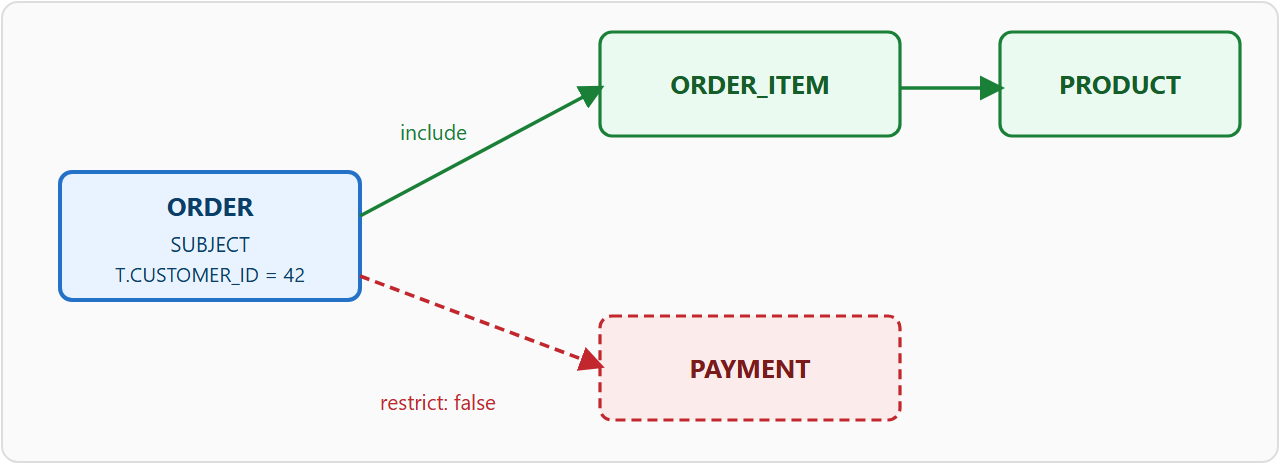
A restriction on an association is one of three things: false (don't follow it — exclude that branch entirely), a SQL predicate (follow it, but only for rows matching the predicate, with A/B aliasing the association's source/destination tables), or empty (follow it, no filtering — the default). Building a correct extraction model is really the exercise of walking every association reachable from your subject table and deciding which of these three it needs.
From Prose to a Reviewable Model, Not Just SQL
The AI Subsetting Assistant lives in the Extraction Model Editor — reachable from the toolbar's "AI" button, the "AI Subsetting Assistant…" menu item (Ctrl+Shift+A), or directly from the startup wizard when you're creating a model from scratch. You type a description, for example:
"All orders for customer 42, with order items and products, but without payment history."
and the assistant doesn't hand back a SQL query. It hands back a structured proposal for the extraction model itself:
{
  "subject": "ORDER",
  "condition": "T.CUSTOMER_ID = 42",
  "restrictions": [
    {"association": "payments",    "condition": "false"},
    {"association": "order_items", "condition": ""},
    {"association": "products",    "condition": ""}
  ],
  "explanation": "Extracts orders of customer 42. Order items and
                   products are included. Payment history is
                   explicitly excluded."
}
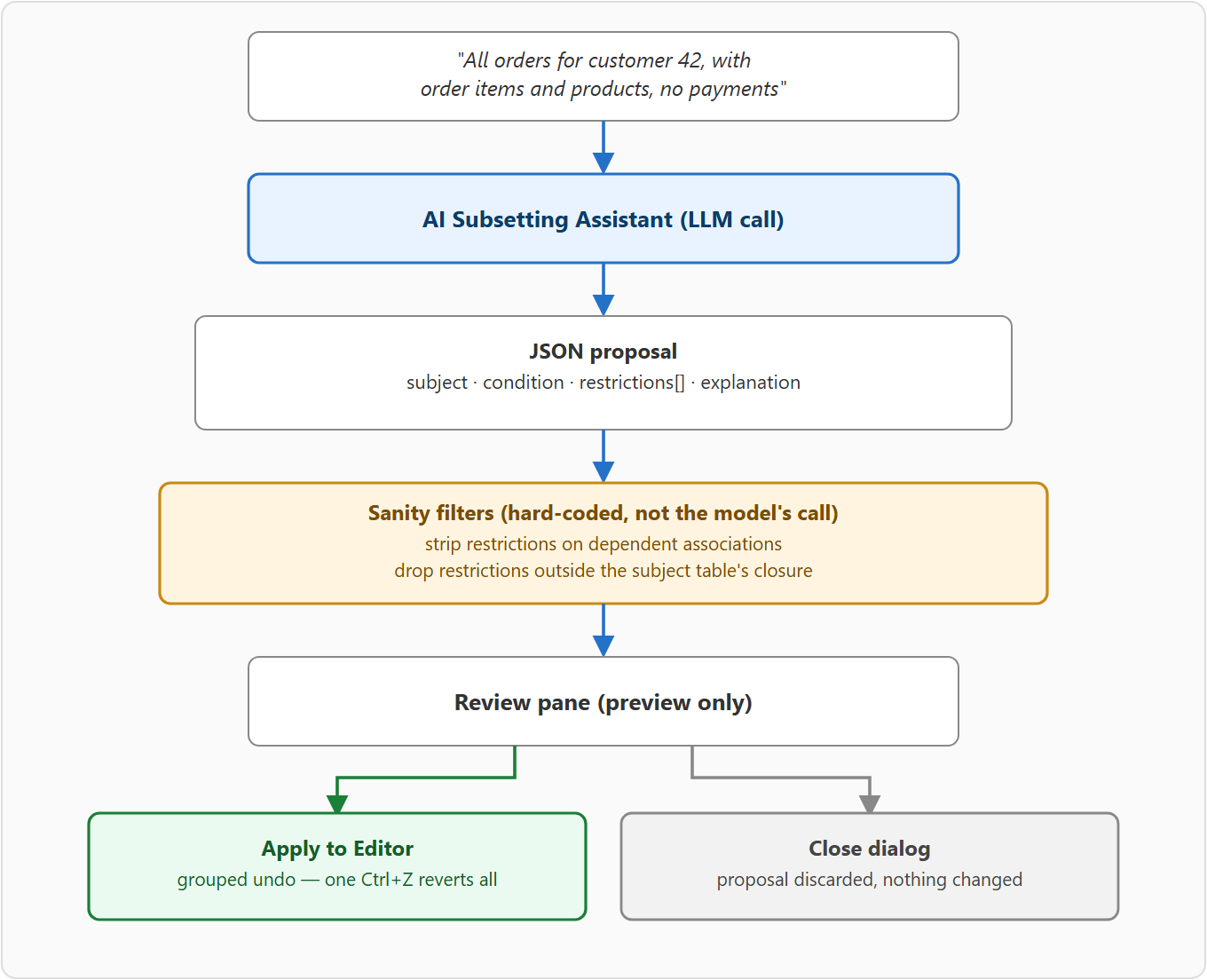
That JSON shape is the actual response contract, not a simplification — subject table, subject condition, a restriction decision for every named association, and a plain-language explanation. The system prompt that produces this is worth a closer look, because it's essentially a compressed spec of Jailer's own traversal semantics, written for an audience that has never seen the tool before: it explains that Jailer follows every association by default, that restrictions are the only way to stop it, what the A/B aliases mean in a restriction predicate, and where a filter belongs — on the subject condition versus on a restriction — depending on which table it constrains.
Getting an LLM to produce a valid, minimal restriction set for an arbitrary schema depends entirely on it understanding that asymmetry between "included by default" and "excluded by default," and the prompt exists specifically to correct for the fact that most LLM training data assumes the opposite.
Why This Is Safe to Point at a Real Schema
Handing an LLM the power to add or remove restrictions on a data model — the same model that determines what a production extraction pulls out of your database — is not something you want to do on blind trust. A few things here are deliberate, not incidental:
Nothing is applied automatically. The proposal is rendered in a preview pane — subject, condition, and a per-association list of "exclude" / "restrict: <sql>" / default — before you touch anything. Only clicking Apply to Editor commits it, and the whole change (subject, condition, and every restriction) is grouped into a single undo step, so one Ctrl+Z reverts it completely.
Beyond the review step, the dialog runs two sanity filters over the model's own response before it's even shown to you:
- It strips any proposed restriction on an association where the destination has to be inserted before the source (a dependent/parent relationship) — restricting those would silently break referential integrity, so the assistant refuses to let the model do it regardless of what it proposed.
- It drops restrictions on associations that aren't even reachable from the proposed subject table's closure — harmless, but noise that would clutter the review with decisions that don't matter.
The effect is that the LLM's output is treated the way you'd treat a junior engineer's pull request: useful, plausible, worth reviewing — but not trusted to bypass the tool's own consistency rules or to go live without a look.
Scaling to Real Schemas
A schema description that includes every table, column, type, and foreign key gets expensive fast once you're past a few dozen tables — both in latency and in the literal risk of blowing past a model's context window. The assistant has two independent levers for this:
- Reduced Schema mode splits the work into two calls. A cheap first pass sends just the list of table names and asks the model to pick the single best subject table for the request. From that table, Jailer does a breadth-first traversal of the association graph up to a configurable table limit, and only that reduced neighborhood — not the full schema — goes into the second call that actually produces the restrictions.
- Omit Column Types trims the per-table description further, keeping table and column names, primary keys, and foreign keys, but dropping type information that the model rarely needs to decide on a restriction anyway.
The dialog also estimates the request size in tokens before sending it and flags — in the status line, not with a blocking error — when the estimate is creeping past roughly 60% of the target model's known context window, which is a small but honest thing to surface rather than let you discover as an opaque API failure.
Bring Your Own Model
The assistant isn't tied to one vendor. It shares its provider plumbing with Jailer's other AI features, supporting Anthropic, any OpenAI-compatible endpoint (OpenAI itself, Azure OpenAI, Groq, and similar), OpenRouter (which includes several free models), and Ollama for models running entirely on your own machine. For anyone whose schema descriptions — table and column names, sometimes revealing plenty about a business on their own — shouldn't leave the building, Ollama's no-API-key, nothing-sent-externally mode is the relevant option, and it's a first-class citizen here, not an afterthought.
Both system prompts used by the assistant — the main extraction-model instructions and the lightweight subject-table-detection prompt used in Reduced Schema mode — are user-editable, with a reset-to-default button, and persist across sessions. If your schema has naming conventions or domain quirks the default prompt doesn't account for, that's the place to teach it.
A Sibling, Not a Duplicate
Jailer's AI Assistant dialog, reachable from the SQL Console, does something related but distinct: it generates and refactors ad-hoc SQL from natural language, with an Advisor mode for explaining and rewriting existing queries. It's built on the same request/response infrastructure as the Subsetting Assistant, but it never touches the extraction model — it writes into the SQL editor for you to review and run yourself. The two features solve different problems (querying versus configuring a repeatable extraction), and the separation is deliberate rather than a gap.
What makes the AI Subsetting Assistant a more interesting case than "yet another natural-language-to-SQL box" is that it isn't generating disposable output — it's proposing an edit to a persistent, rule-based model that later runs unattended against a real database. That constraint shapes everything: the strict JSON contract instead of free text, the system prompt that front-loads the tool's actual semantics instead of assuming the model already knows them, the two hard-coded sanity filters that override the model's own suggestions when they'd violate referential integrity, and the fact that every single proposal ends at a review screen with a one-keystroke undo. For anyone building an LLM feature that edits structured application state rather than just chatting, that pattern — teach the model your domain's actual rules, then don't fully trust it anyway — is the part worth stealing.
Jailer is open source under the Apache 2.0 license: github.com/Wisser/Jailer.
Opinions expressed by DZone contributors are their own.