

Global Setup in Playwright TypeScript for API Testing
Learn how to use Global Setup in Playwright TypeScript to create test data, seed the database, and prepare test environments before executing your test suite.
 CORE
·
CORE
·
If you need to generate prerequisite test data, such as adding dummy records through an API, before executing your test suite, using Global Setup in Playwright is a clean, maintainable, and scalable approach. It ensures all required data is prepared upfront, keeping your test execution structured and reliable.
What Is Global Setup?
The Global Setup in Playwright runs once before the entire test suite begins execution. It is typically used for activities such as creating test data, seeding the database, generating authentication tokens, preparing the test environment, or cleaning up old data. Since it executes only once at the start of the run, it helps ensure efficient and consistent test initialization across the suite.
How to Create a Global Setup in a Playwright TypeScript Project
The following steps need to be followed to create a globalSetup in the Playwright project:
Step 1: Create a global-setup.ts file in the Root Folder of the Project
import orders from './test_data/orders.json' with {type: 'json'};

async function globalSetup() {

    console.log('Running Global Setup...');
    const apiContext = await request.newContext();
    const response = await apiContext.post("http://localhost:3004/addOrder/", {
    data: orders,
});
  if(response.status() !=201) {
    throw new Error ("Failed to create setup test data!");
  }
  console.log('Test data created successfully');
}

export default globalSetup;
The globalSetup() function will insert test data into the RESTful e-commerce demo application.
The test data for creating new orders is supplied using the following orders.json file.
[
  {
    "user_id": "1",
    "product_id": "79",
    "product_name": "5 star 10gm Chocobar",
    "product_amount": 5,
    "qty": 1,
    "tax_amt": 0.5,
    "total_amt": 5.5
  }
]
The data is required to validate the GET API tests, which will execute immediately after the Playwright test command is triggered.
Step 2: Register globalSetup in playwright.config.ts
import { defineConfig } from '@playwright/test';
export default defineConfig({
  globalSetup: './global-setup',
});
The globalSetup property tells Playwright to execute the file once before the entire test suite runs. This setup file is typically used to perform pre-test activities such as creating test data or preparing the test environment, ensuring that all tests start with the required initial state.
tsconfig.json:
{
  "compilerOptions": {
    "module": "NodeNext",
    "moduleResolution": "NodeNext",
    "resolveJsonModule": true,
    "types": ["node", "@playwright/test"]
  }
}
In this case, “require.resolve()” is not used because the project is configured to use ES Modules ("module": "NodeNext" and "moduleResolution": "NodeNext" in tsconfig.json). Since the project runs in ESM mode, Playwright can directly resolve the setup file using a string path ('./global-setup') instead of relying on CommonJS-based require.resolve().

Step 3: Run the Test
The tests are already in place; only global-setup.ts needs to run to feed data into the system before running them.
The script for running the tests is updated in the package.json file:
"scripts": {
    "test": "npx playwright test"
  },
Let’s run the tests by executing the following command in the terminal:
npm run testThe following is a screenshot of the output after running the tests:
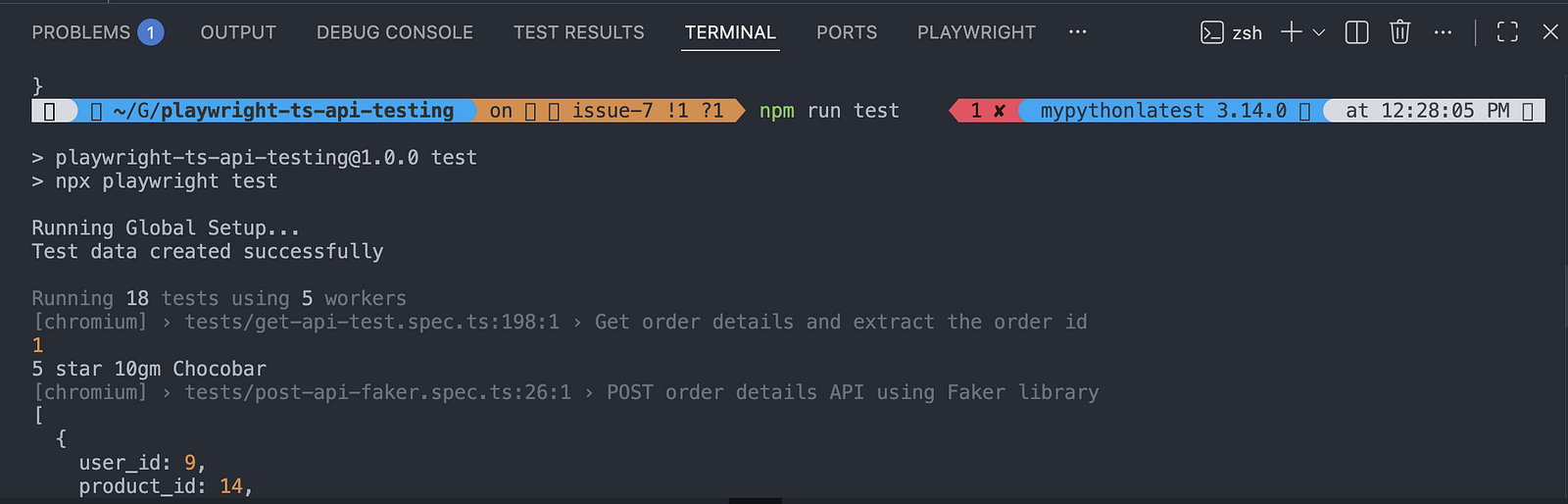
It can be seen that the test data was created using the global setup before running the tests.
How This Helps in Your API Testing
Instead of creating the order in the first test and relying on test execution order, we can use a more robust approach by setting up the required data beforehand.
By creating test data once during global setup, the tests remain independent, reducing flaky dependencies and unintended failures. This approach aligns with Playwright best practices and helps build a stable, maintainable automation test suite.
Important Points to Note About the Global Setup
- It runs once per test run.
- It does NOT share variables directly with tests.
- Use files or environment variables to pass data.
- Assertions should not be put in the global setup, except for setup validation.
Check out how to verify response data with Playwright TypeScript for a detailed understaning on assertions.
Summary
Global setup in Playwright runs once before the entire test suite and is primarily used for preparing the test environment before running the tests.
It helps keep tests independent and avoids relying on execution order. However, since it runs only once and does not directly share variables with tests, any required data must be passed through files, environment variables, or external storage mechanisms.
Happy testing!
Published at DZone with permission of Faisal Khatri. See the original article here.
Opinions expressed by DZone contributors are their own.