

Java Backend Development in the Era of Kubernetes and Docker
Containerization with Docker and orchestration through Kubernetes enables Java backends to be deployed, scaled, managed efficiently in modern cloud-native environments.
 ·
·
Join the DZone community and get the full member experience.
Join For FreeWe moved our monolithic Java application to Kubernetes last year. The promise was scalability and resilience. The reality was a series of silent failures during deployments. Users reported dropped connections every time we pushed a new version. Our monitoring showed zero downtime, but the customer experience told a different story. Requests vanished into the void during rolling updates. We spent weeks chasing network ghosts before finding the root cause. The issue was not the network. It was how our Java application handled termination signals.
In this article, I will share how we adapted our Java backend for container orchestration. I will explain the specific lifecycle issues we encountered. I will detail the configuration changes that solved the dropout problem. This is not a guide on writing Dockerfiles. It is a record of the operational friction we faced when Java met Kubernetes. Building cloud-native Java apps requires more than just packaging a JAR. It requires understanding how the orchestration layer interacts with the JVM.
The Silent Dropout Problem
Our deployment strategy used standard Kubernetes rolling updates. The controller would start a new pod before killing the old one. This should ensure zero downtime. Our users still reported errors during these windows. We checked the service logs. The old pods stopped accepting traffic instantly upon receiving the kill signal. The Kubernetes service endpoint removed the pod IP immediately. There was a gap between traffic cessation and process termination. In-flight requests died mid-stream.
Java applications do not shut down instantly. They need time to finish processing current requests. They need to close database connections gracefully. Our Spring Boot app ignored the termination signal initially. It kept running until the kernel killed it. This hard kill interrupted active transactions. Data consistency was at risk. We needed to implement a graceful shutdown sequence.
Implementing Graceful Shutdowns
We started by configuring Spring Boot to handle shutdown signals. The framework provides a property for this. We enabled it in our application configuration.

This told Spring to stop accepting new requests upon shutdown. It allowed existing requests to complete within thirty seconds. This was a good start, but it was not enough. Kubernetes sends a SIGTERM signal to the container. The JVM catches this signal. The application starts shutting down. Kubernetes waits for a preStop hook or the termination grace period. If the app takes too long, Kubernetes sends SIGKILL.
We added a preStop hook to our deployment manifest. This script sleeps for a few seconds before allowing the container to stop. This delay ensures the Kubernetes service removes the pod IP from the load balancer before traffic stops flowing.

This five-second sleep bridged the gap. The service mesh updated its endpoints. Traffic stopped routing to the terminating pod. Then the application began its graceful shutdown. No in-flight requests were dropped. The error rate during deployments dropped to zero.
Configuration Management Challenges
Configuration management was another pain point. We used ConfigMaps to store environment settings. Kubernetes mounted these as files inside the container. Our Java app reads these files at startup. Changing a ConfigMap triggered a rollout. Every config change restarted all pods. This was disruptive for minor tweaks.
We wanted hot reloading for certain properties. Spring Cloud Kubernetes supports this feature. It watches for ConfigMap changes and refreshes the context. We enabled the reload strategy.

This allowed us to update logging levels without restarting pods. It reduced deployment frequency for operational changes. However, we learned to be careful. Reloading the entire context can be heavy. We restricted hot reload to specific beans. Critical infrastructure settings still required a restart. This balance reduced risk while improving agility.
Logging in a Distributed Environment
Legacy Java apps often write logs to local files. This pattern fails in Kubernetes. Containers are ephemeral. When a pod dies, the local disk disappears. Logs vanish with it. We needed to stream logs to stdout. Kubernetes captures stdout and sends it to the logging driver.
We reconfigured our Logback setup. We removed file appenders. We added a console appender with JSON formatting. Structured logs are easier for aggregation tools to parse.
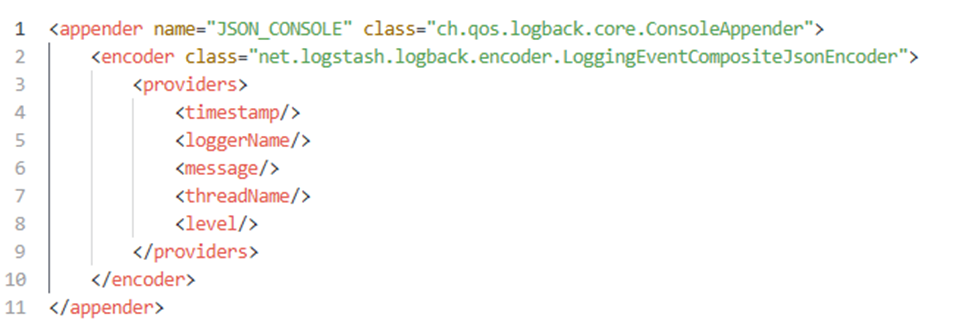
This change integrated us with our ELK stack seamlessly. We could trace requests across multiple pods. We could search logs without accessing individual containers. This visibility was crucial for debugging production issues. It also reduced disk IO within the container. The application ran lighter without file writes.
Security and User Context
Running Java as root in a container is a security risk. If an attacker escapes the JVM, they gain root access to the node. We audited our Docker images. The base images ran as root by default. We created a non-root user in our Dockerfile.

This simple change reduced our attack surface. However, it introduced permission issues. The application could not write to certain directories. We had to adjust volume mounts. We ensured the tmp directory was writable by the new user. This step is often overlooked during migration. Testing security contexts in staging is essential.
Resource Limits and JVM Awareness
We faced memory issues early in the migration. The JVM did not know about container limits. It allocated a heap based on host memory. The container got OOMKilled repeatedly. We fixed this by using percentage-based flags.
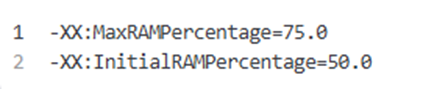
This ensured the JVM respected the cgroup limits. It left room for non-heap memory. We also set requests and limits in Kubernetes. Requests guaranteed resources for scheduling. Limits prevented runaway processes from starving neighbors. This alignment between JVM and Kubernetes was critical for stability.
Health Checks and Startup Probes
Java applications can be slow to start. Loading classes and connecting to databases takes time. Kubernetes liveness probes might kill the pod before it is ready. We used startup probes to handle this. The startup probe disables liveness checks until it succeeds.
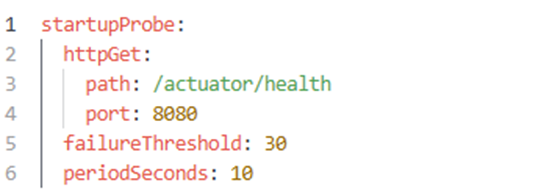
This gave our app up to five minutes to start. Once ready, the liveness probe took over. This prevented premature restarts during cold starts. It also protected us during heavy garbage collection pauses. The app remained healthy even if response times spiked temporarily.
Lessons Learned and Best Practices
Our journey taught us several key lessons. We incorporated these into our development standards.
- Handle SIGTERM. Always configure graceful shutdown. Do not rely on default behavior.
- Use preStop hooks. Bridge the gap between service discovery and process termination.
- Log to stdout. Never write to local files in containers. Use structured logging.
- Run as non-root. Reduce security risks by dropping privileges.
- Tune JVM for containers. Use percentage-based memory flags. Respect cgroup limits.
- Configure probes. Use startup probes for slow-starting applications. Tune liveness thresholds.
- Test failure modes. Simulate pod kills in staging. Verify no data loss occurs.
Conclusion
Moving Java to Kubernetes is more than just an infrastructure change; it is a fundamental shift in how we design, build, and operate software. Over time, we learned that the orchestration layer introduces new requirements. Graceful shutdowns, proper logging, and resource management are now fundamental for reliability. As a result, our application is resilient to both deployments and runtime failures.
We can trust the platform to manage our workloads efficiently while we focus on delivering features. We continue to refine our patterns as the ecosystem evolves and best practices emerge. Java remains a powerful tool for backend development — it just requires a new mindset for the cloud-native era. Happy coding, and always keep your containers healthy.
Opinions expressed by DZone contributors are their own.
Comments