

JWT Policy Enforcement, Rate Limiting, IP White Listing: Using Mulesoft, API Security, Cloudhub 2.0
Learn how to enforce JWT policies in API Manager with a RAML project. Secure endpoints using Auth0, plus apply IP whitelisting and rate limiting in Anypoint.
Join the DZone community and get the full member experience.
Join For FreeThis tutorial is all about implementing JWT Policy Enforcement in API Manager using a sample RAML-based project. It's especially helpful when applying policies through the API Manager in the Anypoint Platform. Along the way, you’ll also learn how to secure a specific API endpoint using a third-party Auth Provider like Auth0.
In this project, the following policies have been applied to enhance API security and traffic control:
- JWT Policy Enforcement
- IP Whitelisting
- Rate Limiting
Prerequisites
- Anypoint Studeio 7.21 (Java 17 Compatible default)
- Java 17
- Anypoint Platform account
- SOAPUI + POSTMAN
- Maven
Watch the video tutorial for a complete walkthrough of the concept.
Refer to the diagram to understand how the JWT (JSON Web Token) authentication process works.
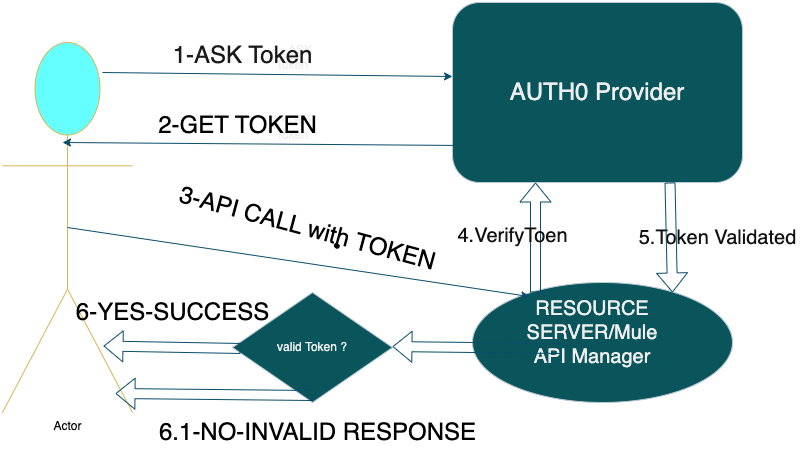
- The client first calls the Auth Provider to obtain a token by sending the client ID, client secret, and grant_type.
- Once the token is received, the client uses it to call the actual resource server endpoint.
- The resource server then validates the token by making a call to the Auth Provider.
- If the token is valid, a 200 OK response is returned to the client.
- If the token is invalid, an error response is sent back.
I’ve included the relevant RAML file details below for reference.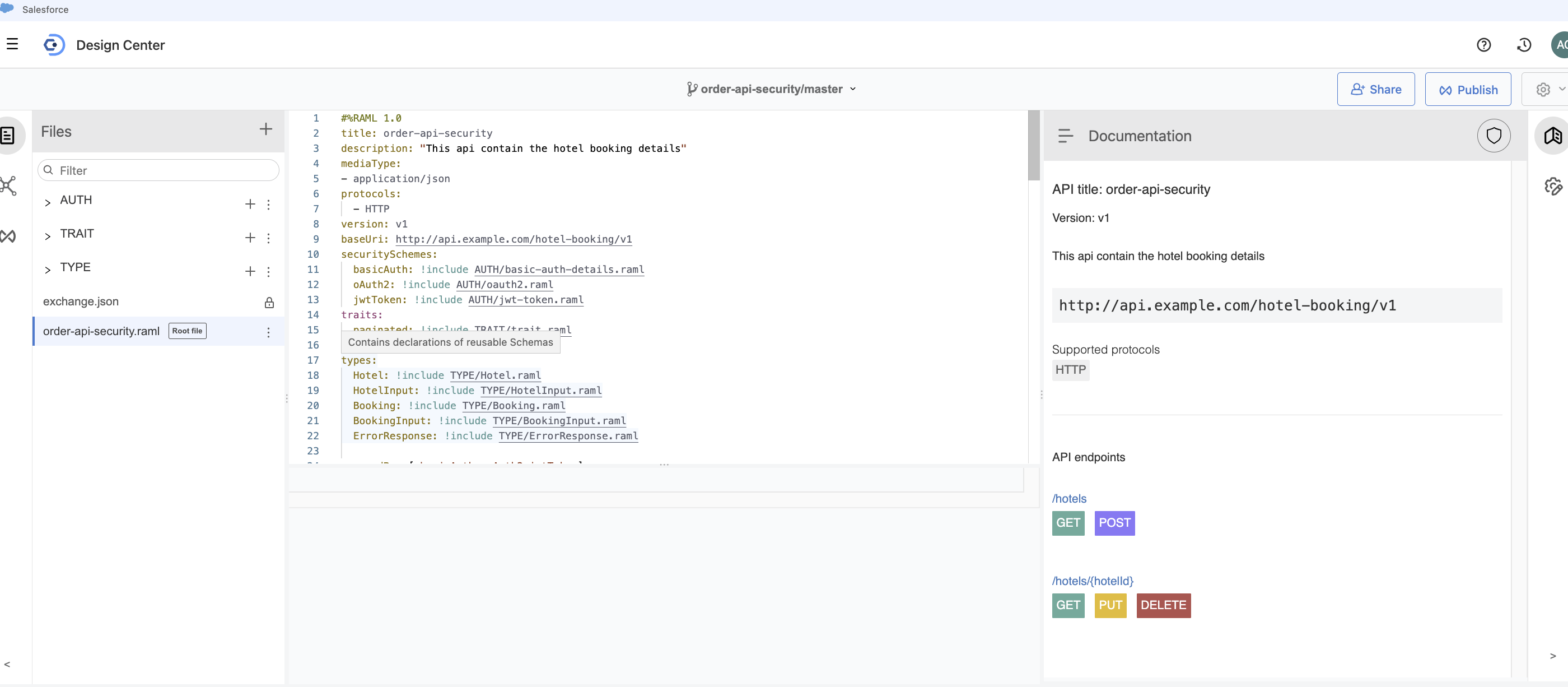
The following RAML files define the API security schemes used in this project:
jwt-token.raml
This file defines the JWT-based security scheme, specifying how tokens should be passed and validated.
#%RAML 1.0 SecurityScheme
type: x-jwt
description: |
      This API uses JWT for authentication. Pass the token in the Authorization header as "Bearer {token}".
describedBy:
      headers:
        Authorization:
          description: |
            JWT access token in the format "Bearer {token}".
          type: string
          required: true
          example: Bearer eyJhbGciOiJIUzI1NiIsInR5cCI6IkpXVCJ9...
      responses:
        401:
          description: |
            Unauthorized. JWT is missing, invalid, or expired.
oauth2.raml
This file defines the OAuth 2.0 security scheme, where clients must obtain an access token and include it in the Authorization header as "Bearer {token}". It supports common grant types like authorization_code and client_credentials, along with scoped access control.
#%RAML 1.0 SecurityScheme
type: OAuth 2.0
description: |
      This API is secured using OAuth 2.0. Obtain an access token and include it in the Authorization header as "Bearer {token".
describedBy:
      headers:
        Authorization:
          description: |
            Used to send the OAuth 2.0 access token. Format: "Bearer {token}".
          type: string
          required: true
          example: Bearer eyJhbGciOiJIUzI1NiIsInR5cCI6IkpXVCJ9...
      responses:
        401:
          description: |
            Unauthorized. Access token is missing, invalid, or expired.
        403:
          description: |
            Forbidden. The access token does not have the required scopes or permissions.
settings:
      authorizationUri: https://auth.example.com/oauth2/authorize
      accessTokenUri: https://auth.example.com/oauth2/token
      authorizationGrants: [ authorization_code, client_credentials ]
      scopes: [ read, write, admin ]
basic-auth-details.xml
This file defines the Basic Authentication scheme using a standard username and password passed in the Authorization header.
#%RAML 1.0 SecurityScheme
type: Basic Authentication
description: |
      Basic Authentication using username and password.
describedBy:
      headers:
        Authorization:
          description: |
            Standard HTTP Basic Authentication header. Value must be "Basic base64(username:password)".
          type: string
          required: true
      responses:
        401:
          description: Unauthorized. Invalid or missing credentials.
The trait file is defined as follows:
#%RAML 1.0 Trait
usage: Apply to collection GET endpoints to support pagination.
queryParameters:
  page:
    type: integer
    required: false
    minimum: 1
    default: 1
    description: The page number to retrieve (starting from 1).
    example: 2
  pageSize:
    type: integer
    required: false
    minimum: 1
    maximum: 100
    default: 20
    description: The number of items per page.
    example: 10
responses:
  200:
    headers:
      X-Total-Count:
        type: integer
        description: Total number of items available.
        example: 57
      X-Total-Pages:
        type: integer
        description: Total number of pages available.
        example: 6
      X-Current-Page:
        type: integer
        description: The current page number.
        example: 2
      X-Page-Size:
        type: integer
        description: The number of items per page in this response.
        example: 10
TYPE RAML Files
The following RAML files define the data types used across the API:
Booking.raml
Defines the Booking data type, including fields like id, hotelId, guestName, checkInDate, checkOutDate, rooms, and status. It represents a complete hotel booking with validation and example data.
#%RAML 1.0 DataType
type: object
properties:
      id:
        type: integer
        description: Unique booking identifier
        example: 1001
      hotelId:
        type: integer
        description: ID of the booked hotel
        example: 101
      guestName:
        type: string
        required: true
        description: Name of the guest
        example: "Alice Smith"
      checkInDate:
        type: date-only
        required: true
        description: Check-in date
        example: 2024-07-01
      checkOutDate:
        type: date-only
        required: true
        description: Check-out date
        example: 2024-07-05
      rooms:
        type: integer
        required: true
        minimum: 1
        description: Number of rooms booked
        example: 2
      status:
        type: string
        enum: [ confirmed, cancelled, pending ]
        description: Booking status
        example: confirmed
example:
      id: 1001
      hotelId: 101
      guestName: "Alice Smith"
      checkInDate: 2024-07-01
      checkOutDate: 2024-07-05
      rooms: 2
      status: confirmed
BookingInput.raml
Outlines the required data format for submitting a hotel booking request. It includes required fields such as hotelId, guestName, checkInDate, checkOutDate, and rooms, with validation rules for each. This file excludes fields like id and status, which are typically set by the system.
#%RAML 1.0 DataType
 type: object
 properties:
      hotelId:
        type: integer
        required: true
      guestName:
        type: string
        required: true
      checkInDate:
        type: date-only
        required: true
      checkOutDate:
        type: date-only
        required: true
      rooms:
        type: integer
        required: true
        minimum: 1
 example:
      hotelId: 101
      guestName: "Alice Smith"
      checkInDate: 2024-07-01
      checkOutDate: 2024-07-05
      rooms: 2
ErrorResponse.raml
Defines a standard error response object containing a single required property: message. This message provides details about the error encountered, such as missing resources, invalid inputs, or authentication failures.
#%RAML 1.0 DataType
  type: object
  properties:
      message:
        type: string
        required: true
        description: Error message
  example:
      message: "Resource not found."
Hotel.raml
Represents the full Hotel data type used in API responses. It includes properties like:
id: Unique identifier for the hotelname: Hotel name (required)address: Hotel address (required)rating: Optional float value (1–5) indicating the hotel’s ratingamenities: Optional list of available features (e.g.,"wifi","pool")
#%RAML 1.0 DataType
type: object
description: Data type for hotel
properties:
      id:
        type: integer
        description: Unique hotel identifier
        example: 101
      name:
        type: string
        required: true
        description: Name of the hotel
        example: "Grand Plaza"
      address:
        type: string
        required: true
        description: Address of the hotel
        example: "123 Main St, Cityville"
      rating?:
        type: number
        format: float
        minimum: 1
        maximum: 5
        description: Hotel rating (1-5 stars)
        example: 4.5
      amenities?:
        type: array
        items: string
        description: List of amenities
        example: [ "wifi", "pool", "gym" ]
example:
      id: 101
      name: "Grand Plaza"
      address: "123 Main St, Cityville"
      rating: 4.5
      amenities: [ "wifi", "pool", "gym" ]
additionalProperties: false
HotelInput.raml
Specifies the format and required details for submitting a new hotel booking. It includes:
name(string, required): The hotel’s nameaddress(string, required): The hotel’s addressrating(number, optional): Hotel rating from 1 to 5 (float)amenities(array of strings, optional): List of hotel amenities like"wifi","pool","gym"
This type is used when sending hotel details in POST or PUT requests.
#%RAML 1.0 DataType
type: object
properties:
      name:
        type: string
        required: true
      address:
        type: string
        required: true
      rating?:
        type: number
        format: float
        minimum: 1
        maximum: 5
      amenities?:
        type: array
        items: string
example:
      name: "Grand Plaza"
      address: "123 Main St, Cityville"
      rating: 4.5
      amenities: [ "wifi", "pool", "gym" ]
additionalProperties: false
order-api-security.raml
This RAML file defines the hotel booking API with security and data types included:
- Title: order-api-security
- Description: API for hotel booking management
- Media Type: application/json
- Protocols: HTTP
- Version: v1
- Base URI:
http://api.example.com/hotel-booking/v1
Security Schemes:
- Basic Authentication
- OAuth 2.0
- JWT Token
Traits:
-
Pagination support applied to GET collections
Data Types Included:
- Hotel
- HotelInput
- Booking
- BookingInput
- ErrorResponse
Endpoints:
/hotelsfor listing and creating hotels (with pagination for GET)/hotels/{hotelId}for retrieving, updating, and deleting specific hotels
The API is secured by basicAuth, oAuth2, and jwtToken schemes.
#%RAML 1.0
title: order-api-security
description: "This api contain the hotel booking details"
mediaType:
- application/json
protocols:
  - HTTP
version: v1
baseUri: http://api.example.com/hotel-booking/v1
securitySchemes:
  basicAuth: !include AUTH/basic-auth-details.raml
  oAuth2: !include AUTH/oauth2.raml
  jwtToken: !include AUTH/jwt-token.raml
traits:
  paginated: !include TRAIT/trait.raml

types:
  Hotel: !include TYPE/Hotel.raml
  HotelInput: !include TYPE/HotelInput.raml
  Booking: !include TYPE/Booking.raml
  BookingInput: !include TYPE/BookingInput.raml
  ErrorResponse: !include TYPE/ErrorResponse.raml

securedBy: [ basicAuth, oAuth2,jwtToken]

/hotels:
  get:
    description: Get a paginated list of hotels.
    is: [ paginated ]
    responses:
      200:
        description: Successful response with a list of hotels.
        body:
          application/json:
            type: Hotel[]
            example:
              - id: 101
                name: "Grand Plaza"
                address: "123 Main St, Cityville"
                rating: 4.5
                amenities: [ "wifi", "pool", "gym" ]
              - id: 102
                name: "Ocean View"
                address: "456 Beach Rd, Seaside"
                rating: 4.0
                amenities: [ "wifi", "spa" ]
  post:
    description: Create a new hotel.
    body:
      application/json:
        type: HotelInput
        example:
          name: "Grand Plaza"
          address: "123 Main St, Cityville"
          rating: 4.5
          amenities: [ "wifi", "pool", "gym" ]
    responses:
      201:
        description: Hotel created successfully.
        body:
          application/json:
            type: Hotel
            example:
              id: 103
              name: "Mountain Retreat"
              address: "789 Hilltop Ave, Mountainview"
              rating: 5
              amenities: [ "wifi", "sauna" ]

/hotels/{hotelId}:
  uriParameters:
    hotelId:
      type: integer
      required: true
      description: Unique hotel identifier
      example: 101
  get:
    description: Get details of a specific hotel.
    responses:
      200:
        description: Successful response with hotel details.
        body:
          application/json:
            type: Hotel
            example:
              id: 101
              name: "Grand Plaza"
              address: "123 Main St, Cityville"
              rating: 4.5
              amenities: [ "wifi", "pool", "gym" ]
  put:
    description: Update details of a specific hotel
    body:
      application/json:
        type: HotelInput
        example:
          name: "Grand Plaza Updated"
          address: "123 Main St, Cityville"
          rating: 4.7
          amenities: [ "wifi", "pool", "gym", "spa" ]
    responses:
      200:
        description: Hotel updated successfully.
        body:
          application/json:
            type: Hotel
            example:
              id: 101
              name: "Grand Plaza Updated"
              address: "123 Main St, Cityville"
              rating: 4.7
              amenities: [ "wifi", "pool", "gym", "spa" ]
  delete:
    description: Delete a specific hotel.
    responses:
      204:
        description: Hotel deleted successfully. No content.
Now, publish your API to Exchange.
To implement the project locally, choose the scaffolding option shown below.
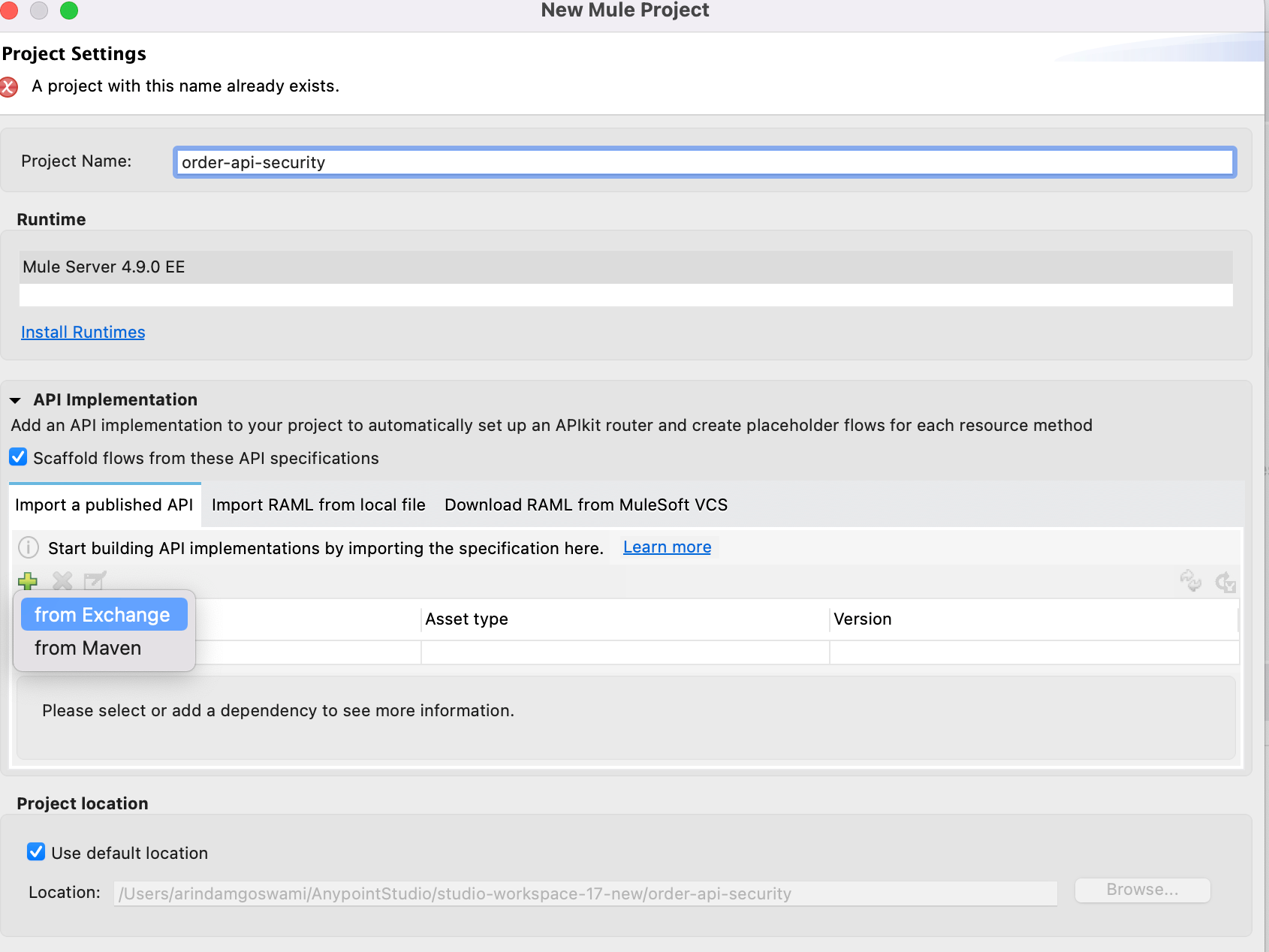
For implementation and auto-discovery, I assume you’re already familiar, so I won’t cover the details here.
Once everything looks good, deploy the project to CloudHub 2.0, where it should appear as running.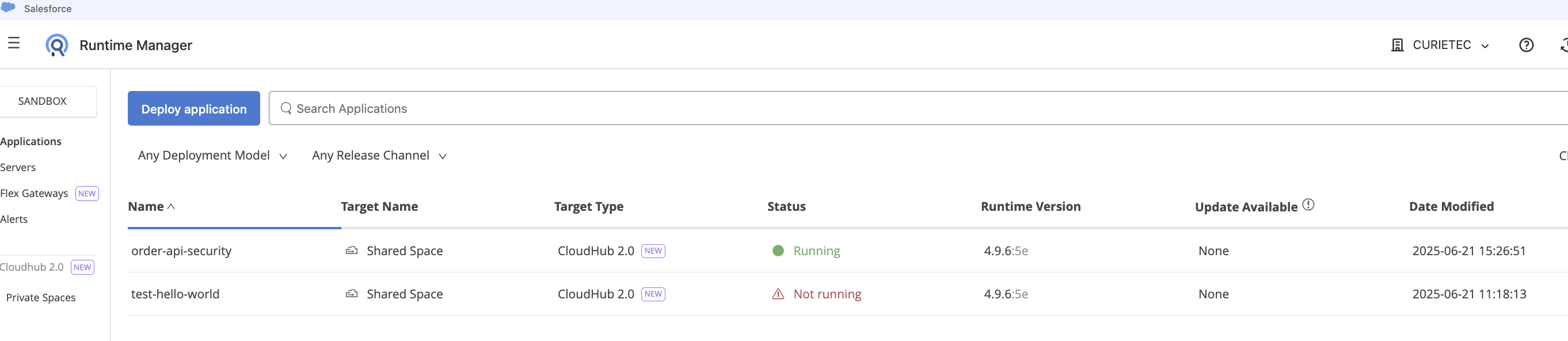
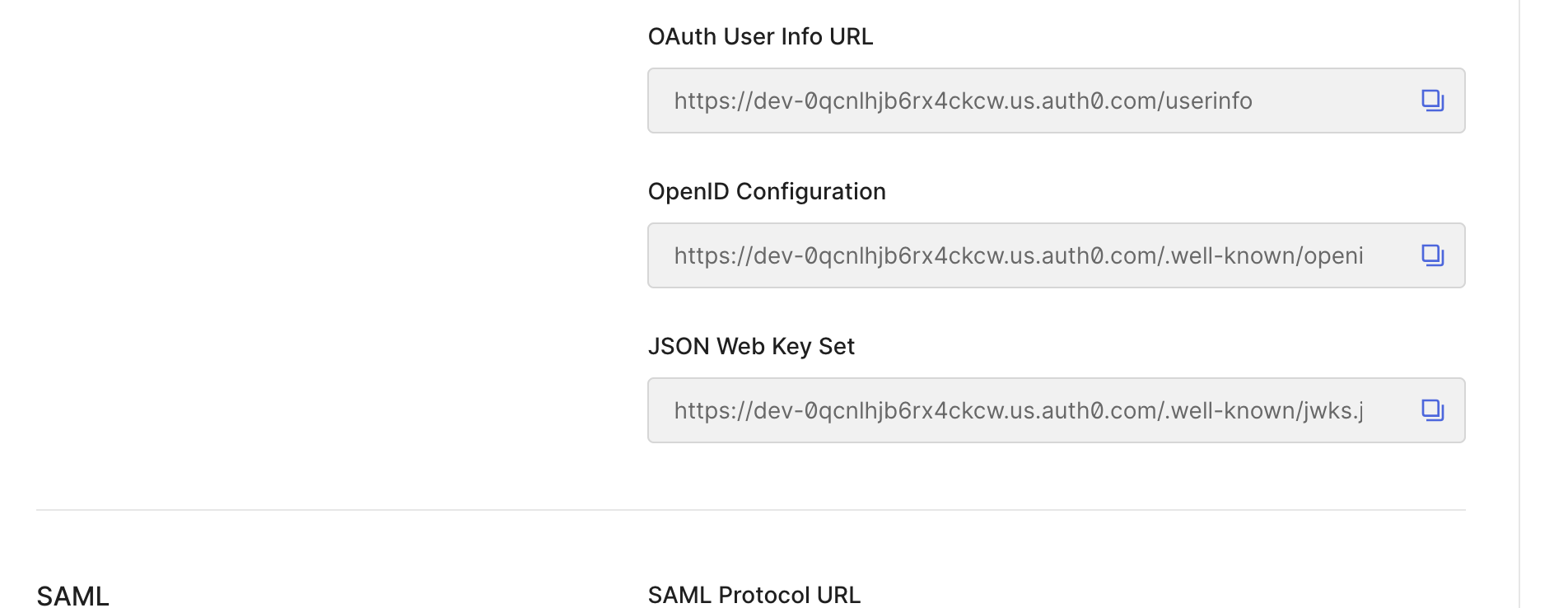
Now, log in or sign up with the Auth0 provider to obtain the JWKS URL.
Navigate to Auth0 > My Profile > Applications > Settings > Endpoints.
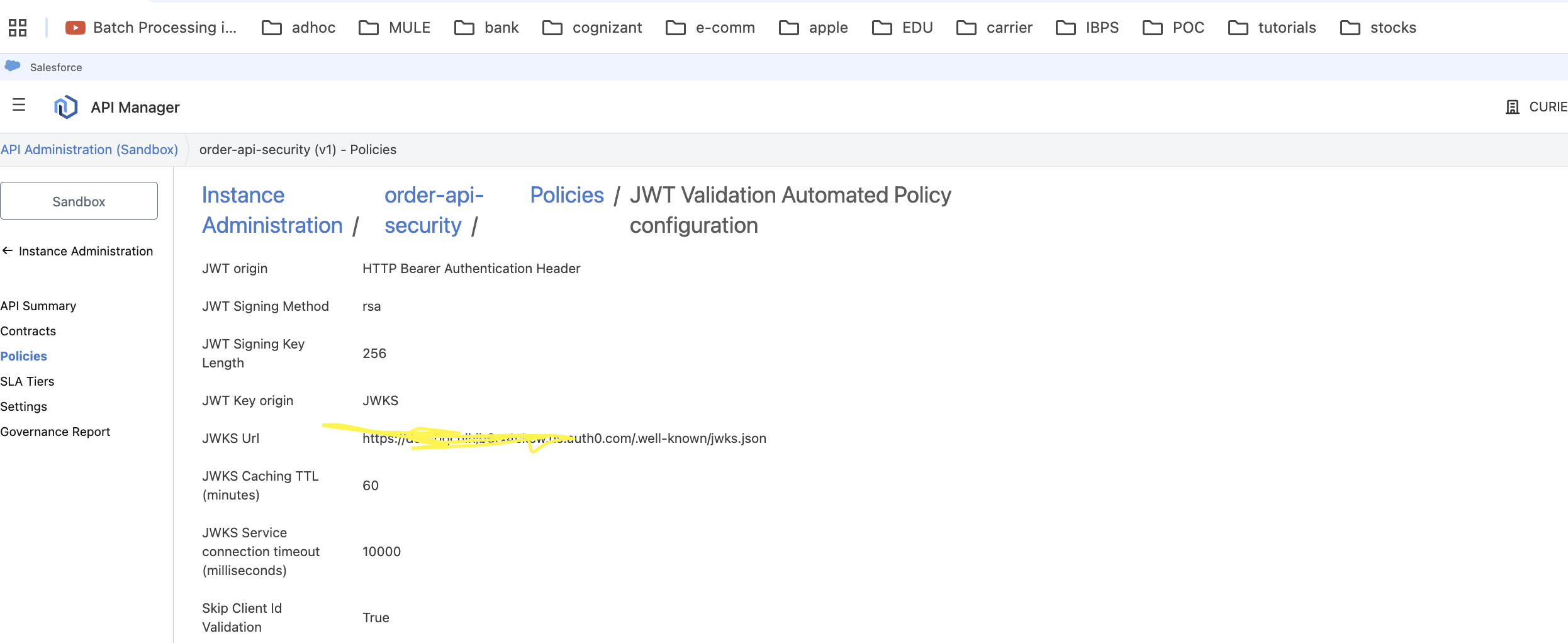
Copy the JWKS URL and paste it into the JWT policy configuration within the API Manager as demonstrated below.
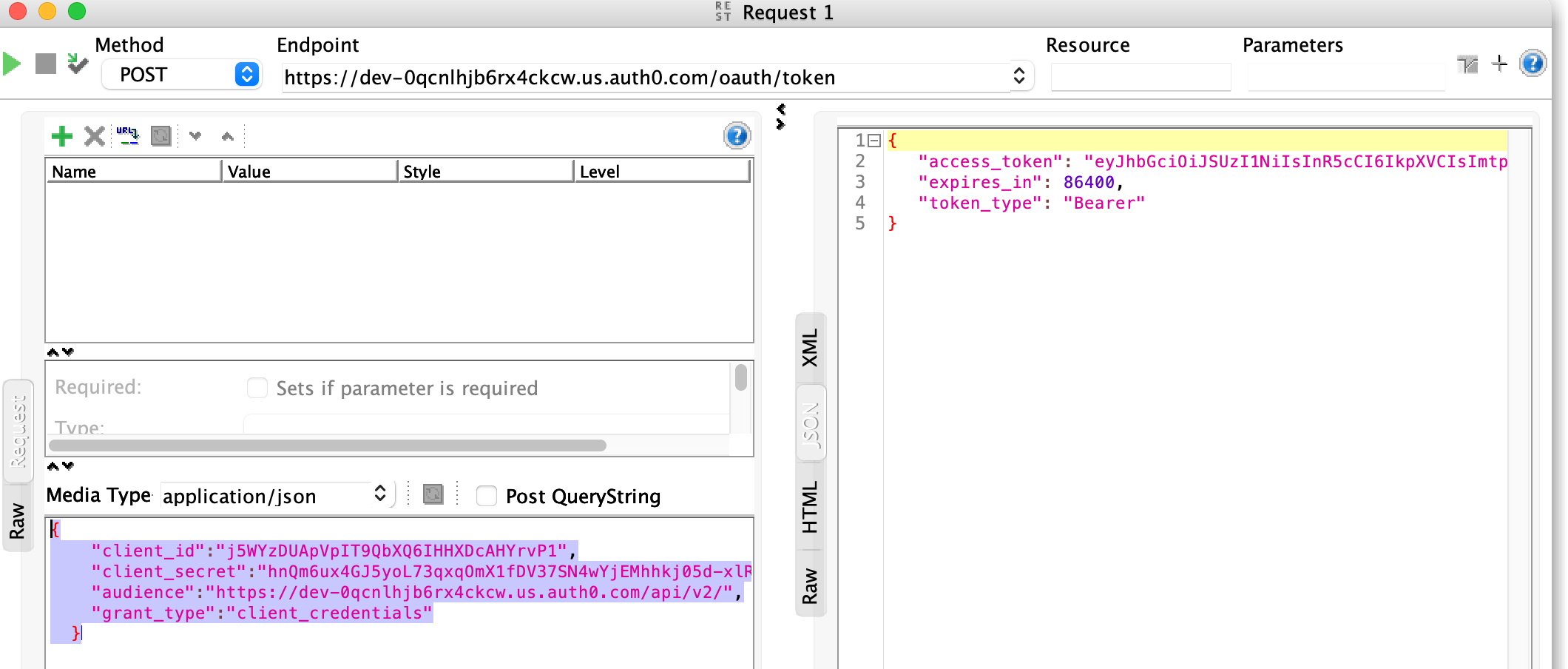
The next step is to obtain the token. You’ll need the following four pieces of information to request it. (Note: The client secret shown here is modified for security.)
{
    "client_id":"j5WYzDUApVpIT9QbXQ6IHHXDcAHYrvP1",
    "client_secret":"hnQmxxsxsxsxsxsoL73qxqOmX1fDV37SN4wYjEMhhkj05d-xlR4oeKExY8PFDYm39iL",
    "audience":"https://dev-0qcnlhjb6rx4ckcw.us.auth0.com/api/v2/",
    "grant_type":"client_credentials"
  }
Next, use the token to call the actual API. If the token is valid, you’ll receive the expected response.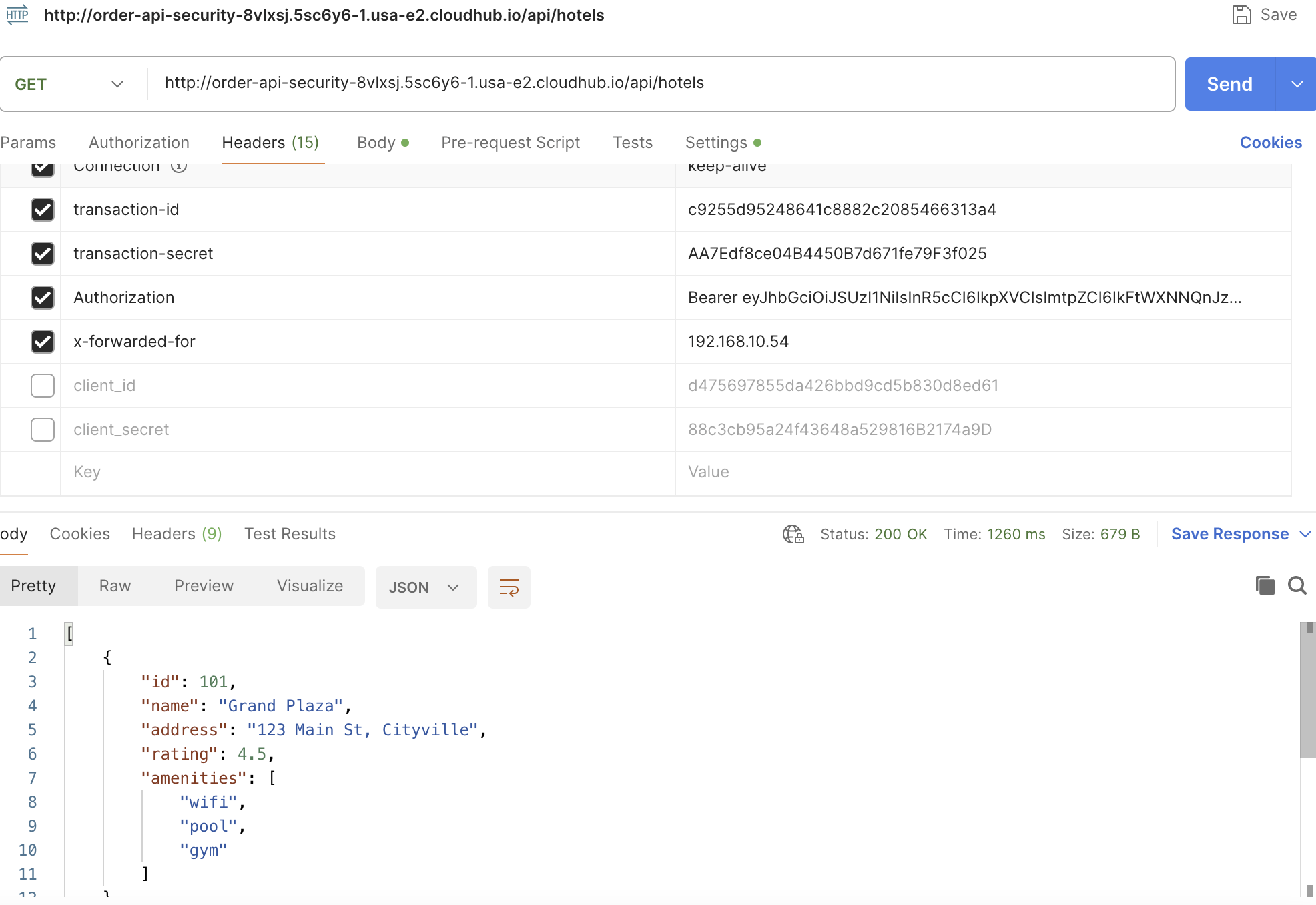
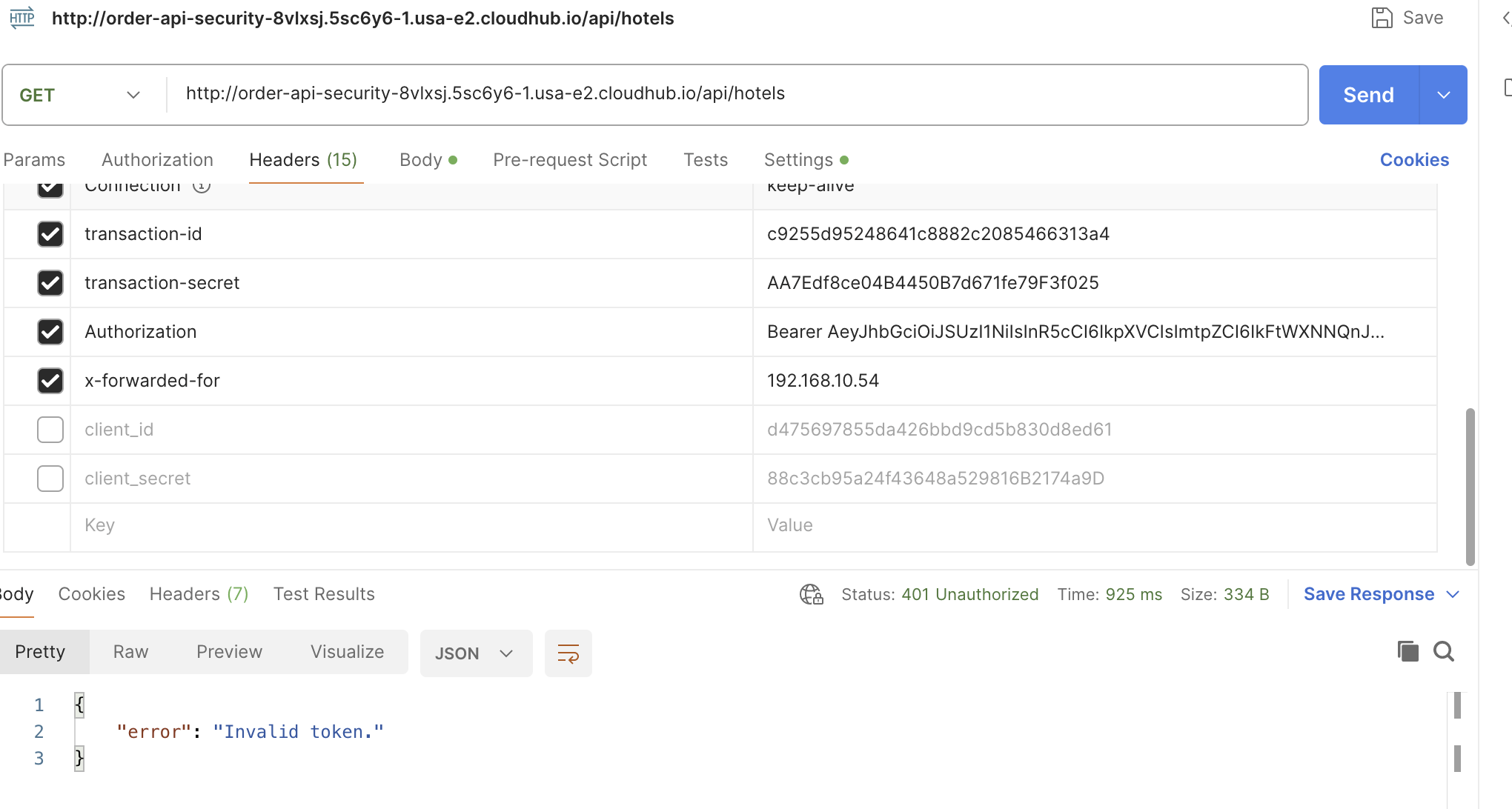
If the token is invalid, you will receive a 401 Unauthorized response.
The IP Allow List policy and Rate Limiting are straightforward—please refer to the video for detailed explanation.
If you found this tutorial helpful, please give it a like and feel free to ask any questions you may have!
Opinions expressed by DZone contributors are their own.
Comments