

AI on the Fly: Real-Time Data Streaming From Apache Kafka to Live Dashboards
Real-time data streaming plays a key role for AI models as it allows them to handle and respond to data as it comes in, instead of just using old fixed datasets.
 CORE
·
CORE
·
In the current fast-paced digital age, many data sources generate an unending flow of information, a never-ending torrent of facts and figures that, while perplexing when examined separately, provide profound insights when examined together. Stream processing can be useful in this situation. It fills the void between real-time data collecting and actionable insights. It’s a data processing practice that handles continuous data streams from an array of sources. Real-time data streaming has started having an important impact on modern AI models for applications that need quick decisions.
We can consider a few examples where AI models need to deliver instant decisions, such as self-driving cars, fraud in stock market trading, and smart factories that utilize technology like sensors, robots, and data analytics to automate and optimize manufacturing processes.
Real-time data streaming plays a key role for AI models as it allows them to handle and respond to data as it comes in, instead of just using old fixed datasets. This speed matters a lot for tasks where quick choices can make a big difference, like spotting fraud in money transfers, tweaking suggestions in online shops, or steering self-driving cars, as said above as an example of AI models that need to deliver instant decisions. By leveraging real-time data, AI models can maintain a current understanding of their environment, adapt quickly to changes, and improve performance through continuous updates.
What's more, real-time streaming helps AI work in edge computing and IoT setups where quick processing is often needed. Without the ability to work in real-time, AI systems might become old news, slow to react, and less useful in fast-moving, data-heavy settings.
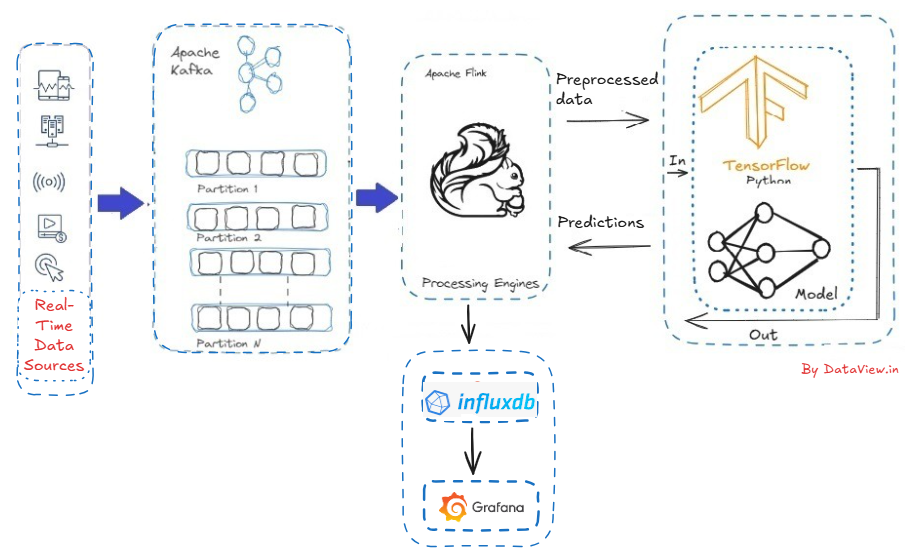
From Source to Streams
Over the past few years, Apache Kafka has emerged as the leading standard for streaming data. Fast-forward to the present day, Kafka has achieved ubiquity, being adopted by at least 80% of the Fortune 100. Kafka’s architecture versatility makes it exceptionally suitable for streaming data at a vast ‘internet’ scale, ensuring fault tolerance and data consistency crucial for supporting mission-critical applications. Flink is a high-throughput, unified batch and stream processing engine, renowned for its capability to handle continuous data streams at scale. It seamlessly integrates with Kafka and offers robust support for exactly-once semantics, ensuring each event is processed precisely once, even amidst system failures. Flink emerges as a natural choice as a stream processor for Kafka. While Apache Flink enjoys significant success and popularity as a tool for real-time data processing, accessing sufficient resources and current examples for learning Flink can be challenging.
Turning Streams into Insights
After ingesting real-time data stream into the multi-node Apache Kafka cluster and subsequently integrating with the Flink cluster, the ingested streaming data can be allowed for the enhancement, filtering, aggregation, and alteration. This has a significant impact on AI systems, as it enables real-time feature engineering to take place before feeding the data to models.
As AI systems, we can consider TensorFlow, which is an open-source platform and framework for machine learning, including libraries and tools based on Python and Java. It is designed with the objective of training machine learning and deep learning models on data.
Here is the pseudocode in Java that demonstrates how we can pass processed stream data from Apache Flink to a TensorFlow AI model. We can use the DataStream API of Flink to ingest streaming data from Kafka's topic and subsequently parse and process the data. Eventually, send processed data to TensorFlow for prediction.
// Step 1: Ingest streaming data from a source (e.g., Kafka)
DataStream<String> rawStream = env.addSource(new FlinkKafkaConsumer<>(...));
// Step 2: Parse and process the data
DataStream<FeatureVector> processedStream = rawStream .map(new ParseAndTransformFunction());
// Step 3: Parse and process the data
DataStream<FeatureVector> processedStream = rawStream
    .map(new ParseAndTransformFunction()); // Extract features suitable for model input
// Step 4: Send processed features to TensorFlow for prediction
DataStream<PredictionResult> predictions = processedStream
    .map(new RichMapFunction<FeatureVector, PredictionResult>() {

        // If calling a TensorFlow SavedModel locally
        transient SavedModelBundle model;

        @Override
        public void open(Configuration parameters) {
            // Load the TensorFlow SavedModel from local or distributed file system
            model = SavedModelBundle.load("/path/to/saved_model", "serve");
        }

        @Override
        public PredictionResult map(FeatureVector input) throws Exception {
            // Convert FeatureVector to Tensor
            Tensor inputTensor = Tensor.create(input.toTensorArray());

            // Run inference
            Tensor resultTensor = model.session()
                .runner()
                .feed("input_tensor_name", inputTensor)
                .fetch("output_tensor_name")
                .run()
                .get(0);

            // Parse and return result
            return new PredictionResult(resultTensor);
        }

        @Override
        public void close() {
            model.close(); // Close model session
        }
    });
// ALTERNATIVE: If using a REST API to call TensorFlow Serving
DataStream<PredictionResult> predictionsViaAPI = processedStream
    .map(new MapFunction<FeatureVector, PredictionResult>() {
        @Override
        public PredictionResult map(FeatureVector input) throws Exception {
            // Serialize feature vector as JSON
            String jsonPayload = serializeToJSON(input);

            // Send HTTP POST request to TensorFlow Serving REST API
            String response = HttpClient.post("http://localhost:8501/v1/models/model:predict", jsonPayload);

            // Parse response and return prediction
            return parsePredictionFromJSON(response);
        }
    });

// Step 5: Use predictions (e.g., sink to database, alerting system, etc.)
predictions.addSink(new MyPredictionSink());

// Execute the pipeline
env.execute("Flink + TensorFlow Streaming Inference");
What’s Next From TensorFlow?
Moving the predicted model from TensorFlow to Grafana for dynamic visualization isn't straightforward. We need to take a few steps in between. This is because Grafana is a multi-platform, open-source analytics and interactive visualization web application. It doesn't work with machine learning models.
Instead, it connects to databases that store data over time. For continuous predictions, we can use InfluxDB, TimescaleDB (a PostgreSQL extension), or any other vendor-specific time-series database. This approach makes it ideal for deploying and tracking models in production that support real-time monitoring, historical trend analysis, and ML model observability.
Conclusion
In today's world, where we are concerned about every millisecond counts, closing the gap between AI and real-time data isn't just a technical achievement. It gives us an edge over competitors. When we stream data through Apache Kafka and display insights right away on live dashboards, we are not only just watching what's happening now, we are shaping it too. This real-time AI system turns raw data into instant intelligence, whether it's spotting unusual patterns, boosting recommendation systems, or guiding operational choices. As information flows faster, those who can respond to it will lead the way. So, connect to the data stream, let our models think, and breathe life into our dashboards. Of course, there are numerous technical problems to solve, starting from data cleansing to the deployment strategy with the right architectural approach.
Thank you for reading! If you found this article valuable, please consider liking and sharing it.
Published at DZone with permission of Gautam Goswami. See the original article here.
Opinions expressed by DZone contributors are their own.