

Kubernetes Says Ready. Your LLM Still Isn’t.
Kubernetes can say Ready before an LLM can infer. Measure the gap, then make the readiness check a real inference in production.
 CORE
·
CORE
·
Join the DZone community and get the full member experience.
Join For FreeA pod can look healthy in Kubernetes while the model behind it is still not ready to answer a request.
That is the gap I wanted to measure.
Kubernetes Ready means the pod passed the readiness condition you configured. It does not automatically mean the model is loaded, resident in memory, or able to complete inference.
For a normal web service, an HTTP check is often good enough. With an LLM serving pod, it can be too shallow.
The process may be running. The API may respond. The model file may even be on disk. The first real request can still spend several seconds loading the model before it completes.
I ran controlled Ollama recovery experiments on Kubernetes to see how big that window was.
Ready Is Only One Point in the Recovery Path
I measured five timestamps:
T0 - pod replacement requested
T1 - Kubernetes reports Ready
T2 - inference runtime responds to HTTP
T3 - first post-recovery inference request begins
T4 - inference request completes successfully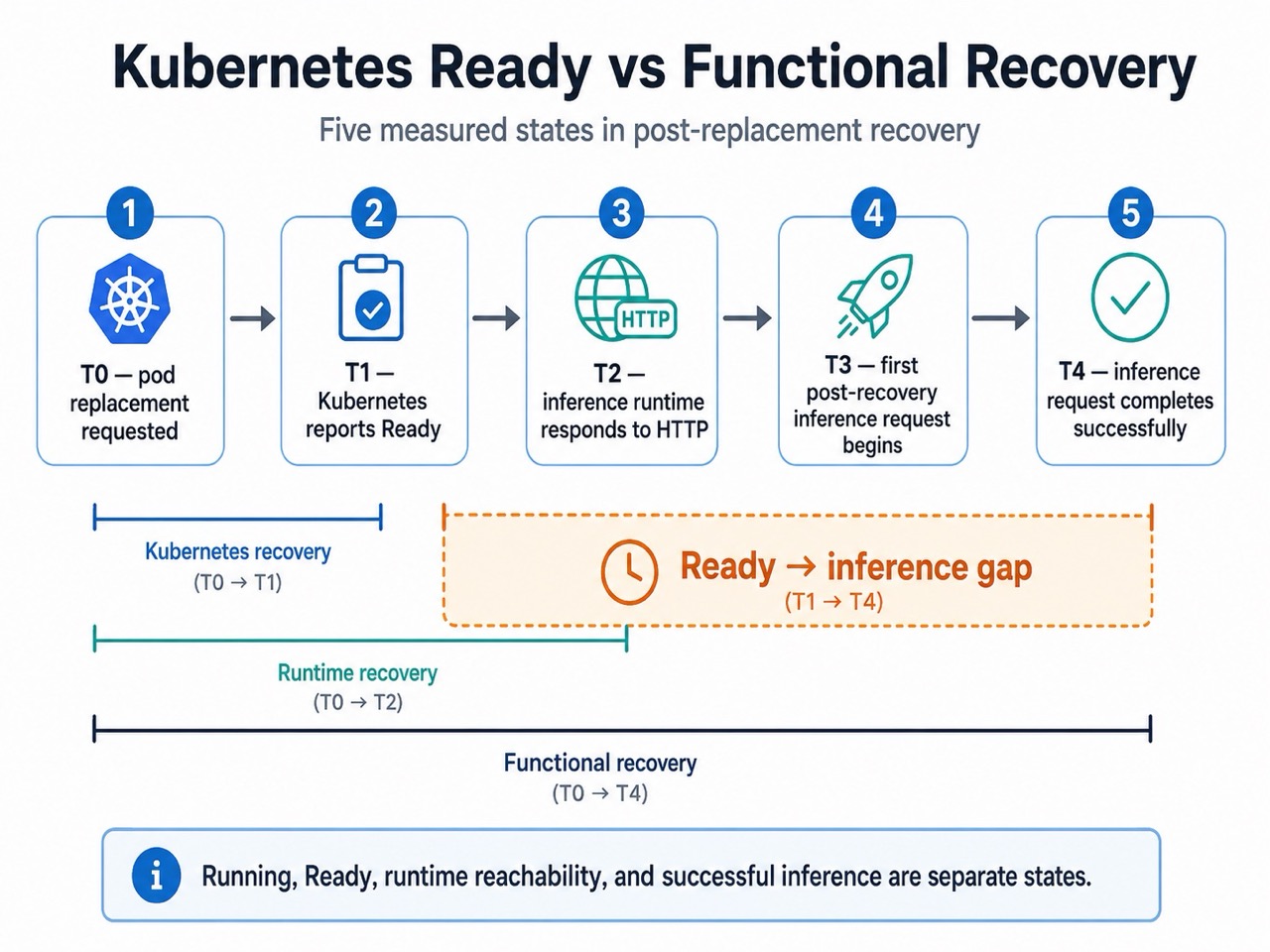
That gave me four useful timings:
Kubernetes recovery    = T1 - T0
Runtime recovery       = T2 - T0
Functional recovery    = T4 - T0
Ready -> inference gap = T4 - T1
The last one is where the problem becomes visible.
The Results
I ran 10 pod-replacement tests for each configuration:
- local Minikube on Mac, CPU-only
- Azure
Standard_D16s_v5Linux VM running Minikube, CPU-only - Ollama
llama3.2:1bllama3.2:3b- same 2 CPU / 4 GiB container limit for the 1B and 3B comparison
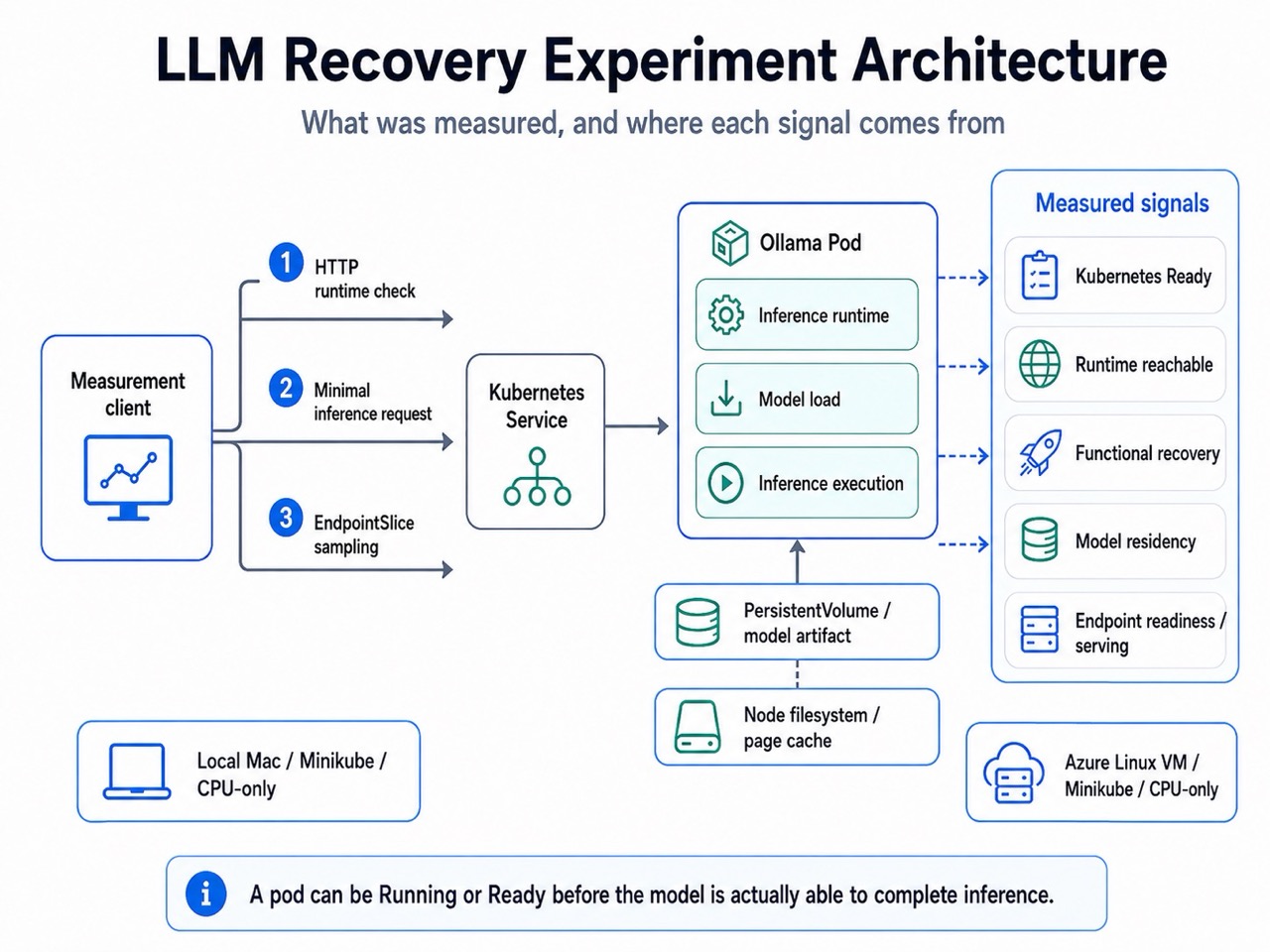
Mean results:
| Metric | Local 1B | Local 3B | Azure 1B | Azure 3B |
|---|---|---|---|---|
| Kubernetes Ready | 1.66 s | 1.96 s | 1.61 s | 1.69 s |
| Runtime reachable | 2.43 s | 2.44 s | 2.19 s | 2.17 s |
| Functional recovery | 11.11 s | 16.27 s | 5.43 s | 7.73 s |
| Ready -> inference | 9.45 s | 14.31 s | 3.83 s | 6.05 s |
| Model load | 5.51 s | 8.60 s | 2.16 s | 3.96 s |
Kubernetes reported the pod Ready in about two seconds or less in all four configurations. Successful inference came later.
The mean Ready-to-inference gap ranged from about 3.8 seconds to 14.3 seconds.
The Azure environment was faster than the local environment for the inference-dependent part of recovery, but the gap was still there.
I did not try to explain the cross-platform difference with one cause. CPU, storage, virtualization, architecture, and cache behavior can all affect the result.
The point was simpler: Kubernetes recovery and inference recovery were not the same event.
There Is More Than One Kind of "Ready"
The experiments also exposed a few other states that are easy to mix together.
The Runtime Can Be Up While the Model Is Gone
One early version used emptyDir for Ollama model storage.
After pod replacement, Ollama started normally.
But:
ollama listreturned no model.
The runtime had recovered. The model artifact had not. Moving the model data to a PVC fixed the persistence problem.
The Model Can Be on Disk Without Being Loaded
A larger llama3.1:8b test made this very clear.
Before inference, ollama list showed the model artifact, but ollama ps showed nothing resident. Cgroup memory usage was only around 14 MiB.
After the first request, the model became resident and memory rose to roughly 5.27 GiB. So "model exists" and "model is ready to serve" are different checks.
A Warm Node Can Make Recovery Look Better
I also ran 10 warm-cache and 10 cold-cache tests for the 3B model on the same Azure node.
For the cold condition:
sync
echo 3 > /proc/sys/vm/drop_caches
This clears the Linux page cache, dentries, and inode caches. It is a host filesystem/page-cache test, not an Ollama-specific model cache.
| metric | warm | cold |
|---|---|---|
| Functional recovery | 7.58 s | 8.09 s |
| Ready -> inference | 5.70 s | 6.26 s |
| Model load | 3.95 s | 4.61 s |
| Request wall time | 5.11 s | 5.70 s |
Model load increased by about 16.6% under the cold condition. Kubernetes recovery barely moved.
That is a useful warning for repeated recovery tests on the same node: the host may be helping more than you realize.
Model Residency Can Overlap
During memory testing, loading the 3B model under a 4 GiB limit once failed with:
signal: killedIt looked like the 3B model did not fit. That was not the actual problem.
A 1B model from an earlier request was still resident. When I tested the 3B model alone under the same limit, it worked, and the cgroup showed no OOM kill.
The failure came from overlapping residency, not the 3B model by itself. A simple runtime health check would not have told me that.
So What Should Readiness Check?
A normal readiness probe usually asks something like:
Is the HTTP endpoint responding?
That proves the runtime is reachable.
For an LLM workload, I care about a stronger question:
Can this pod actually complete inference with the model it is supposed to serve?
One way to test that is with a minimal inference request:
readinessProbe:
  exec:
    command:
      - sh
      - -c
      - |
        curl -sf -X POST http://localhost:11434/api/generate \
          -H 'Content-Type: application/json' \
          -d '{"model":"llama3.2:1b","prompt":"ping","stream":false}' \
          | grep -q '"done":true'
  periodSeconds: 2
  failureThreshold: 1
The exact command will depend on the serving image. The point is not curl.
The point is that readiness now checks the model-serving path, not just the process.
What Happened During Rollouts?
For the 3B readiness test, I sampled Kubernetes EndpointSlice state at roughly 0.5-second intervals during 10 local rollouts and 10 Azure rollouts.
| metric | local 3B | azure 3B |
|---|---|---|
| Mean new-endpoint non-serving duration | 47.6 s | 11.0 s |
| Sampled intervals with zero ready + serving endpoints | 0 | 0 |
| Rollouts observed | 10 | 10 |
Across those 20 rollouts, I did not observe a sampled interval with zero ready-and-serving endpoints. That is not the same as proving packet-level availability between every sample.
What it does show is that the replacement endpoint stayed out of Service eligibility until the inference-aware readiness condition succeeded.
That is much closer to what I wanted Ready to mean.
Readiness Is a Contract
This was the main lesson for me. Readiness is not a universal definition of application health. It is a contract between the workload and Kubernetes.
For a normal API, the contract might be:
My process is initialized and can accept requests.For an LLM workload, it may need to be closer to:
The runtime is running.
The model exists.
The model can be loaded.
Inference can complete.
If the probe only checks the first line but the team reads Ready as all four, the problem is not Kubernetes.
The signal is just weaker than the expectation.
What This Does Not Prove
These tests were CPU-only. They used Ollama. They measured same-node pod replacement. And they used 10 repetitions per condition. So the numbers here should not be treated as universal timings or production SLAs.
Cold-node relocation is also a separate problem. Moving an LLM workload to another node brings node-local cache state and possibly image or model acquisition into the recovery path. I am measuring that separately rather than mixing it into these same-node results.
Takeaway
In these experiments, Kubernetes readiness came back quickly. Inference recovery followed a different timeline. The mean Ready-to-inference gap ranged from about 3.8 seconds to 14.3 seconds, depending on the model and environment.
The fix is not to distrust Kubernetes. It is to make the readiness condition represent the state you actually care about.
A pod can be healthy. The runtime can answer HTTP. The model can exist on disk. And inference can still not be ready. Those are different states.
For the full experiment setup, raw results, methodology, environment captures, and ongoing cold-node work, see the project write-up and repository: https://github.com/opscart/k8s-llm-recovery-lab.
For the full experiment setup, methodology, raw results, environment captures, and ongoing cold-node work, see the complete OpsCart write-up and project repository.
Published at DZone with permission of Shamsher Khan. See the original article here.
Opinions expressed by DZone contributors are their own.
Comments