

Coarse Parallel Processing of Work Queues in Kubernetes: Advancing Optimization for Batch Processing
In the current modern distributed architecture, this article will explain how to execute a Kubernetes Job with optimized and multiple parallel worker processes.
 ·
·
Join the DZone community and get the full member experience.
Join For FreeIn today’s modern distributed systems landscape, many tasks consist of batch processing, and parallel processing divides the jobs into smaller portions and units that can be executed in parallel. Kubernetes, also known for its container orchestration, provides an object called Job to handle such cases.
Not all batch jobs are similar. Depending on the details and nature of the task, some coordination is required between them; we might need different patterns for distributing such workloads. That is where the coarse parallel processing model fits in.
Let us take a simple example: a bakery that receives 500 custom cake orders daily, where all bakers work together on each cake. Suddenly, they receive mega orders of 5,000 cakes, working on each one requires constant coordination and waiting for a shared step. We assign each backer to a whole cake, allowing them to work independently without interference from each other and with efficiency in their task. They grab one order, finish it, and move on.
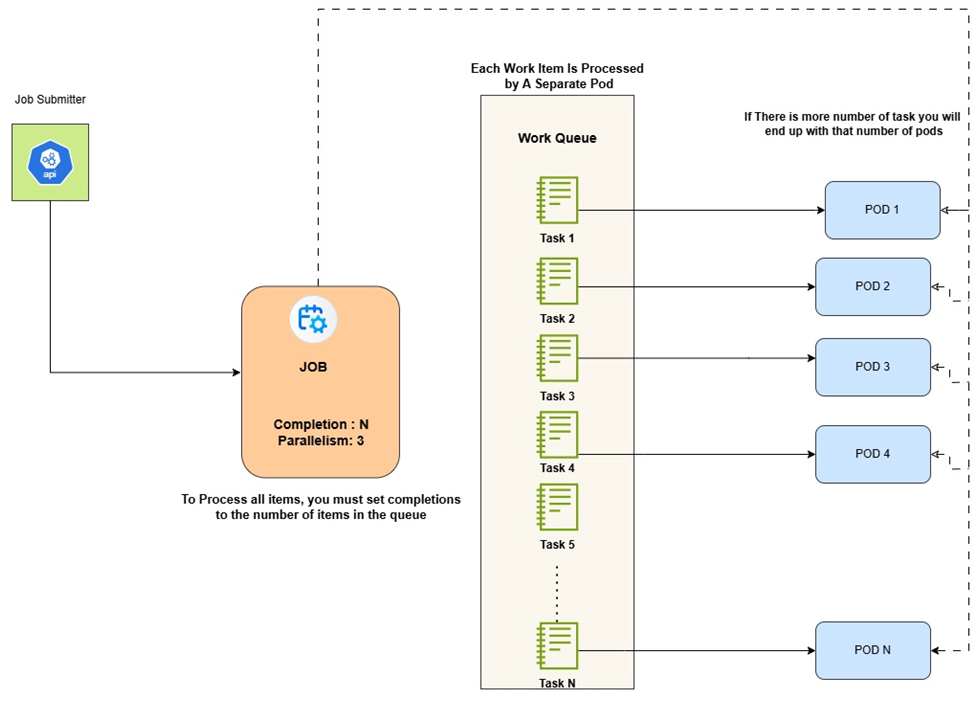
It is similar to coarse parallel processing, where each worker (or pod in Kubernetes) picks up a task from a queue, processes it on its own, and then finishes. No interaction is required between the workers, making it easier to scale and fault-tolerant.
What Is Coarse-Parallel Processing
This approach allows for the distribution of work across multiple pods, each handling a single task from a queue, and enables efficient parallel execution.
The main benefits of coarse parallelism are:
- Simplicity: Tasks do not need to communicate with each other.
- Scalability: We can add more workers (pods) to increase throughput.
- Fault tolerance: A failure in one worker does not affect the others.
In this pattern, each pod in a Kubernetes Job performs:
- Fetches a single task from a message queue (e.g., RabbitMQ).
- Processes the task.
- Acknowledges completion and exits.
It is helpful for tasks that can be processed independently.
Workloads like:
- Image or video processing
- Data transformations
- File conversions
- Long-running calculations
Concept of Work Queue Model (WQM)
To implement coarse parallel processing effectively, we primarily use a work queue, a messaging system where tasks are submitted and then consumed by workers. It decouples task submission from execution, enabling flexibility and durability.
A standard tech stack for this pattern might include:
- RabbitMQ, Redis, or Amazon SQS as the message broker.
- A worker application that connects to the queue, pulls a task, processes it, and exits.
- Kubernetes jobs to deploy and manage the worker pods.
How Kubernetes Fits In
Kubernetes jobs allow running one or more pods to completion. They are perfect for coarse parallel processing because we can control:
- How many total tasks to run (completions)
- How many pods should run in parallel (parallelism)
- What should happen if a pod fails (restart policy)
Combining a job with a work queue means each pod can:
- Start up and connect to the queue
- Grab a single task
- Do the work
- Exit successfully
Kubernetes then marks that pod's completion and continues launching others until all tasks are completed.
Setting Up the Infrastructure
Deploy a Message Queue Service
Start by deploying a message queue service like RabbitMQ. This service will hold the tasks that need to be processed.
kubectl create -f https://raw.githubusercontent.com/kubernetes/kubernetes/release -1.3/examples/celery-rabbitmq/rabbitmq-service.yaml

kubectl create -f https://raw.githubusercontent.com/kubernetes/kubernetes/release-1.3/examples/celery-rabbitmq/rabbitmq-controller.yaml
The above commands will create a RabbitMQ service (rabbitmq-service) and a replication controller (rabbitmq-controller).
Testing The Message Queue
Now, let us test the message queue. We will create a temporary interactive pod, install some tools, and experiment with queues.
First, create a temporary interactive pod.
# Create a temporary interactive container
kubectl run -i --tty temp --image ubuntu:18.04Next, install the amqp-tools so we can work with message queues.
# Install some tools
root@temp:/# apt-get update
root@temp:/# apt-get install -y curl ca-certificates amqp-tools python dnsutils
Later, we will make a Docker image that includes these packages. Next, we will check that we can discover the RabbitMQ service:
# Note the rabbitmq-service has a DNS name, provided by Kubernetes:
root@temp:/# nslookup rabbitmq-serviceIf Kube-DNS is not set up correctly, the previous step may not work. We can also find the service IP in an env var:
# env | grep RABBIT | grep HOSTRABBITMQ_SERVICE_SERVICE_HOST=10.1.123.32 (we will receive the IP address of the service).
Populate the Queue With Tasks
Once RabbitMQ is running, populate the queue with tasks. Each task can be a message in the queue, such as a job ID or a data processing request.
We will verify that we can create a queue and publish and consume messages.
# In the next line, rabbitmq-service is the hostname where the RabbitMQ service
# can be reached. 5672 is the standard port for RabbitMQ.

root@temp:/# export BROKER_URL=amqp://guest:guest@rabbitmq-service:5672

# If you could not resolve "rabbitmq-service" in the previous step,
# then use this command instead:

root@temp:/# export BROKER_URL=amqp://guest:guest@$RABBITMQ_SERVICE_SERVICE_HOST:5672

# Now create a queue:
root@temp:/# /usr/bin/amqp-declare-queue --url=$BROKER_URL -q test -d test

# Publish one message to it:
root@temp:/# /usr/bin/amqp-publish --url=$BROKER_URL -r test -p -b Hello

# And get it back:
root@temp:/# /usr/bin/amqp-consume --url=$BROKER_URL -q test -c 1 cat && echo Hello

root@temp:/#
Create a Docker Image for the Worker
Build a Docker image that includes:
- A lightweight base image (e.g., Ubuntu).
- Necessary tools like
amqp-toolsfor interacting with RabbitMQ. - Worker script that processes tasks from the queue.
Define the Kubernetes Job
Create a Kubernetes job definition (job.yaml) that specifies:
- The number of completions (total tasks to process).
- The parallelism (number of pods to run concurrently).
- The container image to use.
- Environment variables are used to connect to the message queue.
apiVersion: batch/v1
kind: Job
metadata:
  name: job-wq-1
spec:
  completions: 8
  parallelism: 2
  template:
    spec:
      containers:
      - name: worker
        image: your-docker-image
        env:
        - name: BROKER_URL
          value: amqp://guest:guest@rabbitmq-service:5672
        - name: QUEUE
          value: job1
           restartPolicy: OnFailure
Deploy the Job
Apply the job YAML to your Kubernetes:
kubectl apply -f job.yamlMonitor the job's progress:
kubectl wait --for=condition=complete --timeout=300s job/job-wq-1A Few Considerations to Follow
Pod Lifecycle
Each pod processes one task and exits. Ensure that the processing of submitted tasks remains unchanged to handle retries.
Queue Management
Monitor the queue to ensure that tasks are being consumed and processed at a time.
Resource Allocation
Adjust the completions and parallelism settings based on the size of the queue and the resources available in the designated cluster.
When to Use This Pattern
This coarse parallel processing pattern is ideal when:
- Tasks are independent and can be processed in isolation
- Having a large number of small, discrete tasks
- To achieve high throughput with minimal overhead
Conclusion
The implementation of a coarse parallel processing model in a Kubernetes cluster is an efficient and scalable approach that leverages orchestration methods such as automated deployments of containers, job scheduling, and task load balancing. Coarse parallel processing is highly effective in handling tasks that require more computational capabilities with minimal management and operational overhead. In conclusion, the coarse parallel processing model in a Kubernetes environment provides a cost-effective, optimized, and resilient architecture to execute tasks in parallel.
Opinions expressed by DZone contributors are their own.
Comments