

Integrating Lakeflow Connect With PostgreSQL: A Developer’s Complete Hands-On Guide From the Field
Traditional ingestion required custom ETL jobs that were costly to scale and maintain for PostgreSQL. To eliminate that overhead, I wired Lakeflow Connect for PostgreSQL.
 ·
·
Join the DZone community and get the full member experience.
Join For FreeModern data teams want reliable, incremental, near real-time ingestion from PostgreSQL into Databricks Unity Catalog without building costly and fragile CDC jobs, custom pipelines, or manual ETL orchestration. That’s where Lakeflow Connect solves the issue by providing developers with a unified, low-overhead ingestion framework that handles extraction, CDC, schema syncing, and table creation inside Unity Catalog automatically.
This post walks through how I have set up Lakeflow Connect with PostgreSQL, including:
- Setting up the ingestion gateway
- Configuring logical replication on PostgreSQL
- Creating an ingestion pipeline
- Selecting schemas/tables for replication
- Defining the Unity Catalog destination
- Scheduling ingestion
- Validating and consuming replicated Delta tables
I will share an exact developer-first, code-heavy walkthrough with diagrams and real-world configs.
Why Is There a Need for Lakeflow Connect
Before diving into the technical details of each step, I will explain why a structured, end-to-end approach is important when integrating PostgreSQL with Lakeflow Connect. In most engineering teams, data ingestion pipelines are not planned and aren't designed with a long-term unified vision; different systems get stitched together over time, individual engineers add scripts, and each new source introduces yet another version of the same patterns. While functional, these pipelines gradually become costly and fragile, difficult to monitor, and nearly impossible to scale across environments.
My configuration for Lakeflow Connect changes this dynamic by giving developers a standardized, cloud-native ingestion architecture that stays consistent across all relational sources. Whether you’re bringing in PostgreSQL, Oracle, SQL Server, or SAP, the ingestion experience follows the same predictable pattern: configure a gateway, define a pipeline, select your data, and land it in Unity Catalog. This uniformity helps teams eliminate custom CDC logic, reduce operational overhead, and dramatically improve ingestion reliability.
Therefore, I needed some architecture and configuration that was designed with developers in mind. Instead of forcing you to stitch together multiple tools, my architecture provides clear abstractions for CDC, schema evolution, catalog mapping, and change propagation, all of which help reduce complexity while increasing visibility.
With that context established, here is my 9-section developer workflow when building Lakeflow pipelines for PostgreSQL.
1. Reference Architecture: Lakeflow Connect + PostgreSQL + Unity Catalog
I have worked mainly with five main components:
- PostgreSQL: Source database, WAL logical replication enabled
- Lakeflow Ingestion Gateway: Secure agent that extracts WAL logs
- Lakeflow Connect Pipeline: Orchestrates extraction → ingestion → Delta
- Unity Catalog: Delta tables created/updated continuously
- Consumers: ETL, BI, ML workloads

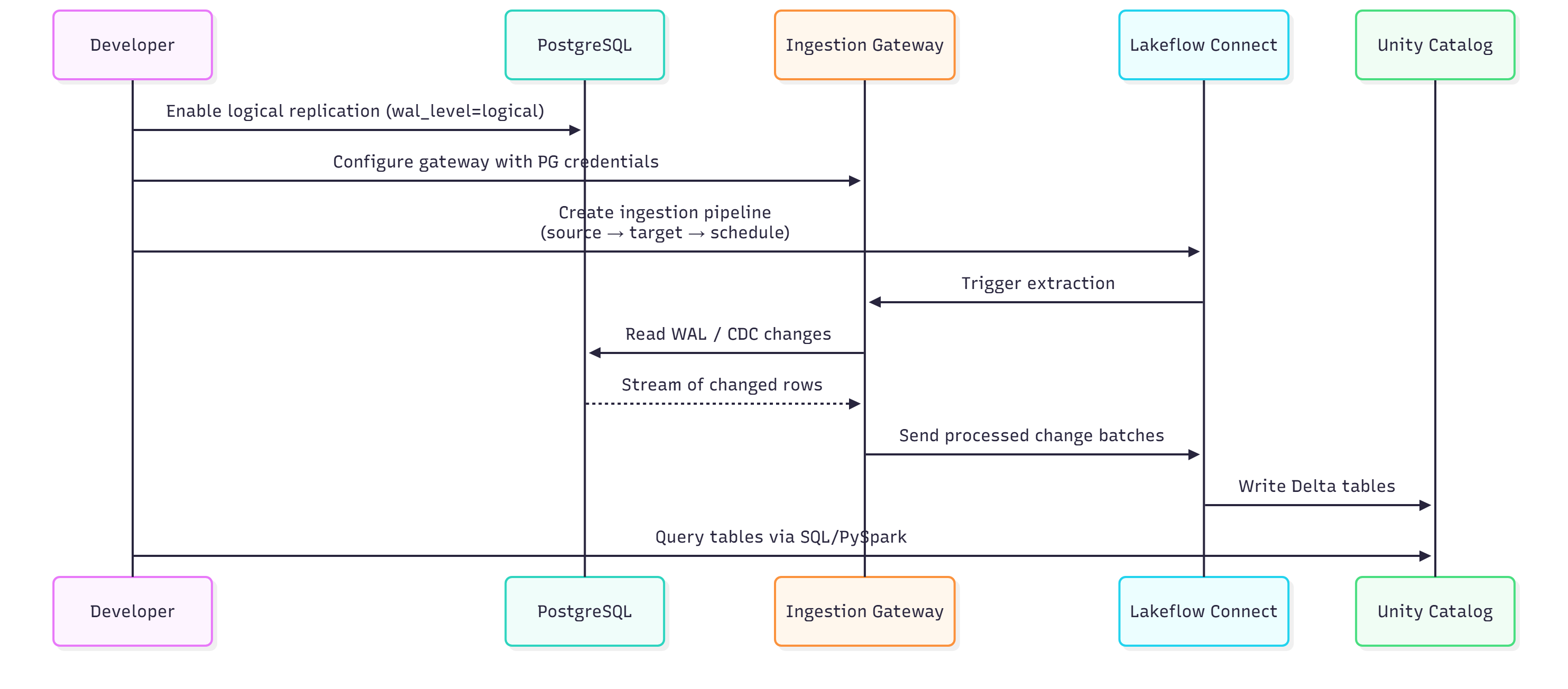
2. End-to-End Ingestion Flow
To stream changes from PostgreSQL through a secure ingestion gateway into Unity Catalog, combining the initial load with continuous CDC updates, I have used the following pipeline that automatically handles extraction, transport, and Delta table writes with a fully managed end-to-end ingestion path.
3. Preparing PostgreSQL for Lakeflow
I followed the steps below for my Lakeflow Connect to use logical replication (CDC):
Step 1: Enable Logical Replication
ALTER SYSTEM SET wal_level = 'logical';
ALTER SYSTEM SET max_replication_slots = 10;
ALTER SYSTEM SET max_wal_senders = 10;

SELECT pg_reload_conf();
Step 2: Create a User for Lakeflow
CREATE ROLE lakeflow_user
WITH LOGIN REPLICATION PASSWORD 'StrongPasswordHere';

GRANT CONNECT ON DATABASE appdb TO lakeflow_user;
GRANT USAGE ON SCHEMA public TO lakeflow_user;
GRANT SELECT ON ALL TABLES IN SCHEMA public TO lakeflow_user;

ALTER DEFAULT PRIVILEGES IN SCHEMA public
GRANT SELECT ON TABLES TO lakeflow_user;
Step 3: (Optional) Create a Publication
If tables must be explicitly published:
CREATE PUBLICATION lakeflow_publication
FOR TABLE
    public.orders,
    public.customers,
    public.payments;
4. Setting Up the Lakeflow Ingestion Gateway
My ingestion gateway is deployed inside your secure network/VPC. It extracts WAL logs and pushes change batches securely to Lakeflow.
Gateway configuration:
gateway:
  name: pg-gateway-prod
  region: us-east-1
  mode: self_hosted

source:
  type: postgresql
  host: pg-prod.internal
  port: 5432
  database: appdb
  username: lakeflow_user
  password: ${PG_PASSWORD}
  sslmode: require

cdc:
  enabled: true
  slot_name: lakeflow_slot
  publication_name: lakeflow_publication
  heartbeat_interval_sec: 10

telemetry:
  enabled: true
  log_level: info
5. Creating an Ingestion Pipeline
I built an ingestion pipeline that controls extraction, CDC behavior, mappings, and target settings. This pipeline defines:
- PostgreSQL source
- Tables/schemas to replicate
- Replication mode (initial load + CDC)
- Unity Catalog destination
- Scheduling and alerts
pipeline:
  name: pg_orders_to_uc
  description: Ingest PostgreSQL orders/customers into Unity Catalog

source:
  type: postgresql
  gateway: pg-gateway-prod
  database: appdb
  mode: incremental_cdc
  cdc:
    initial_load: true
    include_deleted_rows: true

selection:
  schemas:
    - name: public
      tables:
        - name: orders
        - name: customers
        - name: payments

  exclude_columns:
    - table: customers
      columns: ["ssn", "credit_card_number"]

target:
  type: unity_catalog
  catalog: lakehouse
  schema: postgres_raw
  table_naming:
    prefix: pg_
    case: lower
  write_mode:
    type: merge
    keys:
      orders: ["order_id"]
      customers: ["customer_id"]
      payments: ["payment_id"]

schedule:
  type: continuous  # real-time CDC
  fallback:
    on_failure: retry
    max_retries: 5
    backoff_sec: 60

notifications:
  on_success:
    - type: email
      to: [email protected]
  on_failure:
    - type: slack
      webhook_url: ${SLACK_WEBHOOK_URL}
6. Selecting Data for Replication
I had to pick schemas, tables, and optional column filters to define what data flows into the lakehouse. However, you can choose from one of the following:
- Entire schemas
- Specific tables
- Column-level exclusions (PII masking)
- Incremental vs. full load
Example column exclusion:
exclude_columns:
  - table: customers
    columns: ["ssn", "credit_card_number"]
This is extremely useful for security-sensitive datasets.
7. Configuring Unity Catalog as the Destination
My configuration writes data into my chosen catalog and schema as managed Delta tables. Lakeflow Connect automatically creates Delta tables:
PGSQL
catalog.schema.table
Partitioning and schema evolution can be managed automatically.
8. Scheduling and Notifications
In order to enable continuous CDC or periodic runs and configure alerts for success, failures, or schema drift, I used one of the available options:
- Continuous CDC (lowest latency)
- Interval-based (e.g., every 15 minutes)
- Manual or API-triggered
schedule:
  type: interval
  every: 15m
9. Validating Replicated Data in Unity Catalog
To query the ingested Delta tables using SQL or PySpark to ensure the pipeline is working correctly, I used the following code.
SHOW TABLES IN lakehouse.postgres_raw;

SELECT order_id, customer_id, order_total, order_date
FROM lakehouse.postgres_raw.pg_orders
WHERE order_date >= current_date() - INTERVAL '7' DAY
ORDER BY order_date DESC;
orders_df = spark.table("lakehouse.postgres_raw.pg_orders")
customers_df = spark.table("lakehouse.postgres_raw.pg_customers")

df = (
    orders_df.alias("o")
    .join(customers_df.alias("c"), "customer_id")
)

revenue = (
    df.groupBy("c.country")
      .sum("o.order_total")
      .orderBy("sum(order_total)", ascending=False)
)

display(revenue)
10. Developer Checklist
I have used a quick end-to-end checklist to verify that my PostgreSQL, gateway, pipeline, and Unity Catalog setup is correctly configured for seamless Lakeflow ingestion.
[ ] Enable wal_level=logical in PostgreSQL
[ ] Create lakeflow_user with REPLICATION + SELECT
[ ] Grant schema/table-level permissions
[ ] Deploy the ingestion gateway in your VPC
[ ] Configure gateway with PG credentials and CDC details
[ ] Create pipeline targeting Unity Catalog
[ ] Select schemas/tables to ingest
[ ] Configure continuous or interval scheduling
[ ] Enable alerts (Slack/Email)
[ ] Validate Delta tables in Unity Catalog
This architecture has significantly benefited my development team by replacing the brittle ETL code with a clean, managed ingestion framework. This change allows the team to focus on building features rather than maintaining pipelines, resulting in less operational overhead.
Wrapping Up
Lakeflow Connect provides a clean, modern, developer-friendly pipeline for replicating PostgreSQL data into Unity Catalog without writing custom CDC jobs, batch scripts, or ETL glue code.
With a simple gateway, pipeline, and catalog workflow, developers can establish production-grade ingestion with support for Log-based CDC, Initial load + incremental sync, Schema evolution,
Automatic Delta table creation, secure end-to-end transport, and real-time and scheduled ingestion.
If you are running a similar custom ETL setup or if you are in need of modernizing ingestion pipelines, start with Lakeflow Connect for PostgreSQL as a pilot configuration. Once Lakeflow Connect is implemented, you will wonder how you ever managed costly, fragile custom ETL jobs.
Opinions expressed by DZone contributors are their own.
Comments