

Implementing Sharding in PostgreSQL: A Comprehensive Guide
PostgreSQL sharding distributes data by key across servers for horizontal scale. This guide shows how to shard a Sales table with practical SQL.
 CORE
·
CORE
·
Join the DZone community and get the full member experience.
Join For FreeAs applications scale and data volumes increase, efficiently managing large datasets becomes a core requirement. Sharding is a common approach used to achieve horizontal scalability by splitting a database into smaller, independent units known as shards. Each shard holds a portion of the overall data, making it easier to scale storage and workload across multiple servers.
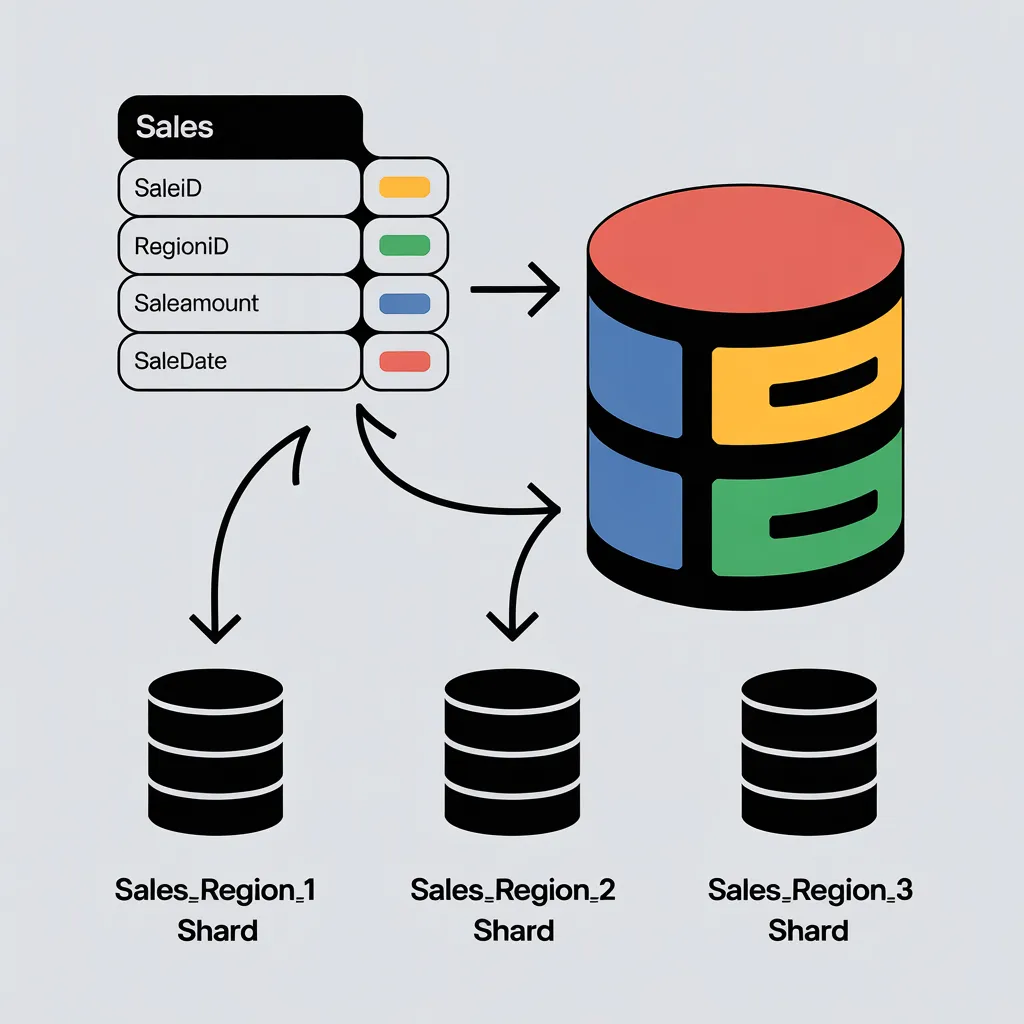
PostgreSQL, as a mature and feature-rich relational database, offers several ways to implement sharding. These approaches allow systems to handle high data volumes while maintaining performance, reliability, and operational stability. This guide explains how sharding can be implemented in PostgreSQL using practical examples and clear, step-by-step instructions.
In a sharded setup, table data is distributed across multiple nodes based on a chosen sharding key. For instance, a customer table may be split by region or customer_id, with each shard storing a specific subset of records. The primary challenge lies in routing queries and transactions to the correct shard while preserving data consistency and application transparency. PostgreSQL supports sharding through built-in features such as postgres_fdw and table partitioning, as well as extensions like Citus for more advanced and large-scale deployments.
Setting Up Sharding in PostgreSQL
To demonstrate the approach, consider a scenario in which sharding is implemented for a Sales table. In this example, sales data is distributed across multiple regions using region_id as the sharding key. Each region is assigned its own shard, allowing the data to be spread across multiple databases while keeping it logically organized. The configuration involves creating individual shards, setting up PostgreSQL to handle data distribution, and ensuring that queries are routed to the correct shard.
The process begins with the base PostgreSQL setup. PostgreSQL should be installed on all required systems. A primary database is then created, which the application connects to directly. This database acts as the coordinator node, responsible for directing queries to the appropriate regional shards based on the sharding logic.
-- Step 1: Create the main database
CREATE DATABASE sales_db;

-- Step 2: Connect to the main database
\c sales_db
Once connected, create a schema that defines the structure of the sales table. Instead of creating a single monolithic table, define the schema without immediately populating it with data. Instead, shards will be created as partitions, with data distributed across them based on regions.
-- Step 3: Define the Sales table schema
CREATE TABLE sales (
    sale_id SERIAL PRIMARY KEY,
    region_id INT NOT NULL,
    sale_amount DECIMAL(10, 2),
    sale_date DATE NOT NULL
) PARTITION BY LIST (region_id);
The PARTITION BY LIST clause specifies how region_id determines data placement. For each region, a partition (a shard) will be created. For example, if you have three regions, you might create separate shards as follows:
-- Step 4: Create individual shards for each region
CREATE TABLE sales_region_1 PARTITION OF sales FOR VALUES IN (1);
CREATE TABLE sales_region_2 PARTITION OF sales FOR VALUES IN (2);
CREATE TABLE sales_region_3 PARTITION OF sales FOR VALUES IN (3);
In this example, the sales_region_1 table will store all records where region_id = 1, while sales_region_2 will store data for region_id = 2, and so on. Each shard can be hosted on a different PostgreSQL server to provide scalability.
Configuring Foreign Data Wrappers for Distributed Shards
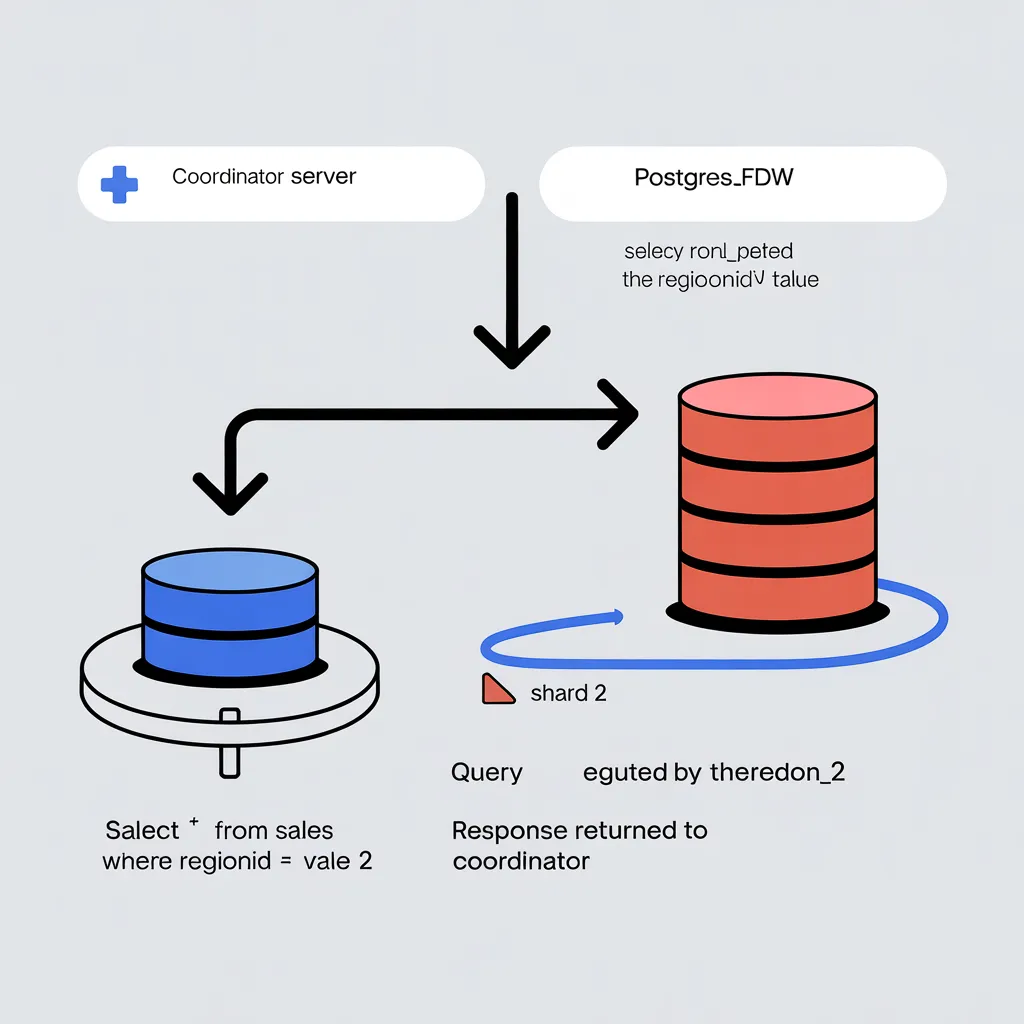
To enable distributed sharding, use PostgreSQL’s postgres_fdw extension. This extension allows you to connect to remote PostgreSQL instances and treat them as part of the database, enabling efficient queries across shards. Install the extension and configure it as follows:
-- Step 5: Enable the postgres_fdw extension
CREATE EXTENSION IF NOT EXISTS postgres_fdw;

-- Step 6: Create a foreign server for each shard
CREATE SERVER shard_1 FOREIGN DATA WRAPPER postgres_fdw OPTIONS (host 'shard1_host', dbname 'shard1_db', port '5432');
CREATE SERVER shard_2 FOREIGN DATA WRAPPER postgres_fdw OPTIONS (host 'shard2_host', dbname 'shard2_db', port '5432');
CREATE SERVER shard_3 FOREIGN DATA WRAPPER postgres_fdw OPTIONS (host 'shard3_host', dbname 'shard3_db', port '5432');

-- Step 7: Create user mappings for each server
CREATE USER MAPPING FOR CURRENT_USER SERVER shard_1 OPTIONS (user 'postgres', password 'password');
CREATE USER MAPPING FOR CURRENT_USER SERVER shard_2 OPTIONS (user 'postgres', password 'password');
CREATE USER MAPPING FOR CURRENT_USER SERVER shard_3 OPTIONS (user 'postgres', password 'password');
Now associate each shard (partition) with its corresponding remote server using foreign tables. This allows PostgreSQL to route queries to the appropriate server.
-- Step 8: Import foreign schemas for each shard
CREATE FOREIGN TABLE sales_region_1 (
    sale_id SERIAL,
    region_id INT,
    sale_amount DECIMAL(10, 2),
    sale_date DATE
) SERVER shard_1 OPTIONS (schema_name 'public', table_name 'sales_region_1');

CREATE FOREIGN TABLE sales_region_2 (
    sale_id SERIAL,
    region_id INT,
    sale_amount DECIMAL(10, 2),
    sale_date DATE
) SERVER shard_2 OPTIONS (schema_name 'public', table_name 'sales_region_2');

CREATE FOREIGN TABLE sales_region_3 (
    sale_id SERIAL,
    region_id INT,
    sale_amount DECIMAL(10, 2),
    sale_date DATE
) SERVER shard_3 OPTIONS (schema_name 'public', table_name 'sales_region_3');
Testing the Sharding Setup
After setting up the shards, test the configuration by inserting data into the sales table and verifying that it is correctly routed to the appropriate shard.
-- Insert data into the main sales table
INSERT INTO sales (region_id, sale_amount, sale_date) VALUES (1, 100.50, '2023-10-01');
INSERT INTO sales (region_id, sale_amount, sale_date) VALUES (2, 200.75, '2023-10-02');
INSERT INTO sales (region_id, sale_amount, sale_date) VALUES (3, 300.25, '2023-10-03');

-- Verify that data is stored in respective shards
SELECT  FROM sales_region_1;
SELECT  FROM sales_region_2;
SELECT * FROM sales_region_3;
Each query above should retrieve the respective rows routed to the appropriate shard. This confirms that the sharding setup is functioning correctly.
Querying and Maintaining Sharded Data
PostgreSQL ensures that queries to the sales table are automatically redirected to the appropriate shard based on the region_id value. Complex queries, such as aggregations across all regions, are also supported, as PostgreSQL can parallelize query execution across shards using postgres_fdw.
-- Example: Aggregated sales across all shards
SELECT SUM(sale_amount) AS total_sales
FROM sales
WHERE sale_date >= '2023-10-01';
Maintenance tasks, such as adding a new shard for additional regions, can be managed seamlessly by creating new partitions and foreign table mappings as required. For example, a new region (region_id = 4) can be supported by adding a new shard:
-- Add a new shard
CREATE TABLE sales_region_4 PARTITION OF sales FOR VALUES IN (4);
CREATE SERVER shard_4 FOREIGN DATA WRAPPER postgres_fdw OPTIONS (host 'shard4_host', dbname 'shard4_db', port '5432');
CREATE USER MAPPING FOR CURRENT_USER SERVER shard_4 OPTIONS (user 'postgres', password 'password');
CREATE FOREIGN TABLE sales_region_4 (
    sale_id SERIAL,
    region_id INT,
    sale_amount DECIMAL(10, 2),
    sale_date DATE
) SERVER shard_4 OPTIONS (schema_name 'public', table_name 'sales_region_4');
Conclusion
Sharding in PostgreSQL provides a practical way to achieve horizontal scalability, particularly for large and growing datasets in distributed environments. By using built-in features such as postgres_fdw and partitioning, PostgreSQL can execute queries across shards transparently, without requiring complex logic in the application layer. This guide has walked through a step-by-step approach to implementing sharding for a table with uneven data distribution, using practical examples to demonstrate how PostgreSQL can be scaled to support high-performance, data-intensive applications.
Opinions expressed by DZone contributors are their own.
Comments