

Using Middleware in LangChain: Recovering From Tool Failures
LangChain Middleware provides ways to recover from Tool Failures. This article helps in understanding how to use ToolRetryMiddleware and @wrap_tool_call to handle errors.
In this article, we will look at how to handle tool errors using middleware in LangChain.
Introduction
Agents are built with tools that they can use to perform different tasks. The agent communicates with the LLM, and the LLM decides which tool to call based on the user's request.
The agent then executes the selected tool and sends the tool result back to the LLM. The LLM can then decide whether another action or tool call is required.

When an agent executes a tool, the tool may fail due to reasons such as a network error, an invalid input, or an external service being temporarily unavailable. Such failures can interrupt an otherwise successful agent workflow.
We want to handle tool failures appropriately so that they do not unnecessarily interrupt the agent's workflow. In this article, we will learn how to use middleware to handle tool failures.
What Is Middleware in LangChain?
The core agent loop involves calling the model, deciding which tools to use, executing those tools, and continuing the loop until no more tool calls are needed.
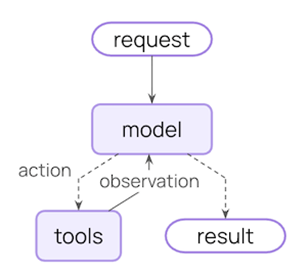
Middleware provides hooks that allow you to run custom logic before and after different steps in the agent loop.
Middleware is code that runs between different parts of the agent's execution pipeline. It can modify or inspect the request before it reaches the model or a tool. It can also modify or inspect the response after the model or tool has finished executing.
Pre-Built and Custom Middleware
In LangChain, middleware can be broadly divided into two types:
1. Pre-built middleware – Ready-to-use middleware provided by LangChain for common use cases.
LangChain provides pre-built middleware for several common scenarios. We can create an instance of the required middleware and attach it to the agent. The underlying logic is already implemented, so we do not need to write it ourselves.
2. Custom middleware – Middleware that we write to add our own logic and customize the agent's behavior.
With custom middleware, we can add our own logic using hooks such as @before_model, @after_model, @before_tool, and @wrap_tool_call.
Alternatively, we can create a custom middleware class by extending AgentMiddleware and overriding methods such as before_agent and after_agent.
Two Ways to Handle Tool Errors
In this article, we will look at two ways to handle tool errors:
- Using pre-built middleware – ToolRetryMiddleware
- Using
@wrap_tool_call
Pre-Built Middleware: ToolRetryMiddleware
We will start with ToolRetryMiddleware.
When a tool throws an exception, ToolRetryMiddleware can automatically retry the tool call. You can configure the middleware to wait for some time between attempts and specify the maximum number of retries.
Retrying makes sense for temporary failures, such as network errors or temporary service unavailability, so the next attempt may succeed. But retries do not help with errors caused by invalid input or incorrect tool arguments. In such cases, ToolRetryMiddleware is not an appropriate choice.
Let’s take a look at an example.
Tool
Let’s start by creating a tool called get_news that communicates with a free news API to retrieve news. Create a notebook in VS Code and add the following code.
import requests
from langchain.tools import tool

attempts = 0
@tool
def get_news(news_type: str) -> str:
    """Get one recent news article."""

    global attempts
    attempts += 1

    print(f"Attempt {attempts} to fetch {news_type} news.")

    if attempts <= 2:
        raise RuntimeError("Unable to get news at the moment. Please try again")

    response = requests.get(
        "https://freenewsapi.ai/v1/search",
        params={"q": news_type, "size": 1}
    )

    return response.json()["results"][0]["title"]
We will simulate an error while retrieving the news. This could be due to a temporary network problem, API failure, or service unavailability.
To simulate this, we will make the tool raise a NetworkError on the first two attempts.
We will also print “Attempt to fetch news” along with the attempt number each time the tool is called. As the tool is retried, you will see this message multiple times. The first two attempts will fail. The third attempt will succeed and return the expected response.
ToolRetryMiddleware
Next, we will create an instance of ToolRetryMiddleware provided by LangChain.
from langchain.agents.middleware import ToolRetryMiddleware

toolRetryMiddleware= ToolRetryMiddleware(max_retries=3,initial_delay=0.5, backoff_factor=2,retry_on=(RuntimeError),on_failure="error" )
Here, we are creating an instance of ToolRetryMiddleware. Let’s look at its configuration.
The max_retries parameter is set to 3. This means the middleware will retry the tool up to 3 times before giving up.
The initial_delay parameter specifies how long to wait before the first retry. Here, it is set to 0.5 seconds, so the middleware waits for 0.5 seconds before the first retry.
Next, we have the backoff_factor, which is used to increase the delay between retries.
The delay for each retry is calculated using:
initial_delay * (backoff_factor ** retry_number)
For the second retry, the calculation is:
0.5 * (2 ** 2) = 2 seconds
So, the middleware waits for 2 seconds before the second retry.
If the tool fails again, the delay for the third retry is:
0.5 * (2 ** 3) = 4 seconds
Notice that the retry_number changes with each retry.
Next is the retry_on parameter; it takes a tuple of exceptions for which the middleware should retry the tool.
Finally, the on_failure parameter determines what happens when all retries are exhausted. It can be set to continue or error. Here, it is set to error, so an error is raised after the retries are exhausted.
Create Agent
We add OPENAI_API_KEY in the .env file in our folder and load this environment variable using the load_dotenv() function.
Next, we create an agent using the model of our choice, the get_news tool we created, and the ToolRetryMiddleware.
from langchain.agents import create_agent
from langchain_openai import ChatOpenAI
from dotenv import load_dotenv
load_dotenv()

myagent = create_agent(
    model=ChatOpenAI(model="gpt-4.1-mini"),
    tools=[get_news],
    middleware=[toolRetryMiddleware],
    system_prompt="First check if tool can handle the request." \
        "If there is no tool defined for the request then only respond yourself"

)
Invoke Agent
Now we invoke the agent with a request to get cricket news.
result = myagent.invoke({
    "messages": [{
        "role": "user",
        "content": "Give me cricket sports news."
    }]
})
print(result['messages'][-1].content)
We will get a response similar to this:

As expected, the agent calls the tool three times. You can see the “Attempt to fetch news” message three times. On the third attempt, the tool execution succeeds, and the agent receives the response.
Configuring ToolRetryMiddleware is helpful because our tools often call external services, which can sometimes fail temporarily. Retrying the tool call can help in such situations.
@Wrap_tool_call
Now let’s look at a scenario where we may want to log an error, add custom recovery logic, or return a message when a tool fails. This approach is useful when we want to handle errors in a customized way.
We can handle exceptions directly inside the tool using a try-except block, or we can use @wrap_tool_call middleware. The middleware approach can be applied to one or more tools.
For this article, we will keep the example focused on a single tool.
With @wrap_tool_call middleware, we can wrap tool execution in our own error-handling logic. We can use a try-except block around the tool call. If the tool executes successfully, we return its output. If an exception occurs, we catch it and return an appropriate error message instead of allowing the exception to interrupt the agent's workflow.
Tool
Let’s create a tool that can send an email. For this article, the tool will simulate sending an email.
from langchain.tools import tool
import re

@tool
def send_email(emailId: str) -> bool:
    """Send an email to the specified email address."""

    pattern = r"^[A-Za-z0-9._%+-]+@[A-Za-z0-9.-]+\.[A-Za-z]{2,}$"

    is_valid_email = bool(re.match(pattern, emailId))

    if not is_valid_email:
        raise ValueError(f"Invalid email address: {emailId}")

    print("Sent email to", emailId)

    return True

print("Tool Created")
The tool first checks whether the email address is valid. If the address is invalid, it raises an error. If the address is valid, it prints a message indicating that the email was sent.
Middleware
Now, let’s create a function and decorate it with @wrap_tool_call.
from langchain.agents.middleware import wrap_tool_call
from langchain.messages import ToolMessage


# Create error handling middleware
@wrap_tool_call
def handle_tool_errors(request, handler):
    """Handle tool execution errors with custom messages."""
    print("Middleware : Checking for errors in tool...")


    try:

       return handler(request)

    except Exception as e:
        print("Error Caught in Middleware ***")
        return ToolMessage(
            content=f"Tool error: An unexpected error occurred. Please check your input and try again. ({str(e)})",
            tool_call_id=request.tool_call["id"]
        )


print("Error handling middleware created!")
This function takes request and handler as arguments. The handler is responsible for executing the tool. When we call handler(request), the request is passed to the handler, which then executes the tool.
Notice that the try-except block surrounds handler(request). This means that the tool execution is wrapped inside the try block, allowing the middleware to catch any exception raised during tool execution.
This middleware currently catches the broad Exception type, but we can modify it to catch specific exceptions, such as ValueError or ZeroDivisionError.
We can also add custom handling logic for different types of exceptions, if required.
Create Agent
Now, let’s create the agent using the model of our choice, the send_email tool, and the middleware that handles tool errors.
from langchain.agents import create_agent
from dotenv import load_dotenv
from langchain_openai import ChatOpenAI
from dotenv import load_dotenv
load_dotenv()

# Create agent with error handling
error_handling_agent = create_agent(
    model=ChatOpenAI(model="gpt-4.1-mini"),
    tools=[send_email],
    middleware=[handle_tool_errors],
    system_prompt=(
        "For any email request, use send_email tool. " \
        "Dont ask any further questions or perform any validation. "
        "The send_email tool is responsible for validation and sending email"
    )
)

print("Agent Created")
Invoke Agent
Now we invoke the agent with an invalid email address.
from IPython.display import Markdown
# Test the basic agent
result = error_handling_agent.invoke({
    "messages": [
        {"role": "user",
         "content": "send email to ruchi@gmail"
}]
})


Markdown(result['messages'][-1].content)
You will see a response similar to this:

First, the middleware is called, which forwards the request to the tool. As the tool raised an error, the middleware catches the error, and the user receives a clear and helpful response instead of an unhandled exception.
Complete Response
We can also print the complete response.
# Print the response
from rich.pretty import pprint

pprint(result, expand_all=True)
In the printed result, you will find a UserMessage, an AIMessage, and a ToolMessage.
In the AIMessage, you will find the tool call that instructs the agent to execute the tool.
AIMessage:
tool_calls=[{'name': 'send_email', 'args': {'emailId': 'ruchi@gmail'}}]
In the ToolMessage, you will find the error message returned by the middleware.
ToolMessage:
Tool error: An unexpected error occurred. Please check your input and try again. (Invalid email address: ruchi@gmail)
The middleware catches the error and returns a ToolMessage from the except block. This message is then passed to the LLM. The LLM uses the ToolMessage to generate a response explaining that the email address is incomplete or invalid and asking the user to provide a valid email address.
Conclusion
Middleware allows us to handle tool failures in a graceful way.
We can use ToolRetryMiddleware when retrying the tool may help it succeed. We can use @wrap_tool_call when we want to handle tool errors with our own logic.
However, handling tool failures is just one use case of middleware. Middleware can be used in many other situations to customize and control different stages of an agent’s execution.
Opinions expressed by DZone contributors are their own.