

How (and Why) to Build Dynamic Data Pipelines
Discover a sample dynamic data pipeline architecture with configurations. Also learn best practices to keep a dynamic architecture stable over time.
AI is changing the way we code. Last week, a friend told me he completed a user story to add new columns to a table and tested it in under an hour. Upstream teams are now shipping changes in days that once took months.
For data pipelines that sit downstream of these fast-moving systems, this speed is a new design constraint. One of the potential solutions is to build dynamic data pipelines that are built to keep up.
What Is a Dynamic Data Pipeline
Dynamic data pipelines are data processing workflows that adapt to changing data and business logic. They use parameterized templates and config files to run custom pipelines on the go as per data requirements. These pipelines are better suited to today’s fast-changing data environment.
| static | dynamic |
|---|---|
|
Hard-coded, fixed tasks |
Configuration-driven, flexible logic |
|
Breaks on schema changes |
Adapts automatically to schema changes |
|
Requires coding and redeployment to handle business logic changes |
Requires just config changes to handle business logic changes |
|
High maintenance with constant updates to prevent failure |
Low maintenance, may require some config changes from time to time |
|
Quick to build the pipeline |
Takes more time upfront for initial coding but once built, it’s easy to add more tasks |
Sample Dynamic Data Pipeline Architecture
I'll walk you through a sample architecture to show how dynamicity is configured into a data pipeline.
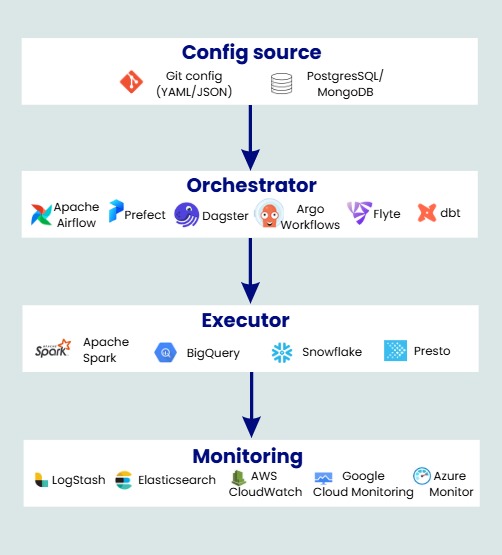
Sample dynamic data pipeline architecture
1. Configuration
The key configurations of a dynamic data pipeline can be stored in Git (YAML/JSON) and a database. Git stores the pipeline logic, and a PostgreSQL/MongoDB database stores the dynamic values used when the pipeline runs.
For example, you may want to build a standardized data ingestion workflow; the logic for it will be in Git, but the list of tables to be ingested can be stored in the database. So when an ingestion workflow initiates, it triggers multiple workflows for each table entry.
Let’s understand it with code:
YAML config of dynamic data ingestion pipeline:
pipeline:
name: dynamic_data_ingestion_pipeline
version: “1.0”

source:
 type: "{{ source_type }}"
 connection:
   host: "{{ source_host }}"
   database: "{{ source_database }}"
   table: "{{ source_table }}"

schema:
on_new_column_detected: “add”               # automatically add new columns
on_column_removal_detected: “ignore”        # ignore column removal
on_type_change_detected: “cast”             # cast the datatype on change

transformations:
name: “if_filter_null”
enabled: “{{ if_filter_null }}”
column: “{{ null_filter_column }}”

target:
type: “{{ target_type }}”
dataset: “{{ target_dataset }}”
table: “{{ target_table }}”

runtime:
schedule: “{{ cron_schedule }}”
retry_attempts: 3
alert_on_failure: true
Database entry of dynamic data ingestion pipeline:
-- Table: pipeline_config

| id | source_type | source_host            | source_database | source_table | if_filter_null | null_filter_column | column_mapping | target_type | target_dataset | target_table          | cron_schedule |
|----|-------------|------------------------|-----------------|--------------|----------------|--------------------|----------------|-------------|----------------|-----------------------|---------------|
| 1  | postgres    | db.customers.prod.com  | customers_db    | customers    | true           | customer_id        | true           | bigquery    | analytics      | customers_details     | 0 * * * *     |
| 2  | s3          | s3.amazonaws.com       | transactions_db | transactions | false          | null               | true           | redshift    | finance        | transactions_details | 0 0 * * *     |
These configurations are what make the pipeline dynamic. Instead of hardcoding column names or schema expectations into the pipeline code, the script reads the schema at runtime and adapts automatically, handling new, removed, or renamed columns without breaking. And whenever any changes happen upstream, all that's needed is a config table update. No pipeline rework, no redeployment.
Tip: Make sure the database fetch step for dynamic pipelines happens during execution inside a task, not during DAG parsing. Because DAG parsing occurs on every scheduler heartbeat, it can crash your orchestrator.
2. Orchestrator
After those configurations are ready, you can design the dynamic pipeline in an orchestrator (such as Airflow, Prefect, or Dagster). It generates pipelines based on configurations defined in YAML/database and dynamically creates the required tasks.
Sample flow in orchestrator:
Reads YAML template

    ↓

Loops over DB config table

     ↓

One sub DAG per row with all tasks
Dynamic DAG skeleton in Airflow:
with open("/opt/airflow/configs/pipeline_config.yaml", "r") as f:
    raw_yaml_template = f.read()

def get_pipeline_settings():
    connection = psycopg2.connect(
        host="company_db.com",
        database="metadata_db",
        user="sys_admin",
        password="******"
    )

    cur = connection.cursor()

    cur.execute("""
        SELECT
            id,
            source_type,
            source_host,
            source_database,
            source_table,
            if_filter_null,
            null_filter_column,
            target_type,
            target_dataset,
            target_table,
            cron_schedule
        FROM pipeline_config
    """)

    rows = cur.fetchall()
    field_names = [col[0] for col in cur.description]

    cur.close()
    connection.close()

    return [dict(zip(field_names, row)) for row in rows]

all_pipeline_settings = get_pipeline_settings()

all_configs = []
for pipeline_settings in all_pipeline_settings:
    resolved_yaml = Template(raw_yaml_template).render(**pipeline_settings)
    pipeline_config = yaml.safe_load(resolved_yaml)
    all_configs.append(pipeline_config)

def task1 ():
  #logic

def task2 ():
  #logic

def task3 ():
  #logic

task1= PythonOperator(
    task_id="task1",
    python_callable=task1,
    dag=ingestion_dag
)

task2= PythonOperator(
    task_id="task2",
    python_callable=task2,
    dag=ingestion_dag
)

task3= PythonOperator(
    task_id="task3",
    python_callable=task3,
    dag=ingestion_dag
)

# ==========================================================
# DAG FLOW
# ==========================================================

task1>> task2>> task3
3. Executor
Your pipeline logic will usually run on compute engines such as Apache Spark, BigQuery, Snowflake, or Presto/Trino, depending on your infrastructure and pipeline configuration. The output will be stored in cloud systems such as Amazon S3, Google Cloud Storage, or Azure Data Lake Storage.
4. Monitoring
Depending on your environment, built-in logging platforms are available, such as AWS CloudWatch, Google Cloud Monitoring, or Azure Monitor. For advanced monitoring, tools like Logstash and Elasticsearch help to aggregate logs and perform analytics.
Should Every Data Pipeline Be Dynamic
No, not every pipeline needs to be dynamic. It will become very tough to maintain all dynamic pipelines. And then it doesn’t make sense to write this logic for every workflow. In some cases, explicit hardcoded logic is actually simpler to read and maintain.
Dynamic pipelines are a good choice if:
- You have 20+ pipelines with similar logic that differ only in a few configuration values
- Your data source schema changes frequently
- Your pipelines have frequent business rule changes
- You can handle pipeline failures in isolation, meaning one bad config cannot break all pipelines at once.
- You can easily monitor DAGs even after the shift to dynamic
- You have non-engineers such as analysts, PMs, or business users who need to make changes to DAG configurations
Best Practices to Maintain Dynamic Data Pipelines
Dynamic data pipelines are still a relatively new concept. Here are some best practices to help you maintain them.
Avoid Doing Too Much in One DAG
One single DAG generating 1000s of sub-DAGs will be a maintenance nightmare. Also, if it’s hitting any API or shared services, it can cause overload. Limit how many sub-DAGs one parent DAG can initiate.
How to implement this? Group pipelines based on business function or sources. For example, you can have one parent DAG for all tables from the same source. Alternatively, you can group pipelines by business function, such as marketing, finance, or reporting.
Maintain Version History
Given the dynamic nature of sources and pipelines, schemas and sources can change over time. The DAG must maintain version history, and any backfill must respect the configuration that was active when the partition originally ran.
How to implement this? Always store the configuration associated with each run so you can trace it for any backfills. You can also design your pipeline config table to maintain history by adding "valid_from" and "valid_to" columns with the exact timelines when that config was active.
Monitor at Sub-DAG Level
Dynamic pipelines are essentially sets of tasks grouped together and generated multiple times based on configuration. For example, an ingestion pipeline is a set of tasks to extract, transform, and load data for different tables. Monitoring must be done at the sub-DAG level rather than the individual task level. That means ingestion must be tracked separately for each source.
How to implement this? Maintain separate logs and tracking for each sub-DAG. For example, you can push a new entry for every sub-DAG with metadata like source name, config ID, row count, and duration to a monitoring table or tool like Datadog or Grafana.
One Sub-DAG Should Not Block the Rest
A dynamic pipeline can trigger hundreds of sub-DAGs, but each sub-DAG must operate as an independent entity. A failed or skipped sub-DAG should not affect other sub-DAGs generated from the same pipeline.
How to implement this? Set failure rules at the sub-DAG level to prevent one failed task from blocking the rest. For example, configurations like on_failure_callback in Airflow can be set at the sub-DAG level to isolate failures and let the rest of the sub-DAGs run fine.
Dynamic Data Pipelines Are No Longer a Nice-to-Have
With AI, companies will soon be building high-velocity products. That means new features will get added at a pace that leaves rigid downstream systems struggling to keep up. The pipelines that run smoothly won't be the ones built for today's schema/rules. It’ll be the ones built to adapt to whatever comes next.
Opinions expressed by DZone contributors are their own.