

Implementing Least Privilege in AWS IAM: Principles, Practices, and Automation
Applying least privilege in AWS IAM helps reduce risk, improve compliance, and secure environments by granting only necessary permissions to users and services.
 ·
·
Join the DZone community and get the full member experience.
Join For FreeThe principle of least privilege is fundamental to securing cloud environments by ensuring that identities have only the permissions necessary to perform their tasks. In AWS Identity and Access Management (IAM), sticking to the principle of least privilege is one of the smartest ways to reduce the chances of unauthorized access, data leaks, or someone getting more permissions than they should. This paper dives into how to apply the principle of least privilege in AWS IAM, covering key best practices, common challenges, and ways to automate policy management. It also highlights AWS tools that help with analyzing, validating, and enforcing IAM policies at scale.
Introduction
As organizations increasingly adopt AWS cloud services, managing access control becomes a critical aspect of maintaining a secure and compliant environment. IAM lets you control exactly who can access which resources in your AWS environment and under what conditions they can do it. However, without careful policy design, users and services may accumulate excessive permissions, thereby violating the principle of least privilege and introducing security risks. This paper outlines approaches for achieving least privilege in AWS IAM and highlights automation techniques that enhance efficiency and accuracy in policy management.
Importance of Least Privilege
The least privilege principle entails granting identities the minimum set of permissions required to complete their tasks. Benefits include:
Improved Security: Reduces the attack surface and limits potential damage from compromised credentials.
Compliance: Makes it easier to meet regulatory standards by putting tight access controls in place.
Operational Integrity: Prevents accidental or unauthorized changes to critical resources.
Best Practices for Implementing Least Privilege
1. Use Managed Policies Judiciously
Prefer AWS managed policies for common use cases, but customize with customer-managed policies for fine-grained control.
Regularly review managed policies to stay informed about updates and changes.
Example of AWS Managed Policies - AmazonS3ReadOnlyAccess
{
  "Version": "2012-10-17",
  "Statement": [
    {
      "Effect": "Allow",
      "Action": [
        "s3:Get*",
        "s3:List*",
        "s3:Describe*",
        "s3-object-lambda:Get*",
        "s3-object-lambda:List*"
      ],
      "Resource": "*"
    }
  ]
}
2. Grant Permissions Based on Roles
- Use IAM roles instead of users whenever possible, particularly for applications and services.
- Define roles with specific scopes and attach them to the appropriate entities.
Here's how to create an IAM Role with custom permissions using the AWS Console. This role will be assumed by a specific AWS Account and will have permissions to get and put items in the DynamoDB employee table:
- Login to the AWS Console.
- Go to IAM > Roles.
- Click on Create Role.
- Select Custom Trust Policy.
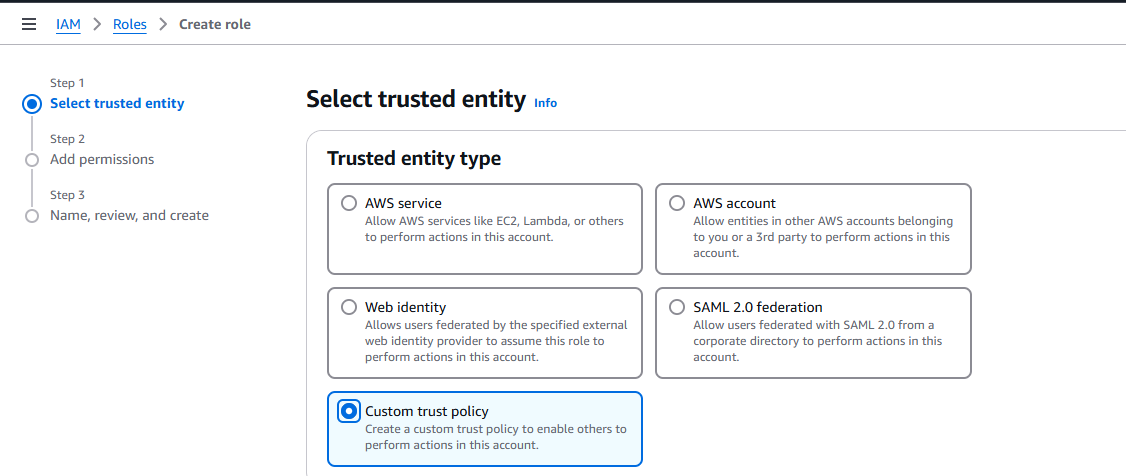
Add the custom trust policy.
- Click Next.
- Do not select any AWS Managed policy, and click Next.
- Enter the Role name and description.
Select trusted entities.
Trust Policy (same as the custom trust policy you added earlier).
-
Skip selecting a permission policy for now, and go ahead and click Create role.
Next, assign inline permissions:
- Head back to IAM > Roles, find the role you just created — DynamoDBGetPutObjectRole — and open it.
- Then, under the Permissions tab, click Create inline policy.
- Select Service:
DynamoDB. - Under Read, select the GetItem action.
- Under Write, select the PutItem action.
- Under Resources, click Add ARNs and specify the relevant table(s).
- Click Next.
- Give the policy a relevant name, and click Create policy.
3. Apply Resource-Level and Condition-Level Constraints
- Use resource-level permissions to restrict access to specific resources.
- Apply condition keys (e.g., aws:SourceIp, aws:RequestTag) to limit actions based on context.
4. Use IAM Access Analyzer and Policy Simulator
- Use IAM Access Analyzer to scan your policies and spot any unused permissions. It’s a great way to tighten access and stick to least privilege.
- Simulate policy changes using IAM Policy Simulator before deployment.
- IAM policies can be validated in advance to ensure compliance with security standards and to proactively detect non-compliant changes. This helps you move faster from development to production while staying confident that your IAM changes reflect exactly what you intended.
5. Implement Permission Boundaries
- Use permission boundaries to define maximum allowable permissions for IAM entities.
- Combine with SCPs (Service Control Policies) in AWS Organizations for broader governance.
Automation Strategies
Policy Generation and Validation
- You can define IAM policies as code using AWS CloudFormation or AWS CDK. With AWS CDK, for example, the IAM module includes a
Roleconstruct that lets you create roles programmatically. Here's how you can create a role that trusts the Amazon EC2 service:
import * as iam from 'aws-cdk-lib/aws-iam';

const role = new iam.Role(this, 'Role', {
  assumedBy: new iam.ServicePrincipal('ec2.amazonaws.com'), // required
});
- Automate policy validation with linters and CI/CD integration.
Continuous Monitoring
- Monitor IAM activity with AWS Cloud Trail and Amazon Cloud Watch.
- Use AWS Access Analyzer to regularly scan IAM policies and identify unused permissions. By reviewing these findings, you can safely remove excess access and keep your environment aligned with the principle of least privilege. It's a simple but effective way to reduce risk and tighten security without disrupting valid workflows.
Periodic Review and Rightsizing
- Schedule periodic access reviews.
- Right size permissions by analyzing access patterns and removing unused permissions.
Challenges and Solutions
- Policy Complexity: Use modular policies and clear naming conventions.
- Dynamic Environments: Automate policy adjustments with event-driven architectures.
- User Education: Provide training and resources on least-privilege practices.
Conclusion
Applying the principle of least privilege in AWS IAM is a cornerstone of secure cloud operations. By adopting best practices, leveraging automation, and conducting regular reviews, organizations can enforce precise access controls that enhance both security and operational efficiency. AWS offers robust services that support the implementation of least privilege, enabling organizations to scale securely and confidently in the cloud.
Opinions expressed by DZone contributors are their own.
Comments