

Integrating AWS With Okta for Just-in-Time (JIT) Access: A Practical Guide From the Field
Static IAM users, login roles were killing our security posture and slowing everyone down. So we wired Okta and AWS with SAML and Okta Workflows for JIT access.
 ·
·
Join the DZone community and get the full member experience.
Join For FreeWhen our engineering team decided to tighten security around AWS access without slowing developers down, we quickly ran into a familiar trade-off — speed vs. control. We had engineers needing quick access to production for debugging, deployments, and performance checks, but long-lived IAM users and static credentials made our compliance team nervous. That’s where Okta-driven Just-in-Time (JIT) access came in.
This post walks through how we set up AWS + Okta integration to give developers on-demand, time-bound access to AWS using SAML federation and Okta Workflows. I’ll share exactly what worked, what didn’t, and what we learned while making it production-ready.
Why We Needed JIT Access
Our setup isn’t unique — a mid-sized cloud platform with multiple AWS accounts for environments like dev, staging, and prod. Over time, static IAM users had multiplied, and every sprint added more “temporary” admin permissions that never got revoked. Security audits revealed:
- Credential sprawl: Too many long-lived keys across accounts and services.
- Approval delays: Manual access tickets taking hours to approve.
- Over-provisioned roles: Users kept admin roles months after incidents.
We needed something cleaner — automated, auditable, and temporary.
After some exploration, we landed on a Just-in-Time access model using Okta Access Requests and AWS IAM Identity Center (formerly SSO). The result? Developers could request AWS access for a specific duration, get approval, and Okta would handle everything — from group assignment to automatic revocation.
High-Level Architecture
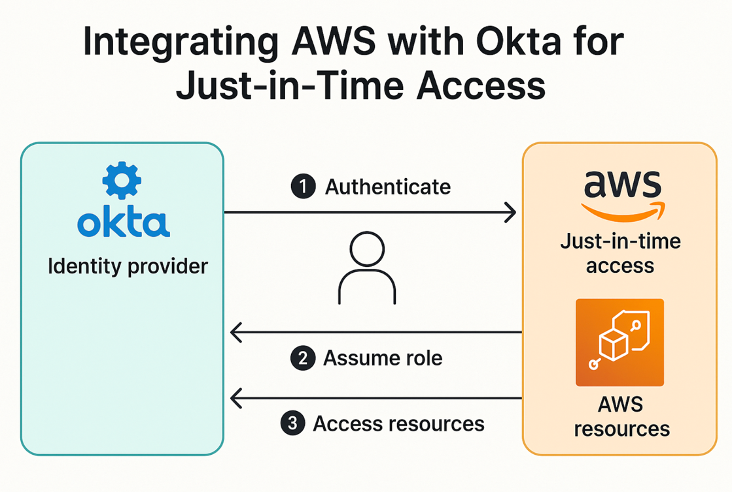
Key Components
- Okta – Identity provider (IdP) for user authentication and SAML assertion.
- AWS IAM / IAM Identity Center (SSO) – Service provider (SP) for federated login.
- Okta Workflows or Access Requests – Automates the JIT approval process.
- AWS STS (Security Token Service) – Issues temporary credentials.
Step 1: Set Up AWS as a SAML Service Provider
In AWS IAM:
- Go to IAM → Identity Providers → Add provider.
- Select SAML and upload the Okta metadata XML.
- Save the Provider ARN — you’ll need this for your IAM role trust policy.
We also defined a dedicated role for this federation:
{
  "Version": "2012-10-17",
  "Statement": [
    {
      "Effect": "Allow",
      "Principal": { "Federated": "arn:aws:iam::123456789012:saml-provider/Okta" },
      "Action": "sts:AssumeRoleWithSAML",
      "Condition": {
        "StringEquals": { "SAML:aud": "https://signin.aws.amazon.com/saml" }
      }
    }
  ]
}
We started small — a read-only role — and then expanded to team-specific temporary roles later (DevOps, Data, Support, etc.).
Lesson learned: don’t overcomplicate your first role mappings. Just get SAML federation working with one test user first.
Step 2: Configure Okta for SAML Integration
In the Okta Admin Console:
- Go to Applications → Create App Integration → SAML 2.0.
- Enter AWS as the app name.
- Use https://signin.aws.amazon.com/saml as the SSO URL.
- Add your AWS SAML Entity ID.
- Map Okta groups to AWS roles (you can use regex if you have multiple AWS accounts).
We also used group attributes in Okta to dynamically control which users can assume specific roles.
Tip: Add a clear naming convention like AWS-<AccountAlias>-<RoleName> for Okta groups. This keeps mapping consistent across accounts.
Step 3: Automate Approvals With Okta Workflows
We built a simple JIT flow inside Okta Workflows:
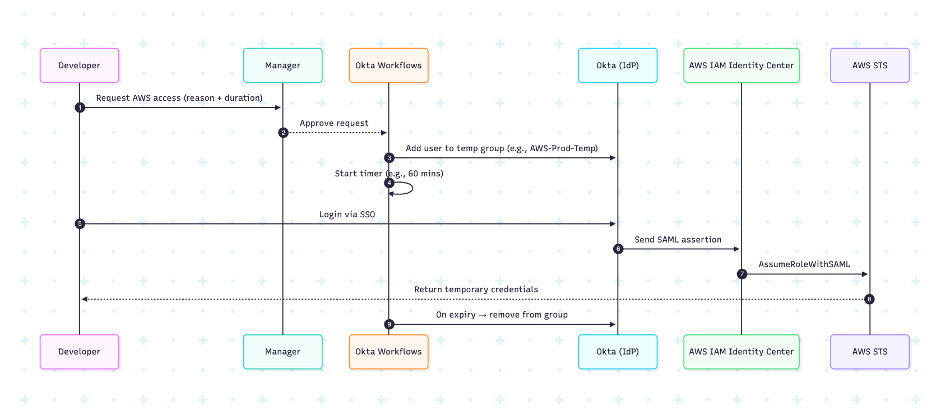
Once the timer expired, the user was automatically removed from the AWS group — no tickets, no reminders.
Real takeaway: Test your workflow logic thoroughly. We initially had cases where the timer didn’t trigger removal because the flow paused during maintenance. We added a nightly cleanup workflow that scans and removes any lingering members.
Step 4: Access Flow for Developers
From the developer side, the process feels almost seamless:
- They open Okta and click “Request AWS Access.”
- Once approved, the AWS app appears in their Okta dashboard.
- They click it → Okta handles MFA + SAML federation.
- AWS opens with a temporary session.
CLI users use tools like aws-okta or saml2aws to get federated credentials:
aws sts get-caller-identity
Result: Temporary credentials mapped to the assumed role — valid for the configured duration only.
We also integrated notifications in Slack — when an access request was approved or revoked, both the requester and the approver were notified.
Step 5: Auditing and Compliance
This was a big win. Between Okta System Logs and AWS CloudTrail, we could finally answer:
- Who accessed which AWS account?
- What role did they assume?
- For how long?
We feed both logs into our SIEM for correlation. Example correlation query:
where event.source = 'Okta' and event.target = 'AWS' | join on userEmail
It’s simple but powerful for compliance reporting.
Pro tip: Create CloudWatch metric filters for AssumeRoleWithSAML events and alert on any anomalies (like role assumptions outside approved hours).
Lessons Learned Along the Way
- Start small. Don’t try to automate all AWS roles at once — begin with a read-only or DevOps role.
- Watch for group propagation delay. Sometimes Okta takes a few seconds to update group membership; build that delay into your workflow.
- Short sessions are safer. We found 60 minutes to be the sweet spot — short enough for security, long enough for troubleshooting.
- MFA everywhere. Even with SAML, enforce MFA in Okta. It adds negligible friction but a huge security layer.
- Keep logs unified. Stream Okta and AWS logs into a central place (we used CloudWatch + SIEM) for full visibility.
Best Practices Checklist
✅ Use short session durations (≤ 1 hour)
✅ Implement group-based role mapping
✅ Enforce MFA for all Okta sign-ins
✅ Automate revocation and cleanup with Workflows
✅ Stream Okta + CloudTrail logs into your SIEM for unified monitoring
✅ Test edge cases like expired timers and overlapping approvals
Wrapping Up
Rolling out Just-in-Time access between Okta and AWS completely changed how we manage developer permissions. No more waiting for tickets to be approved, no more forgotten admin roles lingering around, and no more manual cleanup.
By combining Okta Workflows, SAML federation, and AWS STS, we ended up with an access model that’s both secure and frictionless. Developers get the access they need, when they need it — and nothing more.
If you’re running a similar setup, start with a pilot account, get your approval flow right, and iterate. Once it’s in place, you’ll wonder how you ever managed IAM manually.
Opinions expressed by DZone contributors are their own.
Comments