

Lombok and JPA: What Could Go Wrong?
Mixing great things always results in something great – this law works almost everywhere, but not in cooking or coding. In this article, we will have a look at how Lombok can break your JPA project.
Lombok is a great tool that makes your Java code concise and clean. However, there are a few things to consider when using it with JPA. In this article, we’ll look at how the misuse of Lombok can hurt the performance of JPA applications or even crash them, and how to avoid that but still gain the benefits of using Lombok.
We develop JPA Buddy – a plugin for IntelliJ IDEA designed to make the use of JPA easier. Before writing a single line of code for it, we went through a ton of projects on GitHub to understand how people work with JPA. Turns out, a lot of them use Lombok for their entities.
It is absolutely fine to use Lombok in your JPA projects, but it has some caveats. Analyzing the projects, we see people stumble into the same pitfalls over and over again. This is why we introduced a number of code inspections for Lombok to JPA Buddy. This article shows the most common issues you may face using Lombok with JPA entities.
Broken HashSets (and HashMaps)
Entity classes often get annotated with @EqualsAndHashCode or @Data. The documentation of @EqualsAndHashCode states:
By default, it'll use all non-static, non-transient fields, but you can modify which fields are used (and even specify that the output of various methods is to be used) by marking type members with
@EqualsAndHashCode.Includeor@EqualsAndHashCode.Exclude.
Equals()/hashCode() implementation for JPA entities is a sensitive subject. Naturally, entities are mutable. Even the id of an entity is often generated by a database, so it gets changed after the entity is first persisted. This means there are no fields we can rely on to calculate the hashCode.
For example, let’s create a test entity:
xxxxxxxxxx
public class TestEntity {
(strategy = GenerationType.IDENTITY)
(nullable = false)
private Long id;
}
And execute the following code:
xxxxxxxxxx
TestEntity testEntity = new TestEntity();
Set<TestEntity> set = new HashSet<>();
set.add(testEntity);
testEntityRepository.save(testEntity);
Assert.isTrue(set.contains(testEntity), "Entity not found in the set");
The assertion in the last line fails, even though the entity is added to the set just a couple of lines above. Delomboking the @EqualsAndHashCode gives us the following:
public int hashCode() {
final int PRIME = 59;
int result = 1;
final Object $id = this.getId();
result = result * PRIME + ($id == null ? 43 : $id.hashCode());
return result;
}
Once the id is generated (on its first save) the hashCode gets changed. So the HashSet looks for the entity in a different bucket and cannot find it. It wouldn’t be an issue if the id was set during the entity object creation (e.g. was a UUID set by the app), but DB-generated ids are more common.
Accidentally Loading Lazy Attributes
As mentioned above, @EqualsAndHashCode includes all the object fields by default. The same is right for @ToString:
Any class definition may be annotated with @ToString to let lombok generate an implementation of the toString()method. By default, it'll print your class name, along with each field, in order, separated by commas.
These methods call equals()/hashCode()/toString() on every field of an object. This can have an unwanted side-effect for JPA entities: accidentally loading lazy attributes.
For example, calling hashCode() on a lazy @OneToMany may fetch all the entities it contains. This can easily harm the application performance. It can also lead to a LazyInitializationException if it happens outside a transaction.
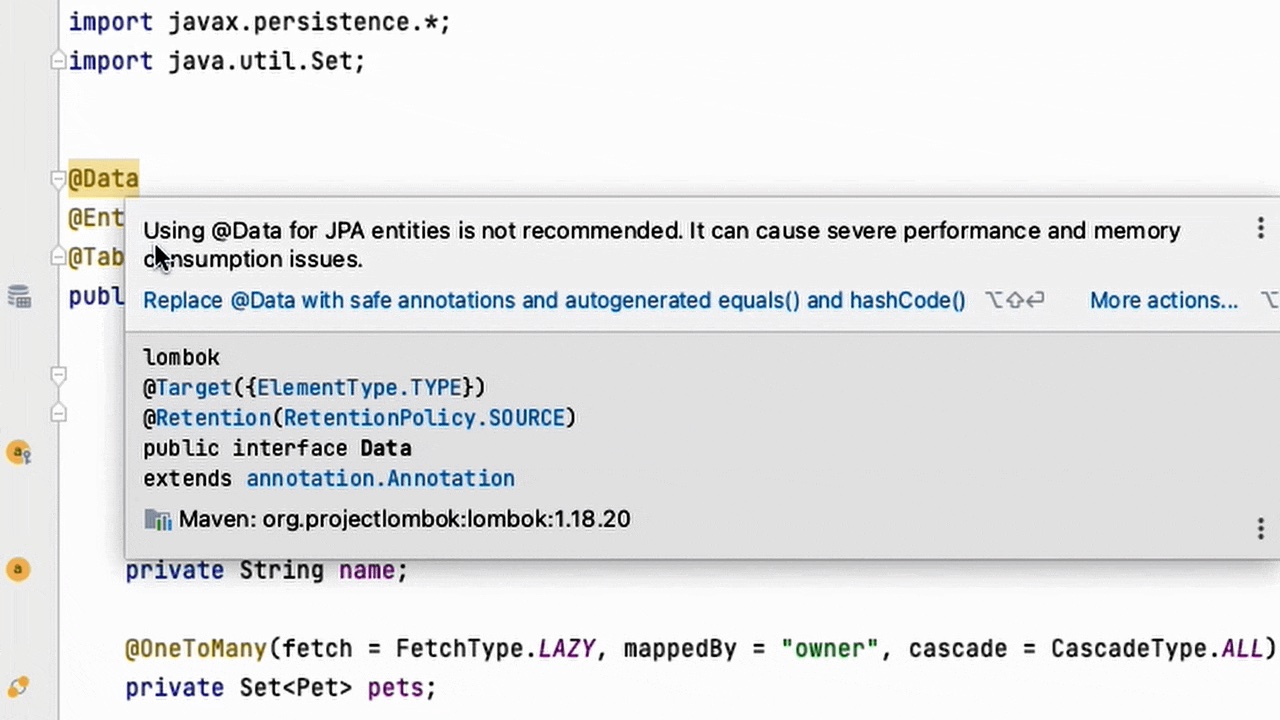
We believe @EqualsAndHashCode and @Data should not be used for entities at all, so JPA Buddy alerts developers:
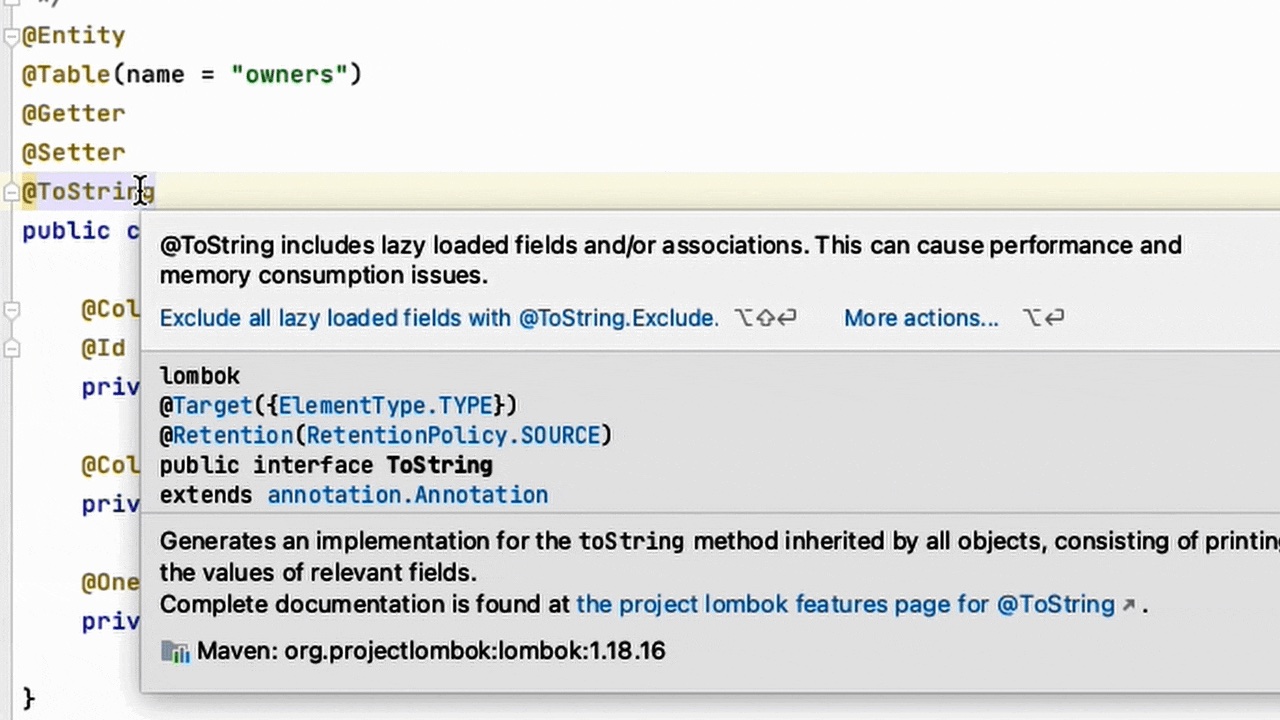
@ToString can still be used, but all the lazy fields need to be excluded. This can be achieved by placing @ToString.Exclude on the desired fields, or by using @ToString(onlyExplicitlyIncluded = true) on the class and @ToString.Include on non-lazy fields. JPA Buddy has a special action for it:
Missing No-Argument Constructor
According to the JPA specification, all entity classes are required to have a public or protected no-argument constructor. Obviously, when @AllArgsConstructor is used the compiler does not generate the default constructor, the same is true for @Builder:
Applying
@Builderto a class is as if you added@AllArgsConstructor(access = AccessLevel.PACKAGE)to the class and applied the@Builderannotation to this all-args-constructor.
So make sure to always use them with @NoArgsConstructor or an explicit no-argument constructor:

Conclusion
Lombok makes your code look nicer, but as with any magic-like tool, it is important to understand how exactly it works and when to use it. You can also rely on development tools to predict potential issues for you. Otherwise, you might accidentally hurt the performance of your application or even break something.
When working with JPA and Lombok, remember these rules:
- Avoid using
@EqualsAndHashCodeand@Datawith JPA entities; - Always exclude lazy attributes when using
@ToString; - Don’t forget to add
@NoArgsConstructorto entities with@Builderor@AllArgsConstructor.
Or let JPA Buddy remember them for you: its code inspections are always at your service.
Published at DZone with permission of Andrey Oganesyan. See the original article here.
Opinions expressed by DZone contributors are their own.