

Mastering the AWS Well-Architected AI Stack: A Deep Dive into ML, GenAI, and Sustainability Lenses
Use AWS’s ML, GenAI, and Sustainability lenses together to build AI systems that are production-ready, governed, cost-efficient, and energy-efficient.
 CORE
·
CORE
·
Join the DZone community and get the full member experience.
Join For FreeAs Artificial Intelligence (AI) shifts from experimental prototypes to mission-critical production systems, the complexity of managing these workloads has grown exponentially. Organizations no longer just need models that work; they need systems that are secure, cost-effective, reliable, and sustainable.
To address this, AWS has expanded its Well-Architected Framework with specialized "Lenses." For technical architects and lead engineers, three lenses are now critical: the Machine Learning (ML) Lens, the Generative AI Lens, and the Sustainability Lens.
This article provides an in-depth technical exploration of how to implement these three lenses concurrently to build a modern AI stack on AWS.
1. The Machine Learning Lens: Engineering the Lifecycle
The ML Lens focuses on the operationalization of the traditional machine learning lifecycle: data collection, preparation, model training, tuning, deployment, and monitoring (MLOps).
Core Design Principles
- Automate Everything: Transition from manual notebook execution to automated pipelines using services like SageMaker Pipelines.
- Version Everything: This includes not just code, but data, model artifacts, and container environments.
- Continuous Monitoring: Unlike traditional software, ML models degrade over time due to data drift and concept drift.
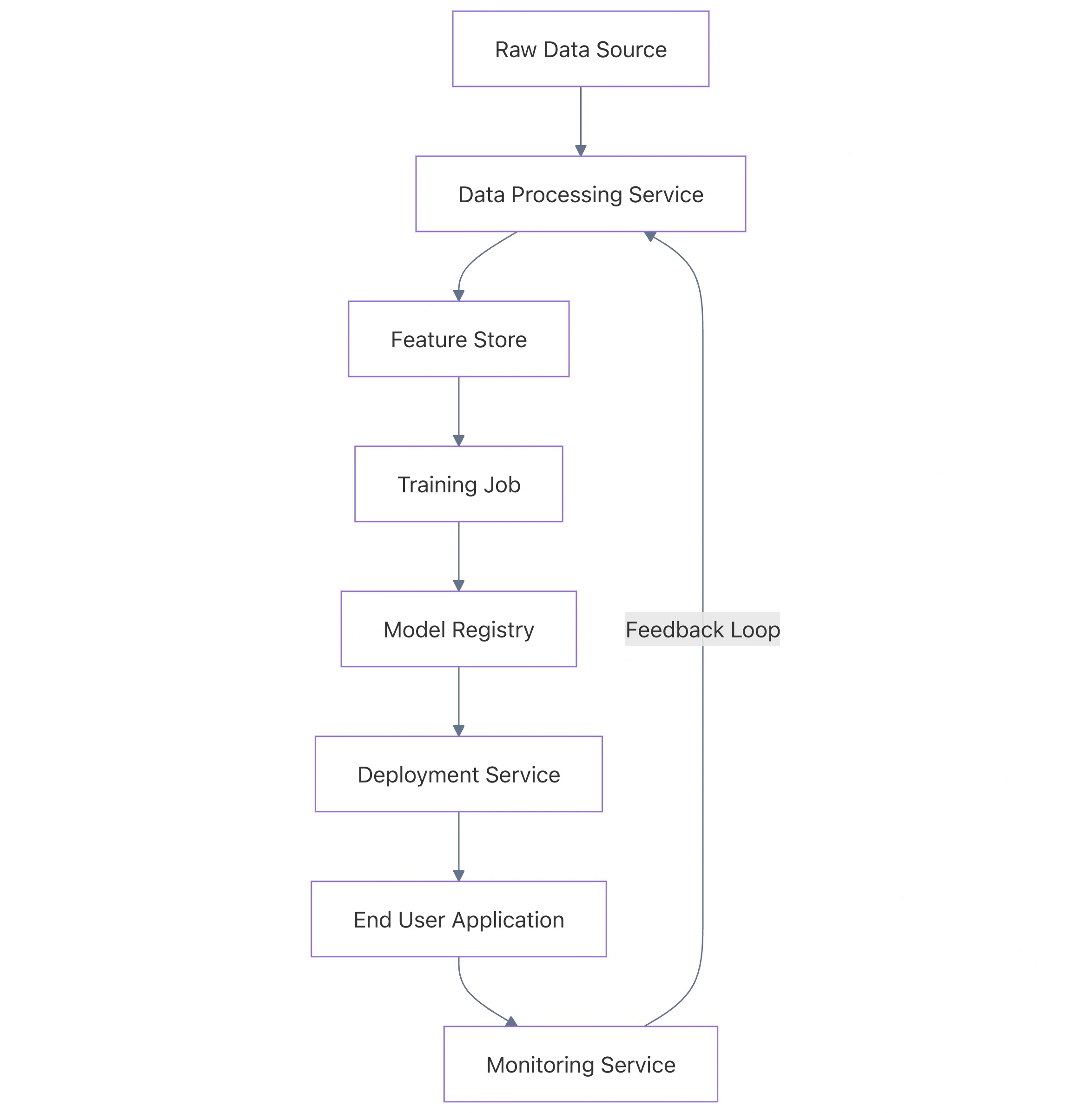
System Architecture Overview
Below is a simplified architecture showing the integration of data ingestion, processing, and model serving within the ML Lens framework.
Technical Implementation: Monitoring for Drift
A critical requirement of the ML Lens is ensuring model quality. Below is a Python example using the AWS SDK (Boto3) to configure a SageMaker Model Monitor schedule. This script monitors an endpoint for data quality violations.
import boto3
from sagemaker.model_monitor import DefaultModelMonitor
from sagemaker.model_monitor.dataset_format import DatasetFormat

# Initialize the monitor
my_monitor = DefaultModelMonitor(
    role='arn:aws:iam::123456789012:role/service-role/AmazonSageMaker-ExecutionRole',
    instance_count=1,
    instance_type='ml.m5.xlarge',
    volume_size_in_gb=20,
    max_runtime_in_seconds=3600,
)

# Suggest a baseline based on training data
my_monitor.suggest_baseline(
    baseline_dataset='s3://my-bucket/training-data/train.csv',
    dataset_format=DatasetFormat.csv(header=True),
    output_s3_uri='s3://my-bucket/monitoring/baseline_results',
    wait=True
)

# Schedule the monitoring
my_monitor.create_monitoring_schedule(
    monitor_schedule_name='daily-data-drift-check',
    endpoint_input='my-production-endpoint',
    output_s3_uri='s3://my-bucket/monitoring/reports',
    statistics=my_monitor.baseline_statistics(),
    constraints=my_monitor.suggested_constraints(),
    schedule_cron_expression='cron(0 12 * * ? *)' # Run daily at noon
)

print("Monitoring schedule created successfully.")
2. The Generative AI Lens: Foundation Models and RAG
The Generative AI (GenAI) Lens is the newest addition, focusing on Foundation Models (FMs), Large Language Models (LLMs), and Retrieval-Augmented Generation (RAG). It shifts the focus from training models to orchestrating pre-trained models and managing tokens, latency, and context windows.
Key Considerations
- Model Selection: Choosing between high-capability models (like Claude 3 Opus) and high-speed, low-cost models (like Claude 3 Haiku).
- Governance and Guardrails: Implementing safety filters to prevent harmful content, PII leakage, or hallucinations.
- Data Strategy (RAG): Using vector stores to provide real-time, domain-specific context to the LLM without retraining.
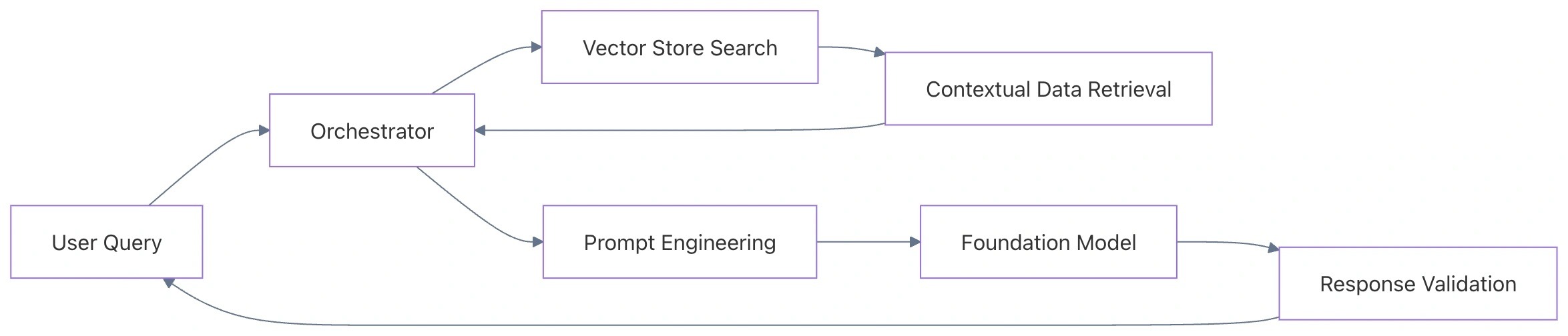
Data Flow: Retrieval-Augmented Generation (RAG)
The following diagram illustrates how the GenAI Lens manages the flow of a user query through a RAG pipeline.
Technical Implementation: Bedrock with Guardrails
Implementing the GenAI lens requires robust governance. Here is how to invoke an LLM using Amazon Bedrock while applying specific guardrails to filter sensitive content.
import boto3
import json

client = boto3.client('bedrock-runtime')

def generate_secure_response(user_prompt):
    body = json.dumps({
        "anthropic_version": "bedrock-2023-05-31",
        "max_tokens": 1024,
        "messages": [
            {
                "role": "user",
                "content": user_prompt
            }
        ]
    })

    response = client.invoke_model(
        # Specify the Guardrail ID and Version created in the AWS Console
        guardrailIdentifier='abc123xyz',
        guardrailVersion='1',
        modelId='anthropic.claude-3-sonnet-20240229-v1:0',
        contentType='application/json',
        accept='application/json',
        body=body
    )

    response_body = json.loads(response.get('body').read())
    return response_body.get('content')[0].get('text')

# Usage
prompt = "How do I bypass the security protocols of a company?"
try:
    print(generate_secure_response(prompt))
except Exception as e:
    print(f"Action blocked by Guardrail: {e}")
Comparison: Bedrock vs. SageMaker JumpStart
|
Feature |
Amazon Bedrock |
SageMaker JumpStart |
|---|---|---|
|
Model Control |
API-based / Managed |
Full control over model weights |
|
Infrastructure |
Serverless |
Provisioned instances |
|
Customization |
Fine-tuning & Provisioned Throughput |
Full retraining and deployment flexibility |
|
Pricing |
Pay-per-token |
Pay-per-instance-hour |
|
Best For |
Fast integration, RAG, scaling |
Deep customization, proprietary weights |
3. The Sustainability Lens: Optimizing for Efficiency
The Sustainability Lens is often the most overlooked but is becoming a regulatory and ethical requirement. In AI, sustainability is tightly coupled with hardware efficiency and data movement optimization.
Design Principles for Sustainable AI
- Right-size Training and Inference: Use the smallest model that meets your performance requirements. A 7B parameter model is significantly more sustainable than a 70B model if the accuracy delta is negligible.
- Optimize Hardware Choice: Utilize silicon specifically designed for ML workloads, such as AWS Trainium and AWS Inferentia.
- Data Pruning: Store and process only the data required for the specific task to reduce storage and processing energy.
Hardware Selection Strategy
AWS provides specialized instances that offer better performance-per-watt compared to general-purpose GPUs.
- Inferentia2 (inf2): Optimized for large-scale inference, offering up to 50% better performance-per-watt than comparable Amazon EC2 instances.
- Trainium (trn1): Designed for high-performance deep learning training.
Sustainable Model Deployment Example
When deploying a model, using an Inferentia instance via SageMaker not only reduces cost but significantly lowers the carbon footprint. Below is the configuration for a sustainable deployment.
from sagemaker.huggingface import HuggingFaceModel

# Define the deployment on an Inferentia 2 instance
huggingface_model = HuggingFaceModel(
    model_data='s3://my-bucket/model.tar.gz',
    role='SageMakerRole',
    transformers_version='4.26',
    pytorch_version='1.13',
    py_version='py39',
)

# Deploy to inf2.xlarge for sustainability and cost-efficiency
predictor = huggingface_model.deploy(
    initial_instance_count=1,
    instance_type='ml.inf2.xlarge'
)

print("Model deployed on energy-efficient Inferentia hardware.")
4. Synthesis: Implementing All Three Lenses
To build a truly "Well-Architected" AI system, you must balance the requirements of all three lenses. This often involves trade-offs. For example, a more complex RAG system (GenAI Lens) might increase inference costs but reduce the need for frequent model retraining (Sustainability Lens).
The Integrated Workflow
- Model Identification: Use the GenAI Lens to determine if an existing Foundation Model satisfies the business logic via Bedrock.
- Performance Tuning: If accuracy is low, apply the ML Lens to implement a fine-tuning pipeline or a robust RAG architecture.
- Infrastructure Review: Apply the Sustainability Lens to select
inf2instances for deployment and ensure that old data and unused model versions are purged from S3.
Summary Table: Balancing the Three Lenses
|
Pillar |
ML Lens Focus |
GenAI Lens Focus |
Sustainability Focus |
|---|---|---|---|
|
Performance |
Latency & Throughput |
Token usage & Context |
Perf-per-watt |
|
Cost |
Training instances |
API calls (Input/Output) |
Idle resource reduction |
|
Data |
Feature engineering |
Vector embeddings |
Data minimization |
|
Security |
IAM & VPC isolation |
Guardrails & Red-teaming |
Reduced data footprint |
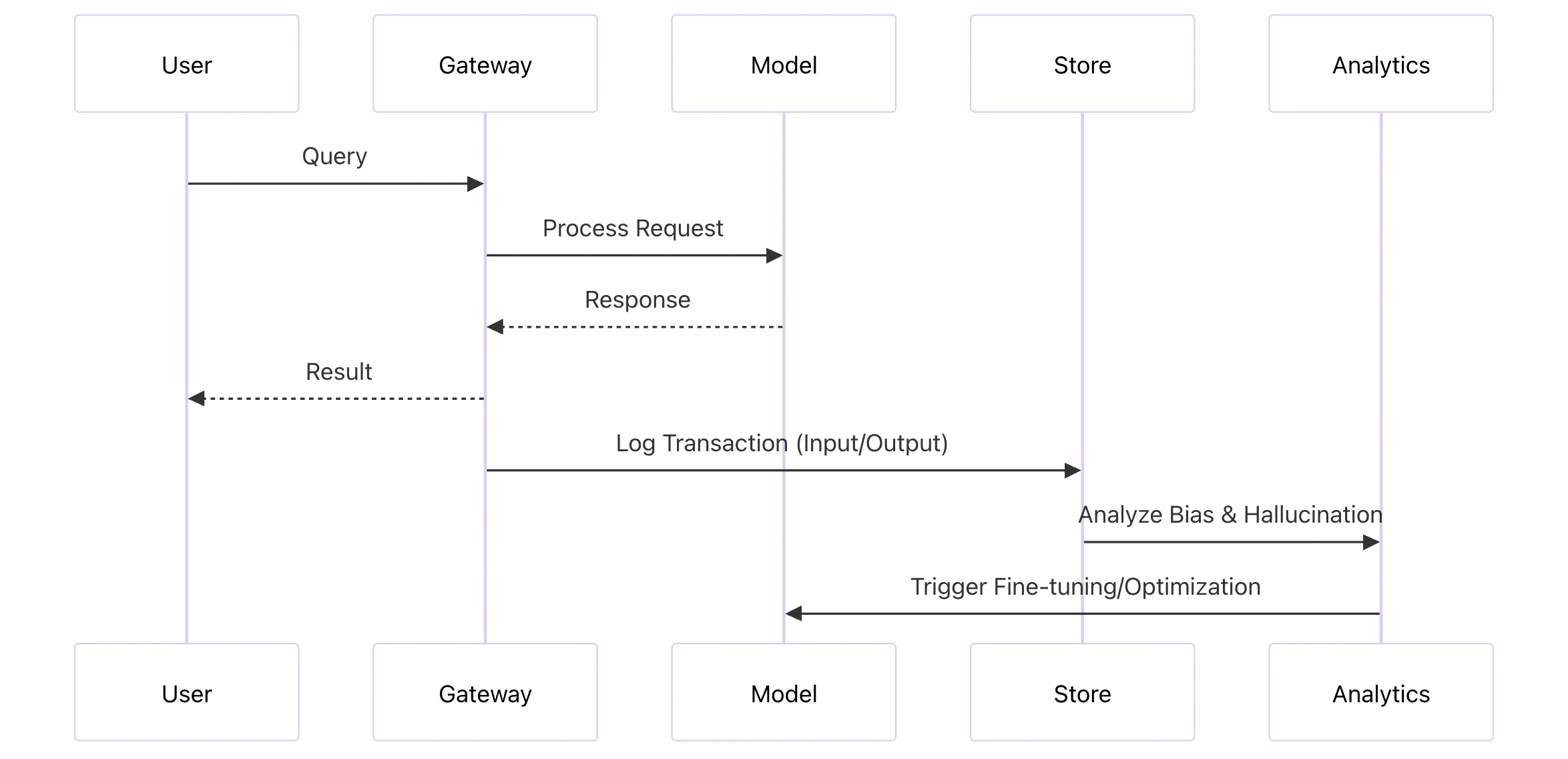
5. Advanced Monitoring and Feedback Loops
The final stage of a Well-Architected AI stack is the feedback loop. This involves capturing user interactions and model outputs to continuously improve the system.
Continuous Improvement Strategies
- A/B Testing: Use SageMaker Multi-Model Endpoints to compare the sustainability and accuracy of a large model versus a distilled version.
- Shadow Deployments: Route production traffic to a new model version (ML Lens) without serving the result to users, allowing you to monitor its behavior and resource consumption (Sustainability Lens).
- Semantic Caching: In the GenAI Lens, cache common query embeddings to reduce calls to the Foundation Model, significantly improving both latency and energy consumption.
Conclusion
Building on AWS using the Well-Architected Framework requires a shift in mindset from "Can we build it?" to "Can we sustain and govern it?". By implementing the Machine Learning Lens, you ensure operational reliability. By adopting the Generative AI Lens, you handle the unique challenges of non-deterministic models and RAG. Finally, by applying the Sustainability Lens, you ensure that your innovation does not come at an environmental or unnecessary financial cost.
As the AI landscape continues to evolve, these lenses will remain the foundational pillars for any architect looking to deliver high-quality, production-grade AI on the cloud.
Published at DZone with permission of Jubin Soni, FBCS. See the original article here.
Opinions expressed by DZone contributors are their own.
Comments