

Microsoft Azure Service Fabric
This article presents the features and advantages of Microsoft Azure Service Fabric, a platform that simplifies the creation and administration of microservices.
Join the DZone community and get the full member experience.
Join For FreeIntroduction
A distributed systems platform called Azure Service Fabric makes it simple to bundle, launch, and manage scalable and dependable microservices and containers. The considerable difficulties in creating and maintaining cloud-native apps are also addressed by Service Fabric.
The high emphasis placed on developing stateful services by Service Fabric is one of its primary differentiators. You can run containerized stateful services created in any language or code using the Service Fabric programming architecture. In addition to Azure, you may create Service Fabric clusters anywhere, including on-premises Windows Server and Linux systems as well as other public clouds.
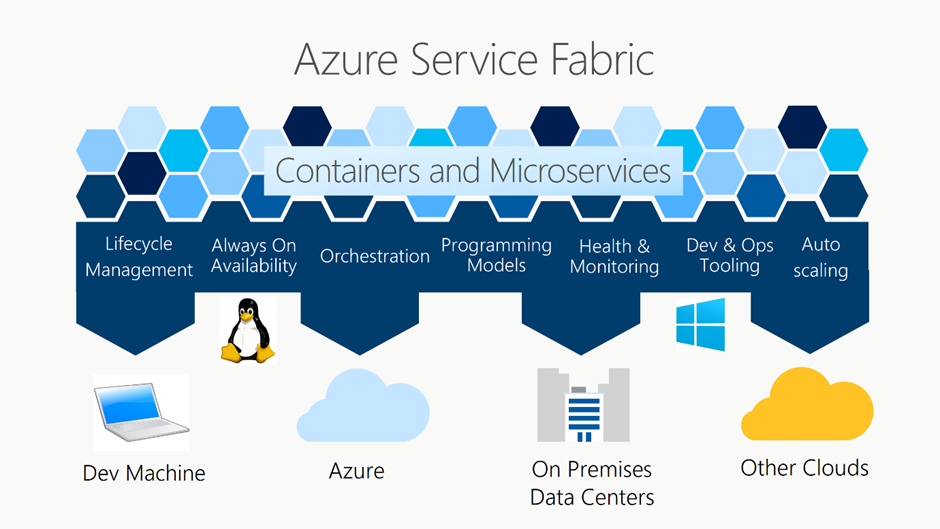
Many Microsoft services are currently powered by Service Fabric, including Dynamics 365, Skype for Business, Azure SQL Database, Azure Cosmos DB, Cortana, Microsoft Power BI, Microsoft Intune, Azure Event Hubs, and Azure IoT Hub.
Orchestration of Containers
With the knowledge gained from administering Microsoft services at a large scale, Service Fabric is Microsoft's container orchestrator for deploying and managing microservices across a cluster of servers. With hundreds or thousands of applications or containers per machine, Service Fabric can deploy applications quickly and densely. You can combine services in processes and services in containers in the same application using Service Fabric.
Microservices With and Without States
Stateless and stateful microservices are supported by the powerful, lightweight runtime that Service Fabric offers. The comprehensive support that Service Fabric offers for developing stateful services, whether using the built-in programming models of Service Fabric or containerized stateful services, is one of its primary differentiators.
Management of the Application’s Lifetime
The whole application lifecycle and CI/CD of cloud apps, including containers, is supported by Service Fabric, from development to deployment, daily monitoring, management, maintenance, and, finally, decommissioning. Service Fabric may be used with any other well-known CI/CD tool and is coupled with technologies like Azure Pipelines, Jenkins, and Octopus Deploy.
Any Cloud, Any OS
In a variety of settings, including Azure or on-premises, using Windows Server or Linux, you can build Service Fabric clusters. Even on other public clouds, you can build clusters. Without the use of emulators, the Service Fabric SDK's development environment is the same as the production environment. In other words, what you deploy to your clusters in other environments is what runs on your local development cluster.
The Service Fabric.NET SDK is integrated with Visual Studio and PowerShell for Windows programming. The Service Fabric Java SDK relates to Eclipse for Linux development, and Yeoman is utilized to provide templates for Java, .NET Core, and container apps.
Compliance
The Azure Service Fabric Resource Provider is accessible in all regions of Azure and complies with all SOC, ISO, PCI DSS, HIPAA, and GDPR compliance certifications. Visit Microsoft's Compliance Offerings for a complete list.
Trust a Tested Platform for Applications That Are Mission-Critical
Concentrate on developing apps and business logic, and let Azure handle challenging distributed systems issues like scalability, administration, dependability, and latency. The open-source project Service Fabric underpins the basic Azure infrastructure as well as other Microsoft services like Dynamics 365, Cortana, Azure Event Hubs, Azure Data Factory, Azure Cosmos DB, and Azure SQL Database. Azure Service Fabric, which was created to enable highly reliable and enduring services at a cloud scale, naturally comprehends the infrastructure and resource requirements of applications, enabling autonomous scaling, rolling upgrades, and self-healing from faults as they arise.
Build your microservice and container-based apps using a range of effective programming paradigms and languages, such as.NET Core 2.0, C#, and Java. Use Azure Service Fabric Mesh, a fully managed microservices platform that is presently in preview, or deploy the Service Fabric cluster there. You can create Service Fabric clusters on-premises or in other clouds using the free Azure Service Fabric download for Windows Server.
Azure Service Fabric’s Features and Advantages
Simplify the Creation and Administration of Microservices
A Quick Time to Market
Instead of spending time designing and writing extra code to address issues with reliability, scalability, maintenance, or latency in the underlying infrastructure, concentrate on developing features that provide business value to your application.
Orchestration of Services and Containers in the Same Environment
Bring your Docker containers and run them stably at scale with other workloads and services on Linux or Windows. Utilize the workload orchestration, cluster resource management, and container hosting features of Azure Service Fabric.
Pick Your Architectural Style
To enable the most sophisticated, low-latency, data-intensive situations, create stateless or stateful microservices, an architectural approach where complex systems are made of small, independently versioned services, and extend them into or across the cloud using Azure Service Fabric. Combine and contrast the programming languages and paradigms that are most effective for you, from guest executables and containers to microservices and actors.
Agile Microservices
By designing fine-grained microservice applications, you can enable continuous integration and development methods and speed up the release of new features.
IDE Integration
Build, test, debug, deploy, and upgrade Service Fabric applications quickly and easily in test, single-box, and production settings. Use a tool from your preferred IDE, such as Visual Studio, Eclipse, or command-line assistance, to do this.
Run Anywhere
With a choice of Windows Server or Linux (Ubuntu or RHEL as the host operating system), it is flexible to deploy the same application code on public, hosted, or private clouds utilizing the same platform services and application programming models.
Deliver at Scale With Reduced Latency and Increased Effectiveness
Automate scaling operations, integrate health monitoring, give automatic recovery from failures, and deliver quick yet safe upgrades with zero downtime. Develop low-latency, robust services that scale by orchestrating microservices and container-based programs, gaining insight into the health and performance of the applications, and doing so.
Provide application lifecycle management capabilities so developers don't have to re-architect applications as usage increases and address challenging distributed systems issues like reliable failure detection and failover, leader election, state management, service discovery, rolling upgrades, application portability, environment abstraction, resource management and governance, and configuration management. Develop and deliver a wide range of workloads and applications, such as multi-tenant SaaS apps, mission-critical line-of-business applications, workloads for IoT data processing and collection, and gaming.
Opinions expressed by DZone contributors are their own.
Comments