

The Middleware Gap in AI Agent Frameworks
Most agent frameworks observe model calls and allow rewriting them only after they reach the model, making an understanding of callbacks and middleware essential.
 ·
·
Join the DZone community and get the full member experience.
Join For FreeMost AI Agent frameworks treat the model as a black box: you register tools, the model picks one, the tool runs, and the cycle repeats. This pattern is perfect for demos, but for a production system, it requires more complex systems. We need to manage context windows, cache API calls, filter sensitive tools by role, and compact the information history within models to avoid token limits.
I landed on middleware while reviewing issues for deepagents and understanding their codebase. This is when I started to wonder what middleware really is in the context of AI agents and its significance. This got me thinking: how do other frameworks handle this problem? So I went ahead and installed Pydantic AI, read the CrewAI source, and checked Langchain and Autogen.
This article compares two frameworks that implement middleware as a primitive: Deep Agents (from LangChain) and Pydantic AI, and understands the difference between middleware and callbacks, and explains why this difference matters when running agents at scale.
What You Will Learn
By the end of this article, you will be able to:
- Distinguish middleware from tool callbacks and event callbacks, and why this matters
- Read working code for deepagents'
AgentMiddlewareand Pydantic AI'sAbstractCapability - Understand the difference between the two frameworks: cross-turn AgentState access, production middleware, and config-driven profiles via
HarnessProfile. - Understand why frameworks built on callbacks cannot support patterns that middleware enables.
What Is Middleware?
The term "Middleware" often gets overloaded. In the context of AI agents, it means code that runs before or after every model call, with the ability to read and rewrite the request or response.
What Differentiates Middleware From the Rest
Middleware is different from:
- Tool callbacks – fired when the tool is called and not the model.
- Event callbacks – fire and forget, that can be observed but not changed.
- Post-processing – wrapping the final output after the agent loop ends.
Middleware sits inside the request/response cycle of every LLM call, which gives it unique capabilities.

Where the Middleware Sits in the Agent Loop
It's the only layer with access to the request before it reaches the model and the response before it reaches the tool executor.
| Capability | Middleware | Tool callback | Event callback |
|---|---|---|---|
| Modify system prompt per call | ✓ | ✗ | ✗ |
| Filter tool list dynamically | ✓ | ✗ | ✗ |
| Transform message history | ✓ | ✗ | ✗ |
| Cancel the model call | ✓ | ✗ | ✗ |
| Track state across turns | ✓ | Partial | ✗ |
| Observe output | ✓ | ✓ | ✓ |
Deep Agents: Middleware as a Composable Hook
Installation:
pip install deepagents
# Requires Python >=3.10
# Docs: https://docs.langchain.com/oss/python/deepagents/overview
deepagents ships AgentMiddleware as a base class from langchain.agents.middleware.types. Every middleware subclass can override these key hooks (each has an async variant):
class AgentMiddleware:
    def wrap_model_call(
        self,
        request: ModelRequest,
        handler: Callable[[ModelRequest], ModelResponse],
    ) -> ModelCallResult:
        # Intercept before AND after the model call. Call handler() to execute it.
        return handler(request)

    def before_model(self, state: AgentState, runtime: Runtime) -> dict | None:
        # Runs before the model is called. Can update agent state.
        return None

    def after_model(
        self, state: AgentState, runtime: Runtime
    ) -> dict | None:
        # Runs after the model responds. Can inject new messages into state.
        return None

    def wrap_tool_call(
        self,
        request: ToolCallRequest,
        handler: Callable[[ToolCallRequest], ToolMessage],
    ) -> ToolMessage:
        # Intercept individual tool calls for retry logic, monitoring, or modification.
        return handler(request)

    # async def awrap_model_call(...): ...  # async versions of each hook also available
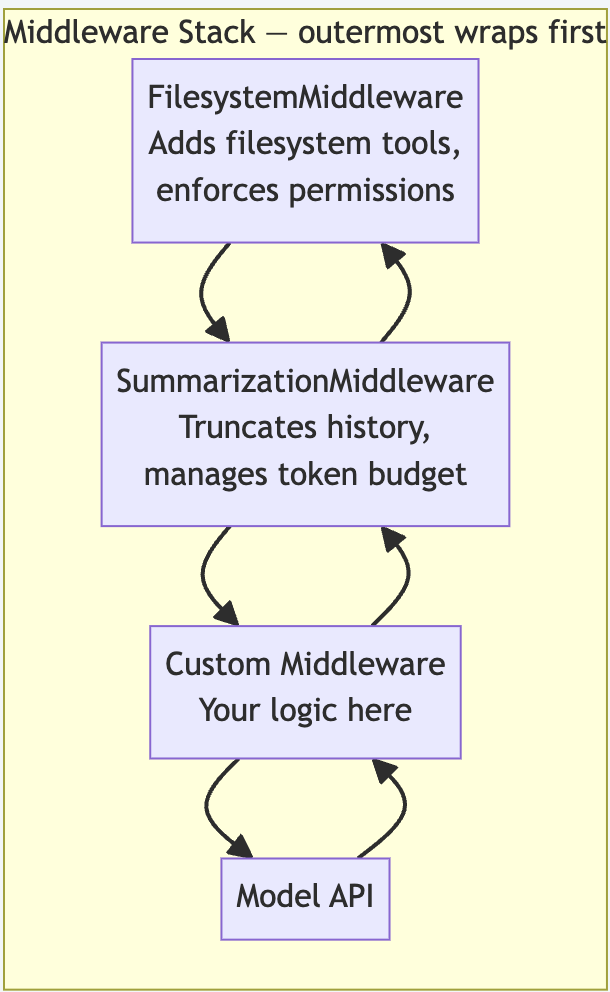
The key insight: wrap_model_call receives the full request: messages, tools, settings, and can return anything, including a modified request passed to the next middleware in the stack. Multiple middleware compose like nested functions:
Request -> Middleware A -> Middleware B -> Model
Response <- Middleware A <- Middleware B <- Model
Built-In Middleware Deep Agents Ships
Deep Agents includes several production-grade middleware out of the box:
from deepagents.middleware import (
    FilesystemMiddleware,       # Filesystem read/write tools + permission enforcement
    MemoryMiddleware,           # Injects relevant memories into system prompt each turn
    SkillsMiddleware,           # Injects SKILL.md definitions into system prompt
    SubAgentMiddleware,         # Spawns synchronous subagents as tools
    AsyncSubAgentMiddleware,    # Spawns async background subagents
    SummarizationMiddleware,    # Auto-compacts history when token budget fills
    SummarizationToolMiddleware,# Exposes compact_conversation as an explicit tool
)
Writing a Custom Middleware
Here is a practical example: a rate-limiting middleware that counts tool calls per turn and injects a warning into a system message when the agent is being "chatty":
from langchain.agents.middleware.types import (
    AgentMiddleware, ModelRequest, ModelResponse, ModelCallResult
)
from langchain_core.messages import SystemMessage
from collections.abc import Callable


class ToolBudgetMiddleware(AgentMiddleware):
    """Warn the model when it has used many tools in a single turn."""

    def __init__(self, budget: int = 5) -> None:
        self.budget = budget
        self._call_count = 0

    def wrap_model_call(
        self,
        request: ModelRequest,
        handler: Callable[[ModelRequest], ModelResponse],
    ) -> ModelCallResult:
        # Count tool messages in the conversation (each = one tool call made)
        tool_calls_this_turn = sum(
            1 for m in request.messages if hasattr(m, "tool_call_id")
        )

        if tool_calls_this_turn >= self.budget:
            warning = (
                f"\n\n[Budget notice: you have called {tool_calls_this_turn} tools "
                f"this turn. Prefer to synthesize results rather than calling more tools.]"
            )
            system = request.system_message
            if system:
                new_content = str(system.content) + warning
                request = request.override(
                    system_message=SystemMessage(content=new_content)
                )

        return handler(request)
You can wire this custom middleware alongside built-ins:
from deepagents import create_deep_agent
from deepagents.middleware import FilesystemMiddleware, SummarizationMiddleware
from deepagents.backends import FilesystemBackend

backend = FilesystemBackend(root_dir="/workspace")
summarizer = SummarizationMiddleware(
    model="anthropic:claude-haiku-4-5",
    backend=backend,
    trigger=("fraction", 0.85),
    keep=("fraction", 0.10),
)

agent = create_deep_agent(
    model="anthropic:claude-sonnet-4-6",
    middleware=[
        FilesystemMiddleware(backend=backend),
        summarizer,
        ToolBudgetMiddleware(budget=5),  # custom
    ],
)
Middleware runs in list order: FilesystemMiddleware wraps first, then SummarizationMiddleware, then your custom one. Innermost is the closest to the model.
The Profiles API: Middleware Configuration Without Code
deepagents v0.5.4 added HarnessProfile which lets you declare middleware changes declaratively — add extra middleware, exclude a few middleware, override tool descriptions without touching create_deep_agent call sites.
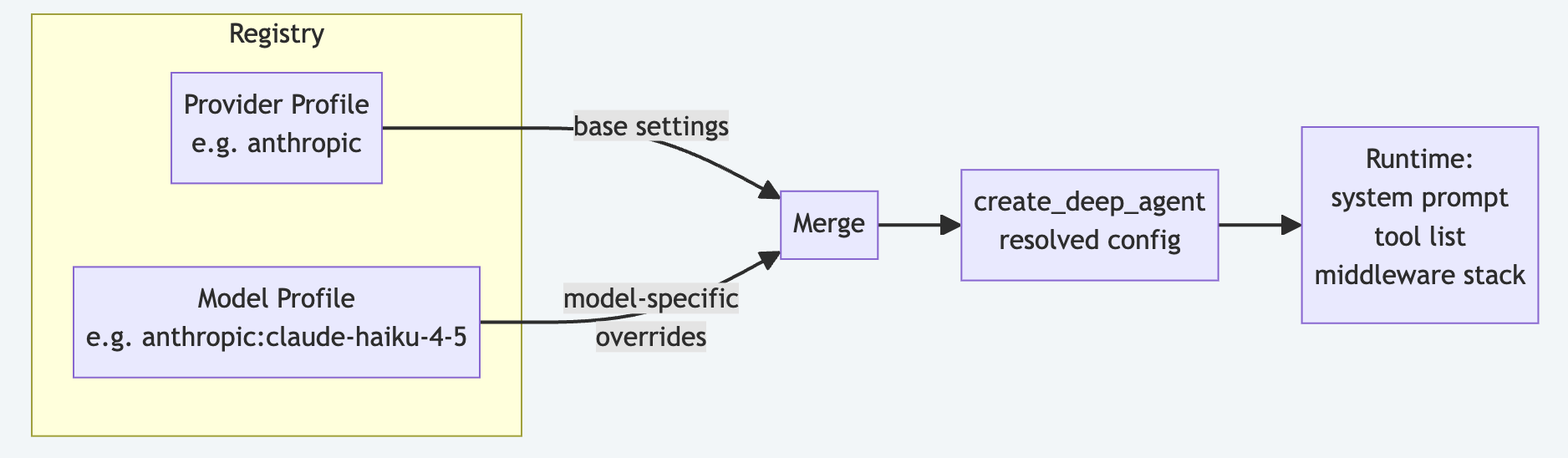
from deepagents.profiles import HarnessProfile, register_harness_profile

register_harness_profile(
    "anthropic:claude-haiku-4-5",
    HarnessProfile(
        system_prompt_suffix="Be concise. Prefer short answers.",
        excluded_middleware={SummarizationMiddleware},  # Haiku has small context, skip
        extra_middleware=[ToolBudgetMiddleware(budget=3)],
    ),
)

# Now any agent using claude-haiku-4-5 automatically gets this profile applied
agent = create_deep_agent(model="anthropic:claude-haiku-4-5")
You can also load from a YAML file for a config file-driven deployment:
# haiku-profile.yaml
system_prompt_suffix: "Be concise. Prefer short answers."
excluded_middleware:
- SummarizationMiddlewareimport yaml
from deepagents.profiles import HarnessProfileConfig, register_harness_profile
with open("haiku-profile.yaml") as f:
register_harness_profile(
"anthropic:claude-haiku-4-5",
HarnessProfileConfig.from_dict(yaml.safe_load(f)),
)Pydantic AI: Capabilities as the Closest Parallel
Installation:
pip install pydantic-ai
# Docs: https://ai.pydantic.dev
Pydantic AI's AbstractCapability is the closest architectural equivalent to LangChain's deepagents middleware. Subclass it from pydantic_ai.capabilities and override any of these lifecycle hooks:
from pydantic_ai.capabilities import AbstractCapability

class MyCapability(AbstractCapability):
    # Run-level hooks
    async def before_run(self, ctx, ...): ...          # Before run starts
    async def after_run(self, ctx, *, result): ...     # Observe/modify result
    async def wrap_run(self, ctx, *, handler): ...     # Full wrap — intercept + resume
    async def on_run_error(self, ctx, *, error): ...   # Handle run-level errors
    # Graph-node hooks
    async def before_node_run(self, ctx, *, node): ... # Before each graph node
    async def wrap_node_run(self, ctx, *, node, handler): ...
    async def on_node_run_error(self, ctx, *, node, error): ...
    # Model-request hooks — intercept the raw LLM call
    async def before_model_request(self, ctx, request_context): ...  # Modify messages/tools
    async def wrap_model_request(self, ctx, *, request_context, handler): ...
    async def after_model_request(self, ctx, *, request_context, response): ...
    async def on_model_request_error(self, ctx, *, request_context, error): ...
Note on granularity: Pydantic AI's before_model_request hook receives a ModelRequestContext containing messages, model_settings, and model_request_parameters (which includes the tool list). You can return a modified ModelRequestContext to rewrite what gets sent to the model, which is similar to deepagents' wrap_model_call. The key remaining difference is state persistence: these hooks operate within a single run's context, not across agent turns via a shared graph state.
A practical example — wrapping a run to add timing and error context:
from pydantic_ai import Agent
from pydantic_ai.capabilities import AbstractCapability
import time

class TimingCapability(AbstractCapability):
    async def wrap_run(self, ctx, *, handler):
        start = time.monotonic()
        try:
            result = await handler()
            elapsed = time.monotonic() - start
            print(f"Run completed in {elapsed:.2f}s")
            return result
        except Exception as e:
            elapsed = time.monotonic() - start
            print(f"Run failed after {elapsed:.2f}s: {e}")
            raise

agent = Agent(
    "anthropic:claude-sonnet-4-6",
    capabilities=[TimingCapability()],
)
For injecting dynamic content into system prompts, you can use before_model_request to return a modified ModelRequestContext with updated instruction_parts, or use the instructions field and callable system_prompt at agent construction time.
Pydantic AI vs. Deep Agents Middleware: The Key Differences
| Dimension | deepagents | Pydantic AI |
|---|---|---|
| Hook class | AgentMiddleware |
AbstractCapability |
| Hook granularity | Per LLM request, tool call, node, run | Per LLM request, node, and run |
| System prompt injection | via ModelRequest in wrap_model_call |
via ModelRequestContext in before_model_request |
| Error hooks | No dedicated hook | on_run_error, on_node_run_error, on_model_request_error |
| State persistence across turns | AgentState dict shared with LangGraph |
Per-run context only |
| Tool list access & filtering | ModelRequest.tools in wrap_model_call |
via ModelRequestContext.model_request_parameters |
| Cross-framework portability | deepagents / LangGraph only | Pydantic AI only |
| Config-driven (no code) | Yes - HarnessProfile + YAML |
No |
| Built-ins included | 7 production middleware | None - user-defined |
The biggest practical difference is that Deep Agent's middleware has access to AgentState (the full LangGraph graph state across turns) through after_modelwhich means middleware can read message history, inject summary nodes, and write back to the state. Pydantic AI capabilities are scoped to a single run's context. This means that there is no shared graph state across agent turns.
What Other Frameworks Do Instead
LangChain Callbacks (v0.1 Style)
from langchain_core.callbacks.base import BaseCallbackHandler

class MyCallback(BaseCallbackHandler):
    def on_llm_start(self, serialized, prompts, **kwargs): ...
    def on_llm_end(self, response, **kwargs): ...
You cannot modify or cancel the request, and it is not composable in any way. This is useful for logging, but not useful in request transformation.
CrewAI Step Callbacks
from crewai import Crew

def my_step_callback(output):
    print(f"Step completed: {output}")

crew = Crew(agents=[...], tasks=[...], step_callback=my_step_callback)
step Callbacks are called after each task step completes. This has no access to the request, and you cannot modify the list of tools or even the system prompt. This has similar limitations to LangChain callbacks.
AutoGen v0.4 Message Middleware
AutoGen's message-passing model means you can inject agents into the conversation (e.g., a logging proxy agent), but there's no formal pre or post-hook around model calls. The closest equivalent is a UserProxy agent that intercepts messages, but it's a peer agent and not a transparent middleware layer.
What the Middleware Gap Can Actually Cost You
- Token budget. When a particular conversation is approaching the model limit, you would want to summarize old tool outputs before the model call and not after. A callback fires too late to help, and you might run out of tokens or overshoot your token usage.
- Per user tool filtering. In any given organization, there are different roles for different users and different access permissions. Without middleware, it's hard to filter out tools that certain users cannot run. Consider a scenario where you don't have middleware to filter, and you just call the LLM, which in turn calls the tools, only to find out that the tool call failed because of access permissions. That's wasted resources and tokens, and unnecessary LLM calls, which could be easily avoided.
- Prompt caching across providers. Anthropic's prompt caching requires
cache_controlin the request.AnthropicPromptCachingMiddlewarerewrites the message and tool definitions of every model call to apply cache breakpoints in the right places. Without middleware, this would have required changes to every call site.
Conclusion
The middleware gap is why some production agents are trivially simple in Deep Agents and PydanticAI, but not possible in other frameworks. Summarizing message history before the model call, filtering tools based on roles, and injecting cache-control blocks in the right position are all possible with middleware, not with a callback that fires after it completes.
For teams choosing a framework today: if you need to transform what the model sees on every call rather than just observe it, the choice narrows to Deep Agents or Pydantic AI. If you want that transformation to reference or rewrite history spanning multiple turns, deepagents with LangGraph is the only framework that supports this today. Middleware is not the most visible feature of an agent framework, but it is a primitive that sets the ceiling for everything else.
Opinions expressed by DZone contributors are their own.
Comments