

Mule 4: Database Connector Bulk Insert
In this article, let's take a look at how to implement the bulk insert operation in the Mule 4 Database Connector.
Join the DZone community and get the full member experience.
Join For FreeIn this article, I will explain how to implement the bulk insert operation in the Mule 4 Database Connector. For instance, we have a CSV Input File that contains a list of people. Our interface will read that input file and insert the person data to a PostgreSQL Database Table using Bulk Insert.
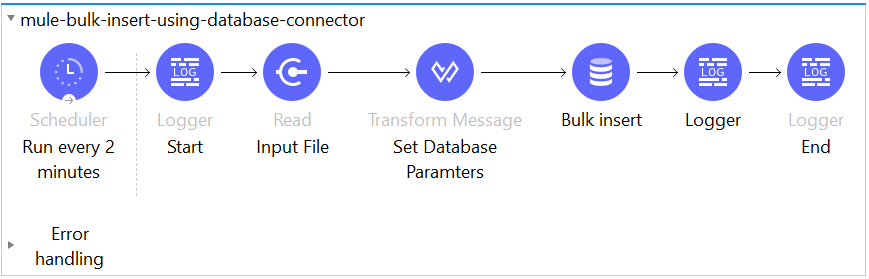
Scheduler Component: Using a Fixed Frequency that set to every 2 minutes scheduled run.
<scheduler doc:name="Run every 2 minutes" doc:id="56f2254d-4884-48aa-affa-970447a41e11" >
<scheduling-strategy >
<fixed-frequency frequency="2" timeUnit="MINUTES"/>
</scheduling-strategy>
</scheduler>
File Connector Read Component: File Connector that reads the input file from local path /appdata/temp/input/persons.csv
<!-- FILE CONNECTOR CONFIGURATION -->
<file:config name="File_Config" doc:name="File Config"
             doc:id="e5b743a3-0f24-4f3c-b6a0-bf868f434393" />
<!-- FILE CONNECTOR -->
<file:read doc:name="Input File" doc:id="6ccc1f6f-b181-49c0-a4a2-becf0e821e50"
           config-ref="File_Config" path="/appdata/temp/input/persons.csv"
           outputMimeType="application/csv" outputEncoding="UTF-8">
<ee:repeatable-file-store-stream />
</file:read>
Transform Message(Dataweave 2.0): This component will transform the CSV Data into a JSON format. The field name in the Dataweave will be the parameter name in our Database Connector Insert Query.
<ee:transform doc:name="Set Database Paramters"
              doc:id="20a8c2bc-fa13-40b5-a442-cd14595817b1" >
<ee:message >
<ee:set-payload ><![CDATA[%dw 2.0
                        output application/json
                        ---
                        payload map {
                            firstnameParam: $."FIRST NAME",
                            lastnameParam: $."LAST NAME",
                            middlenameParam: $."MIDDLE NAME",
                            emailParam: $."EMAIL",
                            homeAddressParam: $."HOME ADDRESS"
                        }]]>
              </ee:set-payload>
</ee:message>
</ee:transform>
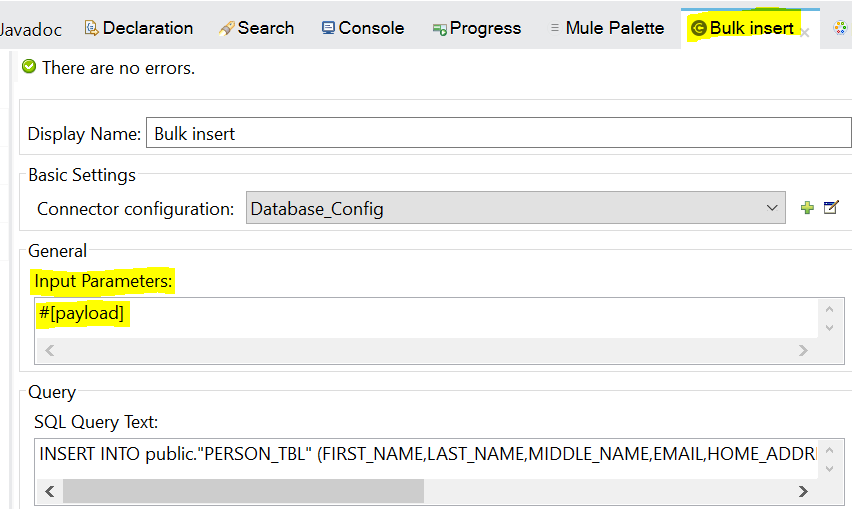
Database Connector (Bulk Insert): This Database Connector will execute the Bulk Insert Operation with the paramaters from the payload(application/json). Note that the General > Input Paramters only accept JSON formatted parameters that why we used Transform Message with MIME Type application/json.
I'm using Generic Connection so that I will able to provide the database connection details of my PostgreSQL Database via URL.
jdbc:postgresql://<<DATABASE SERVER IP ADDRESS>>:<<port>>/<<DATABASE_NAME>>?user=<<USERNAME>>&password=<<PASSWORD>>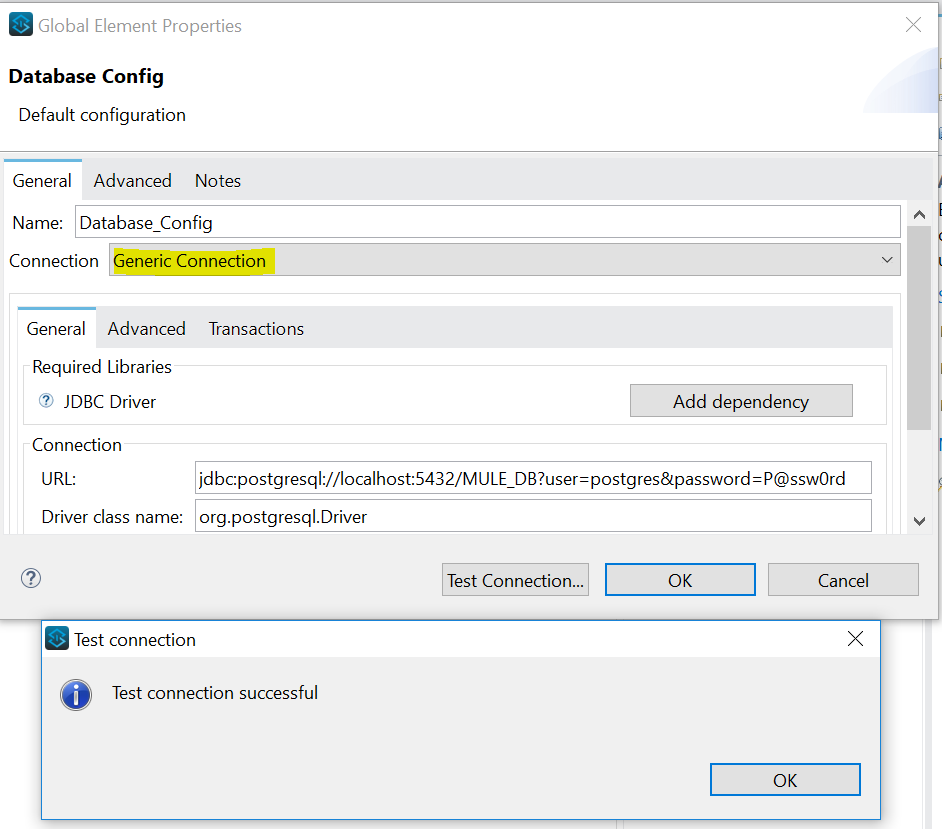
<!-- Database Connector Configuration -->
<db:config name="Database_Config" doc:name="Database Config"
doc:id="14575509-7e82-44ce-a84f-c0f2d1f62989" >
<db:generic-connection
url="jdbc:postgresql://localhost:5432/MULE_DB?user=postgres&password=P@ssw0rd"
driverClassName="org.postgresql.Driver" />
</db:config>
<!-- Database Connector -->
<db:bulk-insert doc:name="Bulk insert" doc:id="ecc385c1-6695-4e90-8128-564b0ebca688"
config-ref="Database_Config">
<db:sql >INSERT INTO public."PERSON_TBL"
(FIRST_NAME,LAST_NAME,MIDDLE_NAME,EMAIL,HOME_ADDRESS)
VALUES
(:firstnameParam,
:lastnameParam,
:middlenameParam,
:emailParam,
:homeAddressParam)
</db:sql>
</db:bulk-insert>Complete Code:
<?xml version="1.0" encoding="UTF-8"?>
<mule xmlns:ee="http://www.mulesoft.org/schema/mule/ee/core" xmlns:file="http://www.mulesoft.org/schema/mule/file"
xmlns:db="http://www.mulesoft.org/schema/mule/db"
xmlns="http://www.mulesoft.org/schema/mule/core" xmlns:doc="http://www.mulesoft.org/schema/mule/documentation" xmlns:xsi="http://www.w3.org/2001/XMLSchema-instance" xsi:schemaLocation="http://www.mulesoft.org/schema/mule/core http://www.mulesoft.org/schema/mule/core/current/mule.xsd
http://www.mulesoft.org/schema/mule/db http://www.mulesoft.org/schema/mule/db/current/mule-db.xsd
http://www.mulesoft.org/schema/mule/file http://www.mulesoft.org/schema/mule/file/current/mule-file.xsd
http://www.mulesoft.org/schema/mule/ee/core http://www.mulesoft.org/schema/mule/ee/core/current/mule-ee.xsd">
<db:config name="Database_Config" doc:name="Database Config" doc:id="14575509-7e82-44ce-a84f-c0f2d1f62989" >
<db:generic-connection url="jdbc:postgresql://localhost:5432/MULE_DB?user=postgres&password=P@ssw0rd" driverClassName="org.postgresql.Driver" />
</db:config>
<file:config name="File_Config" doc:name="File Config" doc:id="e5b743a3-0f24-4f3c-b6a0-bf868f434393" />
<flow name="mule-bulk-insert-using-database-connector" doc:id="0fccd446-d67e-400e-84be-14bb41cfe43d" >
<scheduler doc:name="Run every 2 minutes" doc:id="56f2254d-4884-48aa-affa-970447a41e11" >
<scheduling-strategy >
<fixed-frequency frequency="2" timeUnit="MINUTES"/>
</scheduling-strategy>
</scheduler>
<logger level="INFO" doc:name="Start" doc:id="6d10e0ae-cb9a-4852-8f87-d8d567d6b1b7" message="#[correlationId] - Start Of The Process"/>
<file:read doc:name="Input File" doc:id="6ccc1f6f-b181-49c0-a4a2-becf0e821e50" config-ref="File_Config" path="/appdata/temp/input/persons.csv" outputMimeType="application/csv" outputEncoding="UTF-8">
<ee:repeatable-file-store-stream />
</file:read>
<ee:transform doc:name="Set Database Paramters" doc:id="20a8c2bc-fa13-40b5-a442-cd14595817b1" >
<ee:message >
<ee:set-payload ><![CDATA[%dw 2.0
output application/json
---
payload map {
firstnameParam: $."FIRST NAME",
lastnameParam: $."LAST NAME",
middlenameParam: $."MIDDLE NAME",
emailParam: $."EMAIL",
homeAddressParam: $."HOME ADDRESS"
}]]></ee:set-payload>
</ee:message>
</ee:transform>
<db:bulk-insert doc:name="Bulk insert" doc:id="ecc385c1-6695-4e90-8128-564b0ebca688" config-ref="Database_Config">
<db:sql >INSERT INTO public."PERSON_TBL" (FIRST_NAME,LAST_NAME,MIDDLE_NAME,EMAIL,HOME_ADDRESS) VALUES (:firstnameParam,:lastnameParam,:middlenameParam,:emailParam,:homeAddressParam)</db:sql>
</db:bulk-insert>
<logger level="INFO" doc:name="Logger" doc:id="1bf42bc8-fe1d-4b4d-b923-422ac30b11a0" message='#["\nTotal Records Inserted: " ++ sizeOf(payload) ++ "\nDatabase Connector Returned Payload:\n "] #[payload]'/>
<logger level="INFO" doc:name="End" doc:id="ad9186a9-c023-4179-b630-790684cebeba" message="#[correlationId] - End Of The Process"/>
</flow>
</mule>TEST RESULT:
Input File contains 50 records.
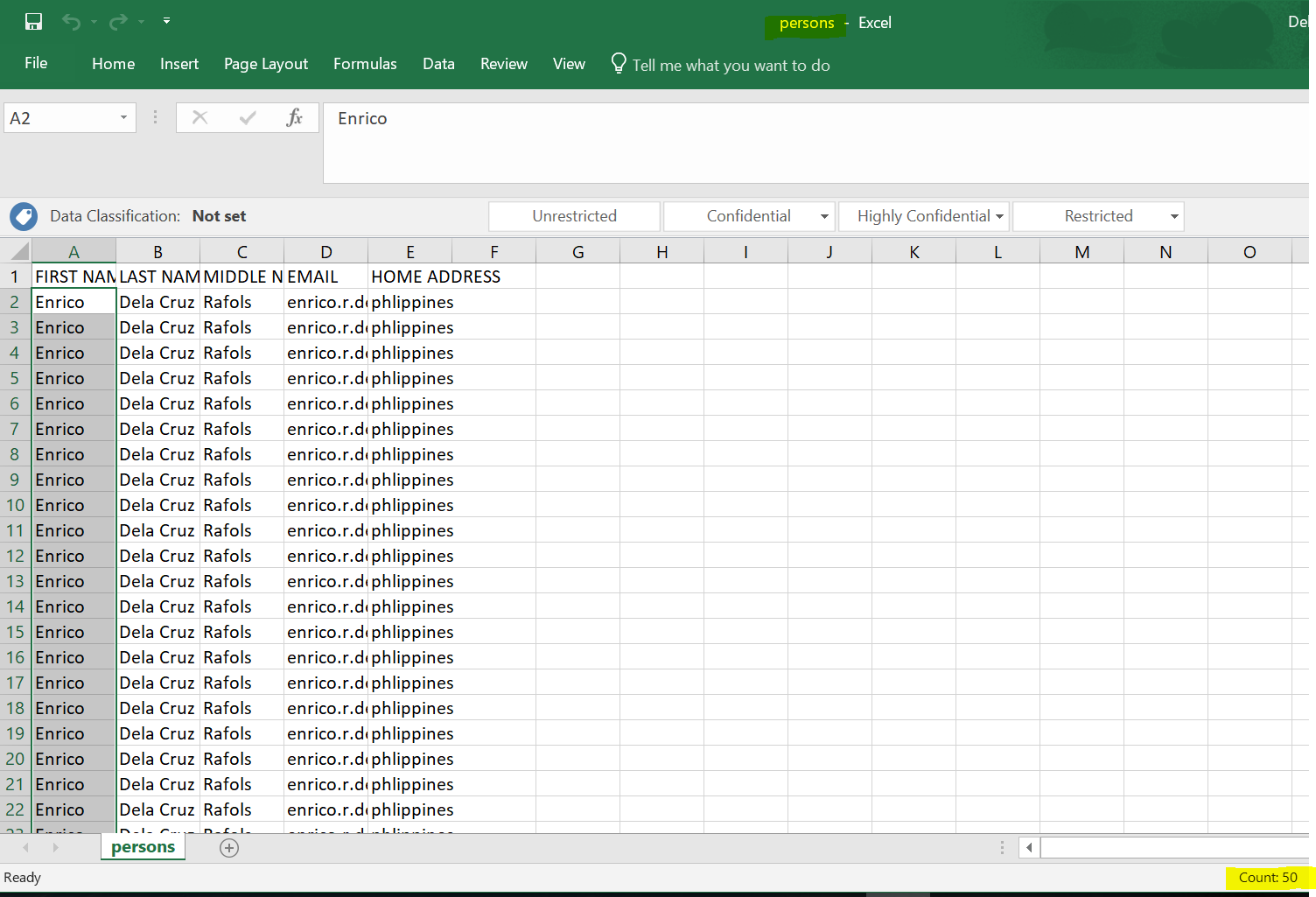
Source Path: /appdata/temp/input/

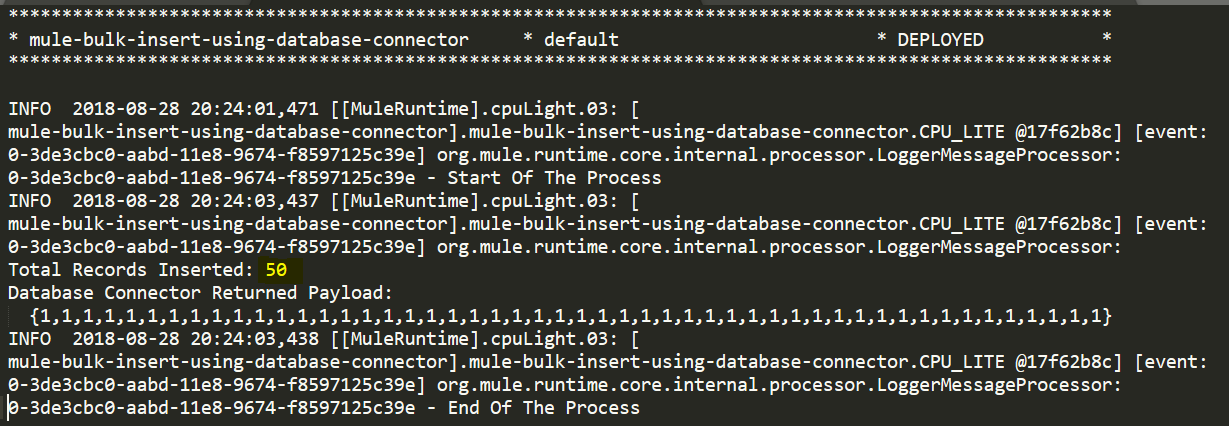
The Mule Application executed showing the total number of records inserted to the PostgreSQL Database. I also logged the returned payload of the Database Connector and it shows an array of numbers, which is 1 (one), which means success, and 0 (zero), which is a fail for a particular record (based on the index) from the payload.
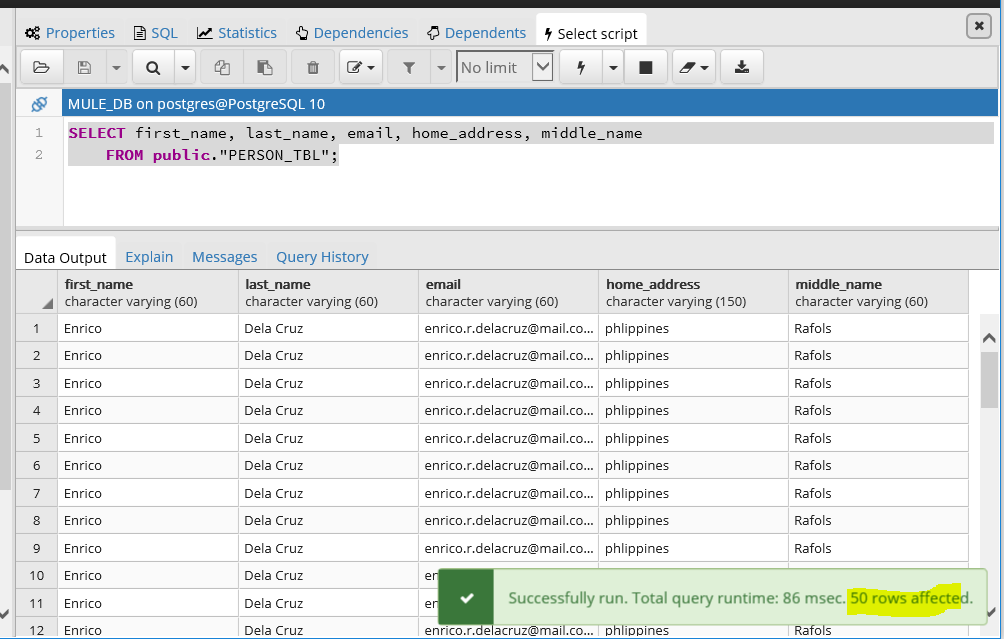
Database Table PERSON_TBL is now having 50 records.
Opinions expressed by DZone contributors are their own.
Comments