

Mule ESB 3.9: Validate Files in Local Directory Using Groovy Component (Google Guava)
This article will explain how to validate files on the source local directory using Groovy Component and Google Guava.
Join the DZone community and get the full member experience.
Join For FreeThis article will explain how to validate files on the source local directory using Groovy Component and Google Guava. This is applicable if you have a requirement that your Mule ESB Interface should only run if required files are there or exist on the source local directory. For instance, Our Mule ESB Interface needs 2 files to process. For example, We have PERSON_DATA_2018.txt and SALARY_DATA_2018.txt. If both files are existing on the source local directory, then the interface will do further processing otherwise stop the process and log a message indicating required file does not exist.
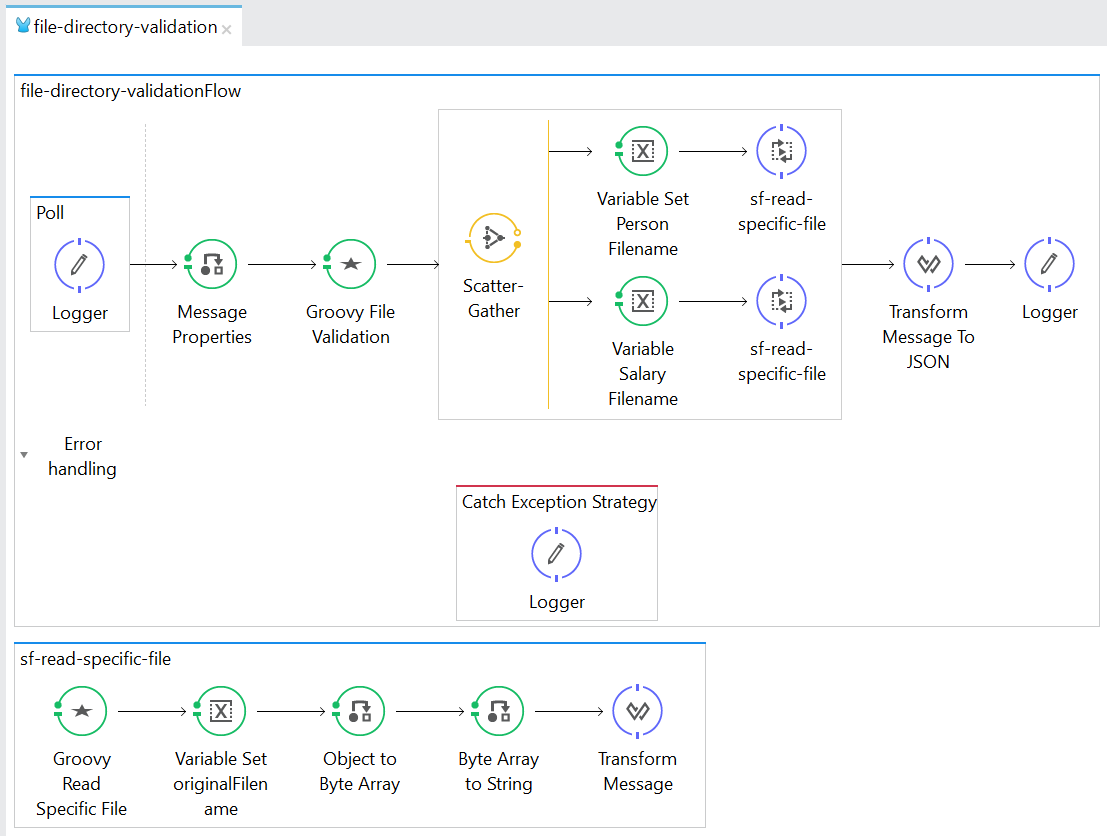
file-directory-validationFlow — Main execution flow that runs every 5 seconds. It simply validates the source path and if the 2 required files exist, it will read those files and log their content.
sf-read-specific-file — A sub-flow that is used to read a specific file on the source path by defining a #[flowVars.targetFilename]
<?xml version="1.0" encoding="UTF-8"?>

<mule xmlns:dw="http://www.mulesoft.org/schema/mule/ee/dw" xmlns:file="http://www.mulesoft.org/schema/mule/file"
xmlns:scripting="http://www.mulesoft.org/schema/mule/scripting" xmlns="http://www.mulesoft.org/schema/mule/core" xmlns:doc="http://www.mulesoft.org/schema/mule/documentation"
xmlns:spring="http://www.springframework.org/schema/beans"
xmlns:xsi="http://www.w3.org/2001/XMLSchema-instance"
xsi:schemaLocation="http://www.mulesoft.org/schema/mule/file http://www.mulesoft.org/schema/mule/file/current/mule-file.xsd
http://www.springframework.org/schema/beans http://www.springframework.org/schema/beans/spring-beans-current.xsd
http://www.mulesoft.org/schema/mule/core http://www.mulesoft.org/schema/mule/core/current/mule.xsd
http://www.mulesoft.org/schema/mule/scripting http://www.mulesoft.org/schema/mule/scripting/current/mule-scripting.xsd
http://www.mulesoft.org/schema/mule/ee/dw http://www.mulesoft.org/schema/mule/ee/dw/current/dw.xsd">
    <file:connector name="FILE_INBOUND_CONNECTOR_CONFIG" autoDelete="false" streaming="true" validateConnections="true"   doc:name="File" fileAge="30000"/>
    <flow name="file-directory-validationFlow">
        <poll doc:name="Poll">
            <fixed-frequency-scheduler frequency="5000"/>
            <logger message="#[message.rootId] - Start Of Process" level="INFO" doc:name="Logger"/>
        </poll>
        <message-properties-transformer scope="invocation" doc:name="Message Properties">
            <add-message-property key="targetPath" value="/appdata/temp/input/"/>
            <add-message-property key="personFilename" value="PERSON_DATA_"/>
            <add-message-property key="salaryFilename" value="SALARY_DATA_"/>
        </message-properties-transformer>
        <scripting:transformer doc:name="Groovy File Validation">
            <scripting:script engine="Groovy"><![CDATA[
String path = flowVars.targetPath;
def isPersonFileExist = false;
def isSalaryFileExist = false;

for(java.io.File file:com.google.common.io.Files.fileTreeTraverser().children(new java.io.File(path))) {
if (file.isFile()) {
log.info("File existing in "+path+": "+file.getName());
if (file.getName().contains(flowVars.personFilename)) {
isPersonFileExist = true;
}
if (file.getName().contains(flowVars.salaryFilename)){
isSalaryFileExist = true;
}
}
}

if (!isPersonFileExist) {
throw new mule.business.exception.BusinessException("PERSON DATA File does not exist.");
}
if (!isSalaryFileExist) {
throw new mule.business.exception.BusinessException("SALARY DATA File does not exist.");
}]]></scripting:script>
        </scripting:transformer>
        <scatter-gather doc:name="Scatter-Gather">
            <processor-chain>
                <set-variable variableName="targetFilename" value="#[flowVars.personFilename]" doc:name="Variable Set Person Filename"/>
                <flow-ref name="sf-read-specific-file" doc:name="sf-read-specific-file"/>
            </processor-chain>
            <processor-chain>
                <set-variable variableName="targetFilename" value="#[flowVars.salaryFilename]" doc:name="Variable Salary Filename"/>
                <flow-ref name="sf-read-specific-file" doc:name="sf-read-specific-file"/>
            </processor-chain>
        </scatter-gather>
        <dw:transform-message doc:name="Transform Message To JSON">
            <dw:set-payload><![CDATA[%dw 1.0
%output application/json
---
payload]]></dw:set-payload>
        </dw:transform-message>
        <logger message="#['\nRESULT: \n'+payload]" level="INFO" doc:name="Logger"/>

        <catch-exception-strategy   doc:name="Catch Exception Strategy" enableNotifications="false" logException="false">
            <logger message="#[exception.message]" level="INFO" doc:name="Logger"/>
        </catch-exception-strategy>
    </flow>
    <sub-flow name="sf-read-specific-file">
        <scripting:transformer doc:name="Groovy Read Specific File">
            <scripting:script engine="Groovy"><![CDATA[def filenameWildcard = flowVars.targetFilename + "*"
def endpointBuilder = muleContext.endpointFactory.getEndpointBuilder('file://'+flowVars.targetPath+'?connector=FILE_INBOUND_CONNECTOR_CONFIG')
endpointBuilder.addMessageProcessor(new org.mule.routing.MessageFilter(new org.mule.transport.file.filters.FilenameWildcardFilter(filenameWildcard)))
def inboundEndpoint = endpointBuilder.buildInboundEndpoint()
inboundEndpoint.request(60000)


                          ]]></scripting:script>
        </scripting:transformer>
        <set-variable variableName="originalFilename" value="#[message.inboundProperties.originalFilename]" doc:name="Variable Set originalFilename"/>
        <object-to-byte-array-transformer doc:name="Object to Byte Array"/>
        <byte-array-to-string-transformer doc:name="Byte Array to String"/>
        <dw:transform-message doc:name="Transform Message">
            <dw:input-payload mimeType="application/java"/>
            <dw:set-payload><![CDATA[%dw 1.0
%output application/java
---
{
filename: flowVars.originalFilename,
content: payload
}]]></dw:set-payload>
        </dw:transform-message>
    </sub-flow>
</mule>
file-directory-validationFlow
POLL: Triggered the file-directory-validationFlow every 5 seconds
<poll doc:name="Poll">
   <fixed-frequency-scheduler frequency="5000"/>
   <logger message="#[message.rootId] - Start Of Process" level="INFO" doc:name="Logger"/>
</poll>
MESSAGE PROPERTIES: Define the needed variables such as the SOURCE PATH and FILENAME. The value can be externalized using Property Placeholder.
<message-properties-transformer scope="invocation" doc:name="Message Properties">
  <add-message-property key="targetPath" value="/appdata/temp/input/"/>
  <add-message-property key="personFilename" value="PERSON_DATA_"/>
  <add-message-property key="salaryFilename" value="SALARY_DATA_"/>
</message-properties-transformer>
GROOVY SCRIPT (Groovy File Validation): The code inside this component is actually using Google Guava Library > com.google.common.io.Files to take care of reading the files from the source path. It will iterate each file objects and check their file names if it contains a string value PERSON_DATA_ or SALARY_DATA_ it will not throw Business Exception and continue the whole process.
<scripting:transformer doc:name="Groovy File Validation">
   <scripting:script engine="Groovy"><![CDATA[
String path = flowVars.targetPath;
def isPersonFileExist = false;
def isSalaryFileExist = false;
for(java.io.File file:com.google.common.io.Files.fileTreeTraverser().children(new java.io.File(path))) {
if (file.isFile()) {
log.info("File existing in "+path+": "+file.getName());
if (file.getName().contains(flowVars.personFilename)) {
isPersonFileExist = true;
}
if (file.getName().contains(flowVars.salaryFilename)){
isSalaryFileExist = true;
}
}
}
if (!isPersonFileExist) {
throw new mule.business.exception.BusinessException("PERSON DATA File does not exist.");
}
if (!isSalaryFileExist) {
throw new mule.business.exception.BusinessException("SALARY DATA File does not exist.");
}]]></scripting:script>
</scripting:transformer>
SCATTER-GATHER: This will read the both PERSON_DATA and SALARY_DATA file in parallel. It using the sub-flow sf-read-specific-file that reads a specific file from the source path. The payload after the scatter-gather will be an Object Array Data Type having 2 elements 1 from the first processor-chain and the other 1 from the second processor-chain.
<scatter-gather doc:name="Scatter-Gather">
  <processor-chain>
     <set-variable variableName="targetFilename" value="#[flowVars.personFilename]" doc:name="Variable Set Person Filename"/>
     <flow-ref name="sf-read-specific-file" doc:name="sf-read-specific-file"/>
  </processor-chain>
  <processor-chain>
     <set-variable variableName="targetFilename" value="#[flowVars.salaryFilename]" doc:name="Variable Salary Filename"/>
     <flow-ref name="sf-read-specific-file" doc:name="sf-read-specific-file"/>
  </processor-chain>
</scatter-gather>
SUB-FLOW (sf-read-specific-file): This contains a Groovy Script that reads a file from the source path. It will convert the content from stream to a string presentation and use Dataweave to format the returned payload as a Map Object that contains FILENAME and CONTENT.
<sub-flow name="sf-read-specific-file">
    <scripting:transformer doc:name="Groovy Read Specific File">
       <scripting:script engine="Groovy"><![CDATA[
def filenameWildcard = flowVars.targetFilename + "*"
def endpointBuilder = muleContext.endpointFactory.getEndpointBuilder('file://'+flowVars.targetPath+'?connector=FILE_INBOUND_CONNECTOR_CONFIG')
endpointBuilder.addMessageProcessor(new org.mule.routing.MessageFilter(new org.mule.transport.file.filters.FilenameWildcardFilter(filenameWildcard)))
def inboundEndpoint = endpointBuilder.buildInboundEndpoint()
inboundEndpoint.request(60000)
]]></scripting:script>
        </scripting:transformer>
        <set-variable variableName="originalFilename" value="#[message.inboundProperties.originalFilename]" doc:name="Variable Set originalFilename"/>
        <object-to-byte-array-transformer doc:name="Object to Byte Array"/>
        <byte-array-to-string-transformer doc:name="Byte Array to String"/>
        <dw:transform-message doc:name="Transform Message">
            <dw:input-payload mimeType="application/java"/>
            <dw:set-payload><![CDATA[%dw 1.0
%output application/java
---
{
filename: flowVars.originalFilename,
content: payload
}]]></dw:set-payload>
        </dw:transform-message>
</sub-flow>
TRANSFORM-MESSAGE (Transform Message To JSON): This will convert the payload after scatter-gather to a JSON Data Format.
<dw:transform-message doc:name="Transform Message To JSON">
<dw:set-payload><![CDATA[%dw 1.0
  %output application/json
  ---
  payload]]>
</dw:set-payload>
</dw:transform-message>
TEST RESULT:
File content:

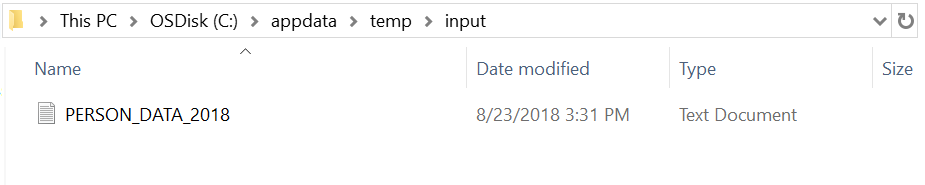
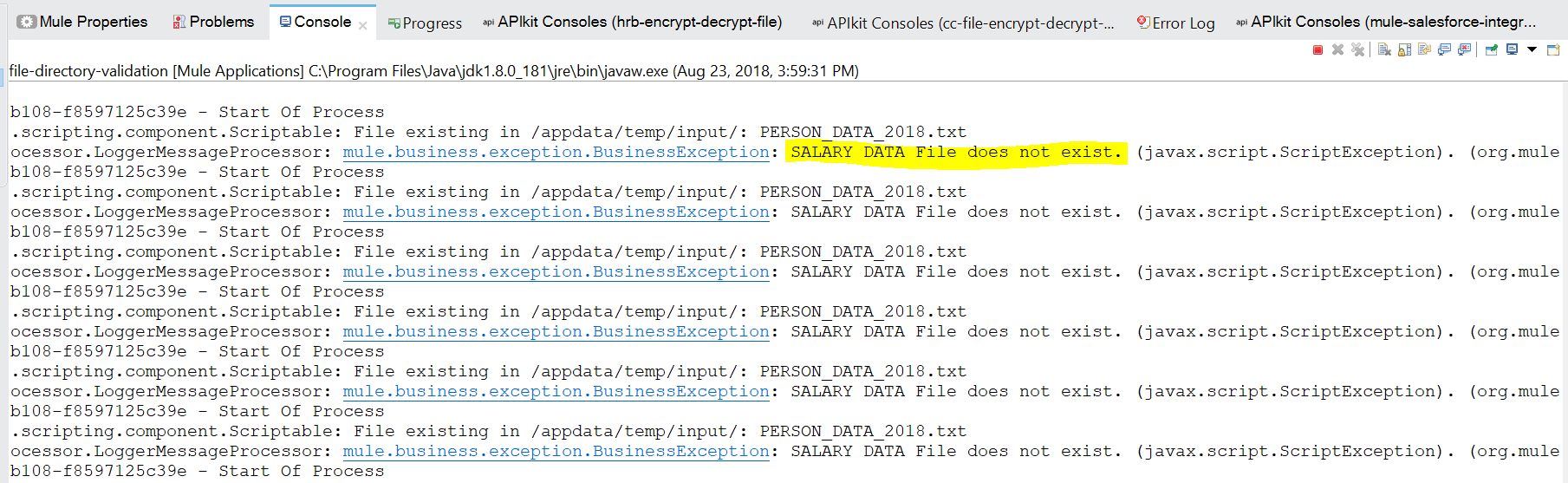
Only PERSON_DATA file exists in /appdata/temp/input/ resulted to a log message SALARY DATA File does not exists then the whole process stops.
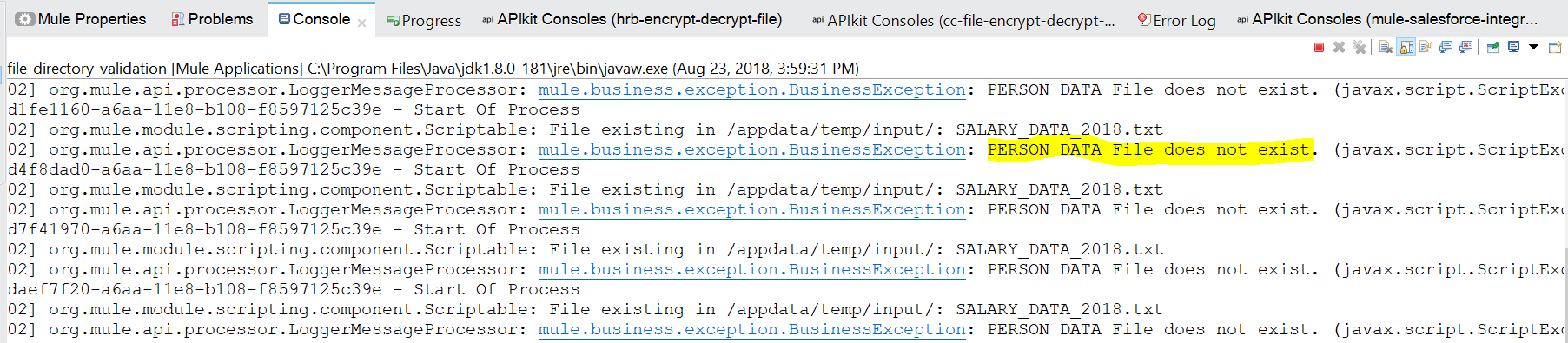
Only SALARY_DATA file exists in /appdata/temp/input/ resulted to a log message PERSON DATA File does not exists then the whole process stops.

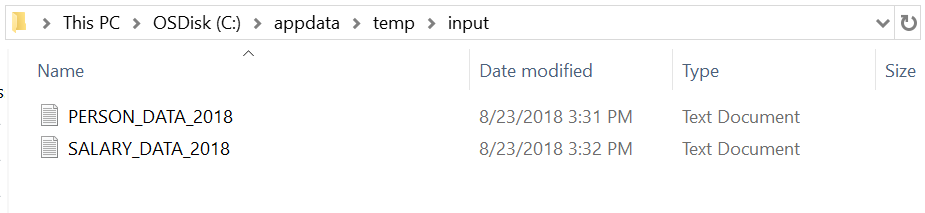
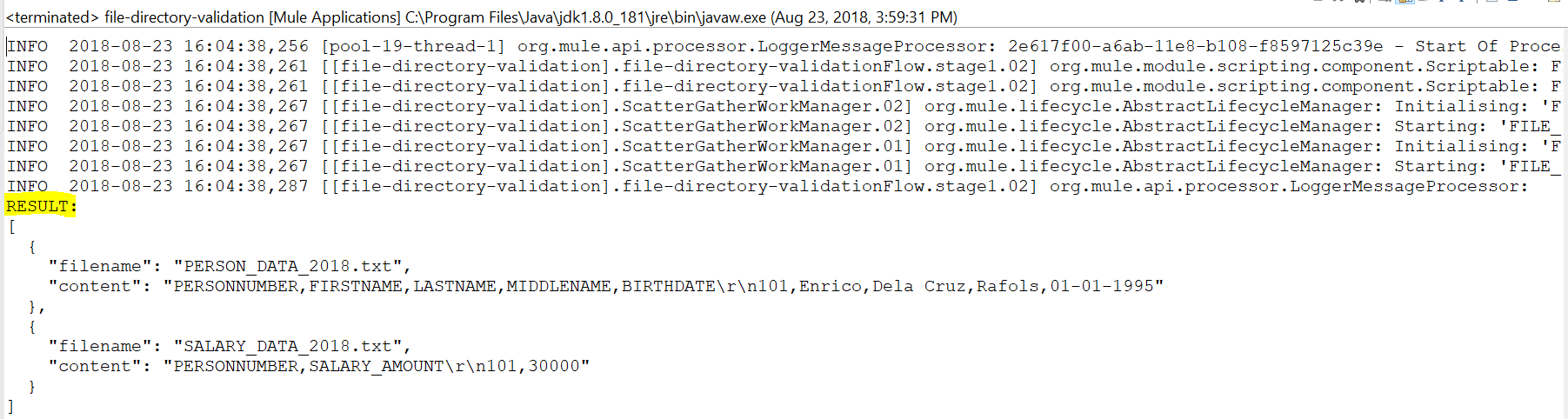
Both PERSON_DATA and SALARY_DATA files exist in /appdata/temp/input/ resulted in a complete process and a log of a JSON data containing the name of the files and their content.
Opinions expressed by DZone contributors are their own.
Comments