

Mule Server, Server Group and Cluster
Read this article to learn core concepts of Mule servers, server group, and cluster of Mule runtime engine instances (servers).
Join the DZone community and get the full member experience.
Join For FreeWhen setting up an on-premise Mule runtime environment, people are often confused and unaware of the core concepts of Mule server and server group. This can lead to turning out the wrong setup or not getting optimum output from the application.
Let me take this opportunity to help you to brush up on your concepts and clear your all doubts.
Server, Server Group and Cluster
The diagram below shows how these servers have configured and communicate with other components of the Mule suite:
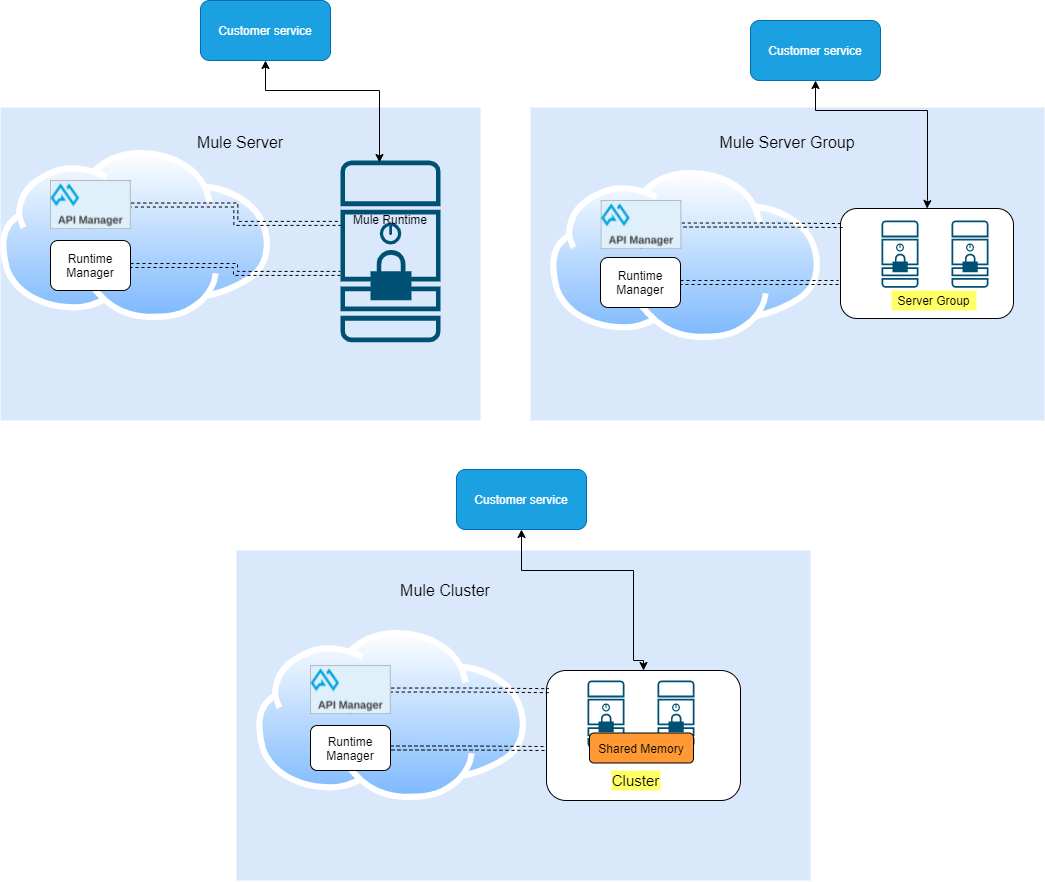
- Server: A server is a set of a single server that acts as a single deployment target for applications. Anypoint Runtime Manager "provides an interface you use to manage your on-premises Mule runtime engine instances (servers). You can manage servers either individually or in server groups or clusters."
- Server Group: A server group "is a set of servers that act as a single deployment target for applications so that you don’t have to deploy applications to each server individually. Deploying applications to servers in server groups provides redundancy so you can restore applications more seamlessly and quickly, with less downtime."
- Cluster: A cluster is a set of up to eight servers that act as a single deployment target and high-availability processing unit. Unlike in server groups, application instances in a cluster are aware of each other, share common information, and synchronize statuses. If one server fails, another server takes over processing applications.
Features of Supports Server, Server Group and Cluster
| Comparison points | Server | Server Group | Cluster |
| Automatic coordination of access to resources, such as files, databases, and FTP sources | þ | þ2 | þ3 |
| Manage servers individually | þ | ý | ý |
| All the servers in the server group must be running on the same version of mule runtime | ý | þ | þ |
| Improve Performance and High Availability | ý | þ | þ |
| Horizontal Scaling can be done easily whenever required | ý | þ | þ |
| instances of the application are isolated from each other | ý | þ | ý |
| Encounter concurrency issues with server groups | ý | þ | ý |
| Nodes are aware of each other, share common information and synchronize status | ý | ý | þ |
| Automatic load balancing of processing within a cluster | ý | ý | þ |
| Clustering helps in improving application performance by dividing the workload between nodes in the cluster | ý | ý | þ |
This is part of a series of related topics. Please stay tuned for my next topic to discuss the configuration of stand-alone Mule runtime instance for onPrem, deployment, and management of the application.
Opinions expressed by DZone contributors are their own.
Comments