

Multi-Cluster Kubernetes Sealed Secrets Management in Jenkins
You will learn to automate Kubernetes sealed secrets management across AKS, GKE, and EKS with a dynamic Jenkins pipeline for secure, parallel processing.
Join the DZone community and get the full member experience.
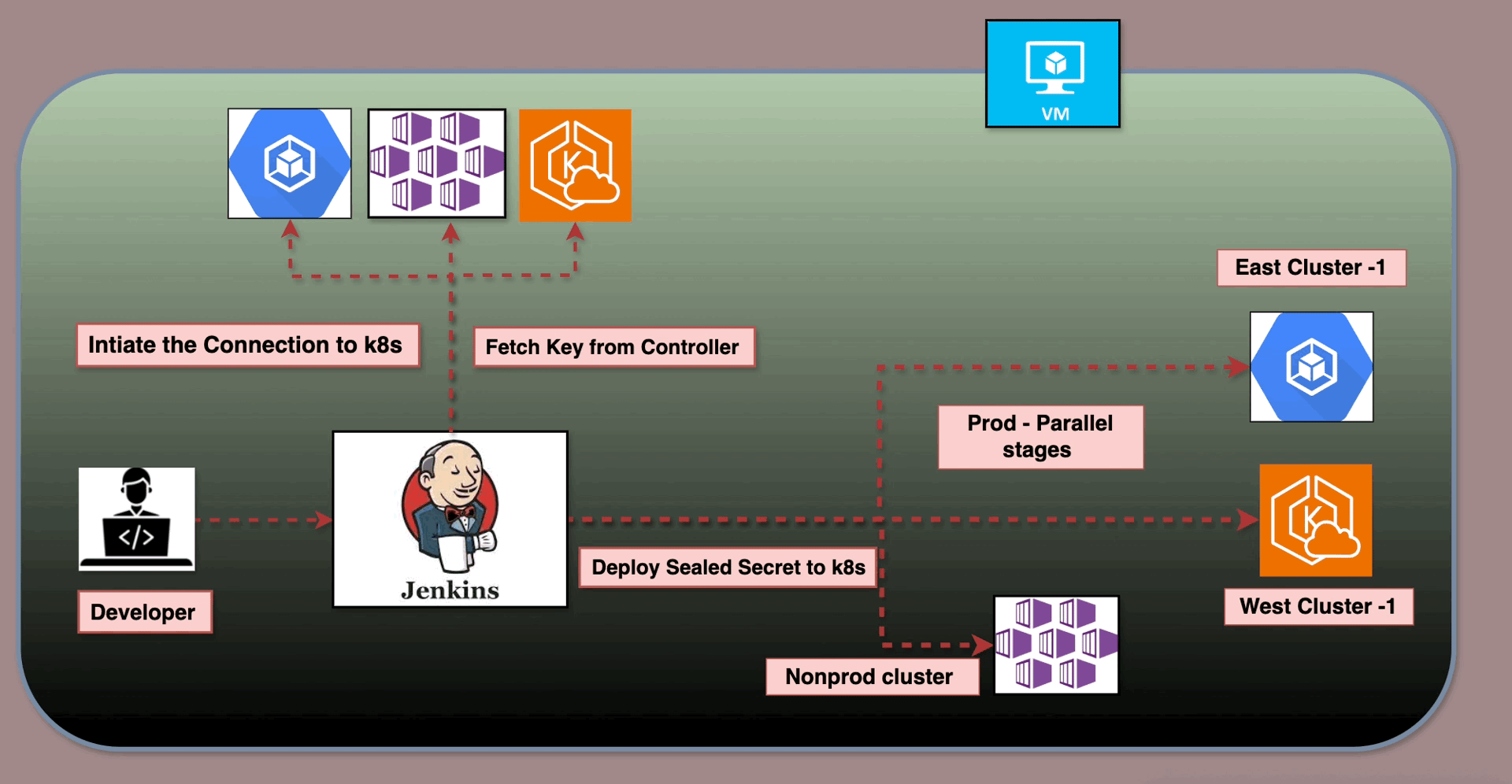
Join For FreeThe Jenkins pipeline below automates the secure management of Kubernetes sealed secrets across multiple environments and clusters, including AKS (Non-Production), GKE (Production Cluster 1), and EKS (Production Cluster 2). It dynamically adapts based on the selected environment, processes secrets in parallel for scalability, and ensures secure storage of credentials and artifacts.
With features like dynamic cluster mapping, parallel execution, and post-build artifact archiving, the pipeline is optimized for efficiency, security, and flexibility in a multi-cloud Kubernetes landscape.
Key Features and Workflow
Dynamic Cluster Selection
- Based on the
ENVIRONMENTparameter, the pipeline dynamically determines the target clusters: - Non-Production: Targets the AKS cluster using the
Stagecredential. - Production: Targets both GKE and EKS clusters with
Production_1andProduction_2credentials respectively.
Parallel Processing
- The Process Clusters stage executes cluster-specific workflows in parallel, significantly reducing runtime for multi-cluster operations. For example:
- In Production, the pipeline simultaneously processes GKE and EKS clusters.
- In Non-Production, only the AKS cluster is processed.
Secure Sealed Secrets Workflow
- Decodes the Base64-encoded
Secrets.yamlfile. - Fetches the public certificate from the Sealed Secrets controller.
- Encrypts the secrets for the respective cluster and namespace.
- Generates
sealed-secrets.yamlartifacts.
Dynamic and Reusable Pipeline
- The cluster list and credentials are dynamically configured, making the pipeline adaptable for additional clusters or environments with minimal changes.
Post-Build Artifact Management
- Artifacts for each cluster, including
sealed-secrets.yamland metadata files (README.txt), are archived and made accessible in Jenkins UI for easy retrieval.
Parallel Execution Logic
The pipeline uses Groovy’s parallel directive to process clusters concurrently:
Cluster Mapping
- The
ENVIRONMENTparameter determines the cluster list: - Non-Production: Includes only the AKS cluster.
- Production: Includes both GKE and EKS clusters.
Parallel Stage Creation
For each cluster:
- A separate parallel stage is defined dynamically with cluster-specific names, credentials, and directories.
- Each stage independently fetches certificates and generates sealed secrets.
Execution
- The
parallelblock runs all stages concurrently, optimizing execution time.
Scenario 1: Non-Production (AKS)
- Selected environment: Non-Production.
- The pipeline:
- Processes the AKS cluster only.
- Generates sealed secrets for AKS.
- Archives artifacts for the AKS environment.
Scenario 2: Production (GKE and EKS)
- Selected environment: Production.
- The pipeline:
- Processes both GKE and EKS clusters simultaneously.
- Generates separate sealed secrets for each cluster.
- Archives artifacts for both GKE and EKS.
Detailed Explanation of the Jenkins Pipeline Script
This Jenkins pipeline script automates the process of managing Kubernetes sealed secrets in a multi-cloud environment consisting of AKS, GKE, and EKS clusters. Below is a detailed step-by-step explanation of how the script functions.
parameters {
    string(name: 'NAMESPACE', defaultValue: 'default', description: 'Kubernetes namespace for the sealed secret')
    choice(
        name: 'ENVIRONMENT',
        choices: ['Non-Production', 'Production'],
        description: 'Select the target environment'
    )
    base64File(name: 'SECRETS_YAML', description: 'Upload Secrets.yaml file to apply to the cluster')
    booleanParam(name: 'STORE_CERT', defaultValue: true, description: 'Store the public certificate for future use')
}NAMESPACE: Specifies the target namespace in Kubernetes where the sealed secrets will be applied.ENVIRONMENT: Determines whether the pipeline operates on Non-Production (AKS) or Production (GKE and EKS).SECRETS_YAML: Accepts the Base64-encoded YAML file containing the sensitive data to be sealed.STORE_CERT: A flag indicating whether the public certificate used for sealing secrets should be archived for future use.
Environment Variables
environment {
    WORK_DIR = '/tmp/jenkins-k8s-apply'
    CONTROLLER_NAMESPACE = 'kube-system'
    CONTROLLER_NAME = 'sealed-secrets'
    CERT_FILE = 'sealed-secrets-cert.pem'
    DOCKER_IMAGE = 'docker-dind-kube-secret'
    ARTIFACTS_DIR = 'sealed-secrets-artifacts'
}WORK_DIR: Temporary workspace for processing files during the pipeline execution.CONTROLLER_NAMESPACEandCONTROLLER_NAME: Define the location and name of the Sealed Secrets controller in the Kubernetes cluster.CERT_FILE: Name of the public certificate file used for sealing secrets.DOCKER_IMAGE: Docker image containing the necessary tools for processing secrets (e.g.,kubeseal).ARTIFACTS_DIR: Directory where artifacts (sealed secrets and metadata) are stored.
Environment Setup
stage('Environment Setup') {
    steps {
        script {
            echo "Selected Environment: ${params.ENVIRONMENT}"

            def clusters = []
            if (params.ENVIRONMENT == 'Production') {
                clusters = [
                    [id: 'prod-cluster-1', name: 'Production Cluster 1', credentialId: 'Production_1'],
                    [id: 'prod-cluster-2', name: 'Production Cluster 2', credentialId: 'Production_2']
                ]
            } else {
                clusters = [
                    [id: 'non-prod-cluster', name: 'Non-Production Cluster', credentialId: 'Stage']
                ]
            }

            env.CLUSTER_IDS = clusters.collect { it.id }.join(',')
            clusters.each { cluster ->
                env["CLUSTER_${cluster.id}_NAME"] = cluster.name
                env["CLUSTER_${cluster.id}_CRED"] = cluster.credentialId
            }

            echo "Number of target clusters: ${clusters.size()}"
            clusters.each { cluster ->
                echo "Cluster: ${cluster.name} (${cluster.id})"
            }
        }
    }
}
Defines the clusters based on the ENVIRONMENT parameter:
- Non-production: Targets only the AKS cluster.
- Production: Targets GKE and EKS clusters.
- Stores cluster information (IDs, names, and credentials) in environment variables for dynamic referencing.
Prepare Workspace
stage('Prepare Workspace') {
    steps {
        script {
            sh """
                mkdir -p ${WORK_DIR}
                mkdir -p ${WORKSPACE}/${ARTIFACTS_DIR}
                rm -f ${WORK_DIR}/* || true
                rm -rf ${WORKSPACE}/${ARTIFACTS_DIR}/* || true
            """
            if (params.ENVIRONMENT == 'Non-Production') {
                sh "rm -rf ${WORKSPACE}/${ARTIFACTS_DIR}/prod-*"
            } else {
                sh "rm -rf ${WORKSPACE}/${ARTIFACTS_DIR}/non-prod-*"
            }

            if (params.SECRETS_YAML) {
                writeFile file: "${WORK_DIR}/secrets.yaml.b64", text: params.SECRETS_YAML
                sh """
                    base64 --decode < ${WORK_DIR}/secrets.yaml.b64 > ${WORK_DIR}/secrets.yaml
                """
            } else {
                error "SECRETS_YAML parameter is not provided"
            }
        }
    }
}- Creates temporary directories for processing secrets and cleaning up old artifacts.
- Decodes the uploaded Base64
Secrets.yamlfile and prepares it for processing.
Process Clusters
stage('Process Clusters') {
    steps {
        script {
            def clusterIds = env.CLUSTER_IDS.split(',')
            def parallelStages = [:]

            clusterIds.each { clusterId ->
                def clusterName = env["CLUSTER_${clusterId}_NAME"]
                def credentialId = env["CLUSTER_${clusterId}_CRED"]

                parallelStages[clusterName] = {
                    stage("Process ${clusterName}") {
                        withCredentials([file(credentialsId: credentialId, variable: 'KUBECONFIG')]) {
                            def clusterWorkDir = "${WORK_DIR}/${clusterId}"
                            def clusterArtifactsDir = "${WORKSPACE}/${ARTIFACTS_DIR}/${clusterId}"

                            sh """
                                mkdir -p ${clusterWorkDir}
                                mkdir -p ${clusterArtifactsDir}
                                cp ${WORK_DIR}/secrets.yaml ${clusterWorkDir}/
                            """

                            sh """
                                docker run --rm \
                                -v \${KUBECONFIG}:/tmp/kubeconfig \
                                -v ${clusterWorkDir}/secrets.yaml:/tmp/secrets.yaml \
                                -e KUBECONFIG=/tmp/kubeconfig \
                                --name dind-service-${clusterId} \
                                ${DOCKER_IMAGE} kubeseal \
                                    --controller-name=${CONTROLLER_NAME} \
                                    --controller-namespace=${CONTROLLER_NAMESPACE} \
                                    --kubeconfig=/tmp/kubeconfig \
                                    --fetch-cert > ${clusterWorkDir}/${CERT_FILE}
                            """

                            sh """
                                docker run --rm \
                                -v \${KUBECONFIG}:/tmp/kubeconfig \
                                -v ${clusterWorkDir}/secrets.yaml:/tmp/secrets.yaml \
                                -v ${clusterWorkDir}/${CERT_FILE}:/tmp/${CERT_FILE} \
                                -e KUBECONFIG=/tmp/kubeconfig \
                                --name dind-service-${clusterId} \
                                ${DOCKER_IMAGE} sh -c "kubeseal \
                                    --controller-name=${CONTROLLER_NAME} \
                                    --controller-namespace=${CONTROLLER_NAMESPACE} \
                                    --format yaml \
                                    --cert /tmp/${CERT_FILE} \
                                    --namespace=${params.NAMESPACE} \
                                    < /tmp/secrets.yaml" > ${clusterArtifactsDir}/sealed-secrets.yaml
                            """

                            sh """
                                echo "Generated on: \$(date)" > ${clusterArtifactsDir}/README.txt
                                echo "Cluster: ${clusterName}" >> ${clusterArtifactsDir}/README.txt
                            """
                        }
                    }
                }
            }

            parallel parallelStages
        }
    }
}- Dynamically creates parallel stages for each cluster:
- Fetches cluster-specific certificates using
kubeseal. - Encrypts the secrets for the target namespace.
- Executes all cluster stages concurrently to optimize time.
Post-Build Actions
post {
    always {
        sh "rm -rf ${WORK_DIR}"
        archiveArtifacts artifacts: "${ARTIFACTS_DIR}/*/**", fingerprint: true
    }
    success {
        echo "Pipeline completed successfully!"
    }
    failure {
        echo "Pipeline failed. Check the logs for details."
    }
}- Cleans up temporary files after execution.
- Archives the generated artifacts (
sealed-secrets.yamlandREADME.txt) for future reference.
Key Advantages
- Dynamic environment setup: Adjusts automatically based on the selected environment.
- Parallel processing: Reduces runtime by concurrently processing clusters.
- Multi-cloud compatibility: Handles AKS, GKE, and EKS seamlessly.
- Secure pperations: Protects sensitive data using Kubernetes Sealed Secrets.
This detailed explanation aligns the script with the discussion, showcasing its robust and dynamic capabilities for managing secrets across diverse Kubernetes clusters.
Opinions expressed by DZone contributors are their own.
Comments